Interactive services message --> VPN connection problems

gordoclimbs

New member
Local time
3:13 PM
Messages
17
Location
Halifax, NS, Canada
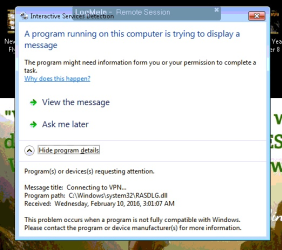
I have multiple sites that all have win7 machines, I keep getting this strange error message from "interactive services" see the attached photo. I am not sure why this keeps coming up. Its a very simple 4 line .bat file that tells it to reconect to the VPN after a certain amount of time or at a specific time. There is also a task in the task scheduler set to run the .bat. any idea's or help is much appreciated.
 

My Computer

Computer type
PC/Desktop
Computer Manufacturer/Model Number
Self made custom
OS
64 bit win7 pro
CPU
AMD 8 core 8320
Motherboard
gigabyte UD3
Memory
24 GB Kingston Fury DDR3 1600
Graphics Card(s)
Gigabyte windforce R9 280X
Monitor(s) Displays
2X Asus VS228
Screen Resolution
1920 X 1080p
Hard Drives
OCZ 240GB SSD

2 X 1TB
PSU
Cooler master 750
Case
Antec
Internet Speed
Bell Aliant fiber op
Antivirus
Malwarebytes premium
Browser
Chrome
Here is a pic of the error
 

Attachments

  • vpn.png
    vpn.png
    240.1 KB · Views: 14

My Computer

Computer type
PC/Desktop
Computer Manufacturer/Model Number
Self made custom
OS
64 bit win7 pro
CPU
AMD 8 core 8320
Motherboard
gigabyte UD3
Memory
24 GB Kingston Fury DDR3 1600
Graphics Card(s)
Gigabyte windforce R9 280X
Monitor(s) Displays
2X Asus VS228
Screen Resolution
1920 X 1080p
Hard Drives
OCZ 240GB SSD

2 X 1TB
PSU
Cooler master 750
Case
Antec
Internet Speed
Bell Aliant fiber op
Antivirus
Malwarebytes premium
Browser
Chrome
It is sad that Microsoft still has a typo in that notification.
(The program might need information FORM from you...)

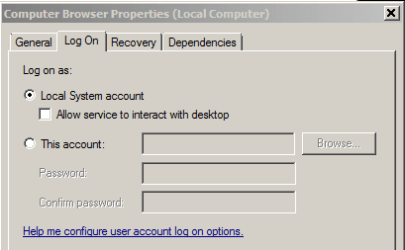
Check the VPN service properties. Is the option to Allow service to interact with desktop checked?

Just a random example:
service.PNG
 

My Computer

Computer type
Laptop
Computer Manufacturer/Model Number
Employer provided Dell Latitude
OS
W7 Pro SP1 64bit
CPU
i7
Memory
8GB
Graphics Card(s)
Intel HD Graphics
Hard Drives
crappy SSD
Antivirus
Employer mandated Symantec Endpoint Protection
Browser
Pale Moon 64bit, IE11 64bit & Chrome 64bit
Hi UsernameIssues,

I am having trouble locating the "VPN service properties" dialog box where do I find this....
 

My Computer

Computer type
PC/Desktop
Computer Manufacturer/Model Number
Self made custom
OS
64 bit win7 pro
CPU
AMD 8 core 8320
Motherboard
gigabyte UD3
Memory
24 GB Kingston Fury DDR3 1600
Graphics Card(s)
Gigabyte windforce R9 280X
Monitor(s) Displays
2X Asus VS228
Screen Resolution
1920 X 1080p
Hard Drives
OCZ 240GB SSD

2 X 1TB
PSU
Cooler master 750
Case
Antec
Internet Speed
Bell Aliant fiber op
Antivirus
Malwarebytes premium
Browser
Chrome
Oh I found it its under "Remote Access Connection Manager properties (Local Computer)" and no that check box is not flagged on...
 

My Computer

Computer type
PC/Desktop
Computer Manufacturer/Model Number
Self made custom
OS
64 bit win7 pro
CPU
AMD 8 core 8320
Motherboard
gigabyte UD3
Memory
24 GB Kingston Fury DDR3 1600
Graphics Card(s)
Gigabyte windforce R9 280X
Monitor(s) Displays
2X Asus VS228
Screen Resolution
1920 X 1080p
Hard Drives
OCZ 240GB SSD

2 X 1TB
PSU
Cooler master 750
Case
Antec
Internet Speed
Bell Aliant fiber op
Antivirus
Malwarebytes premium
Browser
Chrome
I thought that you were using a 3rd party VPN tool. I don't know why I thought that, but I did.

It is normal for the Remote Access Connection Manager (Local Computer) service to not have a check by the option to Allow service to interact with desktop.

Do you get the notification shown in post #2 if you run the batch file manually?
 

My Computer

Computer type
Laptop
Computer Manufacturer/Model Number
Employer provided Dell Latitude
OS
W7 Pro SP1 64bit
CPU
i7
Memory
8GB
Graphics Card(s)
Intel HD Graphics
Hard Drives
crappy SSD
Antivirus
Employer mandated Symantec Endpoint Protection
Browser
Pale Moon 64bit, IE11 64bit & Chrome 64bit
No if we run the .bat file manually its totally fine no error messages. It doesn't even happen everyday perhaps the .bat is trying to run before the service is fully running on occasion or something I'm really not sure...
 

My Computer

Computer type
PC/Desktop
Computer Manufacturer/Model Number
Self made custom
OS
64 bit win7 pro
CPU
AMD 8 core 8320
Motherboard
gigabyte UD3
Memory
24 GB Kingston Fury DDR3 1600
Graphics Card(s)
Gigabyte windforce R9 280X
Monitor(s) Displays
2X Asus VS228
Screen Resolution
1920 X 1080p
Hard Drives
OCZ 240GB SSD

2 X 1TB
PSU
Cooler master 750
Case
Antec
Internet Speed
Bell Aliant fiber op
Antivirus
Malwarebytes premium
Browser
Chrome
Manually halt the service.
Manually run the batch file.
See if an error comes up - other than an error shown in the cmd window.
 

My Computer

Computer type
Laptop
Computer Manufacturer/Model Number
Employer provided Dell Latitude
OS
W7 Pro SP1 64bit
CPU
i7
Memory
8GB
Graphics Card(s)
Intel HD Graphics
Hard Drives
crappy SSD
Antivirus
Employer mandated Symantec Endpoint Protection
Browser
Pale Moon 64bit, IE11 64bit & Chrome 64bit
Back
Top