
Interesting Graphics Issue.

Xenova

New member
Local time
11:17 PM
Messages
9
Location
Cambridgeshire
Howdy.
I've been running 7 for a while with no real issue except for a somewhat annoying bug that seems to be causing some kind of grief with desktop graphics.

Imagine the scenario; you boot up your computer, arrive at your desktop and decide you want to check your emails. You open up your browser, or email program and check your emails. No big deal. You now decide you'll leave your emails open and execute iTunes, WMP or play a game, great! 7 does it fast and doesn't beat about it. After a little while you're tired of your music or game and you decide to exit, on exit you discover you open window of your emails is completely corrupted, with stretched text, misplaced items or, completely unreadable.

Well this is what I have been experiencing from almost the beta versions. Now I am technically minded and have done a lot of testing on my hardware to be sure nothing is going ape with my graphics card. Games run fine, no artifacts or corruption.

The image attached shows what kind of unusual issue i am encountering. My first thought is nVidia's drivers. But there have been subsequent releases and bug fixes to iron out these bumps. I was wondering if anyone else has been encountering this kind of behavior. My graphics work fine under Vista, XP and Ubuntu, i've even run the win7 drivers in Vista and that was fine. So I'm thinking this could have something to do with WDM, because the same behavior can be induced if a window, overlapping another is closed or minimized.

No biggie, I'm just interested to see if anyone else has been getting this issue.
 

Attachments
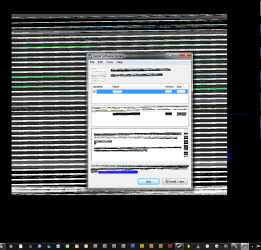
  • Desktop.png
    Desktop.png
    63.1 KB · Views: 88

My Computer

Computer Manufacturer/Model Number
Custom Build
OS
Windows 7 Ultimate 6.1 (Build 7229.0 x64)
CPU
Genuine Intel Q9550 OC'd @ 3.4GHz
Motherboard
Asus Striker II Extreme nForce 790i Ultra chipset
Memory
Corsair Dominator nVidia Partner Memory 4GB DDR3
Graphics Card(s)
nVidia GTX 280 w/ 1GB onboard
Sound Card
Creative PCI-E X-Fi
Monitor(s) Displays
x2 LCD's @ 1280 x 1024 60Hz
Hard Drives
x1 500GB Western Digital HDD (32 MB Cache)
x1 1TB Samsung Spinpoint (32MB Cache)
PSU
Enermax Galaxy DX II 1KW
Case
Zlaman Z-Machine GT1000
Cooling
Zalman Reserator XT CPU > Northbridge > GPU loop
Keyboard
Logitech G15
Mouse
Logitech G9 Laser Mouse
Hello Xenova, and welcome to Seven Forums.

I have had a few distored windows like in your screenshot with old drivers in the beta build of Windows 7, but not nearly as bad. Usually moving the window or refreshing it fixed the issue. I'm using the latest NVIDIA drivers now, and do not seem to have this problem anymore.
 

My Computer

Computer type
PC/Desktop
Computer Manufacturer/Model Number
Self built custom
OS
64-bit Windows 11 Pro for Workstations
CPU
Intel i7-8700K OC'd to 5 GHz
Motherboard
ASUS ROG Maximus XI Formula Z390
Memory
64 GB (4x16GB) G.SKILL TridentZ RGB DDR4 3600 MHz
Graphics Card(s)
ASUS ROG-STRIX-GTX1080TI-O11G-GAMING
Sound Card
Integrated
Monitor(s) Displays
2 x Samsung Odyssey G7 27"
Screen Resolution
2560x1440
Hard Drives
1TB Samsung 990 PRO M.2,
4TB Samsung 990 PRO PRO M.2,
TerraMaster F8 SSD Plus NAS
PSU
Seasonic Prime Titanium 850W
Case
Thermaltake Core P3
Cooling
Corsair Hydro H115i
Keyboard
Logitech wireless K800
Mouse
Logitech MX Master 4
Internet Speed
2 Gb/s Download and 100 Mb/s Upload
Antivirus
Malwarebyte Anti-Malware Premium
Browser
Google Chrome
Other Info
Logitech Z625 speaker system,
Logitech BRIO 4K Pro webcam,
HP Color LaserJet Pro MFP M477fdn,
APC SMART-UPS RT 1000 XL - SURT1000XLI,
Galaxy S23 Plus phone
What kind of display card do you have? I have Windows 7 on my home laptop and work laptop.

I have this problem with my home laptop (Intel Express 4 Mobile) but my work laptop has an Nvidia quatro and no problems at all.
 

My Computer

OS
Windows 7 Build 7600 X64
Thanks for the warm welcome Brink.

I've tried the older archived drivers on nVidia's website, but they don't improve the issue. I have read in other places on this and other forums of people experiencing lines or corruption in the title bar but not the window itself, which intrigued me to find out if other people have experienced the oddity. Both beta builds and the official 7100 RC both produce this issue. One could claim that the hardware is at fault, but this is not the case because a 3D environment performs flawlessly, diagnostics pass and older OS's don't reproduce it. I read somewhere that in 7 Microsoft coded the OS to use the power of new GFX cards to render the Areo environment in real-time thus putting less load on the CPU and RAM. It is DWM that creates the Areo experience, so i can only assume there is a bug or flaw in that module of the OS that causes this problem, word has it that its also affecting (in more subtle ways) ATI cards, and as Gprimr1 Intel integrated graphics too.

@ Gprimr1, I have an nVidia GTX 280, 1 GB; I've had these odd issues since the early betas, again Games or graphic intensive apps such as 3DS work without error, both in Open GL and DirectX
 

My Computer

Computer Manufacturer/Model Number
Custom Build
OS
Windows 7 Ultimate 6.1 (Build 7229.0 x64)
CPU
Genuine Intel Q9550 OC'd @ 3.4GHz
Motherboard
Asus Striker II Extreme nForce 790i Ultra chipset
Memory
Corsair Dominator nVidia Partner Memory 4GB DDR3
Graphics Card(s)
nVidia GTX 280 w/ 1GB onboard
Sound Card
Creative PCI-E X-Fi
Monitor(s) Displays
x2 LCD's @ 1280 x 1024 60Hz
Hard Drives
x1 500GB Western Digital HDD (32 MB Cache)
x1 1TB Samsung Spinpoint (32MB Cache)
PSU
Enermax Galaxy DX II 1KW
Case
Zlaman Z-Machine GT1000
Cooling
Zalman Reserator XT CPU > Northbridge > GPU loop
Keyboard
Logitech G15
Mouse
Logitech G9 Laser Mouse
Thanks for the warm welcome Brink.

I read somewhere that in 7 Microsoft coded the OS to use the power of new GFX cards to render the Areo environment in real-time thus putting less load on the CPU and RAM. It is DWM that creates the Areo experience, so i can only assume there is a bug or flaw in that module of the OS that causes this problem, word has it that its also affecting (in more subtle ways) ATI cards, and as Gprimr1 Intel integrated graphics too.

I would think you can test that theory by turning off Aero.

Hope this helps

Scott
 

My Computer

Computer Manufacturer/Model Number
Custom Built
OS
Windows 7 Rc Build 7264 x86, Ubuntu
CPU
Intel Q8200 Quad Core
Motherboard
Asus P5QL
Memory
2 Gb
Graphics Card(s)
nVidia 8400GS
Sound Card
Stock Realtek HD Audio
Monitor(s) Displays
Hp 2207h and LG 42in LCD
Screen Resolution
1680 x 1050, 1360 x 768
Hard Drives
250 Gb seagate internal, (2) Western Digital 1 Tb external
PSU
Corsair 550W
Case
Thermaltake DH 102
Cooling
Unmodified
Keyboard
Microsoft Wireless
Mouse
Microsoft Wireless
Internet Speed
Time Warner - 15mb\s
Other Info
4 ATI Digital Cable Tuners, 1 XBox 360, Life|Ware home automation,Yamaha RX-V765, Harmony 1000 Remote
I would think you can test that theory by turning off Aero.

Hope this helps

Scott

Funny you should mention that; I have had Areo off since making my last post; it suddenly dawned on me to try something new and turn Areo off. No more window corruption, not yet at least. Still early to tell, i have yet to run any games; but minimizing or maximizing windows over others doesn't trigger the issue...
 

My Computer

Computer Manufacturer/Model Number
Custom Build
OS
Windows 7 Ultimate 6.1 (Build 7229.0 x64)
CPU
Genuine Intel Q9550 OC'd @ 3.4GHz
Motherboard
Asus Striker II Extreme nForce 790i Ultra chipset
Memory
Corsair Dominator nVidia Partner Memory 4GB DDR3
Graphics Card(s)
nVidia GTX 280 w/ 1GB onboard
Sound Card
Creative PCI-E X-Fi
Monitor(s) Displays
x2 LCD's @ 1280 x 1024 60Hz
Hard Drives
x1 500GB Western Digital HDD (32 MB Cache)
x1 1TB Samsung Spinpoint (32MB Cache)
PSU
Enermax Galaxy DX II 1KW
Case
Zlaman Z-Machine GT1000
Cooling
Zalman Reserator XT CPU > Northbridge > GPU loop
Keyboard
Logitech G15
Mouse
Logitech G9 Laser Mouse
Sounds good so far Xenova. Have you tried the new 190.38 beta drivers released from NVIDIA today yet?
 

My Computer

Computer type
PC/Desktop
Computer Manufacturer/Model Number
Self built custom
OS
64-bit Windows 11 Pro for Workstations
CPU
Intel i7-8700K OC'd to 5 GHz
Motherboard
ASUS ROG Maximus XI Formula Z390
Memory
64 GB (4x16GB) G.SKILL TridentZ RGB DDR4 3600 MHz
Graphics Card(s)
ASUS ROG-STRIX-GTX1080TI-O11G-GAMING
Sound Card
Integrated
Monitor(s) Displays
2 x Samsung Odyssey G7 27"
Screen Resolution
2560x1440
Hard Drives
1TB Samsung 990 PRO M.2,
4TB Samsung 990 PRO PRO M.2,
TerraMaster F8 SSD Plus NAS
PSU
Seasonic Prime Titanium 850W
Case
Thermaltake Core P3
Cooling
Corsair Hydro H115i
Keyboard
Logitech wireless K800
Mouse
Logitech MX Master 4
Internet Speed
2 Gb/s Download and 100 Mb/s Upload
Antivirus
Malwarebyte Anti-Malware Premium
Browser
Google Chrome
Other Info
Logitech Z625 speaker system,
Logitech BRIO 4K Pro webcam,
HP Color LaserJet Pro MFP M477fdn,
APC SMART-UPS RT 1000 XL - SURT1000XLI,
Galaxy S23 Plus phone
Sounds good so far Xenova. Have you tried the new 190.38 beta drivers released from NVIDIA today yet?

Now thats funny Shawn, I just came from your driver update page to suggest that very thing.

Thats just . . . . . Alien.:thumbsup:
 

My Computer

Computer Manufacturer/Model Number
Custom Built
OS
Windows 7 Rc Build 7264 x86, Ubuntu
CPU
Intel Q8200 Quad Core
Motherboard
Asus P5QL
Memory
2 Gb
Graphics Card(s)
nVidia 8400GS
Sound Card
Stock Realtek HD Audio
Monitor(s) Displays
Hp 2207h and LG 42in LCD
Screen Resolution
1680 x 1050, 1360 x 768
Hard Drives
250 Gb seagate internal, (2) Western Digital 1 Tb external
PSU
Corsair 550W
Case
Thermaltake DH 102
Cooling
Unmodified
Keyboard
Microsoft Wireless
Mouse
Microsoft Wireless
Internet Speed
Time Warner - 15mb\s
Other Info
4 ATI Digital Cable Tuners, 1 XBox 360, Life|Ware home automation,Yamaha RX-V765, Harmony 1000 Remote
LOL, yep just that ALIEN phsycho ability working. ;)
 

My Computer

Computer type
PC/Desktop
Computer Manufacturer/Model Number
Self built custom
OS
64-bit Windows 11 Pro for Workstations
CPU
Intel i7-8700K OC'd to 5 GHz
Motherboard
ASUS ROG Maximus XI Formula Z390
Memory
64 GB (4x16GB) G.SKILL TridentZ RGB DDR4 3600 MHz
Graphics Card(s)
ASUS ROG-STRIX-GTX1080TI-O11G-GAMING
Sound Card
Integrated
Monitor(s) Displays
2 x Samsung Odyssey G7 27"
Screen Resolution
2560x1440
Hard Drives
1TB Samsung 990 PRO M.2,
4TB Samsung 990 PRO PRO M.2,
TerraMaster F8 SSD Plus NAS
PSU
Seasonic Prime Titanium 850W
Case
Thermaltake Core P3
Cooling
Corsair Hydro H115i
Keyboard
Logitech wireless K800
Mouse
Logitech MX Master 4
Internet Speed
2 Gb/s Download and 100 Mb/s Upload
Antivirus
Malwarebyte Anti-Malware Premium
Browser
Google Chrome
Other Info
Logitech Z625 speaker system,
Logitech BRIO 4K Pro webcam,
HP Color LaserJet Pro MFP M477fdn,
APC SMART-UPS RT 1000 XL - SURT1000XLI,
Galaxy S23 Plus phone
Hah! Fantastic! I hadn't, no. Seeing as they were only just release today; I didn't have a clue there were new beta drivers. Will install, and report back! Gimme a mo. I'll be intrigued if this fixes or at least makes the issue less prevalent because cards or integrated graphics from other vendors appear to have an issue that mimics the one i have.
 

My Computer

Computer Manufacturer/Model Number
Custom Build
OS
Windows 7 Ultimate 6.1 (Build 7229.0 x64)
CPU
Genuine Intel Q9550 OC'd @ 3.4GHz
Motherboard
Asus Striker II Extreme nForce 790i Ultra chipset
Memory
Corsair Dominator nVidia Partner Memory 4GB DDR3
Graphics Card(s)
nVidia GTX 280 w/ 1GB onboard
Sound Card
Creative PCI-E X-Fi
Monitor(s) Displays
x2 LCD's @ 1280 x 1024 60Hz
Hard Drives
x1 500GB Western Digital HDD (32 MB Cache)
x1 1TB Samsung Spinpoint (32MB Cache)
PSU
Enermax Galaxy DX II 1KW
Case
Zlaman Z-Machine GT1000
Cooling
Zalman Reserator XT CPU > Northbridge > GPU loop
Keyboard
Logitech G15
Mouse
Logitech G9 Laser Mouse
Beta drivers are on, here goes nothing!

So far since boot, I've not had a problem. But it can crop up at anytime. I'm going to run a few apps, play a game for a little bit, see if that will upset it at all.

Will post back my findings.;)
 

My Computer

Computer Manufacturer/Model Number
Custom Build
OS
Windows 7 Ultimate 6.1 (Build 7229.0 x64)
CPU
Genuine Intel Q9550 OC'd @ 3.4GHz
Motherboard
Asus Striker II Extreme nForce 790i Ultra chipset
Memory
Corsair Dominator nVidia Partner Memory 4GB DDR3
Graphics Card(s)
nVidia GTX 280 w/ 1GB onboard
Sound Card
Creative PCI-E X-Fi
Monitor(s) Displays
x2 LCD's @ 1280 x 1024 60Hz
Hard Drives
x1 500GB Western Digital HDD (32 MB Cache)
x1 1TB Samsung Spinpoint (32MB Cache)
PSU
Enermax Galaxy DX II 1KW
Case
Zlaman Z-Machine GT1000
Cooling
Zalman Reserator XT CPU > Northbridge > GPU loop
Keyboard
Logitech G15
Mouse
Logitech G9 Laser Mouse
Xenova,

I hope it does the trick for you. :)
 

My Computer

Computer type
PC/Desktop
Computer Manufacturer/Model Number
Self built custom
OS
64-bit Windows 11 Pro for Workstations
CPU
Intel i7-8700K OC'd to 5 GHz
Motherboard
ASUS ROG Maximus XI Formula Z390
Memory
64 GB (4x16GB) G.SKILL TridentZ RGB DDR4 3600 MHz
Graphics Card(s)
ASUS ROG-STRIX-GTX1080TI-O11G-GAMING
Sound Card
Integrated
Monitor(s) Displays
2 x Samsung Odyssey G7 27"
Screen Resolution
2560x1440
Hard Drives
1TB Samsung 990 PRO M.2,
4TB Samsung 990 PRO PRO M.2,
TerraMaster F8 SSD Plus NAS
PSU
Seasonic Prime Titanium 850W
Case
Thermaltake Core P3
Cooling
Corsair Hydro H115i
Keyboard
Logitech wireless K800
Mouse
Logitech MX Master 4
Internet Speed
2 Gb/s Download and 100 Mb/s Upload
Antivirus
Malwarebyte Anti-Malware Premium
Browser
Google Chrome
Other Info
Logitech Z625 speaker system,
Logitech BRIO 4K Pro webcam,
HP Color LaserJet Pro MFP M477fdn,
APC SMART-UPS RT 1000 XL - SURT1000XLI,
Galaxy S23 Plus phone
It's safe to say that i upset it:p
While not as bad, its still there. Playing GoW; minimizing to desktop was fine. Quitting the game, cause the same corruption; yet not to windows, but to the taskbar instead, one i've not had before; and with the new beta, objects in GoW like to disappear when you get up close.

While it seems to have calmed the situation its still there. Disabling Areo stops the corruption completely. I think its a bug Microsoft may want to look into; else i cant fault the OS really. I do have the desktop refresh issue; like if you empty the Recycle Bin the bin still looks full, or if you move a file from desktop to Recycle Bin, its still on the desktop until you hit F5. But a reg tweak cured that one.

Will keep looking into this one, 'bout to try this on another box, which has a nVidia 7900 GT, see if i can't replicate the corruption with the same driver on another box.:devil:
Will post details
 

My Computer

Computer Manufacturer/Model Number
Custom Build
OS
Windows 7 Ultimate 6.1 (Build 7229.0 x64)
CPU
Genuine Intel Q9550 OC'd @ 3.4GHz
Motherboard
Asus Striker II Extreme nForce 790i Ultra chipset
Memory
Corsair Dominator nVidia Partner Memory 4GB DDR3
Graphics Card(s)
nVidia GTX 280 w/ 1GB onboard
Sound Card
Creative PCI-E X-Fi
Monitor(s) Displays
x2 LCD's @ 1280 x 1024 60Hz
Hard Drives
x1 500GB Western Digital HDD (32 MB Cache)
x1 1TB Samsung Spinpoint (32MB Cache)
PSU
Enermax Galaxy DX II 1KW
Case
Zlaman Z-Machine GT1000
Cooling
Zalman Reserator XT CPU > Northbridge > GPU loop
Keyboard
Logitech G15
Mouse
Logitech G9 Laser Mouse
You might see if running the game with different settings in compatibility mode may help any.
 

My Computer

Computer type
PC/Desktop
Computer Manufacturer/Model Number
Self built custom
OS
64-bit Windows 11 Pro for Workstations
CPU
Intel i7-8700K OC'd to 5 GHz
Motherboard
ASUS ROG Maximus XI Formula Z390
Memory
64 GB (4x16GB) G.SKILL TridentZ RGB DDR4 3600 MHz
Graphics Card(s)
ASUS ROG-STRIX-GTX1080TI-O11G-GAMING
Sound Card
Integrated
Monitor(s) Displays
2 x Samsung Odyssey G7 27"
Screen Resolution
2560x1440
Hard Drives
1TB Samsung 990 PRO M.2,
4TB Samsung 990 PRO PRO M.2,
TerraMaster F8 SSD Plus NAS
PSU
Seasonic Prime Titanium 850W
Case
Thermaltake Core P3
Cooling
Corsair Hydro H115i
Keyboard
Logitech wireless K800
Mouse
Logitech MX Master 4
Internet Speed
2 Gb/s Download and 100 Mb/s Upload
Antivirus
Malwarebyte Anti-Malware Premium
Browser
Google Chrome
Other Info
Logitech Z625 speaker system,
Logitech BRIO 4K Pro webcam,
HP Color LaserJet Pro MFP M477fdn,
APC SMART-UPS RT 1000 XL - SURT1000XLI,
Galaxy S23 Plus phone
Well GoW worked flawlessly before the beta driver, so I would imagine that is all it is down to; its a beta so i don't expect perfection. I had a go at compatibility mode, it didn't really change from what i could tell. Textures still went walkies and the corruption on the taskbar remains. Funny how it has switched from window to taskbar; it is exactly the same kind of corruption as my previously posted screenshot. All in all, a rather odd bug. I'm not really a software guy, hardware is my speciality but even so doesn't hurt to give it a shot.

Thank you all for all of your help, I will post my findings on the other box, see how that makes out.
 

My Computer

Computer Manufacturer/Model Number
Custom Build
OS
Windows 7 Ultimate 6.1 (Build 7229.0 x64)
CPU
Genuine Intel Q9550 OC'd @ 3.4GHz
Motherboard
Asus Striker II Extreme nForce 790i Ultra chipset
Memory
Corsair Dominator nVidia Partner Memory 4GB DDR3
Graphics Card(s)
nVidia GTX 280 w/ 1GB onboard
Sound Card
Creative PCI-E X-Fi
Monitor(s) Displays
x2 LCD's @ 1280 x 1024 60Hz
Hard Drives
x1 500GB Western Digital HDD (32 MB Cache)
x1 1TB Samsung Spinpoint (32MB Cache)
PSU
Enermax Galaxy DX II 1KW
Case
Zlaman Z-Machine GT1000
Cooling
Zalman Reserator XT CPU > Northbridge > GPU loop
Keyboard
Logitech G15
Mouse
Logitech G9 Laser Mouse
I've had a similar issue, except my whole screen is affected...
I'm eager to see what your 7900GT card does, as that's what card I'm running right now....
 

My Computer

Computer Manufacturer/Model Number
Custom build
OS
Windows 7... and Ubuntu 9.04
CPU
Intel Core 2 6300
Motherboard
Intel DP965LT
Memory
2x2GB
Graphics Card(s)
Nvidia 7900GT
Sound Card
Creative USB
Monitor(s) Displays
Acer AL1916W, Westinghouse L1975NW
Screen Resolution
1440x900
Hard Drives
1x250GB
Case
Antec P182
Keyboard
G15
Mouse
G5
Hi guys,
Heres the results from my testing yesterday. First up, specs of the test rigs.

Test Rig One: (Intel based)
-Asus P5B-VM
-Intel E6600
-2GB DDR2 RAM
-Windows 7 Build 7100

Test Rig Two: (nVidia based)
-Asus Striker Extreme
-Intel Q9400
-2 GB DDR2 RAM
-Windows 7 Build 7100

I tested both 32bit and 64bit versions of the OS and Drivers.

The 7900GT performed flawlessly throughout 32bit testing in both rigs with both the 186.18 and the 190.38 beta driver. In 64bit; it was the 186.18 driver that caused video corruption, where as the 190 beta worked fine.

The GTX 280 performed consistently better with little or no video corruption in Test Rig Two than in rig one on both drivers under 32bit with the 186.18 driver. In 64bit the GTX280 worked fine with the 186.18 in test rig one, rig two showed video corruption. The 190 beta, in 64bit showed no corruption on both rigs.

Conclusion: If you're suffering from corruption, it may well be worth updating to the latest beta drivers on nVidia's website. It also seems that the 186.18 driver seems to have less problems under 32bit. The 190 beta seems to be the winner of 64bit.
 

My Computer

Computer Manufacturer/Model Number
Custom Build
OS
Windows 7 Ultimate 6.1 (Build 7229.0 x64)
CPU
Genuine Intel Q9550 OC'd @ 3.4GHz
Motherboard
Asus Striker II Extreme nForce 790i Ultra chipset
Memory
Corsair Dominator nVidia Partner Memory 4GB DDR3
Graphics Card(s)
nVidia GTX 280 w/ 1GB onboard
Sound Card
Creative PCI-E X-Fi
Monitor(s) Displays
x2 LCD's @ 1280 x 1024 60Hz
Hard Drives
x1 500GB Western Digital HDD (32 MB Cache)
x1 1TB Samsung Spinpoint (32MB Cache)
PSU
Enermax Galaxy DX II 1KW
Case
Zlaman Z-Machine GT1000
Cooling
Zalman Reserator XT CPU > Northbridge > GPU loop
Keyboard
Logitech G15
Mouse
Logitech G9 Laser Mouse
Be sure to check out the new "Power management" option in the 190.38 drivers.You will see it in "manage 3d" control panel.It adjusts clock speeds depending on use.Best to set at "adaptive" or "performance"
The "Power management option" will only be present with newer cards.
 

My Computer

Computer Manufacturer/Model Number
billdo build
OS
Windows 7 x64 rtm
CPU
Intel Q9550 @3.7Ghz
Motherboard
Gigabyte ep45 UD3P
Memory
8GB OCZ Reaper
Graphics Card(s)
Geforce 9800gtx+
Sound Card
M-Audio 192
Monitor(s) Displays
24" Sammy
Screen Resolution
1920x1200
Hard Drives
System HD:2x Super Talent SX ssd 64GB raid 0(128GB)--
- Storage HD: WD 640GB AAK
PSU
650
Case
Generic box w/little window and pretty blue lights
Cooling
Air
Keyboard
Razor Lycosa
Mouse
Logitech MX518
Internet Speed
unpredictable cable
Other Info
Monkeys are EVIL!!!!!!
Back
Top