Interesting install problem

Steve Spurlock

New member
Local time
12:35 PM
Messages
12
This is kinda strange, but I've got two Win7 licenses, one for Home Premium and one for Professional. I installed the one that was an upgrade that came with my wife's computer on my (slightly older) Vista machine about six or eight months ago. No problem, blew my machine away and did clean install.

Now I've bought the student version so we can have both machines on 7. Problem is, it is the Professional version, so I can't do an upgrade install on her machine because it's moving to a "higher" version, I guess.

I don't want to blow her machine away because it has a ton of games on it (that's about all she uses it for), but want to upgrade in place. So I'm in the weird situation of having the wrong version on the wrong machine.

So, is there any way around this problem? Could I install the upgrade version over my Home Premium version in an "in place" upgrade and then use the disks that came with her upgrade to do an in place upgrade of her Vista machine? What I'm worried about is the serial numbers -- the one has already been registered and activated on my machine, so I don't know what would happen regarding licensing if I tried this.

Any help would be sincerely appreciated! Thank you.
 

My Computer

OS
Win7
That's a similar situation, but not sure it addresses being able to "move" the license on the Home Premium disk to my wife's machine, and whether MS would consider it an illegal move or not.
 

My Computer

OS
Win7
If it's retail full version or upgrade then you can migrate it to any machine of your choice, as long as it isn't one more than one machine at a time. Activation requires a robocall to exchange numbers which update the hardware signature.

If you used a manufacturer's Upgrade Kit to install to another machine, then you are on your own as it likely is an OEM version which locked to that hardware upon install. But you can still try it.

Your OP is a bit confusing so maybe you can clarify each machine's exact situation without mixing descriptions of the two, so we can help better.
 
Thanks -- I'll try to explain a little better. The original install was with a Dell upgrade that came for my wife's Inspiron notebook. Came with Vista but I bought it on the first day that qualified for an upgrade to Win7, so they sent an upgrade disk several months later.

I used that upgrade kit to upgrade MY Dell Inspiron (also running Vista) instead of hers, since she only plays games anyway, and I wanted to try Win7. My machine is older, but running Vista and easily able to do Win7. I did a clean install to get rid of the garbage and reinstalled everything over a one-week period. I was impressed with Win7 and decided to upgrade her machine as well.

I bought the student version of Win7, which turned out to be the Professional version. When I tried to use it to upgrade her Vista machine, it says I can't do so without blowing everything away and doing a clean install. That is what I'm trying to avoid, as I don't really have the time to reinstall all her Windows games.

So, I'm wondering if there is a way to "swap" the Win7 licenses and installations for these two machines. Her machine hasn't been done yet after I saw that I had to do a clean install. I'd have to use the Professional download to change mine to Professional and then use the disk that Dell sent to do an in place upgrade to her machine. The question is what would happen to the two completely legal license keys that I have? Would I somehow be "locked out" on the Dell upgrade disk because it's already been installed on mine? Would I be able to use the download and install the Professional version "over" my Home Premium version and then use the new license key without a problem?

Thanks for any help you can offer.
 

My Computer

OS
Win7
use the Dell upgrade on hers and just wipe yours and install Professional.
You also didn't tell us the versions of each OS, Vista and 7, are they both 32Bit or 64bit, or 1 of each? you can't do an in-place upgrade from 32 to 64 or vice versa.
 

My Computer

Computer Manufacturer/Model Number
HAL-9000
OS
Windows 7 Ultimate 64bit
CPU
Intel i7 3770K
Motherboard
Asus Sabertooth Z77
Memory
16GB DDR3 1333 Corsair XMS3
Graphics Card(s)
XFX HD6950 2GB EyeFinity
Sound Card
Logitech G35 & Sennheiser PC135 & VIA HD
Monitor(s) Displays
23" HP 2310e, 23" Samsung B2230, 21.5" Viewsonic
Screen Resolution
5760x1080
Hard Drives
16TB of Storage
128GB & 256GB Crucial M4 SSD's, 2X 1TB WD Black, 3x 2TB WD, 3x 2TB Samsung F4, 1.5TB Seagate, WD 500GB,
PSU
Antec True Power New 650watt
Case
Cooler Master HAF-932
Cooling
Corsair H60 Hydro Cooler, 3x 230mm Fans, 2x120mm Fan
Keyboard
Logitech G15 and G13
Mouse
Logitech G700 Gaming Mouse
Internet Speed
50/10 Mbit
Other Info
Speakers : Alesis M1 Active Mk2 Studio Monitors , APC RS 1200 UPS, HP 4500DN Color Laser, HP P1006 mono Laser, Kodak 8500 Dye-Sub, Epson 1280 inkjet, Epson Worforce 610 MFC
First thing is to save a Win7 backup image of your Home Premium install so you can revert back if necesary. Then use the workaround I posted earlier to upgrade your Home Premium to Pro. Later get a Win7 backup image so you never have to reinstall Pro, just reimage the HD or replacement in 20 minutes.

Next try upgrading Vista with the Home Premium Upgrade kit on its intended machine. If it refuses the key, Upgrade anyway and later attempt activation by phone, first with robocall to see if it will treat it as retail and trade numbers to deactivate old install and activate new one, then speaking with agent to explain you are trying to use it on intended machine.. You may be referred to Dell, but I would persist since you are attempting to install on the correct machine and can prove it. You don't have to know anything about someone else using the key incorrectly, as anyone could have done that.

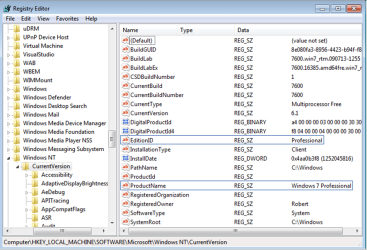
If this is impossible, then you can try to in-place Upgrade Pro on your wife's machine by trying the workaround but changing the Vista registry keys to Pro exactly as shown in screenshot, or do a clean install as last resort. The DVD will see an OS at bootup to allow Upgrade version key even if you then delete/format the HD.

Save a Win7 backup image of the original Home Premium install on your machine so you can reimage it if necessary to roll back. You can use free Macrium Reflect to image Vista for a path back to it.
 
Last edited:
use the Dell upgrade on hers and just wipe yours and install Professional.
You also didn't tell us the versions of each OS, Vista and 7, are they both 32Bit or 64bit, or 1 of each? you can't do an in-place upgrade from 32 to 64 or vice versa.

They are both 32-bit versions of both Vista and Win7
 

My Computer

OS
Win7
First thing is to use the workaround I posted earlier to upgrade your Home Premium to Pro, as you'll need a activated HP to launch the in-place upgrade. Once you have Pro activated, the underlying HP is history. Just get a Win7 backup image so you never have to reinstall Pro, just reimage the HD or replacement in 20 minutes.

Next try upgrading Vista with the Home Premium Upgrade kit on the intended machine. It will require a robocall to MS if migratable which trades a series of numbers that deactivate it on old machine's hardware and activate the new one. If it won't activate, you might be referred to Dell. I would tell them (or MS, if they'll listen) it was somehow installed on wrong machine (true) and you want it put on the correct one, which they might help you achieve.

Thanks, I'll give that a try and report back here. I can't do it for a couple of weeks because the HP upgrade disks are at my son's home and I won't be there for a couple of weeks. He can also help me do the Win7 backup image.
 

My Computer

OS
Win7
Steve please reread my last post as I rewrote it for a better approach. Thanks and good luck. Keep us posted.
 
Steve please reread my last post as I rewrote it for a better approach. Thanks and good luck. Keep us posted.

Hey, Greg. I'm ready to give this a shot and, given the relatively small differences between the two versions (for what we use our computers for), I think I'm going to just leave my HP version alone and try to upgrade hers in place from Vista to Pro. I'll do the image backup first (thanks for the link to the free program to do that) and see how it goes.
 

My Computer

OS
Win7
Tried it on her machine & it didn't work. I did the image backup and then started the install again after changing both registry keys.

It still stopped and said it won't do an "in place" upgrade from Home Premium to Professional. Is there another registry key someplace?

I didn't do the minvalue change in the other post because it only appeared to apply to a change from the RC to retail.
 

My Computer

OS
Win7
Oh, maybe I misunderstood. The first one looked exactly like that, but I left the second one saying Vista and changed the Home Premium to Professional. So should it say Windows 7 even though it's Vista?

Steve
 

My Computer

OS
Win7
I'm not sure the workaround will work from Vista in one step, since Win7 installer allows an in-place Upgrade between Win7 Home Premium and Pro when HP registry is changed to Pro because an in-place Upgrade between the same versions is a Repair Install, so it must be allowed.

If you absolutely don't want to clean install your Win7 Pro you'll need to do it in two steps: first in-place upgrade to Win7 Home Premium by unlocking all versions in your install DVD, then use the workaround to in-place upgrade Win7 HP to Win7 Pro which we know will work from much experience.

To unlock all versions in your install DVD, extract files to desktop, remove ei.cfg file from Sources folder, then run Setup to start the in-place Upgrade from Vista HP, making sure to select Win7 HP and choosing not to insert the key when first requested (also uncheck box to activate when connecting to internet).

After Upgrade to Win7 HP is completed, make the Registry changes and run your 7 Pro DVD to in-place Upgrade (actually a same-version Repair Install) HP to Pro.

The way MS would have you do this is to buy the Anytime Upgrade, but you paid more for the Pro DVD so there is nothing unethical in using the workaround.
 
I guess I should just get over it and do a clean install with the Pro version on her machine. I just didn't want to download and install the games again, but it's probably the smartest way to go. Better she should have a clean machine anyway.

Thanks for all your help!
 

My Computer

OS
Win7
http://www.sevenforums.com/tutorials/1649-clean-install-windows-7-a.html

Back up all files, make the Vista Recovery disks in case you ever want to go back to factory condition to sell machine but keep your Win7.

Be sure to boot Win7 DVD to get cleanest possible install: Custom install, using Drive Tools to delete all partitions, create new one(s) as you wish, then format before installing to first partition.

Installer is mostly driver-complete with newer arriving quickly via optional Windows Updates. Any drivers then missing in Device Manager or favorite apps can be found on the Support downloads webpage for your model computer/device.

Install programs slowly so you can gauage performance after each. Don't let any programs write themselves into msconfig>Startup list unless they absolutely have to start up with computer, which most don't. I only allow my AV and gadgets.

Suggest you migrate to the lightest-weight, effective, nearly invisible AV, new free Microsoft Security Essentials which takes 30 seconds to install.

Finally, after it is set up as you wish, clean and order HD using free state-of-the-art CCleaner "Run Cleaner" and Registry tab, and the Auslogics Disk and Registry Defraggers.

Then save a Win7 backup image so you never have to reinstall again, just reimage the HD (or replacement) using DVD Repair console.
 
Thanks for everything Greg. I'm in the process of doing a clean install on her machine.

Steve
 

My Computer

OS
Win7
Hope it goes well for you.

Nice work greg.
 

My Computer

OS
ME/XP/Vista/Win7
Back
Top