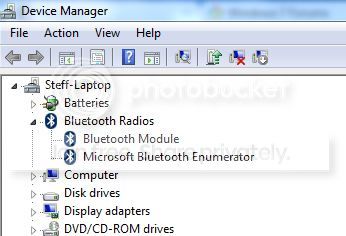
Intergrated bluetooth not working on laptop. Can't find any devices.

steff8000

New member
Local time
11:40 AM
Messages
3
I have this problem with my new Asus A53S - K53SD laptop. The intergrated bluetooth doesn't seem to work. When i try to add a bluetooth device under devices and printers in control panel, it just keeps saying "Searching for devices... Make sure your device is discoverable".I found out that it didn't work, because i just bought a new microsoft notebook Bluetooth mouse 5000, and when i try to install/connect it to my computer, windows just can't find the device. I know it's not my new mouse that isn't working, because i have tried connecting other bluetooth devices aswell, but windows still can't find anything. I have both a Intel Bluetooth driver and an Atheros bluetooth driver (V7.4.0.115) installed. Both downloaded from the Asus support website.I have tried reinstalling both programs a lot of times, and i have runned a lot of different driver update programs, to check if i was using the latest versions or missing any drivers. I have spent a lot of time browsing the web to find a solution to my problem, but none of the suggested solutions have worked.

Here's how it looks:
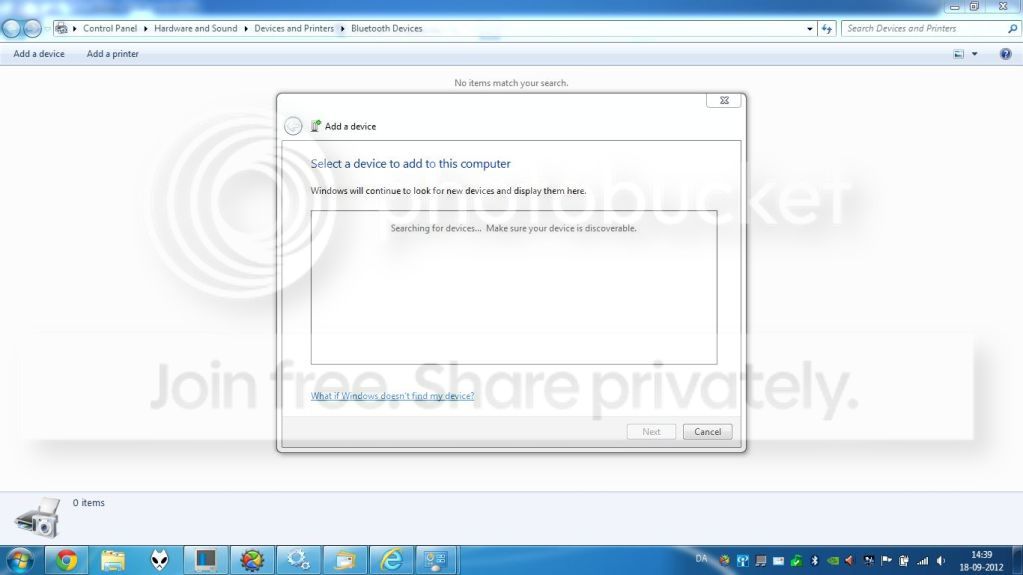
Capture2.jpg


devicemanager.jpg
 

My Computer My Computer

At a glance

Windows 7 Ultimate x64
OS
Windows 7 Ultimate x64
If it's a Microsoft mouse; drivers shouldn't be a problem. I would remove all mouse drivers. Then reboot and Windows 7 should pickup the needed drivers. Then do a Windows 7 Up Date and it will let you know if their is a update for the driver.
 

My Computer My Computer

At a glance

Windows 10 Pro. 64/ version 1709 Windows 7 Pr...Intel i7-6800K @ 4.3Corsair Platinum 16 gig @2400EVGA GTX 1070 OC
Computer type
PC/Desktop
Computer Manufacturer/Model Number
Home made Desktop
OS
Windows 10 Pro. 64/ version 1709 Windows 7 Pro/64
CPU
Intel i7-6800K @ 4.3
Motherboard
ASUS X-99 Deluxe II
Memory
Corsair Platinum 16 gig @2400
Graphics Card(s)
EVGA GTX 1070 OC
Monitor(s) Displays
Asus 27" LED LCD/VE278Q
Screen Resolution
1920-1080 or 1280-720 HDMI
Hard Drives
INTEL SSD 730-240 Gb Sata 3.0/
PSU
EVGA Platium 1200W
Case
Phanteks Luxe Tempered Glass 8 fans/ one radiator
Cooling
XSPC/ Water Cooled CPU
Keyboard
Das 4 Professional
Mouse
Logitech M705/MX Anywhere 2-S
Internet Speed
100 mbits
Antivirus
Microsoft Security Essentials/ Malwarebytes Premium 3.0/ SAS
Browser
I.E. 11 default/Firefox/ ISP Time Warner Cable/Spectrum
Other Info
LG BluRay Burner/
Sound system-KLipsch-THX/
Icy Dock ssd Hot Swap bays.
Thanks for the reply, but i don't think it's the mouse that is causing the problem, since i can't seem to connect any other bluetooth devices as well. I also don't have any mouse drivers installed and windows isn't downloading anything, since the mouse never have been connected to my pc.
 

My Computer My Computer

At a glance

Windows 7 Ultimate x64
OS
Windows 7 Ultimate x64
Solution?

I have exactly the same problem with my new asus x552v? I am sorry if it is me, but I don't see where is the solution for this posted. Did you managed to solve this problem and HOW, please?
 

My Computer My Computer

At a glance

windows 7 Ultimate x64
Computer type
PC/Desktop
OS
windows 7 Ultimate x64
I have exactly the same problem with my new asus x552v? I am sorry if it is me, but I don't see where is the solution for this posted. Did you managed to solve this problem and HOW, please?

I did solve the problem, but only by formatting my pc and doing a fresh install of Windows 7.
 

My Computer My Computer

At a glance

Windows 7 Ultimate x64
OS
Windows 7 Ultimate x64
O.k, I tried everything and it seems doing as you did is the only thing left to try. Thank you for you answer.
 

My Computer My Computer

At a glance

windows 7 Ultimate x64
Computer type
PC/Desktop
OS
windows 7 Ultimate x64
Back
Top