
I've been experiencing issues with my internet connection on just one of my computers over the last 4 days.
From time to time, my browsers stop loading web pages, and then start working again on their own.
Restarting the computer or the modem/router doesn't solve anything as I do this everyday.
I'm positive that the problem is in this computer, as the notebook I use (also connected through the LAN ports) never experienced this issue.
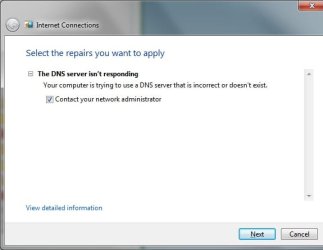
Using Windows Troubleshooting during the issue showed the DNS problem. (Screenshot in attachment)
This issue hasn't stopped any current downloads or connections (i.e., streaming a video, downloading or uploading anything).
The only thing that I can think of is it might be related with this fix that I used a few days before this issue started, otherwise I haven't done any other changes or installed any new software.
http://www.sevenforums.com/tutorials/91738-windows-update-reset.html
In another website I found someone having a similar issue, they said it might be related to a Windows Update: KB2705219, I've tried uninstalling it but this didn't solve it.
Anyone has an idea of what can be caussing this?
System:
Running Windows 7 64 Professional w/ latest updates
From time to time, my browsers stop loading web pages, and then start working again on their own.
Restarting the computer or the modem/router doesn't solve anything as I do this everyday.
I'm positive that the problem is in this computer, as the notebook I use (also connected through the LAN ports) never experienced this issue.
Using Windows Troubleshooting during the issue showed the DNS problem. (Screenshot in attachment)
This issue hasn't stopped any current downloads or connections (i.e., streaming a video, downloading or uploading anything).
The only thing that I can think of is it might be related with this fix that I used a few days before this issue started, otherwise I haven't done any other changes or installed any new software.
http://www.sevenforums.com/tutorials/91738-windows-update-reset.html
In another website I found someone having a similar issue, they said it might be related to a Windows Update: KB2705219, I've tried uninstalling it but this didn't solve it.
Anyone has an idea of what can be caussing this?
System:
Running Windows 7 64 Professional w/ latest updates
Attachments
Last edited:
My Computer
- OS
- Windows 7 Professional 64 Bit

