Intermittent network in Windows 7

pestul

New member
Member
Local time
4:51 AM
Messages
51
My brother-in-law just recently installed Windows 7 Pro 32bit on some older hardware (Pentium 4 on ASUS P4P800D-X, SIS 900 network card). At first we used the network drivers that came with the motherboard cd as Windows couldn't even find drivers for that model. That worked and then we performed update to get the latest ones... great.

The problem is, his network kinda burps along now, when it was fine with Windows XP Pro. It gets short bursts of speed and then almost like stops for a few seconds.. and goes again. I've scoured the Internet for solutions, and most came down to reinstalling the XP network drivers under Win 7. I've tried just about everything and I'm now almost certain that this network card (SIS 900) simply does not work under Windows 7 with his Speedstream 6250 DSL modem. I've tried to adjust every network setting available.. made sure firewalls weren't in the way.. no virus scanner causing trouble.

Has anyone been through this with legacy network cards and W7? I hope he doesn't need to buy a card that's compatible as it seems SIS have dropped the ball on this one.

Thanks for the help.
 

My Computer

OS
Windows 7 Professional 64-bit
CPU
Core i7 920 D0 @4.05GHz
Motherboard
ASUS P6T SE
Memory
6GB DDR3 1600 G.Skill
Graphics Card(s)
Sapphire Radeon 5850
Monitor(s) Displays
Samsung SyncMaster 2253LW
Screen Resolution
1680x1050
Hard Drives
Western Digital Black 640GB
Seagate 7200.12 500GB
PSU
Antec TruePower Blue 750W
Case
Antec 902
Cooling
Thermalright Ultra 120 Extreme 1366
Internet Speed
Bell Aliant High-Speed Ultra 7Mbps
Other Info
Pioneer DVR-116DBK Burner
My brother-in-law just recently installed Windows 7 Pro 32bit on some older hardware (Pentium 4 on ASUS P4P800D-X, SIS 900 network card). At first we used the network drivers that came with the motherboard cd as Windows couldn't even find drivers for that model. That worked and then we performed update to get the latest ones... great.

The problem is, his network kinda burps along now, when it was fine with Windows XP Pro. It gets short bursts of speed and then almost like stops for a few seconds.. and goes again. I've scoured the Internet for solutions, and most came down to reinstalling the XP network drivers under Win 7. I've tried just about everything and I'm now almost certain that this network card (SIS 900) simply does not work under Windows 7 with his Speedstream 6250 DSL modem. I've tried to adjust every network setting available.. made sure firewalls weren't in the way.. no virus scanner causing trouble.

Has anyone been through this with legacy network cards and W7? I hope he doesn't need to buy a card that's compatible as it seems SIS have dropped the ball on this one.

Thanks for the help.

SIS 900 has drivers.
You just have to make them for the specific system. Post the hardware id strings and I'll make it for you.

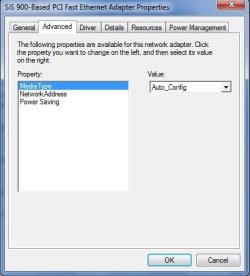
Before we do that though, can you attach a nice screenshot of advanced tab when you go into device manager and double click on it? There's a setting there that will probably fix this right up. I need to see to be able to guess which.
 

My Computer

Computer Manufacturer/Model Number
self built
OS
7600.20510 x86
CPU
P4 550 3.4 GHz HT running at 3.5 GHz
Motherboard
MSI PM8M3-V (MS-7211 v1.x) Micro-ATX mainboard
Memory
OCZ 2 GB(2x1GB) DDR400mHz running @ 414 mHz
Graphics Card(s)
HIS Radeon HD 3850 IceQ 3 Turbo HDMI Dual DL-DVI AGP
Sound Card
MOTU Traveler firewire studio interface 192 kHz 24 bit
Monitor(s) Displays
22" widescreen Acer X223W LCD, 17" Compaq P75 CRT
Screen Resolution
1680x1050 and 1280x1024
Hard Drives
SATA I x2 WD, 400 GB and 120 GB, SATA 2 WD Caviar Black 1 TB
PSU
350W generic
Case
Cybertronpc, it glows blue
Cooling
stock cpu fan, Ice-Q 3 gpu and system, many case fans
Keyboard
Logitch Classical Keyboard 200
Mouse
Logitech Mediaplay cordless
Internet Speed
1792/448 kbits/sec
Other Info
SATA II PCI fake RAID adapter, 1 GB Readyboost, original ATI Remote Wonder (even works with WMC perfectly), Logitech Rumblepad 2 game controller x2
PCI\VEN_1039&DEV_0900&SUBSYS_80A71043&REV_91
PCI\VEN_1039&DEV_0900&SUBSYS_80A71043
PCI\VEN_1039&DEV_0900&CC_020000
PCI\VEN_1039&DEV_0900&CC_0200

I'm not at brother's house now to check the settings in advanced, but he just sent me this via email.

I can remember though when I was poking around that there was only like 3 settings in that tab.
 

My Computer

OS
Windows 7 Professional 64-bit
CPU
Core i7 920 D0 @4.05GHz
Motherboard
ASUS P6T SE
Memory
6GB DDR3 1600 G.Skill
Graphics Card(s)
Sapphire Radeon 5850
Monitor(s) Displays
Samsung SyncMaster 2253LW
Screen Resolution
1680x1050
Hard Drives
Western Digital Black 640GB
Seagate 7200.12 500GB
PSU
Antec TruePower Blue 750W
Case
Antec 902
Cooling
Thermalright Ultra 120 Extreme 1366
Internet Speed
Bell Aliant High-Speed Ultra 7Mbps
Other Info
Pioneer DVR-116DBK Burner
Here's the Advanced Tab he just sent me..

Not much too it. Must mean there's a problem no?
 

Attachments

  • advancedtab.jpg
    advancedtab.jpg
    21.3 KB · Views: 26

My Computer

OS
Windows 7 Professional 64-bit
CPU
Core i7 920 D0 @4.05GHz
Motherboard
ASUS P6T SE
Memory
6GB DDR3 1600 G.Skill
Graphics Card(s)
Sapphire Radeon 5850
Monitor(s) Displays
Samsung SyncMaster 2253LW
Screen Resolution
1680x1050
Hard Drives
Western Digital Black 640GB
Seagate 7200.12 500GB
PSU
Antec TruePower Blue 750W
Case
Antec 902
Cooling
Thermalright Ultra 120 Extreme 1366
Internet Speed
Bell Aliant High-Speed Ultra 7Mbps
Other Info
Pioneer DVR-116DBK Burner
Here ya go.

Right click on the network adapter in the device manager. Update driver software. Browse my computer for software. Let me pick from a list. Have disk. Browse. Now navigate to where you extracted to and double click on the .inf. Click ok the next.
 

Attachments

My Computer

Computer Manufacturer/Model Number
self built
OS
7600.20510 x86
CPU
P4 550 3.4 GHz HT running at 3.5 GHz
Motherboard
MSI PM8M3-V (MS-7211 v1.x) Micro-ATX mainboard
Memory
OCZ 2 GB(2x1GB) DDR400mHz running @ 414 mHz
Graphics Card(s)
HIS Radeon HD 3850 IceQ 3 Turbo HDMI Dual DL-DVI AGP
Sound Card
MOTU Traveler firewire studio interface 192 kHz 24 bit
Monitor(s) Displays
22" widescreen Acer X223W LCD, 17" Compaq P75 CRT
Screen Resolution
1680x1050 and 1280x1024
Hard Drives
SATA I x2 WD, 400 GB and 120 GB, SATA 2 WD Caviar Black 1 TB
PSU
350W generic
Case
Cybertronpc, it glows blue
Cooling
stock cpu fan, Ice-Q 3 gpu and system, many case fans
Keyboard
Logitch Classical Keyboard 200
Mouse
Logitech Mediaplay cordless
Internet Speed
1792/448 kbits/sec
Other Info
SATA II PCI fake RAID adapter, 1 GB Readyboost, original ATI Remote Wonder (even works with WMC perfectly), Logitech Rumblepad 2 game controller x2
So far he hasn't noticed any differences. Is there anything he should do, like say restart the computer, reboot the modem/router etc?

Thanks. At the very least, he definitely has the right drivers installed.
 

My Computer

OS
Windows 7 Professional 64-bit
CPU
Core i7 920 D0 @4.05GHz
Motherboard
ASUS P6T SE
Memory
6GB DDR3 1600 G.Skill
Graphics Card(s)
Sapphire Radeon 5850
Monitor(s) Displays
Samsung SyncMaster 2253LW
Screen Resolution
1680x1050
Hard Drives
Western Digital Black 640GB
Seagate 7200.12 500GB
PSU
Antec TruePower Blue 750W
Case
Antec 902
Cooling
Thermalright Ultra 120 Extreme 1366
Internet Speed
Bell Aliant High-Speed Ultra 7Mbps
Other Info
Pioneer DVR-116DBK Burner
Could try a reboot.

If there are still problems, post a screenshot of the advanced tab if there are any differences now.

You could also look into a firmware update for the router which may help.
 

My Computer

Computer Manufacturer/Model Number
self built
OS
7600.20510 x86
CPU
P4 550 3.4 GHz HT running at 3.5 GHz
Motherboard
MSI PM8M3-V (MS-7211 v1.x) Micro-ATX mainboard
Memory
OCZ 2 GB(2x1GB) DDR400mHz running @ 414 mHz
Graphics Card(s)
HIS Radeon HD 3850 IceQ 3 Turbo HDMI Dual DL-DVI AGP
Sound Card
MOTU Traveler firewire studio interface 192 kHz 24 bit
Monitor(s) Displays
22" widescreen Acer X223W LCD, 17" Compaq P75 CRT
Screen Resolution
1680x1050 and 1280x1024
Hard Drives
SATA I x2 WD, 400 GB and 120 GB, SATA 2 WD Caviar Black 1 TB
PSU
350W generic
Case
Cybertronpc, it glows blue
Cooling
stock cpu fan, Ice-Q 3 gpu and system, many case fans
Keyboard
Logitch Classical Keyboard 200
Mouse
Logitech Mediaplay cordless
Internet Speed
1792/448 kbits/sec
Other Info
SATA II PCI fake RAID adapter, 1 GB Readyboost, original ATI Remote Wonder (even works with WMC perfectly), Logitech Rumblepad 2 game controller x2
I think the next step I'm going to try is to set the Speedstream 6250 as just a modem instead of combo and bring over my extra Wireless G router to test. See if it just doesn't like communicating directly with the 6250. Strange where it was fine with XP though. I suppose it would make sense to try my laptop with the connection just in case something got borked and it was just a coincidence that it happened at the same time as the Windows 7 installation.. you never know.

I don't think upgrading the firmware is an option where his ISP has a proprietary firmware on this thing. I could see if there's a BIOS update for his motherboard too.
 

My Computer

OS
Windows 7 Professional 64-bit
CPU
Core i7 920 D0 @4.05GHz
Motherboard
ASUS P6T SE
Memory
6GB DDR3 1600 G.Skill
Graphics Card(s)
Sapphire Radeon 5850
Monitor(s) Displays
Samsung SyncMaster 2253LW
Screen Resolution
1680x1050
Hard Drives
Western Digital Black 640GB
Seagate 7200.12 500GB
PSU
Antec TruePower Blue 750W
Case
Antec 902
Cooling
Thermalright Ultra 120 Extreme 1366
Internet Speed
Bell Aliant High-Speed Ultra 7Mbps
Other Info
Pioneer DVR-116DBK Burner
I don't think upgrading the firmware is an option where his ISP has a proprietary firmware on this thing. I could see if there's a BIOS update for his motherboard too.

Cool. Many times, the ISP will actually assist in upgrading firmware so you could check with them about it.
 

My Computer

Computer Manufacturer/Model Number
self built
OS
7600.20510 x86
CPU
P4 550 3.4 GHz HT running at 3.5 GHz
Motherboard
MSI PM8M3-V (MS-7211 v1.x) Micro-ATX mainboard
Memory
OCZ 2 GB(2x1GB) DDR400mHz running @ 414 mHz
Graphics Card(s)
HIS Radeon HD 3850 IceQ 3 Turbo HDMI Dual DL-DVI AGP
Sound Card
MOTU Traveler firewire studio interface 192 kHz 24 bit
Monitor(s) Displays
22" widescreen Acer X223W LCD, 17" Compaq P75 CRT
Screen Resolution
1680x1050 and 1280x1024
Hard Drives
SATA I x2 WD, 400 GB and 120 GB, SATA 2 WD Caviar Black 1 TB
PSU
350W generic
Case
Cybertronpc, it glows blue
Cooling
stock cpu fan, Ice-Q 3 gpu and system, many case fans
Keyboard
Logitch Classical Keyboard 200
Mouse
Logitech Mediaplay cordless
Internet Speed
1792/448 kbits/sec
Other Info
SATA II PCI fake RAID adapter, 1 GB Readyboost, original ATI Remote Wonder (even works with WMC perfectly), Logitech Rumblepad 2 game controller x2
Still haven't been able to fix this problem. I just brought over my laptop to his house and it runs flawlessly with his Speedstream modem from wireless.

There must still be an issue with Windows 7 or the driver.

Might have to buy a cheap network card to try it...
 

My Computer

OS
Windows 7 Professional 64-bit
CPU
Core i7 920 D0 @4.05GHz
Motherboard
ASUS P6T SE
Memory
6GB DDR3 1600 G.Skill
Graphics Card(s)
Sapphire Radeon 5850
Monitor(s) Displays
Samsung SyncMaster 2253LW
Screen Resolution
1680x1050
Hard Drives
Western Digital Black 640GB
Seagate 7200.12 500GB
PSU
Antec TruePower Blue 750W
Case
Antec 902
Cooling
Thermalright Ultra 120 Extreme 1366
Internet Speed
Bell Aliant High-Speed Ultra 7Mbps
Other Info
Pioneer DVR-116DBK Burner
Just tried a DFE-538TX.. same issue. For example running speedtest.net servers, the needle will shoot up.. then pause.. then shoot up.. then pause/fall. Downloads will pause and restart and be consistently slow. This is the same with both cards.
 

My Computer

OS
Windows 7 Professional 64-bit
CPU
Core i7 920 D0 @4.05GHz
Motherboard
ASUS P6T SE
Memory
6GB DDR3 1600 G.Skill
Graphics Card(s)
Sapphire Radeon 5850
Monitor(s) Displays
Samsung SyncMaster 2253LW
Screen Resolution
1680x1050
Hard Drives
Western Digital Black 640GB
Seagate 7200.12 500GB
PSU
Antec TruePower Blue 750W
Case
Antec 902
Cooling
Thermalright Ultra 120 Extreme 1366
Internet Speed
Bell Aliant High-Speed Ultra 7Mbps
Other Info
Pioneer DVR-116DBK Burner
Just like to share with everyone the solution to our problem. His SpeedStream 6520 modem was dying. New one works fine with any network driver and Windows 7.

Thanks for the help.
 

My Computer

OS
Windows 7 Professional 64-bit
CPU
Core i7 920 D0 @4.05GHz
Motherboard
ASUS P6T SE
Memory
6GB DDR3 1600 G.Skill
Graphics Card(s)
Sapphire Radeon 5850
Monitor(s) Displays
Samsung SyncMaster 2253LW
Screen Resolution
1680x1050
Hard Drives
Western Digital Black 640GB
Seagate 7200.12 500GB
PSU
Antec TruePower Blue 750W
Case
Antec 902
Cooling
Thermalright Ultra 120 Extreme 1366
Internet Speed
Bell Aliant High-Speed Ultra 7Mbps
Other Info
Pioneer DVR-116DBK Burner
Back
Top