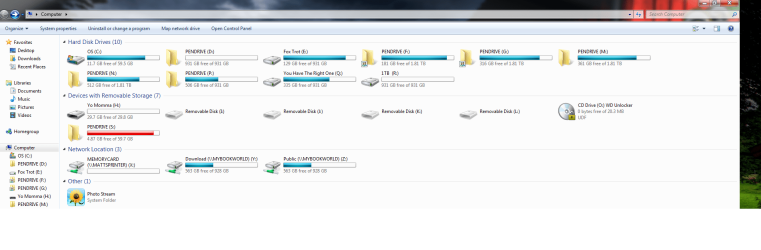
Internal Hard Drive name defaults to "PenDrive"

conticreative

New member
Local time
9:09 PM
Messages
29
I just installed a new internal hard drive that I called "Medusa" (the others are Apollo, Zeuss, etc. I like mythology) but the first time I restarted the computer the name and had changed to "Pendrive" and the icon is now a folder.

When I try to change the name, I get an alert that I need to give permission. I do and rename the drice Medusa again, yet after I click on the permission the name reverts to Pendrive.

When I look at the properties, the name there is Medusa, as it should be.

What is going on with this hard drive? Even my external drives do not behave like this and the otehr internals are fine too.

Thank you.
 

My Computer

OS
Win 7 - Mac OS X - Linux
Memory
8GB
Graphics Card(s)
Nvidia 8600
Sound Card
Many (pro)
Monitor(s) Displays
Viewsonic
Hard Drives
Seagate Velociraptor (350gb, 10000rpm OS)
MyBook (WD) 2TB
Seagate Velociraptor 500gb
Seagate Velociraptor 500GB
When renaming the drive did you simply right click on the drive's icon in an explorer window or go into the Disk Management tool?

If you simply right clicked on the drive's icon to rename it the change wasn't fully seen and put into effect. When right clicking on the drive in the DM however the option for labeling the volume will be seen there. Following a full restart once the drive is labeled while in the DM you shouldn't see any further problems.
 

My Computers

System One System Two

  • Computer type
    PC/Desktop
    Computer Manufacturer/Model Number
    Custom builds = 2
    OS
    W7 Ultimate x64/W10 Pro x64/W11 Pro Triple Boot - Main PC W7 Remote PC Micro ATX W7 Pro x64/W11 Pro
    CPU
    AMD Phenom II X4 975 Deneb 3.6ghz - 965 2nd remote pc
    Motherboard
    Gigabyte GA-790XTA-UD4-Gigabyte GA-880GM-D2H remote pc
    Memory
    Kingston Hyper X DDR3 1600 1.5v 16gb - Hyper X Fury 8gb 2nd
    Graphics Card(s)
    MSI HD Radeon 5750 1gb - MSI HD Radeon 6450 on mini tower
    Sound Card
    Creative Labs X-Fi Xtreme Audio P - Realtek onooard 2nd case
    Monitor(s) Displays
    ASUS VW199T-P 19" HP 2082a Main-HP 2082a 20" remote pc
    Screen Resolution
    Asus 1440x900 - HP 1600x900
    Hard Drives
    WD Black 1TB HD per OS W7, W10, and pending W11 presently on 500gb OS Drive - Pending Triple 1TB HDs for Spanned Storage/backup volume
    Single 2TB external USB enclosure, single 1TB System 7 Host/Boot drive, Pending 8TB external HD for system image b
    PSU
    Corsair 750TX - primary / Corsair CX600 - second
    Case
    Antec 900-2 - SSD compatible / NZXT Vulcan mini tower
    Cooling
    Zalman CNPS9900A
    Keyboard
    AZIO L70 Backlit Letters Gaming - ONN Cordless/USB
    Mouse
    MSI DS200 Programmable, Logitech Cordless
    Internet Speed
    30mbps upgrade - primary hard wired - mini tower usb WiFi
    Antivirus
    GFI VIPRE Internet Security 2014 on W7 2016 beta on W10,
    Browser
    Cyberfox, WaterFox 64bit FF variants, FireFox x64, Pale Moon
    Other Info
    Accomdata fan cooled usb 2.0 PIDE/Sata II, III external enclosure.
    Sambient usb/eSata PATA/Sata II, III external enclosure.
  • Computer type
    PC/Desktop
    System Manufacturer/Model Number
    CUSTOM ASSEMBLY
    OS
    W7 Pro x64/W11 Pro
    CPU
    AMD Deneb 3.6ghz - 965
    Motherboard
    Gigabyte GA-880GM-D2H remote pc
    Memory
    Kingston Hyper X Fury 8gb
    Graphics Card(s)
    MSI HD Radeon 6450 DVI Output
    Sound Card
    Realtek onooard Creative or Other separate PENDING
    Monitor(s) Displays
    VIZIO 32" LCD TV Separate LCD Pending
    Screen Resolution
    1600x1080
    Hard Drives
    WD 500GB OS Host/Boot WD Green 1TB Storage/Backup
    PSU
    Corsair 600W - THERMALTAKE 600W spare case
    Case
    NZXT Vulcan mini tower
    Cooling
    Twin 120mm Top Fans - 240mm Side Cover
    Keyboard
    ONN Cordless/USB Logitech Cordless
    Mouse
    ONN USB/Cordless - Logitech Cordless
    Internet Speed
    DSL 5G
    Browser
    MS Edge, FireFox, WaterFox x64, FireFox Nightly
    Other Info
    OS Testing-Remote Access to Main TeamViewer
Tha nk you for your replay. In the Disk Management Tool there is nothing to change. The drive results as "Medusa", the name I'd like to give it (although, at this point I'd take anything other than "Pendrive")

It's only in Windows explorer==> My computer that the name and Icon reflect the Pendrive name.

Since this happened, I restarted at least 5 times but the Pendrive name is sticking. On the network the drive results as Medusa as it does in the properties and the disk management.

Again, when I try to change the name in WE I do get the alert that I need admin access, it accepts it and then promptly ignores it.

It's getting a bit frustrating.

Otherwise, my experience with 7 is much better than it was with Vista. I love the "libraries" concept. The only thing so far that I find annoying is the size of the icons in the start menu. I'd like them much smaller (the size of win classic).

Thanks
 

My Computer

OS
Win 7 - Mac OS X - Linux
Memory
8GB
Graphics Card(s)
Nvidia 8600
Sound Card
Many (pro)
Monitor(s) Displays
Viewsonic
Hard Drives
Seagate Velociraptor (350gb, 10000rpm OS)
MyBook (WD) 2TB
Seagate Velociraptor 500gb
Seagate Velociraptor 500GB
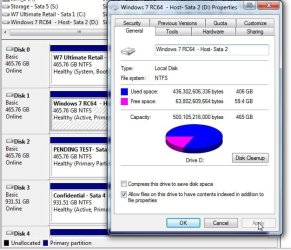
Trying the rename any drive in W.Explorer is pointless from the start. The first screen shows how each drive is renamed in the text slot followed by clicking on the apply button. This is done when logged in as the administrator.

You'll notice that the second screen shows how the first sata was labeled prior to seeing the retail 7 installed there now seen as the default boot drive as well. Previously the RC install on the second sata was set as the default in the bios.
 

Attachments

  • HD Rename.jpg
    HD Rename.jpg
    68.2 KB · Views: 132
  • Present Partitions.jpg
    Present Partitions.jpg
    113.7 KB · Views: 144

My Computers

System One System Two

  • Computer type
    PC/Desktop
    Computer Manufacturer/Model Number
    Custom builds = 2
    OS
    W7 Ultimate x64/W10 Pro x64/W11 Pro Triple Boot - Main PC W7 Remote PC Micro ATX W7 Pro x64/W11 Pro
    CPU
    AMD Phenom II X4 975 Deneb 3.6ghz - 965 2nd remote pc
    Motherboard
    Gigabyte GA-790XTA-UD4-Gigabyte GA-880GM-D2H remote pc
    Memory
    Kingston Hyper X DDR3 1600 1.5v 16gb - Hyper X Fury 8gb 2nd
    Graphics Card(s)
    MSI HD Radeon 5750 1gb - MSI HD Radeon 6450 on mini tower
    Sound Card
    Creative Labs X-Fi Xtreme Audio P - Realtek onooard 2nd case
    Monitor(s) Displays
    ASUS VW199T-P 19" HP 2082a Main-HP 2082a 20" remote pc
    Screen Resolution
    Asus 1440x900 - HP 1600x900
    Hard Drives
    WD Black 1TB HD per OS W7, W10, and pending W11 presently on 500gb OS Drive - Pending Triple 1TB HDs for Spanned Storage/backup volume
    Single 2TB external USB enclosure, single 1TB System 7 Host/Boot drive, Pending 8TB external HD for system image b
    PSU
    Corsair 750TX - primary / Corsair CX600 - second
    Case
    Antec 900-2 - SSD compatible / NZXT Vulcan mini tower
    Cooling
    Zalman CNPS9900A
    Keyboard
    AZIO L70 Backlit Letters Gaming - ONN Cordless/USB
    Mouse
    MSI DS200 Programmable, Logitech Cordless
    Internet Speed
    30mbps upgrade - primary hard wired - mini tower usb WiFi
    Antivirus
    GFI VIPRE Internet Security 2014 on W7 2016 beta on W10,
    Browser
    Cyberfox, WaterFox 64bit FF variants, FireFox x64, Pale Moon
    Other Info
    Accomdata fan cooled usb 2.0 PIDE/Sata II, III external enclosure.
    Sambient usb/eSata PATA/Sata II, III external enclosure.
  • Computer type
    PC/Desktop
    System Manufacturer/Model Number
    CUSTOM ASSEMBLY
    OS
    W7 Pro x64/W11 Pro
    CPU
    AMD Deneb 3.6ghz - 965
    Motherboard
    Gigabyte GA-880GM-D2H remote pc
    Memory
    Kingston Hyper X Fury 8gb
    Graphics Card(s)
    MSI HD Radeon 6450 DVI Output
    Sound Card
    Realtek onooard Creative or Other separate PENDING
    Monitor(s) Displays
    VIZIO 32" LCD TV Separate LCD Pending
    Screen Resolution
    1600x1080
    Hard Drives
    WD 500GB OS Host/Boot WD Green 1TB Storage/Backup
    PSU
    Corsair 600W - THERMALTAKE 600W spare case
    Case
    NZXT Vulcan mini tower
    Cooling
    Twin 120mm Top Fans - 240mm Side Cover
    Keyboard
    ONN Cordless/USB Logitech Cordless
    Mouse
    ONN USB/Cordless - Logitech Cordless
    Internet Speed
    DSL 5G
    Browser
    MS Edge, FireFox, WaterFox x64, FireFox Nightly
    Other Info
    OS Testing-Remote Access to Main TeamViewer
Pendrive naming problem problem

Well, I am sort of at a loss now on how to handle this. I am posting a screenshot of the hard drive manager and the disk properties. I am sure that's better than me trying to describe it.

Thank you very much for the help so far.
 

Attachments

  • pendrive-issue.jpg
    pendrive-issue.jpg
    177.4 KB · Views: 369

My Computer

OS
Win 7 - Mac OS X - Linux
Memory
8GB
Graphics Card(s)
Nvidia 8600
Sound Card
Many (pro)
Monitor(s) Displays
Viewsonic
Hard Drives
Seagate Velociraptor (350gb, 10000rpm OS)
MyBook (WD) 2TB
Seagate Velociraptor 500gb
Seagate Velociraptor 500GB
Once you have renamed a drive or partition and clicked the apply button then close out the DM and return to browsing the drives first reopen an WE window to see the rename in effect. If you leave a window open the change won't be seen at first.
 

My Computers

System One System Two

  • Computer type
    PC/Desktop
    Computer Manufacturer/Model Number
    Custom builds = 2
    OS
    W7 Ultimate x64/W10 Pro x64/W11 Pro Triple Boot - Main PC W7 Remote PC Micro ATX W7 Pro x64/W11 Pro
    CPU
    AMD Phenom II X4 975 Deneb 3.6ghz - 965 2nd remote pc
    Motherboard
    Gigabyte GA-790XTA-UD4-Gigabyte GA-880GM-D2H remote pc
    Memory
    Kingston Hyper X DDR3 1600 1.5v 16gb - Hyper X Fury 8gb 2nd
    Graphics Card(s)
    MSI HD Radeon 5750 1gb - MSI HD Radeon 6450 on mini tower
    Sound Card
    Creative Labs X-Fi Xtreme Audio P - Realtek onooard 2nd case
    Monitor(s) Displays
    ASUS VW199T-P 19" HP 2082a Main-HP 2082a 20" remote pc
    Screen Resolution
    Asus 1440x900 - HP 1600x900
    Hard Drives
    WD Black 1TB HD per OS W7, W10, and pending W11 presently on 500gb OS Drive - Pending Triple 1TB HDs for Spanned Storage/backup volume
    Single 2TB external USB enclosure, single 1TB System 7 Host/Boot drive, Pending 8TB external HD for system image b
    PSU
    Corsair 750TX - primary / Corsair CX600 - second
    Case
    Antec 900-2 - SSD compatible / NZXT Vulcan mini tower
    Cooling
    Zalman CNPS9900A
    Keyboard
    AZIO L70 Backlit Letters Gaming - ONN Cordless/USB
    Mouse
    MSI DS200 Programmable, Logitech Cordless
    Internet Speed
    30mbps upgrade - primary hard wired - mini tower usb WiFi
    Antivirus
    GFI VIPRE Internet Security 2014 on W7 2016 beta on W10,
    Browser
    Cyberfox, WaterFox 64bit FF variants, FireFox x64, Pale Moon
    Other Info
    Accomdata fan cooled usb 2.0 PIDE/Sata II, III external enclosure.
    Sambient usb/eSata PATA/Sata II, III external enclosure.
  • Computer type
    PC/Desktop
    System Manufacturer/Model Number
    CUSTOM ASSEMBLY
    OS
    W7 Pro x64/W11 Pro
    CPU
    AMD Deneb 3.6ghz - 965
    Motherboard
    Gigabyte GA-880GM-D2H remote pc
    Memory
    Kingston Hyper X Fury 8gb
    Graphics Card(s)
    MSI HD Radeon 6450 DVI Output
    Sound Card
    Realtek onooard Creative or Other separate PENDING
    Monitor(s) Displays
    VIZIO 32" LCD TV Separate LCD Pending
    Screen Resolution
    1600x1080
    Hard Drives
    WD 500GB OS Host/Boot WD Green 1TB Storage/Backup
    PSU
    Corsair 600W - THERMALTAKE 600W spare case
    Case
    NZXT Vulcan mini tower
    Cooling
    Twin 120mm Top Fans - 240mm Side Cover
    Keyboard
    ONN Cordless/USB Logitech Cordless
    Mouse
    ONN USB/Cordless - Logitech Cordless
    Internet Speed
    DSL 5G
    Browser
    MS Edge, FireFox, WaterFox x64, FireFox Nightly
    Other Info
    OS Testing-Remote Access to Main TeamViewer
I have done as advised and when I return to WE the name is once again Pendrive.
I have tried using a different name from Medusa, and renaming the drive in DM. I restarted the computer to make sure there were no other windows left open and I tried changing the name once again. All to no avail.

I even shot a short video to display what it does when I try changing the name in WE.

In the properties and the DM I cannot change the name since they display it correctly.

In any event, this is the video I took of the issue: 2009-11-02_1101

My next step is to turn off the security program (whatever it's called in Win 7) and see if that lets me change the drive name and icon. Before that, I'll try disconnecting the external USB drives to see if that too is creating an issue. I am basically grasping at straws.
 

My Computer

OS
Win 7 - Mac OS X - Linux
Memory
8GB
Graphics Card(s)
Nvidia 8600
Sound Card
Many (pro)
Monitor(s) Displays
Viewsonic
Hard Drives
Seagate Velociraptor (350gb, 10000rpm OS)
MyBook (WD) 2TB
Seagate Velociraptor 500gb
Seagate Velociraptor 500GB
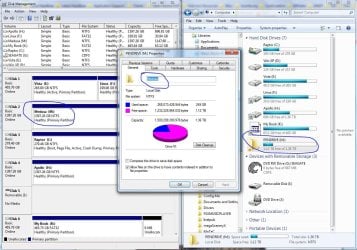
I have just remapped all my drive letters and renamed some of the drives (something that I had planned to do anyway), but PENDRIVE still gives me grief. looks like I'll have to learn to live with it.
I have researched drive renaming on other forums and apparently no one else has the same problem as I do. It's really strange.

Thank you do much for the help so far. I am pretty sure I followed the instructions to the letter, but it just refuses to change.

Maybe one of these days....
 

My Computer

OS
Win 7 - Mac OS X - Linux
Memory
8GB
Graphics Card(s)
Nvidia 8600
Sound Card
Many (pro)
Monitor(s) Displays
Viewsonic
Hard Drives
Seagate Velociraptor (350gb, 10000rpm OS)
MyBook (WD) 2TB
Seagate Velociraptor 500gb
Seagate Velociraptor 500GB
Maybe taking the drive out of the equation and running the system for awhile without it plugged and after a few restarts an entirely fresh detection of the drive will see the change in the DM stick. There may one other thing causing the problem as well namely the drive has bad sectors or is simply worn depending on age and wear.

The removal and then fresh detection might also work if the problem is in Windows itself. The redetect could then jar Windows into correcting this if the drive is in good working order.
 

My Computers

System One System Two

  • Computer type
    PC/Desktop
    Computer Manufacturer/Model Number
    Custom builds = 2
    OS
    W7 Ultimate x64/W10 Pro x64/W11 Pro Triple Boot - Main PC W7 Remote PC Micro ATX W7 Pro x64/W11 Pro
    CPU
    AMD Phenom II X4 975 Deneb 3.6ghz - 965 2nd remote pc
    Motherboard
    Gigabyte GA-790XTA-UD4-Gigabyte GA-880GM-D2H remote pc
    Memory
    Kingston Hyper X DDR3 1600 1.5v 16gb - Hyper X Fury 8gb 2nd
    Graphics Card(s)
    MSI HD Radeon 5750 1gb - MSI HD Radeon 6450 on mini tower
    Sound Card
    Creative Labs X-Fi Xtreme Audio P - Realtek onooard 2nd case
    Monitor(s) Displays
    ASUS VW199T-P 19" HP 2082a Main-HP 2082a 20" remote pc
    Screen Resolution
    Asus 1440x900 - HP 1600x900
    Hard Drives
    WD Black 1TB HD per OS W7, W10, and pending W11 presently on 500gb OS Drive - Pending Triple 1TB HDs for Spanned Storage/backup volume
    Single 2TB external USB enclosure, single 1TB System 7 Host/Boot drive, Pending 8TB external HD for system image b
    PSU
    Corsair 750TX - primary / Corsair CX600 - second
    Case
    Antec 900-2 - SSD compatible / NZXT Vulcan mini tower
    Cooling
    Zalman CNPS9900A
    Keyboard
    AZIO L70 Backlit Letters Gaming - ONN Cordless/USB
    Mouse
    MSI DS200 Programmable, Logitech Cordless
    Internet Speed
    30mbps upgrade - primary hard wired - mini tower usb WiFi
    Antivirus
    GFI VIPRE Internet Security 2014 on W7 2016 beta on W10,
    Browser
    Cyberfox, WaterFox 64bit FF variants, FireFox x64, Pale Moon
    Other Info
    Accomdata fan cooled usb 2.0 PIDE/Sata II, III external enclosure.
    Sambient usb/eSata PATA/Sata II, III external enclosure.
  • Computer type
    PC/Desktop
    System Manufacturer/Model Number
    CUSTOM ASSEMBLY
    OS
    W7 Pro x64/W11 Pro
    CPU
    AMD Deneb 3.6ghz - 965
    Motherboard
    Gigabyte GA-880GM-D2H remote pc
    Memory
    Kingston Hyper X Fury 8gb
    Graphics Card(s)
    MSI HD Radeon 6450 DVI Output
    Sound Card
    Realtek onooard Creative or Other separate PENDING
    Monitor(s) Displays
    VIZIO 32" LCD TV Separate LCD Pending
    Screen Resolution
    1600x1080
    Hard Drives
    WD 500GB OS Host/Boot WD Green 1TB Storage/Backup
    PSU
    Corsair 600W - THERMALTAKE 600W spare case
    Case
    NZXT Vulcan mini tower
    Cooling
    Twin 120mm Top Fans - 240mm Side Cover
    Keyboard
    ONN Cordless/USB Logitech Cordless
    Mouse
    ONN USB/Cordless - Logitech Cordless
    Internet Speed
    DSL 5G
    Browser
    MS Edge, FireFox, WaterFox x64, FireFox Nightly
    Other Info
    OS Testing-Remote Access to Main TeamViewer
Thank you for your kind replay. It did occur to me to proceed just as you have indicated, except that:
1) The drive is brand new, bought a week ago.
2) I just finished moving all my data to it from an external I have been using and it's also connected to carbonite for cloud backup. I know from experience that disconnecting it is going to throw Carbonite into a fit and possibly lose my backups.

One solution would be to deactivate Carbonite for the few days it takes to fix the issue, but the problem of my data remains. I am a web developer and that drive contains all my websites raw code (about 150 of them!), all my client's graphic art, my podcast raw files and so on. Took me 3 days top move them over.

I do have local 1:1 backups as well and I can work off them, but then I'd have to sync them back.
I will try to shuffle the SATA plugs around to see if that makes any difference or maybe even subject it to multiple consecutive restarts to see if your suggestion may work, but I could not do it for a few days. Not even a few hours.

I was thinking that since I just bought Win 7 Professional, this would be a good one to put a ticket into Microsoft for. Make them earn the $200 this upgrade cost me (on my Mac I just upgraded to the new OS for $30. Quite a difference. Also, their older OS wasn't a dud like Vista).

It's not like I can't work with it. Whether it's called "Pendrive" or "Sue Ann" it really doesn't matter. It's more of a psychological issue: brand new OS, 2 new hard drives, enough RAM to launch a Space Shuttle and I can't even rename a drive?

It makes me wonder what else is lurking in the guts that may be wrong.

Thank you
 

My Computer

OS
Win 7 - Mac OS X - Linux
Memory
8GB
Graphics Card(s)
Nvidia 8600
Sound Card
Many (pro)
Monitor(s) Displays
Viewsonic
Hard Drives
Seagate Velociraptor (350gb, 10000rpm OS)
MyBook (WD) 2TB
Seagate Velociraptor 500gb
Seagate Velociraptor 500GB
Your mention now of having a Cloud setup suggests a virtual volume for online application. I think you just named the problem yourself there. The name you gave that is what you are seeing displayed in WE while the Disk Management will only show the physical drive there which can renamed over and over without any effect on the mounted volume.

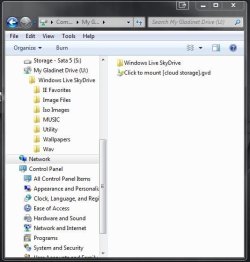
Having been using the Gladinet Cloud Desktop here while having the 64bit 7 RC as well as a few Linux distros installed on the Portable Virtual Box the program was used for uploading files to the Windows Live SkyDrive in order to download to the installation on virtual drives since those lacked direct access to the internal drives on the system.

If you look at the image here you will see how that becomes a separate drive being provided a drive letter while not being seen in the Disk Management tool. Actually that is simply a folder mounted virtually seeing the drive letter designation. If you have anything like this setup this is why you are unable to rename it.
 

Attachments

  • Gladinet Virtual Drive.jpg
    Gladinet Virtual Drive.jpg
    42.1 KB · Views: 55

My Computers

System One System Two

  • Computer type
    PC/Desktop
    Computer Manufacturer/Model Number
    Custom builds = 2
    OS
    W7 Ultimate x64/W10 Pro x64/W11 Pro Triple Boot - Main PC W7 Remote PC Micro ATX W7 Pro x64/W11 Pro
    CPU
    AMD Phenom II X4 975 Deneb 3.6ghz - 965 2nd remote pc
    Motherboard
    Gigabyte GA-790XTA-UD4-Gigabyte GA-880GM-D2H remote pc
    Memory
    Kingston Hyper X DDR3 1600 1.5v 16gb - Hyper X Fury 8gb 2nd
    Graphics Card(s)
    MSI HD Radeon 5750 1gb - MSI HD Radeon 6450 on mini tower
    Sound Card
    Creative Labs X-Fi Xtreme Audio P - Realtek onooard 2nd case
    Monitor(s) Displays
    ASUS VW199T-P 19" HP 2082a Main-HP 2082a 20" remote pc
    Screen Resolution
    Asus 1440x900 - HP 1600x900
    Hard Drives
    WD Black 1TB HD per OS W7, W10, and pending W11 presently on 500gb OS Drive - Pending Triple 1TB HDs for Spanned Storage/backup volume
    Single 2TB external USB enclosure, single 1TB System 7 Host/Boot drive, Pending 8TB external HD for system image b
    PSU
    Corsair 750TX - primary / Corsair CX600 - second
    Case
    Antec 900-2 - SSD compatible / NZXT Vulcan mini tower
    Cooling
    Zalman CNPS9900A
    Keyboard
    AZIO L70 Backlit Letters Gaming - ONN Cordless/USB
    Mouse
    MSI DS200 Programmable, Logitech Cordless
    Internet Speed
    30mbps upgrade - primary hard wired - mini tower usb WiFi
    Antivirus
    GFI VIPRE Internet Security 2014 on W7 2016 beta on W10,
    Browser
    Cyberfox, WaterFox 64bit FF variants, FireFox x64, Pale Moon
    Other Info
    Accomdata fan cooled usb 2.0 PIDE/Sata II, III external enclosure.
    Sambient usb/eSata PATA/Sata II, III external enclosure.
  • Computer type
    PC/Desktop
    System Manufacturer/Model Number
    CUSTOM ASSEMBLY
    OS
    W7 Pro x64/W11 Pro
    CPU
    AMD Deneb 3.6ghz - 965
    Motherboard
    Gigabyte GA-880GM-D2H remote pc
    Memory
    Kingston Hyper X Fury 8gb
    Graphics Card(s)
    MSI HD Radeon 6450 DVI Output
    Sound Card
    Realtek onooard Creative or Other separate PENDING
    Monitor(s) Displays
    VIZIO 32" LCD TV Separate LCD Pending
    Screen Resolution
    1600x1080
    Hard Drives
    WD 500GB OS Host/Boot WD Green 1TB Storage/Backup
    PSU
    Corsair 600W - THERMALTAKE 600W spare case
    Case
    NZXT Vulcan mini tower
    Cooling
    Twin 120mm Top Fans - 240mm Side Cover
    Keyboard
    ONN Cordless/USB Logitech Cordless
    Mouse
    ONN USB/Cordless - Logitech Cordless
    Internet Speed
    DSL 5G
    Browser
    MS Edge, FireFox, WaterFox x64, FireFox Nightly
    Other Info
    OS Testing-Remote Access to Main TeamViewer
Hello conticreative, I am expericiencing the same problem of being unable to rename drives called PENDRIVE. Only I am running Vista Business on the computer where the problem first occured! I have three external hard disks that were called Documents, Music and Multimedia once, but they now all show up as PENDRIVE. Also my USB-stick, that once was called "Smileface", is now PENDRIVE.
When I insert this USB-stick in another PC, its name remains PENDRIVE! I tried it on a machine running Windows 7 Ultimate and Windows XP. So I don`t think the problem is Windows7 specific.....
 

My Computer

OS
Windows Vista Business

My Computer

Computer Manufacturer/Model Number
Dell Inpspiron 1720
OS
Windows 7 Home Premium x64
CPU
Intel 1720 Core 2 Duo 2.00GHz,800,2M
Memory
4GB 667MHz DDR2 SDRAM (2x2048)
Graphics Card(s)
NVIDIA Geforce Go 8600M GT 256MB DDR2
Sound Card
SigmaTel
Monitor(s) Displays
17.0" Widescreen WXGA+ (1440x900) TFT with TrueLife
Screen Resolution
1440x900
Hard Drives
2x160GB 5400RPM Serial ATA
Mouse
Logitech
Good find! zx81 It certainly won't hurt running a sweep of the system for any bugs. External hard drives as well as flash drives are more suceptable to bugs then your internal drives that typically see more security scans.

If you download or copy a bug or infected file onto an external drive and then back onto your system it then may become active and spread efecting your main system files as well as others.
 

My Computers

System One System Two

  • Computer type
    PC/Desktop
    Computer Manufacturer/Model Number
    Custom builds = 2
    OS
    W7 Ultimate x64/W10 Pro x64/W11 Pro Triple Boot - Main PC W7 Remote PC Micro ATX W7 Pro x64/W11 Pro
    CPU
    AMD Phenom II X4 975 Deneb 3.6ghz - 965 2nd remote pc
    Motherboard
    Gigabyte GA-790XTA-UD4-Gigabyte GA-880GM-D2H remote pc
    Memory
    Kingston Hyper X DDR3 1600 1.5v 16gb - Hyper X Fury 8gb 2nd
    Graphics Card(s)
    MSI HD Radeon 5750 1gb - MSI HD Radeon 6450 on mini tower
    Sound Card
    Creative Labs X-Fi Xtreme Audio P - Realtek onooard 2nd case
    Monitor(s) Displays
    ASUS VW199T-P 19" HP 2082a Main-HP 2082a 20" remote pc
    Screen Resolution
    Asus 1440x900 - HP 1600x900
    Hard Drives
    WD Black 1TB HD per OS W7, W10, and pending W11 presently on 500gb OS Drive - Pending Triple 1TB HDs for Spanned Storage/backup volume
    Single 2TB external USB enclosure, single 1TB System 7 Host/Boot drive, Pending 8TB external HD for system image b
    PSU
    Corsair 750TX - primary / Corsair CX600 - second
    Case
    Antec 900-2 - SSD compatible / NZXT Vulcan mini tower
    Cooling
    Zalman CNPS9900A
    Keyboard
    AZIO L70 Backlit Letters Gaming - ONN Cordless/USB
    Mouse
    MSI DS200 Programmable, Logitech Cordless
    Internet Speed
    30mbps upgrade - primary hard wired - mini tower usb WiFi
    Antivirus
    GFI VIPRE Internet Security 2014 on W7 2016 beta on W10,
    Browser
    Cyberfox, WaterFox 64bit FF variants, FireFox x64, Pale Moon
    Other Info
    Accomdata fan cooled usb 2.0 PIDE/Sata II, III external enclosure.
    Sambient usb/eSata PATA/Sata II, III external enclosure.
  • Computer type
    PC/Desktop
    System Manufacturer/Model Number
    CUSTOM ASSEMBLY
    OS
    W7 Pro x64/W11 Pro
    CPU
    AMD Deneb 3.6ghz - 965
    Motherboard
    Gigabyte GA-880GM-D2H remote pc
    Memory
    Kingston Hyper X Fury 8gb
    Graphics Card(s)
    MSI HD Radeon 6450 DVI Output
    Sound Card
    Realtek onooard Creative or Other separate PENDING
    Monitor(s) Displays
    VIZIO 32" LCD TV Separate LCD Pending
    Screen Resolution
    1600x1080
    Hard Drives
    WD 500GB OS Host/Boot WD Green 1TB Storage/Backup
    PSU
    Corsair 600W - THERMALTAKE 600W spare case
    Case
    NZXT Vulcan mini tower
    Cooling
    Twin 120mm Top Fans - 240mm Side Cover
    Keyboard
    ONN Cordless/USB Logitech Cordless
    Mouse
    ONN USB/Cordless - Logitech Cordless
    Internet Speed
    DSL 5G
    Browser
    MS Edge, FireFox, WaterFox x64, FireFox Nightly
    Other Info
    OS Testing-Remote Access to Main TeamViewer
[SOLVED] Internal Hard Drive name defaults to "PenDrive

I have an update on this issue. Apparently while transferring files I must have caught a trojan that my new Antivirus caught (the old one on Vista didn't) and once I cleaned it the HD reverted to the right name "Medusa"
the two occurrences were too closed together for it to be coincidence so I suppose the trojan was the cause of the inability to rename the drive.

I wanted to thank you very much for the help but we can close this thread now since the problem has been resolved
 

My Computer

OS
Win 7 - Mac OS X - Linux
Memory
8GB
Graphics Card(s)
Nvidia 8600
Sound Card
Many (pro)
Monitor(s) Displays
Viewsonic
Hard Drives
Seagate Velociraptor (350gb, 10000rpm OS)
MyBook (WD) 2TB
Seagate Velociraptor 500gb
Seagate Velociraptor 500GB
Hi, i have samo problem too. I renamed my drives but in WE they still had names Local Disk. It wont change... what to do. How to rename it in DM.

P.S. About large icons, just hold CTRL on desktop and use mouse scroll, see what happen;)
 

My Computer

OS
Windows 7
Same Problem

I have the same issue, had it for awhile and even after formatting drives completely which takes care of it for a little bit, the problem comes back.
 

Attachments

  • Pendrive Issue.png
    Pendrive Issue.png
    73.4 KB · Views: 5

My Computer

OS
Windows 7 Ultimate, Mac OS X, Linux
CPU
AMD Phenom X6 Black Edition
Motherboard
ASUS Formulia IV
Memory
16GB Corrsair
Graphics Card(s)
2x HD 5750
Monitor(s) Displays
3x Viewsonic 24in, 1x LG 47in
Hard Drives
Crucial M4 SSD 128GB
14TB HDD Storage
Case
Thermaltake
Back
Top