Solved Internal SATA drive showing as "ejectable"

wegtet

New member
Local time
12:18 AM
Messages
29
I have the "Safely Remove Hardware and Eject Media" icon in my system tray. One of my drives, a WD20EARS (WD Green 2TB) is listed there. I want the icon to go away since I obviously have no need to eject the drive.

How can I stop Windows from thinking it's a drive that's ejectable?
 

My Computer

Computer type
PC/Desktop

My Computer

Computer Manufacturer/Model Number
Custom built
OS
Windows 7 Ultimate 64 bit
CPU
AMD Phenom II X4 965 Black Edition
Motherboard
Gigabyte GA-MA790X-DS4
Memory
GSkill 4 X 2 GB PC 8500
Graphics Card(s)
XFX Radeon HD 6790 D
Sound Card
On board RealTek HD
Monitor(s) Displays
Dual monitors:Samsung SyncMaster S20B300
Screen Resolution
1600 X 900
Hard Drives
Seagate Barracuda 1TB (primary)
Seagate Barracuda 2 X 320 GB
PSU
Ultra X4 750 watt fully modular
Case
Thermaltake Overseer RX 1 full tower
Cooling
Core-Contact 92 mm CPU Cooler
Keyboard
Logitech G510
Mouse
Razor DeathAdder
Internet Speed
50/5 Mbps UL/DL
Other Info
Optical: Super Muliti DVD burner w/lightscribe, Hauppauge WinTV HVR-1800
Is this a new drive recently added?
No. It's around 2 months old, but I did a CPU/board swap last week and now I have the above issue. I installed all the chipset and storage controller drivers. The "eject" option was available from the first time I booted with the new motherboard. The motherboard in question is an ASUS P8Z68-V Pro.

Is this drive the primary drive or just for storage?
Storage.

Did you follow the manufacturers directions for installing the drive if it's an internal HDD.
Yes it's installed correctly. It has no functional issues.
 

My Computer

Computer type
PC/Desktop
This is a common problem when running on the generic AHCI driver supplied in Windows 7.
The solution is to install the correct AHCI driver for your computer.

First - find the AHCI driver. These usually come in the motherboard CD if this were a custom build. For a laptop you would need to see if there is one in the manufacturer's downloads section, contact the manufacturer, or find out the brand of motherboard, check the specs, and see if you can find a suitable driver. The generic Intel driver works for many boards based on Intel chipsets and can be found on Intel's website.

Once you have the correct AHCI driver you install it thus:

  • Open Device Manager
  • Navigate to IDE/ATA/ATAPI Controller > ***AHCI Serial ATA Controller
  • Right click > Properties
  • Choose: Update Driver
  • Browse to the folder that contains the AHCI driver you downloaded > Select > OK
  • “Successful” Message > Close
  • “Must Restart > Restart
  • Drivers Install > Another Restart necessary > Restart
  • Drivers successfully Installed. Remove Hardware Icon no longer showing.
*** : the name of the AHCI device is different for different systems, but it should be the only one with AHCI in it's name.

See if that will help.
 

My Computer

Computer type
PC/Desktop
Computer Manufacturer/Model Number
Home Built - Jan 2013
OS
Windows 7 64 Bit Home Premium SP1
CPU
i7-3820
Motherboard
Asus P9X79-PRO - Bios 4608
Memory
GSkill F3-14900CL9Q - 16GB
Graphics Card(s)
EVGA GeForce GTX660 - Driver 352.86
Sound Card
On board Realtek ALC898
Monitor(s) Displays
Acer S271HL
Screen Resolution
1920 x 1080
Hard Drives
#1- Samsung 840 Pro Series
#2- Western Digital WD1002FAEX Sata3 Black
#3- Western Digital WD1002FAEX Sata3 Black
PSU
Corsair CMPSU-850TX-V2 - 850 watt (by Seasonic)
Case
Corsair Obsidian 550D
Cooling
Standard 3 120mm case fans, Cooler Master Hyper 212 EVO
Keyboard
MS KC-0405
Mouse
Intellimouse 5-button
Internet Speed
56 Mbits/Sec (on a good day)
Antivirus
Avast & Malwarebytes
Browser
Firefox
Other Info
Asus DVD - DRW-24B1ST 24X
I have the "Safely Remove Hardware and Eject Media" icon in my system tray. One of my drives, a WD20EARS (WD Green 2TB) is listed there. I want the icon to go away since I obviously have no need to eject the drive.

How can I stop Windows from thinking it's a drive that's ejectable?

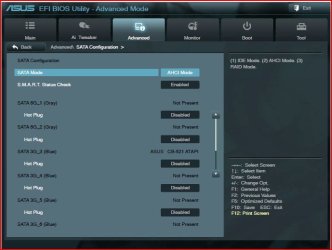
You're referring to hot plugging which becomes available on boards that support it, when AHCI is enabled.
You can disable it in your BIOS.

Capture.JPG
 

My Computer

Computer type
PC/Desktop
Computer Manufacturer/Model Number
Custom Build
OS
Windows 7 Home Premium 64 bit
CPU
Intel Core i7-4790
Motherboard
GA-Z87X-D3H
Memory
G.SKILL 8GB (2 x 4GB) DDR3 F3-10666CL9D-8GBNT
Graphics Card(s)
AMD Radeon R7 250
Sound Card
Realtek ALC892
Monitor(s) Displays
Samsung UN32EH5000, Dell 1703FPT
Screen Resolution
1920 x 1080, 1280 x 1024
Hard Drives
WD5003AZEX
WD10EZEX
Samsung HD103SJ
Samsung 128 GB 840 PRO
PSU
SeaSonic M12II SS-500GM
Case
Fractal Design Define R4
Cooling
Zalman CNPS9900ALED
Keyboard
Logitech K800
Mouse
Logitech M705
Internet Speed
16 Mbps
Antivirus
Avast
Browser
Firefox
Other Info
Bose Companion 2 Multimedia Speakers
I already have it in IDE mode.

Is there a way to swap to AHCI without data loss? It's actually something I wanted to do, but I was under the impression you had to reinstall Windows to make the switch.


Edit: Just checked BIOS.
The 6 ports provided by my Intel chipset are listed in the BIOS, just like in the screenshot above (except with no hotplug option, since I'm in IDE mode). The 2 SATA ports provided by the Marvell controller are not listed. Unfortunately I plugged the drive in question into one of those ports. I assume swapping the drive over to a different port will solve this.


Edit 2:
Ugh another random issue with the drive: 15k load/unload cycles generated in the last 2-3 days. Stupid Superfetch. I guess changing the board made Windows take notice of the drive? who knows.
 
Last edited:

My Computer

Computer type
PC/Desktop
I suspect that you have the Marvel Storage Controller set to AHCI.

Go to Advanced / Onboard Device Configuration / Marvell Storage Controller.
Is it set to IDE or AHCI?
 

My Computer

Computer type
PC/Desktop
Computer Manufacturer/Model Number
Custom Build
OS
Windows 7 Home Premium 64 bit
CPU
Intel Core i7-4790
Motherboard
GA-Z87X-D3H
Memory
G.SKILL 8GB (2 x 4GB) DDR3 F3-10666CL9D-8GBNT
Graphics Card(s)
AMD Radeon R7 250
Sound Card
Realtek ALC892
Monitor(s) Displays
Samsung UN32EH5000, Dell 1703FPT
Screen Resolution
1920 x 1080, 1280 x 1024
Hard Drives
WD5003AZEX
WD10EZEX
Samsung HD103SJ
Samsung 128 GB 840 PRO
PSU
SeaSonic M12II SS-500GM
Case
Fractal Design Define R4
Cooling
Zalman CNPS9900ALED
Keyboard
Logitech K800
Mouse
Logitech M705
Internet Speed
16 Mbps
Antivirus
Avast
Browser
Firefox
Other Info
Bose Companion 2 Multimedia Speakers
I suspect that you have the Marvel Storage Controller set to AHCI.

Go to Advanced / Onboard Device Configuration / Marvell Storage Controller.
Is it set to IDE or AHCI?

ah missed that. Thanks, problem solved.:) Now to figure out why my disk is being accessed every ~15 seconds.
 

My Computer

Computer type
PC/Desktop
Back
Top