Yes.
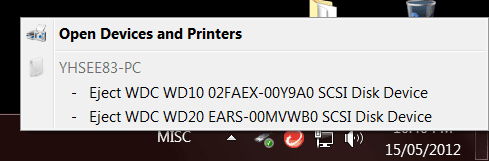
Q1: Removable drive: You have installed W7 in AHCI mode and are using the generic AHCI driver that comes with Windows.
You want to find and install the correct AHCI driver from your motherboard manufacturer.
Edit: [FONT="]The “Intel Rapid Storage Technology Driver” installs the AHCI Drivers. (AKA “Intel Matrix Control Driver” on older systems)[/FONT]
Q2: Drive goes to sleep: is solved in your power management settings:
Control Panel >Hardware & Sound > Power Options
Whatever Power Plan you are on - click "Change Plan Settings"
Then click: "Change Advanced Plan Settings"
Click to expand Hard Disks
Click to expand "Turn Off Hard Disk After"
And change the time to Zero. It will now say "Never"
Last edited:
My Computer
Computer type
PC/Desktop
Computer Manufacturer/Model Number
Home Built - Jan 2013
OS
Windows 7 64 Bit Home Premium SP1
CPU
i7-3820
Motherboard
Asus P9X79-PRO - Bios 4608
Memory
GSkill F3-14900CL9Q - 16GB
Graphics Card(s)
EVGA GeForce GTX660 - Driver 352.86
Sound Card
On board Realtek ALC898
Monitor(s) Displays
Acer S271HL
Screen Resolution
1920 x 1080
Hard Drives
#1- Samsung 840 Pro Series
#2- Western Digital WD1002FAEX Sata3 Black
#3- Western Digital WD1002FAEX Sata3 Black
PSU
Corsair CMPSU-850TX-V2 - 850 watt (by Seasonic)
Case
Corsair Obsidian 550D
Cooling
Standard 3 120mm case fans, Cooler Master Hyper 212 EVO
It is an either/or situation. You can install the Intel AHCI drivers and remove the false "removable drive" information, or use the generic Windows driver and keep it. It will affect both drives equally.
Notice I said "false".
You can go ahead and try to select your main hard drive and 'Safely Remove Hardware'. The system will not let you. That is because those are not external drives and will not behave like one.
This is not to be confused with AHCI's "hotplug" capability: the ability to install or remove an internal hard drive while the system is running. That is not the same thing and not what those false messages refer to.
Also note that I personally do not hot-plug drives even though I could do so. I am not going to take the chance on some stray static discharge frying my components.
My Computer
Computer type
PC/Desktop
Computer Manufacturer/Model Number
Home Built - Jan 2013
OS
Windows 7 64 Bit Home Premium SP1
CPU
i7-3820
Motherboard
Asus P9X79-PRO - Bios 4608
Memory
GSkill F3-14900CL9Q - 16GB
Graphics Card(s)
EVGA GeForce GTX660 - Driver 352.86
Sound Card
On board Realtek ALC898
Monitor(s) Displays
Acer S271HL
Screen Resolution
1920 x 1080
Hard Drives
#1- Samsung 840 Pro Series
#2- Western Digital WD1002FAEX Sata3 Black
#3- Western Digital WD1002FAEX Sata3 Black
PSU
Corsair CMPSU-850TX-V2 - 850 watt (by Seasonic)
Case
Corsair Obsidian 550D
Cooling
Standard 3 120mm case fans, Cooler Master Hyper 212 EVO