
Internet access problem via usb modem problem

Piaras

New member
Local time
10:28 PM
Messages
6
I need your help. I can’t seem to connect to the internet with my USB ‘dongle’ modem on my new laptop. My service provider says that the problem is not a problem with coverage. The device is working properly, according to Windows 7 and I can also access the internet on another older laptop that has Windows XP. The service provider reckons it is likely to be related to one of four possibilities:
· (1) Anti-viral software (I managed to access the internet once to register my subscription and to download some windows updates)
or
· Services on the laptop not being enabled: (2) telephony, (3) RPC and (4) plug and play. The laptop provider recommended that these settings be changed from manual to automatic, which I‘ve done. This allowed me to access the internet again, but only once, allowing to me to download more windows updates.
I guess this looks like it could be the anti-viral software, yes? Should I uninstall my anti-viral software or are there other settings in Windows 7 that I change change/reconfigure? I am not a tech person at all. I’ve been bounced between my service provider and my laptop manufacturer for a couple of weeks now to try to sort this problem, but still no luck. So, any pointers would be really appreciated.
Thanks
 

My Computer

Computer Manufacturer/Model Number
Dell XPS studio 16 (Model 1645)
OS
Windows 7 Profession (64 BIT)
CPU
Intel Core i7 Processor 820QM (1.73GHz, 8MB cache)
Memory
6144MB 1333MHz DDR3 Dual Channel)
Graphics Card(s)
Integrated 1GB ATI Radeon HD 565v graphics
Monitor(s) Displays
15.6 WLED FullHD 1080p with TrueLife
Hard Drives
500GB Free Fall Sensor (7200RPM)
PSU
Primary 9-cell 85W/HR LI-ION; UK 250V
I need your help. I can’t seem to connect to the internet with my USB ‘dongle’ modem on my new laptop. My service provider says that the problem is not a problem with coverage. The device is working properly, according to Windows 7 and I can also access the internet on another older laptop that has Windows XP. The service provider reckons it is likely to be related to one of four possibilities:
· (1) Anti-viral software (I managed to access the internet once to register my subscription and to download some windows updates)
or
· Services on the laptop not being enabled: (2) telephony, (3) RPC and (4) plug and play. The laptop provider recommended that these settings be changed from manual to automatic, which I‘ve done. This allowed me to access the internet again, but only once, allowing to me to download more windows updates.
I guess this looks like it could be the anti-viral software, yes? Should I uninstall my anti-viral software or are there other settings in Windows 7 that I change change/reconfigure? I am not a tech person at all. I’ve been bounced between my service provider and my laptop manufacturer for a couple of weeks now to try to sort this problem, but still no luck. So, any pointers would be really appreciated.
Thanks

Piaras hi and welcome

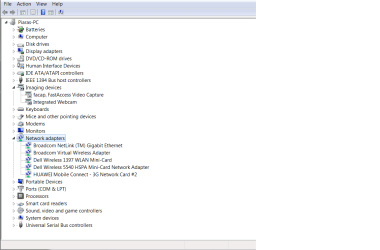
first, go into device manager (type device manger in search). Go to the network tab and look for your USB dongle. Is it listed? does it have a yellow triangle over it? Are there any other "unknown devices" listed in device manager?

Second, do you have a win 7 dvd from which to do a repair install?

Ken
 

My Computer

Computer Manufacturer/Model Number
HP Pavillion dv-7 1005 Tx
OS
Win 8 Release candidate 8400
CPU
[email protected]
Memory
4 gigs
Graphics Card(s)
Nvidia 9600M
Sound Card
HD built-in
Monitor(s) Displays
17" Wxga
Screen Resolution
1440x900
Cooling
none
Internet Speed
45Mb down 5Mb up
What AV do you use? Most shouldn't cause any problem.
 

My Computer

Computer type
Laptop
Computer Manufacturer/Model Number
Toshiba P775-S7100
OS
Windows 7 Professional SP1 64-bit
CPU
Intel Core i5-2450M @2.5 GHz
Memory
6 GB DDR3 1333MHz
Graphics Card(s)
Intel HD 3000
Monitor(s) Displays
Built-in 17.3" LED; 22" Insignia NS-L22Q-10A
Screen Resolution
1600x900; 1360x768
Hard Drives
750 GB Hitachi
1TB Seagate FreeAgent External
Internet Speed
Verizon DSL Speed(Down/Up): 3360 Kbps / 800 Kbps
Antivirus
MSE and MBAM Pro
Browser
IE10
Hi Ken
I couldn't really find a 'triangle' icon beside the network device managers but attached is a screen grab of what's there at the minute. The 'dongle' is the last listed item under network adapters (HUAWEI 3G network card). Also, I do have a reinstallation DVD.
Piaras
 

Attachments

  • Network adaptors print screen.png
    Network adaptors print screen.png
    22.7 KB · Views: 219

My Computer

Computer Manufacturer/Model Number
Dell XPS studio 16 (Model 1645)
OS
Windows 7 Profession (64 BIT)
CPU
Intel Core i7 Processor 820QM (1.73GHz, 8MB cache)
Memory
6144MB 1333MHz DDR3 Dual Channel)
Graphics Card(s)
Integrated 1GB ATI Radeon HD 565v graphics
Monitor(s) Displays
15.6 WLED FullHD 1080p with TrueLife
Hard Drives
500GB Free Fall Sensor (7200RPM)
PSU
Primary 9-cell 85W/HR LI-ION; UK 250V
Sorry, I am a bit new at this. I 've just seen your post. Petey7. AV is short for....?
Piaras
 

My Computer

Computer Manufacturer/Model Number
Dell XPS studio 16 (Model 1645)
OS
Windows 7 Profession (64 BIT)
CPU
Intel Core i7 Processor 820QM (1.73GHz, 8MB cache)
Memory
6144MB 1333MHz DDR3 Dual Channel)
Graphics Card(s)
Integrated 1GB ATI Radeon HD 565v graphics
Monitor(s) Displays
15.6 WLED FullHD 1080p with TrueLife
Hard Drives
500GB Free Fall Sensor (7200RPM)
PSU
Primary 9-cell 85W/HR LI-ION; UK 250V
AV is short for anti-virus. Or as you called it "anti-viral". I guess different places call it by different names, so no biggie.
 

My Computer

Computer type
Laptop
Computer Manufacturer/Model Number
Toshiba P775-S7100
OS
Windows 7 Professional SP1 64-bit
CPU
Intel Core i5-2450M @2.5 GHz
Memory
6 GB DDR3 1333MHz
Graphics Card(s)
Intel HD 3000
Monitor(s) Displays
Built-in 17.3" LED; 22" Insignia NS-L22Q-10A
Screen Resolution
1600x900; 1360x768
Hard Drives
750 GB Hitachi
1TB Seagate FreeAgent External
Internet Speed
Verizon DSL Speed(Down/Up): 3360 Kbps / 800 Kbps
Antivirus
MSE and MBAM Pro
Browser
IE10
AV, antiviral, of course! Anyway, I'm using McAfee.
 

My Computer

Computer Manufacturer/Model Number
Dell XPS studio 16 (Model 1645)
OS
Windows 7 Profession (64 BIT)
CPU
Intel Core i7 Processor 820QM (1.73GHz, 8MB cache)
Memory
6144MB 1333MHz DDR3 Dual Channel)
Graphics Card(s)
Integrated 1GB ATI Radeon HD 565v graphics
Monitor(s) Displays
15.6 WLED FullHD 1080p with TrueLife
Hard Drives
500GB Free Fall Sensor (7200RPM)
PSU
Primary 9-cell 85W/HR LI-ION; UK 250V
hmpuhuphmhpmphumhpu I hate McAfee soooooo much.

Don't know if McAfee would cause a problem or not, but it has never done anything but cause me serious problems. I also see where a lot of people are having problems with USB dongles around the net. McAfee is easy to download and reinstall as long as you have all your subscription info. Uninstall it, then download one of the programs that removes the left overs from McAfee. McAfee's uninstaller ALWAYS leaves a lot of stuff behind, most of which can cause problems. If that works, download and install Microsoft Security Essentials. I use it one all of my computers and it has always worked so much better than McAfee.
 

My Computer

Computer type
Laptop
Computer Manufacturer/Model Number
Toshiba P775-S7100
OS
Windows 7 Professional SP1 64-bit
CPU
Intel Core i5-2450M @2.5 GHz
Memory
6 GB DDR3 1333MHz
Graphics Card(s)
Intel HD 3000
Monitor(s) Displays
Built-in 17.3" LED; 22" Insignia NS-L22Q-10A
Screen Resolution
1600x900; 1360x768
Hard Drives
750 GB Hitachi
1TB Seagate FreeAgent External
Internet Speed
Verizon DSL Speed(Down/Up): 3360 Kbps / 800 Kbps
Antivirus
MSE and MBAM Pro
Browser
IE10
Sorry about taking so long to reply. Anyway, success! Followed your advice and it worked. I did have to tweak the RPC service settings to automatic and reboot, however as the uninstallation of McAfee didn't allow me to connect to the internet initially. The important thing is that a) I 'm posting this on the laptop that I had the trouble with and b) thanks again for all your help. I really appreciate it.
 

My Computer

Computer Manufacturer/Model Number
Dell XPS studio 16 (Model 1645)
OS
Windows 7 Profession (64 BIT)
CPU
Intel Core i7 Processor 820QM (1.73GHz, 8MB cache)
Memory
6144MB 1333MHz DDR3 Dual Channel)
Graphics Card(s)
Integrated 1GB ATI Radeon HD 565v graphics
Monitor(s) Displays
15.6 WLED FullHD 1080p with TrueLife
Hard Drives
500GB Free Fall Sensor (7200RPM)
PSU
Primary 9-cell 85W/HR LI-ION; UK 250V
Glad to here you got everything working. Feel free to ask anymore questions when they pop up :)
 

My Computer

Computer type
Laptop
Computer Manufacturer/Model Number
Toshiba P775-S7100
OS
Windows 7 Professional SP1 64-bit
CPU
Intel Core i5-2450M @2.5 GHz
Memory
6 GB DDR3 1333MHz
Graphics Card(s)
Intel HD 3000
Monitor(s) Displays
Built-in 17.3" LED; 22" Insignia NS-L22Q-10A
Screen Resolution
1600x900; 1360x768
Hard Drives
750 GB Hitachi
1TB Seagate FreeAgent External
Internet Speed
Verizon DSL Speed(Down/Up): 3360 Kbps / 800 Kbps
Antivirus
MSE and MBAM Pro
Browser
IE10
Thanks! I think though I may have been a bit premature in announcing a success story...Sorry. I find that connecting to the internet doesn't always work: I only managed to log in this time after rebooting my laptop a couple of times with the modem dongle in its usb port. Its possible that the McAfee software may not have been the problem, yes? Anyway, I did think after installing MS security essentials that I would only be able to connect provided I have the modem in the usb port before I rebooedt. Ok, not ideal. Now connecting is a bit hit and miss whatever I do, if you know what I mean...Very strange.
 

My Computer

Computer Manufacturer/Model Number
Dell XPS studio 16 (Model 1645)
OS
Windows 7 Profession (64 BIT)
CPU
Intel Core i7 Processor 820QM (1.73GHz, 8MB cache)
Memory
6144MB 1333MHz DDR3 Dual Channel)
Graphics Card(s)
Integrated 1GB ATI Radeon HD 565v graphics
Monitor(s) Displays
15.6 WLED FullHD 1080p with TrueLife
Hard Drives
500GB Free Fall Sensor (7200RPM)
PSU
Primary 9-cell 85W/HR LI-ION; UK 250V
3G dongle can't connect

Hi, well in my laptop there is no modem and it isn't accepting to connect to any modem such as a dongle or a mobile and it's not even putting them in the network adapter.
So can anyone help please?? and thanks..
 

My Computer

Computer type
PC/Desktop
OS
windows 7 home premium x64
Hi, well in my laptop there is no modem and it isn't accepting to connect to any modem such as a dongle or a mobile and it's not even putting them in the network adapter.
So can anyone help please?? and thanks..
 

My Computer

Computer type
PC/Desktop
OS
windows 7 home premium x64
Back
Top