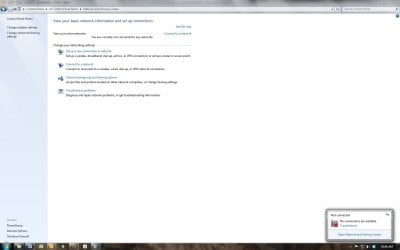
Internet but no network connection

mvanneman

New member
Local time
3:52 PM
Messages
8
I have internet but no network connections. I am wired to a netgear router using cat 5. 5 other PC's on network operating normally. If I map the network i can see all other PC's but it still tells me that I have no network connections. I have reinstalled gigabyte driver and tried using a restore point. Nothing has changed on my system in months. Can someone give me an idea of where to look?

thanks
 

My Computer

Computer type
PC/Desktop
Computer Manufacturer/Model Number
HP
OS
Windows 7 pro 64-bit
CPU
I5-3570
Memory
67 GB DDR3
Antivirus
Norton
Browser
Mozilla
Sounds like Network Discovery has turned off. It's in Network and Sharing Center > Change Advanced Sharing Settings. I've had this happen more than once.
 

My Computer

Computer type
PC/Desktop
Computer Manufacturer/Model Number
PC Specialist Custom
OS
Windows 7 Pro 64 bit
CPU
Intel i5
Motherboard
ASUS® H81M-PLUS
Memory
8GB KINGSTON DUAL-DDR3 1600MHz
Graphics Card(s)
2GB AMD RADEON™ R7 250
Hard Drives
120GB KINGSTON V300 SSD
1TB WD CAVIAR BLACK WD1003FZEX
Thanks! You know back when I was an appliance repairman many years ago we would always look to see if something had power before we moved to more complex answers. I should follow the same advice now. Don't have any idea how it got turned off (this was my PC and no one else has the password) but it was off. Thanks again.
 

My Computer

Computer type
PC/Desktop
Computer Manufacturer/Model Number
HP
OS
Windows 7 pro 64-bit
CPU
I5-3570
Memory
67 GB DDR3
Antivirus
Norton
Browser
Mozilla
Are you using a 4-port or 5-port Router or do you also have a Switch to gain additional ports? I use a 4-port Wi-Fi Router with an 8-port Switch for 4 computers, a NAS HDD, an AT&T MicroCell [for cellphone signal] and 2 Networked-attached printers.

Have you checked Control Panel, Internet Options and the Security tab and the Connections tab? The Security settings may need to be Default, at least for testing. On the Connections tab click LAN Settings, usually need only the first item checked that mentions "automatically detect" unless specified differently by your ISP.
 

My Computer

Computer type
PC/Desktop
Computer Manufacturer/Model Number
Customs, Dell, Gateway, HP, Toshiba, Acer, ASUS
OS
Windows 7 Ultimate 64-bit, Windows 8.1 64-bit, Mac OS X 10.10, Linux Mint 17, Windows 10 Pro TP
Keyboard
Microsoft
Mouse
Microsoft
Only easy when you know how ;)
 

My Computer

Computer type
PC/Desktop
Computer Manufacturer/Model Number
PC Specialist Custom
OS
Windows 7 Pro 64 bit
CPU
Intel i5
Motherboard
ASUS® H81M-PLUS
Memory
8GB KINGSTON DUAL-DDR3 1600MHz
Graphics Card(s)
2GB AMD RADEON™ R7 250
Hard Drives
120GB KINGSTON V300 SSD
1TB WD CAVIAR BLACK WD1003FZEX
Just one additional question. I now have full access to the network and all public folders the way that I set it up, however my system is still telling me that there are no network connections available and does not even show a local area network in the network and sharing center. Why would this happen?

thanks in advance
 

My Computer

Computer type
PC/Desktop
Computer Manufacturer/Model Number
HP
OS
Windows 7 pro 64-bit
CPU
I5-3570
Memory
67 GB DDR3
Antivirus
Norton
Browser
Mozilla
A screenshot speaks a thousand words :)
 

My Computer

Computer type
PC/Desktop
Computer Manufacturer/Model Number
PC Specialist Custom
OS
Windows 7 Pro 64 bit
CPU
Intel i5
Motherboard
ASUS® H81M-PLUS
Memory
8GB KINGSTON DUAL-DDR3 1600MHz
Graphics Card(s)
2GB AMD RADEON™ R7 250
Hard Drives
120GB KINGSTON V300 SSD
1TB WD CAVIAR BLACK WD1003FZEX
This is a screenshot of my network and sharing center
 

Attachments

  • Network and sharing.jpg
    Network and sharing.jpg
    66.7 KB · Views: 4

My Computer

Computer type
PC/Desktop
Computer Manufacturer/Model Number
HP
OS
Windows 7 pro 64-bit
CPU
I5-3570
Memory
67 GB DDR3
Antivirus
Norton
Browser
Mozilla
Back tomorrow, but others will probably jump in.
 

My Computer

Computer type
PC/Desktop
Computer Manufacturer/Model Number
PC Specialist Custom
OS
Windows 7 Pro 64 bit
CPU
Intel i5
Motherboard
ASUS® H81M-PLUS
Memory
8GB KINGSTON DUAL-DDR3 1600MHz
Graphics Card(s)
2GB AMD RADEON™ R7 250
Hard Drives
120GB KINGSTON V300 SSD
1TB WD CAVIAR BLACK WD1003FZEX
Just one additional question. I now have full access to the network and all public folders the way that I set it up, however my system is still telling me that there are no network connections available and does not even show a local area network in the network and sharing center. Why would this happen?

thanks in advance
I don't have any explanation for that. Clearly you are actually connected but I have no idea why the connection is not showing. Maybe it will appear/has appeared on reboot?
 

My Computer

Computer type
PC/Desktop
Computer Manufacturer/Model Number
PC Specialist Custom
OS
Windows 7 Pro 64 bit
CPU
Intel i5
Motherboard
ASUS® H81M-PLUS
Memory
8GB KINGSTON DUAL-DDR3 1600MHz
Graphics Card(s)
2GB AMD RADEON™ R7 250
Hard Drives
120GB KINGSTON V300 SSD
1TB WD CAVIAR BLACK WD1003FZEX

My Computer

Computer type
PC/Desktop
Computer Manufacturer/Model Number
Home built
OS
Windows 7 Ult, Windows 8.1 Pro,
CPU
Q9650-4.275GHz, E8600 4.5GHz, E6750-3.8GHz
Motherboard
Evga 780i FTW
Memory
G.Skill PC2 9600 1200Mhz 5 5 5 15 2T
Graphics Card(s)
GTX480
Sound Card
Asus Xonar D2
Monitor(s) Displays
HannsG
Screen Resolution
1680X1050
Hard Drives
GSkill Phoenix Pro 120GB SSD
PSU
ThermalTake Toughpower 1000Watt modular
Case
ThermalTake XaserV
Cooling
Xigmatek S1283
Keyboard
Logitech G15
Mouse
Logitech G9
Internet Speed
T1
Back
Top