Internet connected but cannot connect

ichicat

New member
Local time
3:47 PM
Messages
8
Hello,
I joined the forum just to address my concern.
My HP laptop 2006 model was upgraded to windows 7 from vista 1 year ago.
It was working great then suddenly early this year, I cannot connect to the internet.
I thought it was my ISP problem. I called my internet provider and opted for dual connection, LAN and wireless. Still no access.

I reformatted my laptop last sunday, wipe all data clean and then install everything back again, my kaspersky internet security and office. all worked fine until 2 days the internet went off again.

More weird things, I can use skype and bittorrent. I can also update kaspersky but firefox and IE cant browse.

I tried turning firewall off and downloaded the trial version of sphinx software "windows 7 firewall control". It did solve the problem for 1 day but failed again.

Im frustrated by now. I went to hp service center and told me my laptop wasn't compatible with windows7 and should only use vista. I think that's unlikely the cause.

Any help is greatly appreciated.
Jim
 

My Computer

Computer Manufacturer/Model Number
HP Pavilion laptop
OS
Windows 7
CPU
AMD
Memory
1Gb Ram
Graphics Card(s)
Nvidia
Hard Drives
120Gb
I remove bonjour using bonjour remover.exe but no bonjour found in my laptop. I tried to ping google.com from run but server not found.
I also tried typing IP address in IE but cannot access.

But to my suprise, I can use internet now in FF and IE by typing this thread.

Im not gonna put [SOLVED] on this thread yet because I feel not secure.

More infos to come.

Jim
 

My Computer

Computer Manufacturer/Model Number
HP Pavilion laptop
OS
Windows 7
CPU
AMD
Memory
1Gb Ram
Graphics Card(s)
Nvidia
Hard Drives
120Gb
If you boot into safe mode with Internet, do you have full Internet access?
What is it you presently cannot access?
Can you ping an ip address?
Can you ping an alpha address?
Do all browsers work, or just some?
Did you scan for malware and viruses?
Did you power down/power up your router?
What if all firewalls are off (JUST for experimentation)?
In your IP settings, are ip and dns set to auto?
Provide a screen capture of ipconfig /all at the command prompt.
 

My Computer

Computer Manufacturer/Model Number
Dell and Custom
OS
Systems 1 and 2: Windows 7 Enterprise x64, Win 8 Developer
CPU
System 1: i7 [email protected], System 2: AMD FX-4100 Zambezi 3.6G
Motherboard
System 1:Dell 06NWYK System 2: ASUS M5A97 AM3+
Memory
System 1: 8GB System 2: 8GB
Graphics Card(s)
System 1: ATI FirePro V4800 System 2: Radeon HD 6850
Sound Card
System 1: onboard System 2: onboard
Monitor(s) Displays
System1: Viewsonic HDMI 24"
Screen Resolution
System 1: 1920x1080 System 2: 1920x1080
Hard Drives
System 1: Mirrored .5B drives System 2: Seagate Barracuda ST1000DM003 1TB 7200 RPM 64MB Cache SATA 6.0Gb/s
Case
System 1: Dell System 2: Cooler Master
Internet Speed
10 MBPS
So busy I haven't use my laptop for the whole week.

@Lemur
The problem of my laptop is that I can connect the net since I can use skype and bittorrent.
I cannot use my internet browser(firefox and IE) due to " page not found" thing.
I haven't tried using safe mode in accessing the net.
I tried "pinging" google using ip address and google.com in cmd but failed.
I don't know what's alpha address.. what is it?
I scan many times using CCleaner and my laptop is doing well, no malware/viruses so far. Also, my Kaspersky Internet Security is doing great with less than 1 yr in license to go.
I did power up/down my router while rebooting my laptop.
My Windows 7 firewall is OFF since I downloaded and use the trial version of Windows 7 Firewall Control Software.
Yes, dns and ip are set in auto.
I read various post nearly identical with my situation and tried "netsh winsock reset" and "netsh int ip reset" thing and was successful in resetting but still no internet.
I also tried ipconfig/flushdns as what other threads say.
I have no bonjour mdsresponder in my laptop as verified by bonjour remover tool.
Im using wireless connection.
My ISP provider software says Im connected to their modem, to their network but not to internet.

I will post screeenshot next time. Im using my friend's laptop.
Im thinking could it be kaspersky blocking me? My kaspersky was trouble free since I bought it last year.
There could be something else.

Jim
 

My Computer

Computer Manufacturer/Model Number
HP Pavilion laptop
OS
Windows 7
CPU
AMD
Memory
1Gb Ram
Graphics Card(s)
Nvidia
Hard Drives
120Gb
What happens if you type 173.194.36.104 into your web browser (google's IP address)
 

My Computer

Computer type
PC/Desktop
Computer Manufacturer/Model Number
Medion Erazer (note to self: insert model number) - with custom additions
OS
Windows 10 Pro x64
CPU
Intel Core i5 7400 @ 3.00GHz
Motherboard
OEM supllied with PC
Memory
8GB 2133Mhz DDR4 (OEM supplied)
Graphics Card(s)
Gygabyte Windforce GTX 1050Ti (Factory Overclocked)
Sound Card
Realtek
Monitor(s) Displays
Acer Al1980 + HKC
Screen Resolution
1360*768(HKC) / 1280*1024(Acer)
Hard Drives
1TB Toshiba
1TB WD Caviar Green
120GB Samsung Evo 840
PSU
OEM supplied (no power rating on case)
Case
OEM Supplied
Cooling
Stock
Keyboard
Logitech Wireless
Mouse
Logitect Wireless
Internet Speed
40Mb/s Down 10Mb/s Up
Antivirus
Defender
Browser
Firefox
Page error or page not found in both IE and Firefox.

Additional info.
When I ran network troubleshooter, it cannot resolve the problem.
Same with my ISP software troubleshooter, cannot solve the problem.

I think something is blocking my internet most probably a software or deep within win7.

jim
 

My Computer

Computer Manufacturer/Model Number
HP Pavilion laptop
OS
Windows 7
CPU
AMD
Memory
1Gb Ram
Graphics Card(s)
Nvidia
Hard Drives
120Gb
Did Network Troubleshooter give you any sort of clue as to what was wrong? Mine is normally very helpful, and tells me if I'm having a router error.

The fact that you can get online at all, suggests that it's not your computer thats at fault, but in order to check it, try booting into "Safe Mode with Networking" and see what happens.

To be honest, I'm thinking one of two things:
1) The Modem/Router is dying, and not resolving http properly.
2) Its a problem with your ISP.

couple of things I notice that seem a bit suspect:
I called my internet provider and opted for dual connection, LAN and wireless. Still no access.
have you tried using LAN only? Possibly Windows is getting confused.
My ISP provider software says Im connected to their modem, to their network but not to internet.
Do your ISP say you are connected to their network? (not the software, the actual ISP) If so, then it is most likely their problem.

another thing that might be useful, is if you open command prompt and type "ipconfig /all" (no quotes) and post a screenshot

Do you have another computer you can test the connection on?
 

My Computer

Computer type
PC/Desktop
Computer Manufacturer/Model Number
Medion Erazer (note to self: insert model number) - with custom additions
OS
Windows 10 Pro x64
CPU
Intel Core i5 7400 @ 3.00GHz
Motherboard
OEM supllied with PC
Memory
8GB 2133Mhz DDR4 (OEM supplied)
Graphics Card(s)
Gygabyte Windforce GTX 1050Ti (Factory Overclocked)
Sound Card
Realtek
Monitor(s) Displays
Acer Al1980 + HKC
Screen Resolution
1360*768(HKC) / 1280*1024(Acer)
Hard Drives
1TB Toshiba
1TB WD Caviar Green
120GB Samsung Evo 840
PSU
OEM supplied (no power rating on case)
Case
OEM Supplied
Cooling
Stock
Keyboard
Logitech Wireless
Mouse
Logitect Wireless
Internet Speed
40Mb/s Down 10Mb/s Up
Antivirus
Defender
Browser
Firefox
The fact that you can get online at all, suggests that it's not your computer thats at fault...
Im using a laptop from a friend.

The built-in troubleshooter couldn't resolve the problem and will direct me to microsoft community for more help.

What I mean with my ISP software is that in normal internet mode, my laptop will connect to their modem/router, to their network and then to the internet.
They do have an animation where I can see the error.
I did experience before where I only able to connect to the router but not to their network and the ISP guys couldn't ping me.
Now that I can't connect to the internet only, they told me they can ping me.

Ok I will use LAN when I get home. I will also post ipconfig/all screenshot next time.
I have to go.

Jim
 

My Computer

Computer Manufacturer/Model Number
HP Pavilion laptop
OS
Windows 7
CPU
AMD
Memory
1Gb Ram
Graphics Card(s)
Nvidia
Hard Drives
120Gb
There are complaints about Kapersky causing connection problems all over the internet. Some said that doing this works to fix the problem...

Ok, do the following:

Close the apps that you are having problems with.

Open Kaspersky
Go to Settings > Click Firewall > Under filtration System click Settings.

Under the tab "Rules for Applications" delete the following:

iexplore.exe
firefox.exe
MSN messengers and Yahoo messengers exe's

Restart ie or firefox and see if you can get a web page.
 

My Computer

Computer type
PC/Desktop
Computer Manufacturer/Model Number
Home built
OS
Windows 7 Ult, Windows 8.1 Pro,
CPU
Q9650-4.275GHz, E8600 4.5GHz, E6750-3.8GHz
Motherboard
Evga 780i FTW
Memory
G.Skill PC2 9600 1200Mhz 5 5 5 15 2T
Graphics Card(s)
GTX480
Sound Card
Asus Xonar D2
Monitor(s) Displays
HannsG
Screen Resolution
1680X1050
Hard Drives
GSkill Phoenix Pro 120GB SSD
PSU
ThermalTake Toughpower 1000Watt modular
Case
ThermalTake XaserV
Cooling
Xigmatek S1283
Keyboard
Logitech G15
Mouse
Logitech G9
Internet Speed
T1
Thanks chev.

I reformat my laptop last night. I freshly install win7 by dawn and tried internet using the built in IE. Still no internet. I use LAN and Wireless. No internet.

I called my ISP and they assist me this whole afternoon. They told me that they only give dynamic IP address to all their residential users. I can opt for a static ip thou.

Now let's dissect the problem.
1. I have fresh win7 with no other software installed. No internet connection in LAN and wireless.
2. I cannot ping my modem using LAN but I can ping using wireless.
3. Sometimes I can access the net for 10 seconds on random reboot of my laptop then goes back to nothing.

With the scenario above, Im having thoughts that maybe the HP guys are correct that my laptop isn't compatible with win7. I should revert back to Vista as its original OS.

Now.
1. Is it really my laptop's incompatibility with win7 causing the problem?
2. My HP laptop is 2006 model pavilion dv6000 series.
3. The original built in Vista was flawless despite slow processing speed.
4. After getting rid of vista and installing win7 about a year ago, my internet connection started to deteriorate starting from LAN until I couldn't connect using wireless.

If you guys support this theory about my laptop's incompatibility, I will surely revert back to Vista.

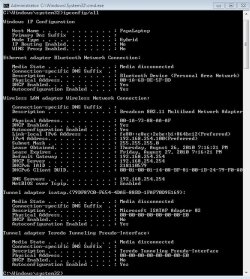
For the ipconfig/all screenshot, please see attached.

Jim
 

Attachments

  • cmdCapture.JPG
    cmdCapture.JPG
    86.4 KB · Views: 96

My Computer

Computer Manufacturer/Model Number
HP Pavilion laptop
OS
Windows 7
CPU
AMD
Memory
1Gb Ram
Graphics Card(s)
Nvidia
Hard Drives
120Gb
Here is a guide for your model of HP with drivers, you should follow the guide and install the drivers. It looks like HP does not support your model but this guide should get it working for you. There looks to be two different links, one for AMD and one for Intel.

Windows 7 Upgrade Guide for dv6000/dv9000 models - HP Support Forum
 

My Computer

Computer type
PC/Desktop
Computer Manufacturer/Model Number
Home built
OS
Windows 7 Ult, Windows 8.1 Pro,
CPU
Q9650-4.275GHz, E8600 4.5GHz, E6750-3.8GHz
Motherboard
Evga 780i FTW
Memory
G.Skill PC2 9600 1200Mhz 5 5 5 15 2T
Graphics Card(s)
GTX480
Sound Card
Asus Xonar D2
Monitor(s) Displays
HannsG
Screen Resolution
1680X1050
Hard Drives
GSkill Phoenix Pro 120GB SSD
PSU
ThermalTake Toughpower 1000Watt modular
Case
ThermalTake XaserV
Cooling
Xigmatek S1283
Keyboard
Logitech G15
Mouse
Logitech G9
Internet Speed
T1
Your gateway address looks strange. If you are not able to ping ip's I would blame the default gateway.

If you cannot ping domain names I would look to dns servers.

The fact that you cannot ping your gateway is a LAN issue and must be solved before you attempt to fix the internet.

Your routers dhcp server could also be causing the problems.

Sent from my PC36100 using Tapatalk
 

My Computer

Computer Manufacturer/Model Number
Optiplex 960
OS
Windows 7 Enterprise 64bit
CPU
Dual Quad-Core
Memory
8GB
Graphics Card(s)
NVidia Quadro NVS 450
Monitor(s) Displays
3 Monitors - ViewSonic VP2030b 21in-
Hard Drives
Raid configuration with 300GB
Other Info
Also owne a Tablet x61 Lenovo Laptop
thanks nickiler.

@chev, im looking on the hp website now. There are lots of support in there and I do find my laptop model dv6550ee. Thanks.

I reformatted my laptop again this morning and installed my old XP OS. Still I cannot connect to the net using LAN and wireless.
I think its my ISP provider problem. There could be a wire problem somewhere out there. I also notice that my laptop was sending already but doesn't receive anything save for a few burst in a second then nothing receive again.

Im also thinking that maybe a hardware issue in my laptop(ie, my network card malfunctioning). But that's unlikely..

Since XP doesn't solve my internet problem, I can say that win7 is not at fault afterall.

Gonna post some updates soon.

Jim
 

My Computer

Computer Manufacturer/Model Number
HP Pavilion laptop
OS
Windows 7
CPU
AMD
Memory
1Gb Ram
Graphics Card(s)
Nvidia
Hard Drives
120Gb
I'm curious and if your still unconnected you can try setting a static.

Set as your address:
192.168.1.10 or 192.168.0.10

Subnet:
255.255.255.0

Gateway address:
192.168.1.1 or 192.168.0.1

Try to get the dns servers for your isp and use those for the dns or use the router.
192.168.1.1 or 192.168.0.1

Sometimes just setting a static can bypass some problems.

Nick
 

My Computer

Computer Manufacturer/Model Number
Optiplex 960
OS
Windows 7 Enterprise 64bit
CPU
Dual Quad-Core
Memory
8GB
Graphics Card(s)
NVidia Quadro NVS 450
Monitor(s) Displays
3 Monitors - ViewSonic VP2030b 21in-
Hard Drives
Raid configuration with 300GB
Other Info
Also owne a Tablet x61 Lenovo Laptop
Hi nickiler,

I solved my problem before reading your post. But let me recap what's happening in my laptop.

1. I lost my internet connection before in windows7. I reformatted, installed windows 7 again and still no internet connection. I reformatted and installed windows xp still no luck. I resorted to install win7 no matter having internet connections or not.
Windows 7 is not at fault.

2. Having fresh windows 7 installed, I manage to install skype from USB drive. I was able to use skype but my IE and Firefox browser still no connection. I observed that IPV4 and IPV6 displayed "no internet access" but when skype is running, IPV4 will say "internet connected". Im not an IT guy but I can say something's wrong with IPV6. Note that Im using wireless in this connection, not LAN.
My hardware wireless networking card is functioning well.

3. Since no software installed in my laptop other that skype, there could be no suspect in blocking my internet access. I turn OFF windows firewall and still no internet access in browser but Skype is OK.
Windows 7 firewall is not blocking my internet access.

4. With this current scenario, I tried pinging my router in cmd and was successful. I tried pinging google using "google.com" and using its IP address to no avail.
My laptop connection to my router is good.

5. I tried the following in cmd "netsh winsock reset" and "netsh int ip reset" many times and reboot but still no internet connection.
No winsock related problem in my laptop.

6. I tried giving static DNS server using 208.67.222.222 in my wireless IPV4 and viola!.. I have internet access in my IE and firefox browser.

I installed my kaspersky and waited to update and internet was super excellent. I reboot my router and my laptop many times to be sure of my internet access and it was really really working.
Giving static DNS server address in my IPV4 solved the problem.

Now, Im not an IT guy but I have questions. I solved my internet connectivity in wireless mode. Do I need to set static DNS server in IPV6 also? Because in my wireless status now, IPV6 still shows "no internet access".

Im gonna resolve LAN issue this weekend. Im satisfied by the status of my wireless connection right now..

@ Nickiler,
Im gonna try your idea this weekend. Im quite busy this week.

Much appreciated,
Jim
 

My Computer

Computer Manufacturer/Model Number
HP Pavilion laptop
OS
Windows 7
CPU
AMD
Memory
1Gb Ram
Graphics Card(s)
Nvidia
Hard Drives
120Gb
Glad your problem is resolved. Try setting the static dns settings in the routers DHCP server.

If your router allows it your clients will automatically obtain the network settings from the DHCP.

I have 200+ workstations setup like this.

Nick

Sent from my PC36100 using Tapatalk
 

My Computer

Computer Manufacturer/Model Number
Optiplex 960
OS
Windows 7 Enterprise 64bit
CPU
Dual Quad-Core
Memory
8GB
Graphics Card(s)
NVidia Quadro NVS 450
Monitor(s) Displays
3 Monitors - ViewSonic VP2030b 21in-
Hard Drives
Raid configuration with 300GB
Other Info
Also owne a Tablet x61 Lenovo Laptop
Back
Top