Internet Connection is far below expected

darknightz0117

New member
Member
VIP
Local time
12:02 PM
Messages
179
Hello all,

This is a problem that I can't seem to figure out, even after multiple fixes. On my PC, I have Windows 7 64-bit installed, and I have a wireless router. The first one I used was an Iogear WiFi USB 2.0 Adapter Model #GWU523. The internet connection I have is the Comcast internet, with 12 Mbps. With that wireless adapter, I can sometimes get 10. The average would be about 6. I lived with that for a while, then saw a deal for a $10 wireless adapter, so I hopped on that to see if that would help.

When I first installed that on a clean Windows 7 reinstall, I was able to get the 12 Mbps. The adapter is a Airlink 101 Ultra Mini Wireless N 150Mbps wireless adapter. The fresh Windows 7 install was on September 6, 2010. Up until last night, the speed tests always showed up as 10+ Mbps. So I was happy!

But I reinstalled Windows 7 again last night, because my Windows Live Messenger didn't uninstall properly, so the only way I could get it to reinstall again was to wipe my hard drive and do a clean reinstall. So I did that, and now my speeds are even lower: no more than 4 Mbps at most. I am really confused :rolleyes:

Drivers are all up to date; I had DriverMax check. Sometimes I rollback the network drivers to see if this helps, but it doesn't. Thank you all for your help!

AMD Phenom II X4 555 BE
Biostar TA785GE motherboard
Airlink 101 Ultra Mini Wireless adapter

I can provide any other information needed; just point me in the direction how. Thanks all!!!
 

My Computer

OS
Windows 7
CPU
AMD Phenom II X4 555
Motherboard
Biostar TA785G3
Memory
2x2GB OCZ Platinum Edition DDR3 PC3-10666
Graphics Card(s)
Sapphire Radeon 6870
Hard Drives
Generic SSD (64GB)
Samsung F3 (1TB)
Seagate (1TB)
Case
Antec 300
Have you updated Windows?
What software changes are in place following the deleted setup and your new install?

Regards
 

My Computer

Computer Manufacturer/Model Number
Custom
OS
Win7 HP (x64)/Win7 Ultimate (x64)
CPU
Core i7 920
Motherboard
Intel X58
Memory
6 x 2GB Corsair XMS3
Graphics Card(s)
CF HD4890
Sound Card
Asus Xonar
Monitor(s) Displays
Dell 2408WFP
Screen Resolution
1920 x 1200
Hard Drives
2 x 150GB WDC Velociraptors (Raid 0)
1 x 1TB Seagate
1 x 1.5TB Seagate
PSU
Corsair HX1000W
Case
Antec 1200
Keyboard
Razer Lycosa/N52te
Mouse
Razer Lachesis
Have you updated Windows?
What software changes are in place following the deleted setup and your new install?

Regards

Yeah, Windows is all updated. I haven't installed my antivirus yet. Umm... all my anti-spyware are the same. My web browsers are the same, and I have Rainmeter and ObjectDock running both times. Anything else? I won't be able to respond till tomorrow (need to sleep because I have class :cry: ), but thank you so much for your efforts.

 

My Computer

OS
Windows 7
CPU
AMD Phenom II X4 555
Motherboard
Biostar TA785G3
Memory
2x2GB OCZ Platinum Edition DDR3 PC3-10666
Graphics Card(s)
Sapphire Radeon 6870
Hard Drives
Generic SSD (64GB)
Samsung F3 (1TB)
Seagate (1TB)
Case
Antec 300
Roger that - focus on class tomorrow :)
Things to try:

Go to>Control Panel>Admin tools>Services>Check if the listing (Under the standard Tab)- WLAN AutoConfiguration is started and set to automatic.

Also post a snip of your device manager and check whether the wireless adapter is listed there - could you also confirm that this is the driver version that you are using? AWLL5088 Updated Driver

Regards
 
Last edited:

My Computer

Computer Manufacturer/Model Number
Custom
OS
Win7 HP (x64)/Win7 Ultimate (x64)
CPU
Core i7 920
Motherboard
Intel X58
Memory
6 x 2GB Corsair XMS3
Graphics Card(s)
CF HD4890
Sound Card
Asus Xonar
Monitor(s) Displays
Dell 2408WFP
Screen Resolution
1920 x 1200
Hard Drives
2 x 150GB WDC Velociraptors (Raid 0)
1 x 1TB Seagate
1 x 1.5TB Seagate
PSU
Corsair HX1000W
Case
Antec 1200
Keyboard
Razer Lycosa/N52te
Mouse
Razer Lachesis
Roger that - focus on class tomorrow :)
Things to try:

Go to>Control Panel>Admin tools>Services>Check if the listing (Under the standard Tab)- WLAN AutoConfiguration is started and set to automatic.

Also post a snip of your device manager and check whether the wireless adapter is listed there - could you also confirm that this is the driver version that you are using? AWLL5088 Updated Driver

Regards

Thanks a bunch Lomai =) I checked the service, and WLAN is indeed set to autoconfiguration.

I actually gave some wrong information: my adapter is this one: Wireless N Adapters – AWLL6075

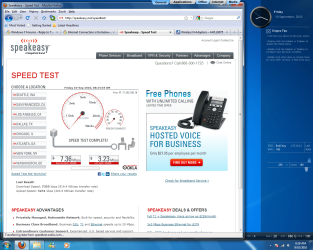
I've attached the new speakeasy speedtest, as well as my device manager. This is weird, cause now the speed went up, but still not the 12 I'm looking for =/
 

Attachments

  • Device Manager.png
    Device Manager.png
    40 KB · Views: 10
  • speakeasy.png
    speakeasy.png
    187.7 KB · Views: 13

My Computer

OS
Windows 7
CPU
AMD Phenom II X4 555
Motherboard
Biostar TA785G3
Memory
2x2GB OCZ Platinum Edition DDR3 PC3-10666
Graphics Card(s)
Sapphire Radeon 6870
Hard Drives
Generic SSD (64GB)
Samsung F3 (1TB)
Seagate (1TB)
Case
Antec 300
Unless you have an actual wireless internet connection, that speed test is meaningless for the connection between your computer and the router (LAN or WLAN) and only tests the speed from the router/modem to the test server (WAN).
 

My Computer

Computer type
PC/Desktop
Computer Manufacturer/Model Number
Me
OS
Win 7 Ultimate x64
CPU
FX-8350 @ 4.6 GHz so far
Motherboard
Asus M5A97 EVO
Memory
ADATA XPG V1 Series Black 8GB DDR3 1600
Graphics Card(s)
Sapphire R9 270x Dual-X
Sound Card
Xonar DGX w/ Corsair Vengence 1300
Monitor(s) Displays
Acer S232HL Abid
Screen Resolution
1920x1080
Hard Drives
120 GB OCZ Vertex 3
500 GB Seagate 7200.12
PSU
Antec Earthwatts 650W Green
Case
Antec Three Hundred
Cooling
Cooler Master 212 EVO
Keyboard
Logitech G510
Mouse
Logitech G500s
Internet Speed
35000/3000
Are you certain that the wireless channel is not being used by one of your neighbors? If someone is using your wireless channel that will slow your connection down. You can check this out by using Xirrus wi-fi inspector. Use the link for the speed test on Xirrus wi-fi inspector and make sure you are using a clear channel. :)
I can assure you that the speed test does have a purpose when testing wireless connections. I have tested this out many times at different distances from my router and it's very accurate.

Xirrus: The Leader in High Performance Wi-Fi - Advanced IT Wi-Fi Networking Tools
 

My Computer

Computer type
PC/Desktop
Computer Manufacturer/Model Number
Home built
OS
Windows 7 Ult, Windows 8.1 Pro,
CPU
Q9650-4.275GHz, E8600 4.5GHz, E6750-3.8GHz
Motherboard
Evga 780i FTW
Memory
G.Skill PC2 9600 1200Mhz 5 5 5 15 2T
Graphics Card(s)
GTX480
Sound Card
Asus Xonar D2
Monitor(s) Displays
HannsG
Screen Resolution
1680X1050
Hard Drives
GSkill Phoenix Pro 120GB SSD
PSU
ThermalTake Toughpower 1000Watt modular
Case
ThermalTake XaserV
Cooling
Xigmatek S1283
Keyboard
Logitech G15
Mouse
Logitech G9
Internet Speed
T1
Are you certain that the wireless channel is not being used by one of your neighbors? If someone is using your wireless channel that will slow your connection down. You can check this out by using Xirrus wi-fi inspector. Use the link for the speed test on Xirrus wi-fi inspector and make sure you are using a clear channel. :)
I can assure you that the speed test does have a purpose when testing wireless connections. I have tested this out many times at different distances from my router and it's very accurate.

Xirrus: The Leader in High Performance Wi-Fi - Advanced IT Wi-Fi Networking Tools


We have a password on our wireless; I checked the router, and the only computers that show up are those that are in my household. I don't think it's the internet problem, because my laptop can connect to the internet just fine (gets 11 Mbps on speakeasy.)
 

My Computer

OS
Windows 7
CPU
AMD Phenom II X4 555
Motherboard
Biostar TA785G3
Memory
2x2GB OCZ Platinum Edition DDR3 PC3-10666
Graphics Card(s)
Sapphire Radeon 6870
Hard Drives
Generic SSD (64GB)
Samsung F3 (1TB)
Seagate (1TB)
Case
Antec 300
The wi-fi inspector is just to insure that you aren't using a channel that is already being used by one of your neighbors which can slow down connection speeds. The speed test isn't meanlingless at all.

I have tested this out six ways to sunday and the distance from the router compared to the speed is very predicable and repeatable.

7+ mpbs is fairly typical of a wireless G connection at some distance from the router. With wireless G' I get around 12mpbs right next to the router, 8mpbs down the hall through a couple of walls and 3 mpbs out in my garage approx 60 feet from the router. This is on a 30Mpbs broadband connection.

However, with wireless N the speeds should be much better. I get nearly 15 Mpbs in my garage appox. 65 feet from my router through two walls. So about 5 times better with wireless N. This allows for perfect HD streaming at all times.

You need to make sure your router is set to AES only not mixed with TKIP, and also make sure it's set to use G and N only which should work better for you. This assumes that your wireless adaptor and router are wireless N capible.

Another thing is that most often those so called wireless manager software's that come on a CD are not worth using and often times will hinder your connections performance. It's best to delate the wireless drivers from device manager and uninstall the wireless software from add-remove programs and start over again.

It's usually best to let Windows install the driver and to use the Windows wireless connection manager to set up the connection.
 

My Computer

Computer type
PC/Desktop
Computer Manufacturer/Model Number
Home built
OS
Windows 7 Ult, Windows 8.1 Pro,
CPU
Q9650-4.275GHz, E8600 4.5GHz, E6750-3.8GHz
Motherboard
Evga 780i FTW
Memory
G.Skill PC2 9600 1200Mhz 5 5 5 15 2T
Graphics Card(s)
GTX480
Sound Card
Asus Xonar D2
Monitor(s) Displays
HannsG
Screen Resolution
1680X1050
Hard Drives
GSkill Phoenix Pro 120GB SSD
PSU
ThermalTake Toughpower 1000Watt modular
Case
ThermalTake XaserV
Cooling
Xigmatek S1283
Keyboard
Logitech G15
Mouse
Logitech G9
Internet Speed
T1
The wi-fi inspector is just to insure that you aren't using a channel that is already being used by one of your neighbors which can slow down connection speeds. The speed test isn't meanlingless at all.

I have tested this out six ways to sunday and the distance from the router compared to the speed is very predicable and repeatable.

7+ mpbs is fairly typical of a wireless G connection at some distance from the router. With wireless G' I get around 12mpbs right next to the router, 8mpbs down the hall through a couple of walls and 3 mpbs out in my garage approx 60 feet from the router. This is on a 30Mpbs broadband connection.

However, with wireless N the speeds should be much better. I get nearly 15 Mpbs in my garage appox. 65 feet from my router through two walls. So about 5 times better with wireless N. This allows for perfect HD streaming at all times.

You need to make sure your router is set to AES only not mixed with TKIP, and also make sure it's set to use G and N only which should work better for you. This assumes that your wireless adaptor and router are wireless N capible.

Another thing is that most often those so called wireless manager software's that come on a CD are not worth using and often times will hinder your connections performance. It's best to delate the wireless drivers from device manager and uninstall the wireless software from add-remove programs and start over again.

It's usually best to let Windows install the driver and to use the Windows wireless connection manager to set up the connection.

Thanks a lot for your help! I tried setting the router to N, but it turns out N isn't supported. I tried using windows update to find the drivers, but that seems to make it slower. The router seems to be set to TKIP according to the Windows Wireless Network Properties. This might be the problem but it doesn't make much sense because this exact router and computer was able to connect to fast internet a week ago. This is really frustrating =/. Oh, and there aren't any walls between my computer and the router.
 

My Computer

OS
Windows 7
CPU
AMD Phenom II X4 555
Motherboard
Biostar TA785G3
Memory
2x2GB OCZ Platinum Edition DDR3 PC3-10666
Graphics Card(s)
Sapphire Radeon 6870
Hard Drives
Generic SSD (64GB)
Samsung F3 (1TB)
Seagate (1TB)
Case
Antec 300
update: my upload speed is now less than one Mbps =/
 

My Computer

OS
Windows 7
CPU
AMD Phenom II X4 555
Motherboard
Biostar TA785G3
Memory
2x2GB OCZ Platinum Edition DDR3 PC3-10666
Graphics Card(s)
Sapphire Radeon 6870
Hard Drives
Generic SSD (64GB)
Samsung F3 (1TB)
Seagate (1TB)
Case
Antec 300
Back
Top