Internet connection issues after Windows Update

desperado558

New member
Local time
9:25 AM
Messages
1
Last night i was playing an online game when my computer unexpectedly shut down for Windows Updates. I didnt think much of it and restarted it and continued playing, but after about 5 minutes i started to receive very bad lag on my end, and i simply decided to shut down my computer and just worry about it tomorrow. Today i started my computer up and it refuses to connect to the internet. It finds the network and router but will not allow me to connect to the internet. I am currently on a laptop that is connected to the same network(wirelessly) and my desktop is hardwired to my router. I'm not sure what is causing this issue, and would greatly appreciate any help people could offer.

I'm not sure if this issue has anything to do with the Windows Update or not but i cant seem to figure it out on my own.
 

My Computer

Computer Manufacturer/Model Number
Asus
OS
Windows 7 Home Premium 64bit
First guess without any specific experience with your computer is that your av or firewall software is freaking out.
Usually uninstall/reinstall will solve if that is the case.

It's also possible some core system files were damaged when windows was updating.
That's also easy to check though.
http://www.sevenforums.com/tutorials/1538-sfc-scannow-command-system-file-checker.html
^just follow those instructions for that one.


As always with connection issues.
Turn off the computer.
Unplug modem (remove battery if it has one)
Unplug router.
Do something else that takes about five minutes.
Plug in the modem wait until it fully connects and cycles
Plug in the router give it time to also fully set up.
Reboot the computer.

That specific order is the best way to get any junk settings cleared from all the connection related devices.
 

My Computer

Computer Manufacturer/Model Number
Insane hobo technologies. ;-)
OS
Windows 7 x64
CPU
Intel i7 2600k
Motherboard
Asrock z68 extreme 4 gen 3
Memory
G.skill Ripjaw 16gigs @ 1866
Graphics Card(s)
Nvidia gtx580 (evga)
Sound Card
Integrated HD audio + hdmi
Monitor(s) Displays
24" ASUS widescreen + 42" insignia
Screen Resolution
1080p (1920x1080)
Hard Drives
128 Samsung 830
256 Samsung 840
3 x 1tb storage drive (various)
1 western digital 1tb (eSATA)
1 Seagate 1tb (eSATA)
PSU
1 kilowatt SLI/Crossfire rated Silverstone modular
Case
NZXT Phantom + additional 220 fan
Cooling
Zalmann
Keyboard
Microsoft wireless 3000 (v2)
Mouse
MS - wireless 5000 (bluetrack)
Internet Speed
depends on if you ask me or my provider.
Other Info
The above information is provided as is, and the author assumes no responsibility for issues it may cause with your sanity or fanboyism.
Welcome to Windows Seven Forums.

First, try a system restore to a point before this update was downloaded.

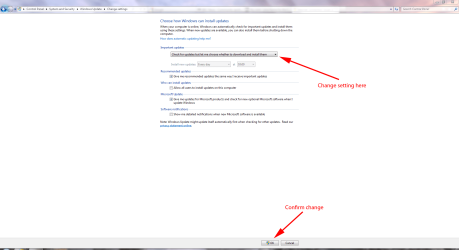
If that cures your problem you need to reconfigure Windows/Microsoft Updates so that they are not downloaded and installed automatically.

WU.PNG
 

My Computer

Computer Manufacturer/Model Number
HP Pavilion Elite 495UK
OS
Windows 7 Ultimate SP1 64-Bit
CPU
Intel Core i7 870 @ 2.93GHz
Motherboard
MSI 2A9C (CPU1)
Memory
8Gb Dual-Channel DDR3 @ 664MHz
Graphics Card(s)
nVidia GeForce GTX 460 1024MB dedicated RAM
Sound Card
Realtek HD Audio
Monitor(s) Displays
HP2310i
Screen Resolution
1920 x 1080
Hard Drives
1x1954GB Hitachi HDS22020ALA 330 (RAID), 1x1954GB Hitachi External for backup and storage
PSU
460W
Case
HP Elite
Cooling
Air cooled
Keyboard
Logitech K750 solar-powered keyboard
Mouse
Logitech Wireless M180 mouse
Internet Speed
2Mb
Other Info
Pure Avanti Flow Internet Radio with iPod Dock, 64Gb iPod, HP USB Speakers, Sony MDR-V500 Headphones, Sony Vaio F-Series Laptop
Back
Top