Internet Connection Issues

Jangus

New member
Local time
7:13 AM
Messages
9
Hi,

I've had a fairly irritating internet issue for 3 months or so. I tried a number of things to fix it but eventually gave up in frustration.

Basically, whenever I boot up my computer I do not have an internet connection for a random amount of time, varying from a few minutes to 20 or more (depending if I'm trying to load many webpages or internet reliant programs). This never used to be the case, where I was able to load web pages within seconds of booting up. Also, if I close a browser and reopen it I'm met with the same issue, where it wont load web pages for a random period of time, although pinging google returns an internet connection, something that isn't the case on boot up. Furthermore, at random intervals loading web pages will slow, sometimes to a halt. In regards to what I've done to try and fix the issue:

- Ran multiple anti-virus scans
- Restarted router
- reinstalled OS (Windows 7)
- Used a different network adapter
- Tried a wireless adapter
- Took my PC to a computer repair store. They installed a previous network adapter driver and it fixed the issue. Upon taking it home the issue returned (even after redoing what they did)
- Had a computer technician come out and look at what's going on (he couldnt fix it)
- Tried varying the internet demand on start up


Also note that there are a number of other computers in my household, none of which experience the same issue. So based on that I'm thinking it's something hardware related? Although if I've changed the network adapter, what could be causing it?

If there's anything else I can provide that will help the diagnosis of this issue let me know.

Cheers.
 

My Computer

Computer type
PC/Desktop
Computer Manufacturer/Model Number
Asus
OS
Windows 7 Home Premium x64
CPU
i5 4670k @3.4
Motherboard
Z87 A
Memory
16 GB
Graphics Card(s)
2x GTX 770's
Hard Drives
NFTS 2gb HDD
Samsung SSD 840 SCSI 120gb
Samsung SSD 850 SCSI 240gb
Antivirus
Norton
Browser
Firefox
Lets start with loading defaults in BIOS. How to reset CMOS or BIOS settings

Try a clean startup - http://www.sevenforums.com/tutorial...ation-conflicts-performing-clean-startup.html

Then download Linux Mint MATE and make it a bootable DVD/USB. Boot with it (no installation needed) and see if you can connect normal.

Run in elevated cmd and report back the outcome:
Code:
sfc /scannow

Did you try uninstalling security software? AV/ Firewall/ other? What firewall are you using by the way?

Run as admin: Download Complete Internet Repair - MajorGeeks - Options 1,2,3,4, Windows Firewall.
 

My Computer

Computer type
PC/Desktop
Computer Manufacturer/Model Number
Custom Build
OS
Windows 7 Ultimate x64 SP1
CPU
AMD Phenom 2 1090T
Motherboard
Gigabyte GA-890FXA-UD5
Memory
2x8GB Kingston HyperX Fury Black 1600Mhz Unganged
Graphics Card(s)
MSI GTX 970 Gaming 4G
Sound Card
Realtek On-Board HD 7.1 Audio / Logitech G35
Monitor(s) Displays
3xAcer GD245HQ
Screen Resolution
1920x1080
Hard Drives
Samsung 850 Pro 512GB SSD - OS /
WD Caviar Black SATA 3 - 1 TBx2 - Dynamic RAID 0 /
WD Caviar Green SATA 2 - 640GBx2 - Dynamic RAID 0 /
WD Caviar Green SATA 2 - 640GB - Internal Backup /
Seagate Barracude SATA 3 - 3TB - External Backup/ Sync
PSU
HighPower 1000W
Case
Cooler Master HAF 932
Cooling
Noctua NH-D14
Keyboard
Logitech G19
Mouse
Logitech G500
Internet Speed
100/4 Mbit Cable (100GB quota)
Antivirus
ZoneAlarm Extreme Security / MBAM Pro / MBAE Free / SAS Free
Browser
IE 11 - Firefox - Chrome
Other Info
Logitech F710/ G27/ G940/ Z5500 // TrackIR 5 // Nvidia 3D Surround Vision
Thanks for the reply, GokAy.

I restarted the comp after each suggestion, however the results were always the same (The defaulting BIOS, clean Start up and the Complete Internet Repair program). The Linux Mint MATE experienced the same issue.

In regards to the cmd outcome. I always got the following output:

"Windows Resource Protection did not find any integrity violations"

And yea, when I reinstalled Win 7 I tried using the net without anything installed to no avail. As far as I can tell Windows Firewall, unless Norton as something inbuilt.

Let me know if you need any other info.
 

My Computer

Computer type
PC/Desktop
Computer Manufacturer/Model Number
Asus
OS
Windows 7 Home Premium x64
CPU
i5 4670k @3.4
Motherboard
Z87 A
Memory
16 GB
Graphics Card(s)
2x GTX 770's
Hard Drives
NFTS 2gb HDD
Samsung SSD 840 SCSI 120gb
Samsung SSD 850 SCSI 240gb
Antivirus
Norton
Browser
Firefox
Well, if this is happening on both Linux and Windows, it is either a faulty adapter or your router is playing games.

But since you said:
- Used a different network adapter
- Tried a wireless adapter
I wonder if wireless and Ethernet are related.

Can you try with another cable? Try another port on the router. If you have a modem try connecting the PC directly to the modem. Does it connect if you configure a static IP to it and restart PC?

You can also try factory resetting the router (check its manual how to, there may be an option for it in its management interface.

Surely interesting problem you got.

Edit: One thing in common between two OSs is BIOS. Did you try loading defaults in BIOS yet? How to reset CMOS or BIOS settings
 

My Computer

Computer type
PC/Desktop
Computer Manufacturer/Model Number
Custom Build
OS
Windows 7 Ultimate x64 SP1
CPU
AMD Phenom 2 1090T
Motherboard
Gigabyte GA-890FXA-UD5
Memory
2x8GB Kingston HyperX Fury Black 1600Mhz Unganged
Graphics Card(s)
MSI GTX 970 Gaming 4G
Sound Card
Realtek On-Board HD 7.1 Audio / Logitech G35
Monitor(s) Displays
3xAcer GD245HQ
Screen Resolution
1920x1080
Hard Drives
Samsung 850 Pro 512GB SSD - OS /
WD Caviar Black SATA 3 - 1 TBx2 - Dynamic RAID 0 /
WD Caviar Green SATA 2 - 640GBx2 - Dynamic RAID 0 /
WD Caviar Green SATA 2 - 640GB - Internal Backup /
Seagate Barracude SATA 3 - 3TB - External Backup/ Sync
PSU
HighPower 1000W
Case
Cooler Master HAF 932
Cooling
Noctua NH-D14
Keyboard
Logitech G19
Mouse
Logitech G500
Internet Speed
100/4 Mbit Cable (100GB quota)
Antivirus
ZoneAlarm Extreme Security / MBAM Pro / MBAE Free / SAS Free
Browser
IE 11 - Firefox - Chrome
Other Info
Logitech F710/ G27/ G940/ Z5500 // TrackIR 5 // Nvidia 3D Surround Vision
Still receiving the same results. I did the following:

Used another cable that was plugged into another computer.
Plugged into another port on the router + directly into the modem.

Not entirely sure how to configure a static IP, but would it require me to log into the router? If so I wouldn't be able to do that. Just my Dad doesnt want me to "break the internet" haha. Actually, that reminds me. When the technician came around he said he was surprised the network worked. Not entirely sure on how it's set up, but something like having the primary hub upstairs which then connects with the modem and router downstairs. Sorry, not entirely sure on terminology. Could that be the cause of the problem, a dodgy network set up?

Oh, and I did try defaulting the BIOS; didn't help.
 

My Computer

Computer type
PC/Desktop
Computer Manufacturer/Model Number
Asus
OS
Windows 7 Home Premium x64
CPU
i5 4670k @3.4
Motherboard
Z87 A
Memory
16 GB
Graphics Card(s)
2x GTX 770's
Hard Drives
NFTS 2gb HDD
Samsung SSD 840 SCSI 120gb
Samsung SSD 850 SCSI 240gb
Antivirus
Norton
Browser
Firefox
Static IP is done on the PC.

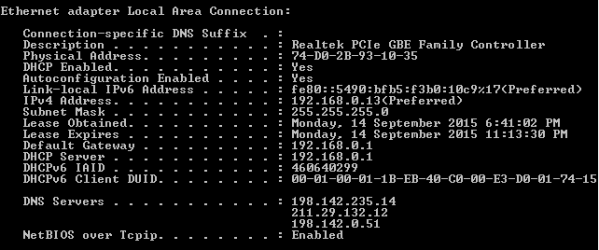
On a working PC - run cmd:
Code:
ipconfig -all

Paste it here, so I can tell what IP to configure.

When you decide on an IP:
Open Network and Sharing Center - Change Adapter Settings - Right click the connection - Properties - TCP/IPv4 - Properties - Use the following IP address: enter those details, and restart PC to see if it works or not.
 

My Computer

Computer type
PC/Desktop
Computer Manufacturer/Model Number
Custom Build
OS
Windows 7 Ultimate x64 SP1
CPU
AMD Phenom 2 1090T
Motherboard
Gigabyte GA-890FXA-UD5
Memory
2x8GB Kingston HyperX Fury Black 1600Mhz Unganged
Graphics Card(s)
MSI GTX 970 Gaming 4G
Sound Card
Realtek On-Board HD 7.1 Audio / Logitech G35
Monitor(s) Displays
3xAcer GD245HQ
Screen Resolution
1920x1080
Hard Drives
Samsung 850 Pro 512GB SSD - OS /
WD Caviar Black SATA 3 - 1 TBx2 - Dynamic RAID 0 /
WD Caviar Green SATA 2 - 640GBx2 - Dynamic RAID 0 /
WD Caviar Green SATA 2 - 640GB - Internal Backup /
Seagate Barracude SATA 3 - 3TB - External Backup/ Sync
PSU
HighPower 1000W
Case
Cooler Master HAF 932
Cooling
Noctua NH-D14
Keyboard
Logitech G19
Mouse
Logitech G500
Internet Speed
100/4 Mbit Cable (100GB quota)
Antivirus
ZoneAlarm Extreme Security / MBAM Pro / MBAE Free / SAS Free
Browser
IE 11 - Firefox - Chrome
Other Info
Logitech F710/ G27/ G940/ Z5500 // TrackIR 5 // Nvidia 3D Surround Vision
Here's the output.
8g739r
 

Attachments

  • Screenshot_2.png
    Screenshot_2.png
    13.1 KB · Views: 27

My Computer

Computer type
PC/Desktop
Computer Manufacturer/Model Number
Asus
OS
Windows 7 Home Premium x64
CPU
i5 4670k @3.4
Motherboard
Z87 A
Memory
16 GB
Graphics Card(s)
2x GTX 770's
Hard Drives
NFTS 2gb HDD
Samsung SSD 840 SCSI 120gb
Samsung SSD 850 SCSI 240gb
Antivirus
Norton
Browser
Firefox
Alright on your problem PC:
IP Address: 192.168.0.20
Subnet: 255.255.255.0
Gateway: 192.168.0.1

Also DNS servers (only these 2 will be enough for testing, your ISP seem to provide 3)
198.142.235.14
198.142.0.51
 

My Computer

Computer type
PC/Desktop
Computer Manufacturer/Model Number
Custom Build
OS
Windows 7 Ultimate x64 SP1
CPU
AMD Phenom 2 1090T
Motherboard
Gigabyte GA-890FXA-UD5
Memory
2x8GB Kingston HyperX Fury Black 1600Mhz Unganged
Graphics Card(s)
MSI GTX 970 Gaming 4G
Sound Card
Realtek On-Board HD 7.1 Audio / Logitech G35
Monitor(s) Displays
3xAcer GD245HQ
Screen Resolution
1920x1080
Hard Drives
Samsung 850 Pro 512GB SSD - OS /
WD Caviar Black SATA 3 - 1 TBx2 - Dynamic RAID 0 /
WD Caviar Green SATA 2 - 640GBx2 - Dynamic RAID 0 /
WD Caviar Green SATA 2 - 640GB - Internal Backup /
Seagate Barracude SATA 3 - 3TB - External Backup/ Sync
PSU
HighPower 1000W
Case
Cooler Master HAF 932
Cooling
Noctua NH-D14
Keyboard
Logitech G19
Mouse
Logitech G500
Internet Speed
100/4 Mbit Cable (100GB quota)
Antivirus
ZoneAlarm Extreme Security / MBAM Pro / MBAE Free / SAS Free
Browser
IE 11 - Firefox - Chrome
Other Info
Logitech F710/ G27/ G940/ Z5500 // TrackIR 5 // Nvidia 3D Surround Vision
Made a typo on the IP address, corrected it. Make sure you try that one. Sorry :)

In case correct one is
192.168.0.20
 

My Computer

Computer type
PC/Desktop
Computer Manufacturer/Model Number
Custom Build
OS
Windows 7 Ultimate x64 SP1
CPU
AMD Phenom 2 1090T
Motherboard
Gigabyte GA-890FXA-UD5
Memory
2x8GB Kingston HyperX Fury Black 1600Mhz Unganged
Graphics Card(s)
MSI GTX 970 Gaming 4G
Sound Card
Realtek On-Board HD 7.1 Audio / Logitech G35
Monitor(s) Displays
3xAcer GD245HQ
Screen Resolution
1920x1080
Hard Drives
Samsung 850 Pro 512GB SSD - OS /
WD Caviar Black SATA 3 - 1 TBx2 - Dynamic RAID 0 /
WD Caviar Green SATA 2 - 640GBx2 - Dynamic RAID 0 /
WD Caviar Green SATA 2 - 640GB - Internal Backup /
Seagate Barracude SATA 3 - 3TB - External Backup/ Sync
PSU
HighPower 1000W
Case
Cooler Master HAF 932
Cooling
Noctua NH-D14
Keyboard
Logitech G19
Mouse
Logitech G500
Internet Speed
100/4 Mbit Cable (100GB quota)
Antivirus
ZoneAlarm Extreme Security / MBAM Pro / MBAE Free / SAS Free
Browser
IE 11 - Firefox - Chrome
Other Info
Logitech F710/ G27/ G940/ Z5500 // TrackIR 5 // Nvidia 3D Surround Vision
The problem still persists, unfortunately. Also, when I tried to load a few net reliant programs in one of my restarts just before the network connectivity icon on the taskbar went from "Internet Access" to "No Internet Access" and 20 seconds later back to "Internet Access". Not sure if useful information just thought I'd mention it.
 

My Computer

Computer type
PC/Desktop
Computer Manufacturer/Model Number
Asus
OS
Windows 7 Home Premium x64
CPU
i5 4670k @3.4
Motherboard
Z87 A
Memory
16 GB
Graphics Card(s)
2x GTX 770's
Hard Drives
NFTS 2gb HDD
Samsung SSD 840 SCSI 120gb
Samsung SSD 850 SCSI 240gb
Antivirus
Norton
Browser
Firefox
Well, nothing I can think of that would remedy all the diagnosis you provided. For example we can try a MAC Address change (I am still assuming wired and wireless has different issues).

Get Win7 MAC Address Changer v2.0 and try to change the MAC address of the ethernet adapter (last 2 digits) to 01 and 02, respectively. Note that some NICs don't allow MAC address changing. Hopefully yours will.

Perhaps you should also check your RAMs and CPU.
- http://www.sevenforums.com/tutorials/105647-ram-test-memtest86.html
- CPU: Intel Burn Test and/or Prime95

- Just saw you got 2x770s - try disabling SLI too
 

My Computer

Computer type
PC/Desktop
Computer Manufacturer/Model Number
Custom Build
OS
Windows 7 Ultimate x64 SP1
CPU
AMD Phenom 2 1090T
Motherboard
Gigabyte GA-890FXA-UD5
Memory
2x8GB Kingston HyperX Fury Black 1600Mhz Unganged
Graphics Card(s)
MSI GTX 970 Gaming 4G
Sound Card
Realtek On-Board HD 7.1 Audio / Logitech G35
Monitor(s) Displays
3xAcer GD245HQ
Screen Resolution
1920x1080
Hard Drives
Samsung 850 Pro 512GB SSD - OS /
WD Caviar Black SATA 3 - 1 TBx2 - Dynamic RAID 0 /
WD Caviar Green SATA 2 - 640GBx2 - Dynamic RAID 0 /
WD Caviar Green SATA 2 - 640GB - Internal Backup /
Seagate Barracude SATA 3 - 3TB - External Backup/ Sync
PSU
HighPower 1000W
Case
Cooler Master HAF 932
Cooling
Noctua NH-D14
Keyboard
Logitech G19
Mouse
Logitech G500
Internet Speed
100/4 Mbit Cable (100GB quota)
Antivirus
ZoneAlarm Extreme Security / MBAM Pro / MBAE Free / SAS Free
Browser
IE 11 - Firefox - Chrome
Other Info
Logitech F710/ G27/ G940/ Z5500 // TrackIR 5 // Nvidia 3D Surround Vision
Okay, managed to change the MAC address; restarted and issue the same.

Ran Burn test on CPU, it's all fine.

Memtest86 is all good to go, but the documentation said it can take 7 hours, so I'll leave it running overnight and get back to you.

Yea, I've got two but haven't used SLI for a while. There must have been something going wrong because if anything I was getting less frames than from just using 1. Also not entirely sure even one of them works as well as it should. Have a mate with the same card and he continually gets higher frames than me on games- probably a topic for another discussion, however.

Anyways, I'll get back to you with the results from the RAM test overnight.
 

My Computer

Computer type
PC/Desktop
Computer Manufacturer/Model Number
Asus
OS
Windows 7 Home Premium x64
CPU
i5 4670k @3.4
Motherboard
Z87 A
Memory
16 GB
Graphics Card(s)
2x GTX 770's
Hard Drives
NFTS 2gb HDD
Samsung SSD 840 SCSI 120gb
Samsung SSD 850 SCSI 240gb
Antivirus
Norton
Browser
Firefox
SLI performance can be affected by your CPU and motherboard (how PCI-e lanes are designed). Even SLI connector can make a difference.
 

My Computer

Computer type
PC/Desktop
Computer Manufacturer/Model Number
Custom Build
OS
Windows 7 Ultimate x64 SP1
CPU
AMD Phenom 2 1090T
Motherboard
Gigabyte GA-890FXA-UD5
Memory
2x8GB Kingston HyperX Fury Black 1600Mhz Unganged
Graphics Card(s)
MSI GTX 970 Gaming 4G
Sound Card
Realtek On-Board HD 7.1 Audio / Logitech G35
Monitor(s) Displays
3xAcer GD245HQ
Screen Resolution
1920x1080
Hard Drives
Samsung 850 Pro 512GB SSD - OS /
WD Caviar Black SATA 3 - 1 TBx2 - Dynamic RAID 0 /
WD Caviar Green SATA 2 - 640GBx2 - Dynamic RAID 0 /
WD Caviar Green SATA 2 - 640GB - Internal Backup /
Seagate Barracude SATA 3 - 3TB - External Backup/ Sync
PSU
HighPower 1000W
Case
Cooler Master HAF 932
Cooling
Noctua NH-D14
Keyboard
Logitech G19
Mouse
Logitech G500
Internet Speed
100/4 Mbit Cable (100GB quota)
Antivirus
ZoneAlarm Extreme Security / MBAM Pro / MBAE Free / SAS Free
Browser
IE 11 - Firefox - Chrome
Other Info
Logitech F710/ G27/ G940/ Z5500 // TrackIR 5 // Nvidia 3D Surround Vision
Hmmm okay, but what about the performance of one? Something about an i5 4670k @ 3.4 negatively affects it? How is that my mate's 770 apparently far out performs mine? Like can the CPU and motherboard impact it that much?
 

My Computer

Computer type
PC/Desktop
Computer Manufacturer/Model Number
Asus
OS
Windows 7 Home Premium x64
CPU
i5 4670k @3.4
Motherboard
Z87 A
Memory
16 GB
Graphics Card(s)
2x GTX 770's
Hard Drives
NFTS 2gb HDD
Samsung SSD 840 SCSI 120gb
Samsung SSD 850 SCSI 240gb
Antivirus
Norton
Browser
Firefox
Depends on the game, some are CPU-bound and no matter how strong your GPU is, won't run any higher as long as CPU stays the same. Then there are the drivers, compatibility etc. Some games are plain incompatible in which case it will either won't run at all or run worse than a single GPU.

Best is to Google the game you are interested in with sli scaling or performance.
 

My Computer

Computer type
PC/Desktop
Computer Manufacturer/Model Number
Custom Build
OS
Windows 7 Ultimate x64 SP1
CPU
AMD Phenom 2 1090T
Motherboard
Gigabyte GA-890FXA-UD5
Memory
2x8GB Kingston HyperX Fury Black 1600Mhz Unganged
Graphics Card(s)
MSI GTX 970 Gaming 4G
Sound Card
Realtek On-Board HD 7.1 Audio / Logitech G35
Monitor(s) Displays
3xAcer GD245HQ
Screen Resolution
1920x1080
Hard Drives
Samsung 850 Pro 512GB SSD - OS /
WD Caviar Black SATA 3 - 1 TBx2 - Dynamic RAID 0 /
WD Caviar Green SATA 2 - 640GBx2 - Dynamic RAID 0 /
WD Caviar Green SATA 2 - 640GB - Internal Backup /
Seagate Barracude SATA 3 - 3TB - External Backup/ Sync
PSU
HighPower 1000W
Case
Cooler Master HAF 932
Cooling
Noctua NH-D14
Keyboard
Logitech G19
Mouse
Logitech G500
Internet Speed
100/4 Mbit Cable (100GB quota)
Antivirus
ZoneAlarm Extreme Security / MBAM Pro / MBAE Free / SAS Free
Browser
IE 11 - Firefox - Chrome
Other Info
Logitech F710/ G27/ G940/ Z5500 // TrackIR 5 // Nvidia 3D Surround Vision
So ran the RAM software last night and everything's good. I imagine that's pretty much the end of the tether when it comes to trying to diagnose the issue? Shame the issue still persists, but thanks for your help none the less, appreciated.

Would upgrading my CPU potentially help with the GPU issue?
 

My Computer

Computer type
PC/Desktop
Computer Manufacturer/Model Number
Asus
OS
Windows 7 Home Premium x64
CPU
i5 4670k @3.4
Motherboard
Z87 A
Memory
16 GB
Graphics Card(s)
2x GTX 770's
Hard Drives
NFTS 2gb HDD
Samsung SSD 840 SCSI 120gb
Samsung SSD 850 SCSI 240gb
Antivirus
Norton
Browser
Firefox
Yeah, pretty much it :) I can't think of anything that would affect both Linux and Windows, both wired and wireless and different cards. All there left is a faulty motherboard. As the ultimate test if you get the chance, take that PC to another place (friend/work/school etc.) and see if it will work.

Edit: Hmm, what is your BIOS version and did you check ASUS site if there are any updates for it?

Regarding changing CPU for better SLI, you have to benchmark your games and check the performance online for similar systems. Also benchmark both single and SLI with known benchmarks (3D Mark, Unigine, etc.)
 

My Computer

Computer type
PC/Desktop
Computer Manufacturer/Model Number
Custom Build
OS
Windows 7 Ultimate x64 SP1
CPU
AMD Phenom 2 1090T
Motherboard
Gigabyte GA-890FXA-UD5
Memory
2x8GB Kingston HyperX Fury Black 1600Mhz Unganged
Graphics Card(s)
MSI GTX 970 Gaming 4G
Sound Card
Realtek On-Board HD 7.1 Audio / Logitech G35
Monitor(s) Displays
3xAcer GD245HQ
Screen Resolution
1920x1080
Hard Drives
Samsung 850 Pro 512GB SSD - OS /
WD Caviar Black SATA 3 - 1 TBx2 - Dynamic RAID 0 /
WD Caviar Green SATA 2 - 640GBx2 - Dynamic RAID 0 /
WD Caviar Green SATA 2 - 640GB - Internal Backup /
Seagate Barracude SATA 3 - 3TB - External Backup/ Sync
PSU
HighPower 1000W
Case
Cooler Master HAF 932
Cooling
Noctua NH-D14
Keyboard
Logitech G19
Mouse
Logitech G500
Internet Speed
100/4 Mbit Cable (100GB quota)
Antivirus
ZoneAlarm Extreme Security / MBAM Pro / MBAE Free / SAS Free
Browser
IE 11 - Firefox - Chrome
Other Info
Logitech F710/ G27/ G940/ Z5500 // TrackIR 5 // Nvidia 3D Surround Vision
I wasn't going to reply again, however another issue has arisen. Typically, starting a browser and attempting to load webpages would be impossible for 5-20 minutes, where after that period of time loading any webpage was fine until a closed the browser and reopened it. For the past 2 days, the symptom still exists, but now throughout browsing random pages will either load extremely slowly or will fail to load at all. I'm just wondering whether this could have been caused by any of the steps I took previously or whether the original problem is simply getting worse.

Oh, and I had taken it to a computer shop to get it looked at. They diagnosed it as an issue with the network adapter and fixed it by updating the drivers. Upon taking the PC home the issue remained the same, even after doing what they did. Important to note that the the issue was occurring at the computer store before they installed the other driver.
 

My Computer

Computer type
PC/Desktop
Computer Manufacturer/Model Number
Asus
OS
Windows 7 Home Premium x64
CPU
i5 4670k @3.4
Motherboard
Z87 A
Memory
16 GB
Graphics Card(s)
2x GTX 770's
Hard Drives
NFTS 2gb HDD
Samsung SSD 840 SCSI 120gb
Samsung SSD 850 SCSI 240gb
Antivirus
Norton
Browser
Firefox
Didn't it get fixed earlier when you previously took it to a shop as well? So something must be different with their network and yours.

Can you take it straight back to the shop just to try connect from their network without changing anything and tempering with settings?
 

My Computer

Computer type
PC/Desktop
Computer Manufacturer/Model Number
Custom Build
OS
Windows 7 Ultimate x64 SP1
CPU
AMD Phenom 2 1090T
Motherboard
Gigabyte GA-890FXA-UD5
Memory
2x8GB Kingston HyperX Fury Black 1600Mhz Unganged
Graphics Card(s)
MSI GTX 970 Gaming 4G
Sound Card
Realtek On-Board HD 7.1 Audio / Logitech G35
Monitor(s) Displays
3xAcer GD245HQ
Screen Resolution
1920x1080
Hard Drives
Samsung 850 Pro 512GB SSD - OS /
WD Caviar Black SATA 3 - 1 TBx2 - Dynamic RAID 0 /
WD Caviar Green SATA 2 - 640GBx2 - Dynamic RAID 0 /
WD Caviar Green SATA 2 - 640GB - Internal Backup /
Seagate Barracude SATA 3 - 3TB - External Backup/ Sync
PSU
HighPower 1000W
Case
Cooler Master HAF 932
Cooling
Noctua NH-D14
Keyboard
Logitech G19
Mouse
Logitech G500
Internet Speed
100/4 Mbit Cable (100GB quota)
Antivirus
ZoneAlarm Extreme Security / MBAM Pro / MBAE Free / SAS Free
Browser
IE 11 - Firefox - Chrome
Other Info
Logitech F710/ G27/ G940/ Z5500 // TrackIR 5 // Nvidia 3D Surround Vision
Back
Top