Internet connection not working

loomam88

New member
Local time
9:23 PM
Messages
8
I have a pc that doesnt have internet. It has an X on my internet connection bar. It is wireless and it shows no internet connect bar and an X. I've tried connecting my wire to the modem to the pc. It didnt work but it worked connecting to the Modem to my laptop. I need help please..
 

My Computer

OS
windows 7 32 bit
and it worked right before an another update for windows 7
 

My Computer

OS
windows 7 32 bit
Did Windows Update possibly install a driver for your network card? You can go to Start > All Programs > Windows Update and click the View Windows Update option on the left to see. Take a look in your Control Panel > Device Manager under Network Adapters, and make sure the adapter doesn't have an X or a ! mark next to it.
 

My Computer

OS
Windows 7 Home Premium x64 SP1
CPU
AMD Athlon II X4 640 3.0 GHz
Motherboard
Asus M4A785TD-V EVO
Memory
Kingston Hyper-X 4 GB DDR3
Graphics Card(s)
EVGA 9800 GTX+ 512 MB
Monitor(s) Displays
Samsung Syncmaster P2250
Hard Drives
Seagate Barracuda 250GB 7200 RPM SATA 3.0Gb/s
PSU
CORSAIR CMPSU-550VX
Case
Lian-Li K60
Cooling
3 x 140mm, 1 x 120mm
Keyboard
Saitek Eclipse
Internet Speed
10 MB
It doesnt have an x On it and i tried automatically updating it and manually too and it says it is up to date
 

My Computer

OS
windows 7 32 bit
Can you see any wireless networks available, or does it not see any?
 

My Computer

OS
Windows 7 Home Premium x64 SP1
CPU
AMD Athlon II X4 640 3.0 GHz
Motherboard
Asus M4A785TD-V EVO
Memory
Kingston Hyper-X 4 GB DDR3
Graphics Card(s)
EVGA 9800 GTX+ 512 MB
Monitor(s) Displays
Samsung Syncmaster P2250
Hard Drives
Seagate Barracuda 250GB 7200 RPM SATA 3.0Gb/s
PSU
CORSAIR CMPSU-550VX
Case
Lian-Li K60
Cooling
3 x 140mm, 1 x 120mm
Keyboard
Saitek Eclipse
Internet Speed
10 MB
What about when you connect wired? Does it recognize a cable being plugged in? Does it try to acquire an IP?
 

My Computer

OS
Windows 7 Home Premium x64 SP1
CPU
AMD Athlon II X4 640 3.0 GHz
Motherboard
Asus M4A785TD-V EVO
Memory
Kingston Hyper-X 4 GB DDR3
Graphics Card(s)
EVGA 9800 GTX+ 512 MB
Monitor(s) Displays
Samsung Syncmaster P2250
Hard Drives
Seagate Barracuda 250GB 7200 RPM SATA 3.0Gb/s
PSU
CORSAIR CMPSU-550VX
Case
Lian-Li K60
Cooling
3 x 140mm, 1 x 120mm
Keyboard
Saitek Eclipse
Internet Speed
10 MB
no i tried wired nothing happens but when i when i put the wire to my laptop the laptop gets internet
 

My Computer

OS
windows 7 32 bit
and ill be constantly waiting for ur quick reply so ill be on for at least 30 minutes waiting
 

My Computer

OS
windows 7 32 bit
Odd, if it's in your Device Manager and there's no X next to it, your computer recognizes it and it should be enabled.
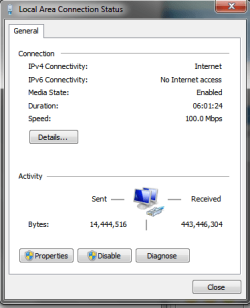
Connect the cable and go to Control Panel > Network and Sharing Center, and click Change Adapter settings on the left pane. Right click your network adapter and click Status. Just a double check to make sure it's enabled.
Unfortunately, I do have to take off for the evening, but I'm sure there are plenty here who can help. I'll check back tomorrow.
 

Attachments

  • network.png
    network.png
    11 KB · Views: 5

My Computer

OS
Windows 7 Home Premium x64 SP1
CPU
AMD Athlon II X4 640 3.0 GHz
Motherboard
Asus M4A785TD-V EVO
Memory
Kingston Hyper-X 4 GB DDR3
Graphics Card(s)
EVGA 9800 GTX+ 512 MB
Monitor(s) Displays
Samsung Syncmaster P2250
Hard Drives
Seagate Barracuda 250GB 7200 RPM SATA 3.0Gb/s
PSU
CORSAIR CMPSU-550VX
Case
Lian-Li K60
Cooling
3 x 140mm, 1 x 120mm
Keyboard
Saitek Eclipse
Internet Speed
10 MB
I can't click status it's not allowing me
 

My Computer

OS
windows 7 32 bit
It wont let me clicks status cuz its blocking me...
 

My Computer

OS
windows 7 32 bit
Back
Top