Internet connection over wireless

7ass00n

New member
Local time
8:05 PM
Messages
5
PPPoE connection error

Hi Guys,

Just installed a clean copy of windows 7 on a new partition, and everything is going smooth except for internet connection. Up till now, am not able to connect to my broadband connection.

What I have is the following:
wireless router to transmit the broadband connection from cable to my network.
Now that I created a new connection (as usually do in other OS), and tried dialing the server through the wireless connection, but keep telling me there is a problem with modem or something like that.
Although am connected successfully to the wireless connection.


Any idea ?
 
Last edited:

My Computer

OS
Windows XP Pro SP2
Hi Guys,

Just installed a clean copy of windows 7 on a new partition, and everything is going smooth except for internet connection. Up till now, am not able to connect to my broadband connection.

What I have is the following:
wireless router to transmit the broadband connection from cable to my network.
Now that I created a new connection (as usually do in other OS), and tried dialing the server through the wireless connection, but keep telling me there is a problem with modem or something like that.
Although am connected successfully to the wireless connection.


Any idea ?

Have you checked your "wep" password settings or security settings?
 

My Computer

Computer Manufacturer/Model Number
Dilithium Computers/Engineering (Myself) Star date 42.739285.5432.9
OS
Win7 Ultimate x64 on Desktop / Win7 Ultimate x86 on laptop / Win7 x86 Starter on Netbook
CPU
AMD Phenom 965 X4 3.4Ghz cpu Black Edition
Motherboard
Gigabyte 790XT
Memory
12 Gb DDR3
Graphics Card(s)
Nvidea Gforce GTX 470
Sound Card
Onboard Realtek hi-fi
Monitor(s) Displays
Lg 3D led 23"
Screen Resolution
1920x1080
Hard Drives
Loads maxstore sata 1 & 2/ loads of partitions + 1Tb Hitachi sata 2. 256Gb Crucial ssd.
PSU
OCZ 700W GameXstream
Case
Artec 10000
Cooling
On board + many case fans
Keyboard
Logitech wireless K350
Mouse
Inferno gaming mouse
Internet Speed
Talk talk. 10Mb
Other Info
My PC was hand built with matchsticks. xbox 360 controller. Printers,fax.........
Well it seems that the problem is not in the wireless connection (actually am already connected to wireless successfully). I tried connecting the network cable directly into my laptop instead of using the wireless switch.
Unfortunately same problem"your modem has reported an error...."

and hidden setting to do ?
 

My Computer

OS
Windows XP Pro SP2
Well it seems that the problem is not in the wireless connection (actually am already connected to wireless successfully). I tried connecting the network cable directly into my laptop instead of using the wireless switch.
Unfortunately same problem"your modem has reported an error...."

and hidden setting to do ?
 

My Computer

OS
Windows XP Pro SP2
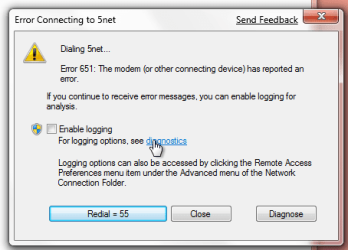
Attached is a screenshot of the error message
 

Attachments

  • error651kj8.png
    error651kj8.png
    32.8 KB · Views: 23,717

My Computer

OS
Windows XP Pro SP2
Probably a driver issue, take a look at device manager and see if the modem driver is correct. Also try repairing the connections, and make sure the connections are configured correctly, no dial up, dhcp, etc...
 

My Computer

OS
Multiple
No driver issue, all are correctly installed. I use a cable and not a modem to connect to the broadband.
Googling the error, I found somewhere that the PPPOE client in Windows 8 might be sending the Service name in wrong encoding and thus will be unable to connect to that service.
So far, no resolution for this problem... :S
 

My Computer

OS
Windows XP Pro SP2
I used to found the problem while i try to connect internet through wireless lan device.
I decided to turn windows firewall off. then normally connect as use nic device.

would you try like me? Turn OFF Windows Firewall, every connection run smooth.
 

My Computer

Computer Manufacturer/Model Number
Acer Inc. Acer Aspire 4720ZG
OS
Windows 7 Ultimate Release Candidate [build 7100]
CPU
Intel(R)Pentium(R)Dual-CORE [email protected] L2-Cache 1MB
Motherboard
Acer, Inc. Nestos Intel(R) Chipset PM965 Rev.C0
Memory
Apacer DDR2-RAM 2 GB
Graphics Card(s)
nVidia GeForce 8400M G DDR2-VRAM 128 MB
Sound Card
Realtek High Definition
Monitor(s) Displays
Acer CrystalBrite LCD - Generic Laptop PnP
Screen Resolution
1280x800 pixels
Hard Drives
Toshiba MK1646GSX ATA 160 GB
Mouse
Synaptic TouchPad v6.5
Internet Speed
2048/512 (Down/Up) ADSL-TOT-Thailand
Other Info
HL-DT-ST DVDRAM GSA-T40N ATA DVD-Super Multi DL
802.11 B/G WLAN
Bluetooth(R) 2.0+EDR
Posible Solution

Try logging into your router (enter 192.168.1.1 into a web browser on a computer directly connected to the router). Unless you have messed with the settings, the password and username is probably "admin", or something like that. Anyways, try messing around with the settings.

Hope this helps.
 

My Computer

Computer Manufacturer/Model Number
Thinkpad E420
OS
Windows 7 64 bit
CPU
i3-2310M
Memory
6GB
Back
Top