Solved Internet Connectivity Issues (Default Gateway Missing)

Phluff

New member
Local time
6:31 PM
Messages
14
Ok, so because the internet company hasn't helped me at all, I have decided to reach out with my own words. I've browsed this forum for a bit, and nothing seems like it would help. I don't know what I am doing, but I have been having intermittent connectivity issues.

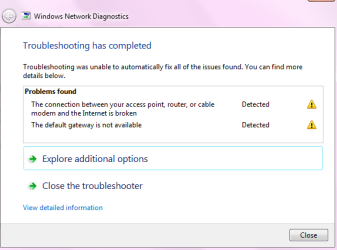
What has been going on is that my internet connection has been dropping several times throughout the day, everyday. This issue was only affecting my computer at first, but I moved my modem away from my old tv and the issue has moved onto the two laptops in this house. I get errors such as "Default Gateway is missing" and "Link between router, modem and the internet is broken."

I only moved my modem because last time I called my ISP the guy basically told me that the error was not on my end, but was because I had my modem sitting right next to my old tube tv. Thing is, up until three months ago I had not had this problem at all. The technician who came out to my house told me that the error was at the pole, and nothing in my house was causing it. I've lived at this house for two years, and the internet was a fresh install, all new wires and everything.

I am reaching out to you guys because this is affecting my online college work. Attached is my ipconfig /all.

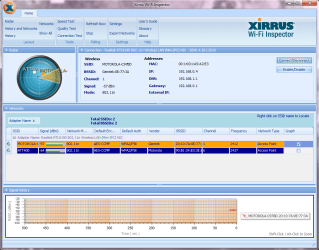
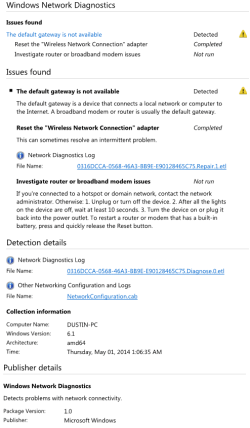
Edit: Also, since my net just dropped again, I have a screenshot of my troubleshooter. Usually it fixes the default gateway, but here recently it has not been. All it has been doing is resetting my wireless connections.

Edit2: I have Cable One internet, 50mbps package. Wireless cable internet. Running MSE av.
 

Attachments
  • troubleshooting.png
    troubleshooting.png
    11.9 KB · Views: 32
  • ipconfigall.png
    ipconfigall.png
    38.5 KB · Views: 5
  • xirrus.png
    xirrus.png
    55.6 KB · Views: 1
Last edited:

My Computer

Computer type
PC/Desktop
Computer Manufacturer/Model Number
Dell / Custom build
OS
Windows 7 Professional x64 SP1
CPU
Intel Core 2 Duo CPU e8500 @ 3.16GHz
Memory
6144MB ram
Graphics Card(s)
NVIDIA GeForce GT 520
Hard Drives
TOSHIBA External USB 3.0 USB
WDC WD10EZEX-60ZF5A0 ATA
WDC WD1600JS-55MHB1 ATA
Antivirus
MSE
Browser
Firefox
Hello and welcome Phluff could you let us know what the motherboard is in that machine please .

Plus in the Device Meager are there any yellow triangles against any of the networking stuff?
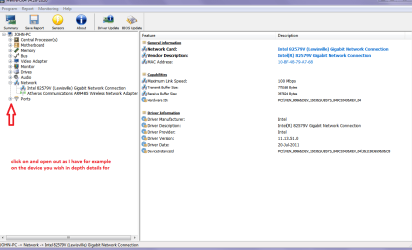
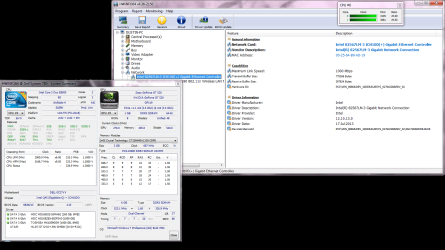
In my pic is an example of the points to look at if you cannot find the manufacturer run this HWiNFO, HWiNFO32/64 - Download < get the right bit version and close the right hand screen and then click on those same device is the window that remains - open them out and it will show you the absolute in details re the device.
We need this to look for drivers mate. see pic
 

Attachments

  • HW INFO open devices.PNG
    HW INFO open devices.PNG
    31.1 KB · Views: 4

My Computer

Computer type
PC/Desktop
Computer Manufacturer/Model Number
Own build (new) Desk1 / Asus ROG Win 7 / Desk2 1st build
OS
Desk1 7 Home Prem / Desk2 10 Pro / Main lap Asus ROG 10 Pro 2 laptop Toshiba 7 Pro Asus P2520 7 & 10
CPU
Desk1 i5 3750K / Laptop i7 GTX 860M / Desk2 i5 2500
Motherboard
Desk1 Asus P877-V / Desk2 Gigabyte H67 UD3H / Laptop ?
Memory
Desk1 8GB (1866) / Desk2 16GB (1333) / Laptop 8Gb DDR3
Graphics Card(s)
Desk 1& 2NVidia GTX 650 & Laptops on board Intel
Sound Card
Desk 1 & 2 -XONAR DG Realtek High Def audio Laptop
Monitor(s) Displays
Desk 1 Benq HD 2450 / Desk2 Philips 24" / Laptop 17.5"
Screen Resolution
1920x1080 D1 & D2 & Laptop 1
Hard Drives
Desk1 Samsung 120GB 830 SSD
Asus ROG 256GB 850 Pro SSD
Desk2 Samsung 840 256 SSD
Toshiba 120GB EVO
PSU
Desk 1 Corsair HX 1050/ Laptop ? / Desk 2 Corsair HX 650
Case
Desk 1 Cooler HAF XM ? Toshiba laptop / Desk2 Coolermaster
Cooling
Fans on all Desk1 -2 Desk2 - all Coolermasters 5 Laptop ?
Keyboard
Desk 1 MS Sidewinder X6 Desk 2 MS Sidewinder X 4
Mouse
Desk 1&2 - Gigabyte MS 900 gamer - laptop - Logitec wireless
Internet Speed
ADSL2+
Other Info
One other Desktop (tester) and spare Toshba laptop both with SSD's
Running Kaspersky 2016 ISS on all machines config'd identically
Logitec audio stereo systems on each machine (x3)
Canon MG5250MFC
Router/modem TP-Link running WPA2SK
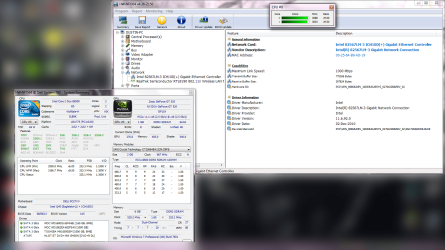
Alright, so I got two more screenshots for you. I didn't know if I should leave something out of that one from the program, but here you go:
 

Attachments

  • Systeminfo.png
    Systeminfo.png
    12.4 KB · Views: 30
  • HWiNFO64.png
    HWiNFO64.png
    195.3 KB · Views: 5

My Computer

Computer type
PC/Desktop
Computer Manufacturer/Model Number
Dell / Custom build
OS
Windows 7 Professional x64 SP1
CPU
Intel Core 2 Duo CPU e8500 @ 3.16GHz
Memory
6144MB ram
Graphics Card(s)
NVIDIA GeForce GT 520
Hard Drives
TOSHIBA External USB 3.0 USB
WDC WD10EZEX-60ZF5A0 ATA
WDC WD1600JS-55MHB1 ATA
Antivirus
MSE
Browser
Firefox

My Computer

Computer type
PC/Desktop
Computer Manufacturer/Model Number
Own build (new) Desk1 / Asus ROG Win 7 / Desk2 1st build
OS
Desk1 7 Home Prem / Desk2 10 Pro / Main lap Asus ROG 10 Pro 2 laptop Toshiba 7 Pro Asus P2520 7 & 10
CPU
Desk1 i5 3750K / Laptop i7 GTX 860M / Desk2 i5 2500
Motherboard
Desk1 Asus P877-V / Desk2 Gigabyte H67 UD3H / Laptop ?
Memory
Desk1 8GB (1866) / Desk2 16GB (1333) / Laptop 8Gb DDR3
Graphics Card(s)
Desk 1& 2NVidia GTX 650 & Laptops on board Intel
Sound Card
Desk 1 & 2 -XONAR DG Realtek High Def audio Laptop
Monitor(s) Displays
Desk 1 Benq HD 2450 / Desk2 Philips 24" / Laptop 17.5"
Screen Resolution
1920x1080 D1 & D2 & Laptop 1
Hard Drives
Desk1 Samsung 120GB 830 SSD
Asus ROG 256GB 850 Pro SSD
Desk2 Samsung 840 256 SSD
Toshiba 120GB EVO
PSU
Desk 1 Corsair HX 1050/ Laptop ? / Desk 2 Corsair HX 650
Case
Desk 1 Cooler HAF XM ? Toshiba laptop / Desk2 Coolermaster
Cooling
Fans on all Desk1 -2 Desk2 - all Coolermasters 5 Laptop ?
Keyboard
Desk 1 MS Sidewinder X6 Desk 2 MS Sidewinder X 4
Mouse
Desk 1&2 - Gigabyte MS 900 gamer - laptop - Logitec wireless
Internet Speed
ADSL2+
Other Info
One other Desktop (tester) and spare Toshba laptop both with SSD's
Running Kaspersky 2016 ISS on all machines config'd identically
Logitec audio stereo systems on each machine (x3)
Canon MG5250MFC
Router/modem TP-Link running WPA2SK
Alright, I have installed it, and I'll run it for a day or two and report back. Thank you for the prompt responses.

Strike that, I went and tried to open one of the webpages that causes my internet to drop for a short period, and it did it again. Same thing, "The default network gateway is not available." Windows did not automatically fix it, but again, I am able to reconnect.
 

My Computer

Computer type
PC/Desktop
Computer Manufacturer/Model Number
Dell / Custom build
OS
Windows 7 Professional x64 SP1
CPU
Intel Core 2 Duo CPU e8500 @ 3.16GHz
Memory
6144MB ram
Graphics Card(s)
NVIDIA GeForce GT 520
Hard Drives
TOSHIBA External USB 3.0 USB
WDC WD10EZEX-60ZF5A0 ATA
WDC WD1600JS-55MHB1 ATA
Antivirus
MSE
Browser
Firefox
Well going on the first post Dustin it does seem like your provider has a problem and you might need to change it if the cannot rectify the problem.
Let us know how you get on with tackling them as it can be a real pain and after all they are taking money off you for the privilege of having a net connection.:huh:
 

My Computer

Computer type
PC/Desktop
Computer Manufacturer/Model Number
Own build (new) Desk1 / Asus ROG Win 7 / Desk2 1st build
OS
Desk1 7 Home Prem / Desk2 10 Pro / Main lap Asus ROG 10 Pro 2 laptop Toshiba 7 Pro Asus P2520 7 & 10
CPU
Desk1 i5 3750K / Laptop i7 GTX 860M / Desk2 i5 2500
Motherboard
Desk1 Asus P877-V / Desk2 Gigabyte H67 UD3H / Laptop ?
Memory
Desk1 8GB (1866) / Desk2 16GB (1333) / Laptop 8Gb DDR3
Graphics Card(s)
Desk 1& 2NVidia GTX 650 & Laptops on board Intel
Sound Card
Desk 1 & 2 -XONAR DG Realtek High Def audio Laptop
Monitor(s) Displays
Desk 1 Benq HD 2450 / Desk2 Philips 24" / Laptop 17.5"
Screen Resolution
1920x1080 D1 & D2 & Laptop 1
Hard Drives
Desk1 Samsung 120GB 830 SSD
Asus ROG 256GB 850 Pro SSD
Desk2 Samsung 840 256 SSD
Toshiba 120GB EVO
PSU
Desk 1 Corsair HX 1050/ Laptop ? / Desk 2 Corsair HX 650
Case
Desk 1 Cooler HAF XM ? Toshiba laptop / Desk2 Coolermaster
Cooling
Fans on all Desk1 -2 Desk2 - all Coolermasters 5 Laptop ?
Keyboard
Desk 1 MS Sidewinder X6 Desk 2 MS Sidewinder X 4
Mouse
Desk 1&2 - Gigabyte MS 900 gamer - laptop - Logitec wireless
Internet Speed
ADSL2+
Other Info
One other Desktop (tester) and spare Toshba laptop both with SSD's
Running Kaspersky 2016 ISS on all machines config'd identically
Logitec audio stereo systems on each machine (x3)
Canon MG5250MFC
Router/modem TP-Link running WPA2SK
Yeah, I have noticed. I have been keeping a note of every time my internet drops, and I am calling them later today with the report. They basically told me it was my fault for having it next to my tv, but now it drops all the computers in the house. It happens a lot while I play MC or I'm on my college's login page. I do have the last report from my Windows Troubleshooter. I am going to put it up to see if it explains anything.
 

Attachments

  • defaultnetwork.png
    defaultnetwork.png
    35.1 KB · Views: 0

My Computer

Computer type
PC/Desktop
Computer Manufacturer/Model Number
Dell / Custom build
OS
Windows 7 Professional x64 SP1
CPU
Intel Core 2 Duo CPU e8500 @ 3.16GHz
Memory
6144MB ram
Graphics Card(s)
NVIDIA GeForce GT 520
Hard Drives
TOSHIBA External USB 3.0 USB
WDC WD10EZEX-60ZF5A0 ATA
WDC WD1600JS-55MHB1 ATA
Antivirus
MSE
Browser
Firefox
Just out of curiosity have you tried a wired connection from your router to one of your PCs? Just to see if it works fine as a modem?
 

My Computer

Computer type
PC/Desktop
Computer Manufacturer/Model Number
Custom Build
OS
W7 Pro x64 SP1 | W10 Pro IP x64 | W8.1 Pro x64 VM | Linux Mint VM
CPU
i7-4790k @ 4GHz (4.4GHz Boost)
Motherboard
ASUS Sabertooth Z87 (BIOS Rev 2004)
Memory
16GB DDR3 Kingston HyperX Fury @ 1600MHz CL 9-9-9-27
Graphics Card(s)
EVGA GTX 980 Classified
Sound Card
Realtek Onboard
Monitor(s) Displays
Samsung S27D390
Screen Resolution
1920 x 1080
Hard Drives
240GB Intel 520 Series SSD |
Samsung 850 EVO 120GB SSD |
2TB WD Caviar Black |
2TB WD Caviar Green
PSU
Corsair HX850-80 Gold Modular
Case
Cooler Master Silencio 650
Cooling
Corsair H80i w/2 x Corsair SP120 | 2 x 120mm Noctua NF-S12B
Keyboard
Microsoft Sidewinder X4
Mouse
Gigabyte M6900 optical
Internet Speed
152mb
Antivirus
F-Secure
Browser
Firefox 38.0
Other Info
Backup Rig: Win 7 Pro 64-bit | AMD A10-5800k | ASUS F2A85-V Pro | 8GB Samsung DDR3 @1600MHz | 120GB Toshiba SDD | 2TB Seagate HDD | Cooler Master Silencio 550
Dustin mate try powering off the modem for a minute then power back on I have had a few problems that have been solved doing this.

Plus what exactly is the model of modem because that yellow triangle next to it is indicating a problem.
 

My Computer

Computer type
PC/Desktop
Computer Manufacturer/Model Number
Own build (new) Desk1 / Asus ROG Win 7 / Desk2 1st build
OS
Desk1 7 Home Prem / Desk2 10 Pro / Main lap Asus ROG 10 Pro 2 laptop Toshiba 7 Pro Asus P2520 7 & 10
CPU
Desk1 i5 3750K / Laptop i7 GTX 860M / Desk2 i5 2500
Motherboard
Desk1 Asus P877-V / Desk2 Gigabyte H67 UD3H / Laptop ?
Memory
Desk1 8GB (1866) / Desk2 16GB (1333) / Laptop 8Gb DDR3
Graphics Card(s)
Desk 1& 2NVidia GTX 650 & Laptops on board Intel
Sound Card
Desk 1 & 2 -XONAR DG Realtek High Def audio Laptop
Monitor(s) Displays
Desk 1 Benq HD 2450 / Desk2 Philips 24" / Laptop 17.5"
Screen Resolution
1920x1080 D1 & D2 & Laptop 1
Hard Drives
Desk1 Samsung 120GB 830 SSD
Asus ROG 256GB 850 Pro SSD
Desk2 Samsung 840 256 SSD
Toshiba 120GB EVO
PSU
Desk 1 Corsair HX 1050/ Laptop ? / Desk 2 Corsair HX 650
Case
Desk 1 Cooler HAF XM ? Toshiba laptop / Desk2 Coolermaster
Cooling
Fans on all Desk1 -2 Desk2 - all Coolermasters 5 Laptop ?
Keyboard
Desk 1 MS Sidewinder X6 Desk 2 MS Sidewinder X 4
Mouse
Desk 1&2 - Gigabyte MS 900 gamer - laptop - Logitec wireless
Internet Speed
ADSL2+
Other Info
One other Desktop (tester) and spare Toshba laptop both with SSD's
Running Kaspersky 2016 ISS on all machines config'd identically
Logitec audio stereo systems on each machine (x3)
Canon MG5250MFC
Router/modem TP-Link running WPA2SK
Just out of curiosity have you tried a wired connection from your router to one of your PCs? Just to see if it works fine as a modem?

No because I don't have a cord long enough. My modem is across the room from my desktop. I have tried using a router with the modem, but it was giving me just as many issues.

Dustin mate try powering off the modem for a minute then power back on I have had a few problems that have been solved doing this.

Plus what exactly is the model of modem because that yellow triangle next to it is indicating a problem.

My modem is a Motorola with model: SBG6580 and another part of it calls it a SURFboard. Also, to get that info, I did unplug to bring it to the computer to read that.
 

My Computer

Computer type
PC/Desktop
Computer Manufacturer/Model Number
Dell / Custom build
OS
Windows 7 Professional x64 SP1
CPU
Intel Core 2 Duo CPU e8500 @ 3.16GHz
Memory
6144MB ram
Graphics Card(s)
NVIDIA GeForce GT 520
Hard Drives
TOSHIBA External USB 3.0 USB
WDC WD10EZEX-60ZF5A0 ATA
WDC WD1600JS-55MHB1 ATA
Antivirus
MSE
Browser
Firefox
Sorry for double posting, but my internet dropped and the computer would not let me reconnect or open networks and sharing. Now it is having difficulty shutting down. Oh crap.
 

My Computer

Computer type
PC/Desktop
Computer Manufacturer/Model Number
Dell / Custom build
OS
Windows 7 Professional x64 SP1
CPU
Intel Core 2 Duo CPU e8500 @ 3.16GHz
Memory
6144MB ram
Graphics Card(s)
NVIDIA GeForce GT 520
Hard Drives
TOSHIBA External USB 3.0 USB
WDC WD10EZEX-60ZF5A0 ATA
WDC WD1600JS-55MHB1 ATA
Antivirus
MSE
Browser
Firefox
Now I don't know where you stand the modem Dustin but I have found a couple of refs to it using the 2.4GHz frequency for wifi and it is the same frequency used by a lot of other outside devices such as the microwave oven cordless phones unless they are the 5.8GHz types so is it near anything like that?
If you haven't got it still the manual for this device is here Motorola SBG6580 | User Manual the support site is rather pathetic for anything resembling software for it but it does mention it came with an installation disk somewhere.

I am tending to go with Boozad on the cable connection to be honest at least it is physical and less likely to interference.
 

My Computer

Computer type
PC/Desktop
Computer Manufacturer/Model Number
Own build (new) Desk1 / Asus ROG Win 7 / Desk2 1st build
OS
Desk1 7 Home Prem / Desk2 10 Pro / Main lap Asus ROG 10 Pro 2 laptop Toshiba 7 Pro Asus P2520 7 & 10
CPU
Desk1 i5 3750K / Laptop i7 GTX 860M / Desk2 i5 2500
Motherboard
Desk1 Asus P877-V / Desk2 Gigabyte H67 UD3H / Laptop ?
Memory
Desk1 8GB (1866) / Desk2 16GB (1333) / Laptop 8Gb DDR3
Graphics Card(s)
Desk 1& 2NVidia GTX 650 & Laptops on board Intel
Sound Card
Desk 1 & 2 -XONAR DG Realtek High Def audio Laptop
Monitor(s) Displays
Desk 1 Benq HD 2450 / Desk2 Philips 24" / Laptop 17.5"
Screen Resolution
1920x1080 D1 & D2 & Laptop 1
Hard Drives
Desk1 Samsung 120GB 830 SSD
Asus ROG 256GB 850 Pro SSD
Desk2 Samsung 840 256 SSD
Toshiba 120GB EVO
PSU
Desk 1 Corsair HX 1050/ Laptop ? / Desk 2 Corsair HX 650
Case
Desk 1 Cooler HAF XM ? Toshiba laptop / Desk2 Coolermaster
Cooling
Fans on all Desk1 -2 Desk2 - all Coolermasters 5 Laptop ?
Keyboard
Desk 1 MS Sidewinder X6 Desk 2 MS Sidewinder X 4
Mouse
Desk 1&2 - Gigabyte MS 900 gamer - laptop - Logitec wireless
Internet Speed
ADSL2+
Other Info
One other Desktop (tester) and spare Toshba laptop both with SSD's
Running Kaspersky 2016 ISS on all machines config'd identically
Logitec audio stereo systems on each machine (x3)
Canon MG5250MFC
Router/modem TP-Link running WPA2SK
I have my modem sitting about a foot off the floor about four feet from that tv. I wired in a router to the modem, and it dropped when trying to access that website.
 

My Computer

Computer type
PC/Desktop
Computer Manufacturer/Model Number
Dell / Custom build
OS
Windows 7 Professional x64 SP1
CPU
Intel Core 2 Duo CPU e8500 @ 3.16GHz
Memory
6144MB ram
Graphics Card(s)
NVIDIA GeForce GT 520
Hard Drives
TOSHIBA External USB 3.0 USB
WDC WD10EZEX-60ZF5A0 ATA
WDC WD1600JS-55MHB1 ATA
Antivirus
MSE
Browser
Firefox
My internet is working for now. I don't know what the ISP lady did besides changing the modem name, but it is working quite well now.
 

My Computer

Computer type
PC/Desktop
Computer Manufacturer/Model Number
Dell / Custom build
OS
Windows 7 Professional x64 SP1
CPU
Intel Core 2 Duo CPU e8500 @ 3.16GHz
Memory
6144MB ram
Graphics Card(s)
NVIDIA GeForce GT 520
Hard Drives
TOSHIBA External USB 3.0 USB
WDC WD10EZEX-60ZF5A0 ATA
WDC WD1600JS-55MHB1 ATA
Antivirus
MSE
Browser
Firefox
Well Dustin maybe it is just their side of things mate cos you have done all the right things will just have to see how it pans out.
John:)
 

My Computer

Computer type
PC/Desktop
Computer Manufacturer/Model Number
Own build (new) Desk1 / Asus ROG Win 7 / Desk2 1st build
OS
Desk1 7 Home Prem / Desk2 10 Pro / Main lap Asus ROG 10 Pro 2 laptop Toshiba 7 Pro Asus P2520 7 & 10
CPU
Desk1 i5 3750K / Laptop i7 GTX 860M / Desk2 i5 2500
Motherboard
Desk1 Asus P877-V / Desk2 Gigabyte H67 UD3H / Laptop ?
Memory
Desk1 8GB (1866) / Desk2 16GB (1333) / Laptop 8Gb DDR3
Graphics Card(s)
Desk 1& 2NVidia GTX 650 & Laptops on board Intel
Sound Card
Desk 1 & 2 -XONAR DG Realtek High Def audio Laptop
Monitor(s) Displays
Desk 1 Benq HD 2450 / Desk2 Philips 24" / Laptop 17.5"
Screen Resolution
1920x1080 D1 & D2 & Laptop 1
Hard Drives
Desk1 Samsung 120GB 830 SSD
Asus ROG 256GB 850 Pro SSD
Desk2 Samsung 840 256 SSD
Toshiba 120GB EVO
PSU
Desk 1 Corsair HX 1050/ Laptop ? / Desk 2 Corsair HX 650
Case
Desk 1 Cooler HAF XM ? Toshiba laptop / Desk2 Coolermaster
Cooling
Fans on all Desk1 -2 Desk2 - all Coolermasters 5 Laptop ?
Keyboard
Desk 1 MS Sidewinder X6 Desk 2 MS Sidewinder X 4
Mouse
Desk 1&2 - Gigabyte MS 900 gamer - laptop - Logitec wireless
Internet Speed
ADSL2+
Other Info
One other Desktop (tester) and spare Toshba laptop both with SSD's
Running Kaspersky 2016 ISS on all machines config'd identically
Logitec audio stereo systems on each machine (x3)
Canon MG5250MFC
Router/modem TP-Link running WPA2SK
So far things have been working good. I'll give some feedback after a few days.

One thing I have noticed is that my net hasn't dropped when trying to access my college sign in page. Another thing is that my computer has two versions of my modem in its system, and connects to it twice. I don't know why, or how to stop it from doing so. I have removed it from my computer's memory, but when I reconnected it did it again.
 

My Computer

Computer type
PC/Desktop
Computer Manufacturer/Model Number
Dell / Custom build
OS
Windows 7 Professional x64 SP1
CPU
Intel Core 2 Duo CPU e8500 @ 3.16GHz
Memory
6144MB ram
Graphics Card(s)
NVIDIA GeForce GT 520
Hard Drives
TOSHIBA External USB 3.0 USB
WDC WD10EZEX-60ZF5A0 ATA
WDC WD1600JS-55MHB1 ATA
Antivirus
MSE
Browser
Firefox
Dustin lets let it go for a few days mate before anything is doen about that doubling up if it isn't breaking the system then why try repair it mate - like the wheel that isn't broken:)
 

My Computer

Computer type
PC/Desktop
Computer Manufacturer/Model Number
Own build (new) Desk1 / Asus ROG Win 7 / Desk2 1st build
OS
Desk1 7 Home Prem / Desk2 10 Pro / Main lap Asus ROG 10 Pro 2 laptop Toshiba 7 Pro Asus P2520 7 & 10
CPU
Desk1 i5 3750K / Laptop i7 GTX 860M / Desk2 i5 2500
Motherboard
Desk1 Asus P877-V / Desk2 Gigabyte H67 UD3H / Laptop ?
Memory
Desk1 8GB (1866) / Desk2 16GB (1333) / Laptop 8Gb DDR3
Graphics Card(s)
Desk 1& 2NVidia GTX 650 & Laptops on board Intel
Sound Card
Desk 1 & 2 -XONAR DG Realtek High Def audio Laptop
Monitor(s) Displays
Desk 1 Benq HD 2450 / Desk2 Philips 24" / Laptop 17.5"
Screen Resolution
1920x1080 D1 & D2 & Laptop 1
Hard Drives
Desk1 Samsung 120GB 830 SSD
Asus ROG 256GB 850 Pro SSD
Desk2 Samsung 840 256 SSD
Toshiba 120GB EVO
PSU
Desk 1 Corsair HX 1050/ Laptop ? / Desk 2 Corsair HX 650
Case
Desk 1 Cooler HAF XM ? Toshiba laptop / Desk2 Coolermaster
Cooling
Fans on all Desk1 -2 Desk2 - all Coolermasters 5 Laptop ?
Keyboard
Desk 1 MS Sidewinder X6 Desk 2 MS Sidewinder X 4
Mouse
Desk 1&2 - Gigabyte MS 900 gamer - laptop - Logitec wireless
Internet Speed
ADSL2+
Other Info
One other Desktop (tester) and spare Toshba laptop both with SSD's
Running Kaspersky 2016 ISS on all machines config'd identically
Logitec audio stereo systems on each machine (x3)
Canon MG5250MFC
Router/modem TP-Link running WPA2SK
So, everything was fine until my computer deemed it appropriate to install an Intel driver that was released in 2009. Though that driver did remove the double connections to the same modem, it also semi-broke the connection again. It auto-installed the driver, even though I had told the computer not to install it.
 

My Computer

Computer type
PC/Desktop
Computer Manufacturer/Model Number
Dell / Custom build
OS
Windows 7 Professional x64 SP1
CPU
Intel Core 2 Duo CPU e8500 @ 3.16GHz
Memory
6144MB ram
Graphics Card(s)
NVIDIA GeForce GT 520
Hard Drives
TOSHIBA External USB 3.0 USB
WDC WD10EZEX-60ZF5A0 ATA
WDC WD1600JS-55MHB1 ATA
Antivirus
MSE
Browser
Firefox
So, everything was fine until my computer deemed it appropriate to install an Intel driver that was released in 2009. Though that driver did remove the double connections to the same modem, it also semi-broke the connection again. It auto-installed the driver, even though I had told the computer not to install it.
Hum something is wrong but I am at a loss as to what?
 

My Computer

Computer type
PC/Desktop
Computer Manufacturer/Model Number
Own build (new) Desk1 / Asus ROG Win 7 / Desk2 1st build
OS
Desk1 7 Home Prem / Desk2 10 Pro / Main lap Asus ROG 10 Pro 2 laptop Toshiba 7 Pro Asus P2520 7 & 10
CPU
Desk1 i5 3750K / Laptop i7 GTX 860M / Desk2 i5 2500
Motherboard
Desk1 Asus P877-V / Desk2 Gigabyte H67 UD3H / Laptop ?
Memory
Desk1 8GB (1866) / Desk2 16GB (1333) / Laptop 8Gb DDR3
Graphics Card(s)
Desk 1& 2NVidia GTX 650 & Laptops on board Intel
Sound Card
Desk 1 & 2 -XONAR DG Realtek High Def audio Laptop
Monitor(s) Displays
Desk 1 Benq HD 2450 / Desk2 Philips 24" / Laptop 17.5"
Screen Resolution
1920x1080 D1 & D2 & Laptop 1
Hard Drives
Desk1 Samsung 120GB 830 SSD
Asus ROG 256GB 850 Pro SSD
Desk2 Samsung 840 256 SSD
Toshiba 120GB EVO
PSU
Desk 1 Corsair HX 1050/ Laptop ? / Desk 2 Corsair HX 650
Case
Desk 1 Cooler HAF XM ? Toshiba laptop / Desk2 Coolermaster
Cooling
Fans on all Desk1 -2 Desk2 - all Coolermasters 5 Laptop ?
Keyboard
Desk 1 MS Sidewinder X6 Desk 2 MS Sidewinder X 4
Mouse
Desk 1&2 - Gigabyte MS 900 gamer - laptop - Logitec wireless
Internet Speed
ADSL2+
Other Info
One other Desktop (tester) and spare Toshba laptop both with SSD's
Running Kaspersky 2016 ISS on all machines config'd identically
Logitec audio stereo systems on each machine (x3)
Canon MG5250MFC
Router/modem TP-Link running WPA2SK
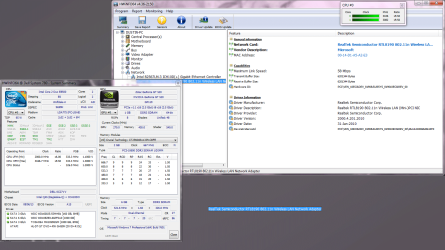
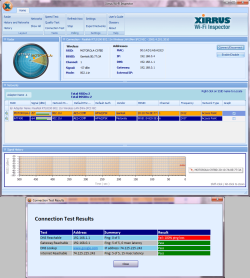
Alright, I got some updated images for you.

Code:
Windows IP Configuration

   Host Name . . . . . . . . . . . . : Dustin-PC
   Primary Dns Suffix  . . . . . . . : 
   Node Type . . . . . . . . . . . . : Hybrid
   IP Routing Enabled. . . . . . . . : No
   WINS Proxy Enabled. . . . . . . . : No

Wireless LAN adapter Wireless Network Connection:

   Connection-specific DNS Suffix  . : 
   Description . . . . . . . . . . . : Realtek RTL8190 802.11n Wireless LAN (Mini-)PCI NIC
   Physical Address. . . . . . . . . : 00-14-D1-A5-A2-E3
   DHCP Enabled. . . . . . . . . . . : Yes
   Autoconfiguration Enabled . . . . : Yes
   Link-local IPv6 Address . . . . . : fe80::acc5:9e7b:64b8:279e%13(Preferred) 
   IPv4 Address. . . . . . . . . . . : 192.168.0.4(Preferred) 
   Subnet Mask . . . . . . . . . . . : 255.255.255.0
   Lease Obtained. . . . . . . . . . : Monday, May 05, 2014 7:44:15 PM
   Lease Expires . . . . . . . . . . : Monday, May 05, 2014 9:14:16 PM
   Default Gateway . . . . . . . . . : 192.168.0.1
   DHCP Server . . . . . . . . . . . : 192.168.0.1
   DHCPv6 IAID . . . . . . . . . . . : 318772433
   DHCPv6 Client DUID. . . . . . . . : 00-01-00-01-1A-2A-FE-A6-00-25-64-B9-AD-19
   DNS Servers . . . . . . . . . . . : 192.168.1.1
                                       208.67.222.222
   NetBIOS over Tcpip. . . . . . . . : Enabled

Ethernet adapter Local Area Connection:

   Media State . . . . . . . . . . . : Media disconnected
   Connection-specific DNS Suffix  . : 
   Description . . . . . . . . . . . : Intel(R) 82567LM-3 Gigabit Network Connection
   Physical Address. . . . . . . . . : 00-25-64-B9-AD-19
   DHCP Enabled. . . . . . . . . . . : Yes
   Autoconfiguration Enabled . . . . : Yes

Ethernet adapter VirtualBox Host-Only Network:

   Connection-specific DNS Suffix  . : 
   Description . . . . . . . . . . . : VirtualBox Host-Only Ethernet Adapter
   Physical Address. . . . . . . . . : 08-00-27-00-84-FC
   DHCP Enabled. . . . . . . . . . . : No
   Autoconfiguration Enabled . . . . : Yes
   Link-local IPv6 Address . . . . . : fe80::dc2d:9ee7:eb26:993a%19(Preferred) 
   IPv4 Address. . . . . . . . . . . : 192.168.56.1(Preferred) 
   Subnet Mask . . . . . . . . . . . : 255.255.255.0
   Default Gateway . . . . . . . . . : 
   DHCPv6 IAID . . . . . . . . . . . : 537395239
   DHCPv6 Client DUID. . . . . . . . : 00-01-00-01-1A-2A-FE-A6-00-25-64-B9-AD-19
   DNS Servers . . . . . . . . . . . : fec0:0:0:ffff::1%1
                                       fec0:0:0:ffff::2%1
                                       fec0:0:0:ffff::3%1
   NetBIOS over Tcpip. . . . . . . . : Enabled

Tunnel adapter isatap.{D40A88B4-7C14-4487-953B-45B945D33BD0}:

   Media State . . . . . . . . . . . : Media disconnected
   Connection-specific DNS Suffix  . : 
   Description . . . . . . . . . . . : Microsoft ISATAP Adapter
   Physical Address. . . . . . . . . : 00-00-00-00-00-00-00-E0
   DHCP Enabled. . . . . . . . . . . : No
   Autoconfiguration Enabled . . . . : Yes

Tunnel adapter Local Area Connection* 11:

   Media State . . . . . . . . . . . : Media disconnected
   Connection-specific DNS Suffix  . : 
   Description . . . . . . . . . . . : Teredo Tunneling Pseudo-Interface
   Physical Address. . . . . . . . . : 00-00-00-00-00-00-00-E0
   DHCP Enabled. . . . . . . . . . . : No
   Autoconfiguration Enabled . . . . : Yes

Tunnel adapter isatap.{EB3F0BF5-22BA-44DE-B3D4-084A1D199012}:

   Media State . . . . . . . . . . . : Media disconnected
   Connection-specific DNS Suffix  . : 
   Description . . . . . . . . . . . : Microsoft ISATAP Adapter #2
   Physical Address. . . . . . . . . : 00-00-00-00-00-00-00-E0
   DHCP Enabled. . . . . . . . . . . : No
   Autoconfiguration Enabled . . . . : Yes

Tunnel adapter isatap.{D59493FE-84A5-423E-8C68-69F3BAA35C76}:

   Media State . . . . . . . . . . . : Media disconnected
   Connection-specific DNS Suffix  . : 
   Description . . . . . . . . . . . : Microsoft ISATAP Adapter #4
   Physical Address. . . . . . . . . : 00-00-00-00-00-00-00-E0
   DHCP Enabled. . . . . . . . . . . : No
   Autoconfiguration Enabled . . . . : Yes
 

Attachments

  • HWiNFO64.png
    HWiNFO64.png
    95 KB · Views: 0
  • HWiNFO64-wireless.png
    HWiNFO64-wireless.png
    142.5 KB · Views: 0
  • xirrus.png
    xirrus.png
    74.8 KB · Views: 1

My Computer

Computer type
PC/Desktop
Computer Manufacturer/Model Number
Dell / Custom build
OS
Windows 7 Professional x64 SP1
CPU
Intel Core 2 Duo CPU e8500 @ 3.16GHz
Memory
6144MB ram
Graphics Card(s)
NVIDIA GeForce GT 520
Hard Drives
TOSHIBA External USB 3.0 USB
WDC WD10EZEX-60ZF5A0 ATA
WDC WD1600JS-55MHB1 ATA
Antivirus
MSE
Browser
Firefox
Back
Top