Internet Crashes when Phone opens.. s;

Sp1t0nTh3Gr0und

New member
Local time
7:01 PM
Messages
44
Hey guys i got a really annoying problem with my Internet Connection.
First of all, whenever the home-phone opens/close my internet is down the next 1-5 Min(s)
I been searching abit on Google & Yahoo but i didnt find any other people with same problem, and how to resolve this.
Information :
This happend just after i moved the Internet Router(Box) From the Living room to my room, cuz of some Wireless problems...
Router Information :
Billion - Wireless G ADSL Router.
Model: BiPac 5200G R5
Product: 802.11g ADSL2+ Firewall Router.
If any more information about Router / Phone needed please make a comment or PM me.
~Sp1t0nTh3Gr0und'!
 
Last edited:

My Computer

OS
Windows 7
Hi Sp1t0nTh3Gr0und,

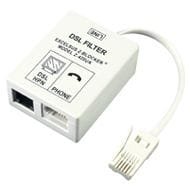
Have you tried a new ADSL filter?

imgB143361.jpg
 

My Computer

Computer type
PC/Desktop
Computer Manufacturer/Model Number
Dwarf Dwf/11/2012 r09/2013
OS
Windows 8.1 Pro RTM x64
CPU
Intel Core-i5-3570K 4-core @ 3.4GHz (Ivy Bridge) (OC 4.4GHz)
Motherboard
ASRock Z77 Extreme4-M
Memory
4 x 4GB DDR3-1600 Corsair Vengeance CMZ8GX3M2A1600C9B (16GB)
Graphics Card(s)
MSI GeForce GTX770 Gaming OC 2GB
Sound Card
Realtek High Definition on board solution (ALC 898)
Monitor(s) Displays
ViewSonic VA1912w Widescreen (VGA)
Screen Resolution
1440x900
Hard Drives
OCZ Agility 3 SSD 120GB SATA III x2 (RAID 0)
Samsung HD501LJ 500GB SATA II x2
Hitachi HDS721010CLA332 1TB SATA II
Iomega 1.5TB Ext USB 2.0
WD 2.0TB Ext USB 3.0
PSU
XFX Pro Series 850W Semi-Modular
Case
Gigabyte IF233
Cooling
1 x 120mm Front Inlet 1 x 120mm Rear Exhaust
Keyboard
Microsoft Comfort Curve Keyboard 3000 (USB)
Mouse
Microsoft Comfort Mouse 3000 for Business (USB)
Internet Speed
NetGear DG834Gv3 ADSL Modem/Router (Ethernet) ~4.0 Mb/s (O2)
Antivirus
Avast! 8.0.1497
Browser
IE 11
Other Info
Optical Drive: HL-DT-ST BD-RE BH10LS30 SATA Bluray
Lexmark S305 Printer/Scanner/Copier (USB)
WEI Score: 8.1/8.1/8.5/8.5/8.25
Asus Eee PC 1011PX Netbook (Windows 7 x86 Starter)
Do you have DSL? I have DSL and have the same problem. I've been looking for sometime and haven't found anything that solved my particular problem, but I might be able to point you the direction of something that might solve yours.

EDIT: I have never seen the ADSL filter, just a DSL filter, which is all the phones in my house.

EDIT2: never mind. didn't realize the two filters were the same thing.
 

My Computer

Computer type
Laptop
Computer Manufacturer/Model Number
Toshiba P775-S7100
OS
Windows 7 Professional SP1 64-bit
CPU
Intel Core i5-2450M @2.5 GHz
Memory
6 GB DDR3 1333MHz
Graphics Card(s)
Intel HD 3000
Monitor(s) Displays
Built-in 17.3" LED; 22" Insignia NS-L22Q-10A
Screen Resolution
1600x900; 1360x768
Hard Drives
750 GB Hitachi
1TB Seagate FreeAgent External
Internet Speed
Verizon DSL Speed(Down/Up): 3360 Kbps / 800 Kbps
Antivirus
MSE and MBAM Pro
Browser
IE10
Its the ADSL Filter that you did not move with the router. Are you in SA?
 

My Computer

Computer Manufacturer/Model Number
Proline
OS
Windows 7 Pro 64 bit
CPU
Intel(R) Core(TM) i7 CPU 870 @ 2.93GHz
Motherboard
H55-G43(MS-7638)
Memory
4GB
Graphics Card(s)
NVIDIA GeForce GTX 470
Sound Card
Onboard
Monitor(s) Displays
Proline LCD 19 inch
Screen Resolution
1280 x 1024
Hard Drives
2 x SATA 250 Gig 1 x External 2TB
PSU
RX 730 SS
Case
Proline
Cooling
Standard
Keyboard
PS2
Mouse
PS2
Internet Speed
To embarrassed to tell lol
Hi Sp1t0nTh3Gr0und,

Have you tried a new ADSL filter?

View attachment 86604
Could you tell me exactly what this "ADSL Filter" do, and how much it would cost?

Do you have DSL? I have DSL and have the same problem. I've been looking for sometime and haven't found anything that solved my particular problem, but I might be able to point you the direction of something that might solve yours.
If DSL is the cable to connect from my router to my PC so that is what I have.
If not :
Can you tell me what a DSL is ?

Its the ADSL Filter that you did not move with the router. Are you in SA?
I live in Denmark.
I didnt understand your question sorry, my english isnt so good and i dont have much knownledge in Internet routers, ADSL & Dsl etc... :/
 

My Computer

OS
Windows 7
DSL is a type of internet service. It uses the phone line, kind of like dail-up, but is much faster. If your modem connects to the phone line you have DSL.
 

My Computer

Computer type
Laptop
Computer Manufacturer/Model Number
Toshiba P775-S7100
OS
Windows 7 Professional SP1 64-bit
CPU
Intel Core i5-2450M @2.5 GHz
Memory
6 GB DDR3 1333MHz
Graphics Card(s)
Intel HD 3000
Monitor(s) Displays
Built-in 17.3" LED; 22" Insignia NS-L22Q-10A
Screen Resolution
1600x900; 1360x768
Hard Drives
750 GB Hitachi
1TB Seagate FreeAgent External
Internet Speed
Verizon DSL Speed(Down/Up): 3360 Kbps / 800 Kbps
Antivirus
MSE and MBAM Pro
Browser
IE10
DSL is a type of internet service. It uses the phone line, kind of like dail-up, but is much faster. If your modem connects to the phone line you have DSL.

Is there a fast way to check if it do that? :D
Like looking at a cable or something s; ?
 

My Computer

OS
Windows 7
Hi Sp1t0nTh3Gr0und,

Have you tried a new ADSL filter?

View attachment 86604

Ok then just go and have a look where it was plugged in before and see if you can see a box something like the above. Take the box and plug it in where you now have your router :D
 

My Computer

Computer Manufacturer/Model Number
Proline
OS
Windows 7 Pro 64 bit
CPU
Intel(R) Core(TM) i7 CPU 870 @ 2.93GHz
Motherboard
H55-G43(MS-7638)
Memory
4GB
Graphics Card(s)
NVIDIA GeForce GTX 470
Sound Card
Onboard
Monitor(s) Displays
Proline LCD 19 inch
Screen Resolution
1280 x 1024
Hard Drives
2 x SATA 250 Gig 1 x External 2TB
PSU
RX 730 SS
Case
Proline
Cooling
Standard
Keyboard
PS2
Mouse
PS2
Internet Speed
To embarrassed to tell lol
It's the same thing. The A simply means Asynchronous, which relates to your transfer speeds, with Down being greater than Up. If they were both the same, it would be Synchronous, but you would still use the same filter. Basically, the filter separates the low-frequency voice data from the high-frequency broadband signal. If the filter is failing, or has failed, then the signals aren't separated properly and can interfere with each other. In many cases, it is the signal pulse that is generated by picking up the telephone receiver that is responsible.
 

My Computer

Computer type
PC/Desktop
Computer Manufacturer/Model Number
Dwarf Dwf/11/2012 r09/2013
OS
Windows 8.1 Pro RTM x64
CPU
Intel Core-i5-3570K 4-core @ 3.4GHz (Ivy Bridge) (OC 4.4GHz)
Motherboard
ASRock Z77 Extreme4-M
Memory
4 x 4GB DDR3-1600 Corsair Vengeance CMZ8GX3M2A1600C9B (16GB)
Graphics Card(s)
MSI GeForce GTX770 Gaming OC 2GB
Sound Card
Realtek High Definition on board solution (ALC 898)
Monitor(s) Displays
ViewSonic VA1912w Widescreen (VGA)
Screen Resolution
1440x900
Hard Drives
OCZ Agility 3 SSD 120GB SATA III x2 (RAID 0)
Samsung HD501LJ 500GB SATA II x2
Hitachi HDS721010CLA332 1TB SATA II
Iomega 1.5TB Ext USB 2.0
WD 2.0TB Ext USB 3.0
PSU
XFX Pro Series 850W Semi-Modular
Case
Gigabyte IF233
Cooling
1 x 120mm Front Inlet 1 x 120mm Rear Exhaust
Keyboard
Microsoft Comfort Curve Keyboard 3000 (USB)
Mouse
Microsoft Comfort Mouse 3000 for Business (USB)
Internet Speed
NetGear DG834Gv3 ADSL Modem/Router (Ethernet) ~4.0 Mb/s (O2)
Antivirus
Avast! 8.0.1497
Browser
IE 11
Other Info
Optical Drive: HL-DT-ST BD-RE BH10LS30 SATA Bluray
Lexmark S305 Printer/Scanner/Copier (USB)
WEI Score: 8.1/8.1/8.5/8.5/8.25
Asus Eee PC 1011PX Netbook (Windows 7 x86 Starter)
Hi Sp1t0nTh3Gr0und,

Have you tried a new ADSL filter?

View attachment 86604

Ok then just go and have a look where it was plugged in before and see if you can see a box something like the above. Take the box and plug it in where you now have your router :D

Okay at my old plugged place, there is a 3 tagged black thing plugged in another 3 tagged thing lol, but at the buttom of the Black thing is our phone plugged like the ADSL Filter, just black and with only 1 plugable place.(: Hope you understand or else i'll try see if i can take a picture(:
 

My Computer

OS
Windows 7
It's the same thing. The A simply means Asynchronous, which relates to your transfer speeds, with Down being greater than Up. If they were both the same, it would be Synchronous, but you would still use the same filter. Basically, the filter separates the low-frequency voice data from the high-frequency broadband signal. If the filter is failing, or has failed, then the signals aren't separated properly and can interfere with each other. In many cases, it is the signal pulse that is generated by picking up the telephone receiver that is responsible.

Well, i think about if i should plug my phone at my current modern plugged place, like old times just in my room instead of the Living room(: ? another feature in this is making me take the phone faster L0L (:
 

My Computer

OS
Windows 7
Another point to note is that ALL phone socket extensions should have such a filter unit attached, even if you only connect a phone/answering machine/fax to that extension.
 

My Computer

Computer type
PC/Desktop
Computer Manufacturer/Model Number
Dwarf Dwf/11/2012 r09/2013
OS
Windows 8.1 Pro RTM x64
CPU
Intel Core-i5-3570K 4-core @ 3.4GHz (Ivy Bridge) (OC 4.4GHz)
Motherboard
ASRock Z77 Extreme4-M
Memory
4 x 4GB DDR3-1600 Corsair Vengeance CMZ8GX3M2A1600C9B (16GB)
Graphics Card(s)
MSI GeForce GTX770 Gaming OC 2GB
Sound Card
Realtek High Definition on board solution (ALC 898)
Monitor(s) Displays
ViewSonic VA1912w Widescreen (VGA)
Screen Resolution
1440x900
Hard Drives
OCZ Agility 3 SSD 120GB SATA III x2 (RAID 0)
Samsung HD501LJ 500GB SATA II x2
Hitachi HDS721010CLA332 1TB SATA II
Iomega 1.5TB Ext USB 2.0
WD 2.0TB Ext USB 3.0
PSU
XFX Pro Series 850W Semi-Modular
Case
Gigabyte IF233
Cooling
1 x 120mm Front Inlet 1 x 120mm Rear Exhaust
Keyboard
Microsoft Comfort Curve Keyboard 3000 (USB)
Mouse
Microsoft Comfort Mouse 3000 for Business (USB)
Internet Speed
NetGear DG834Gv3 ADSL Modem/Router (Ethernet) ~4.0 Mb/s (O2)
Antivirus
Avast! 8.0.1497
Browser
IE 11
Other Info
Optical Drive: HL-DT-ST BD-RE BH10LS30 SATA Bluray
Lexmark S305 Printer/Scanner/Copier (USB)
WEI Score: 8.1/8.1/8.5/8.5/8.25
Asus Eee PC 1011PX Netbook (Windows 7 x86 Starter)
Hi Sp1t0nTh3Gr0und,

Have you tried a new ADSL filter?

View attachment 86604

Ok then just go and have a look where it was plugged in before and see if you can see a box something like the above. Take the box and plug it in where you now have your router :D

Okay at my old plugged place, there is a 3 tagged black thing plugged in another 3 tagged thing lol, but at the buttom of the Black thing is our phone plugged like the ADSL Filter, just black and with only 1 plugable place.(: Hope you understand or else i'll try see if i can take a picture(:
Can we have a picture, please? This sounds like the filter I was on about.
 

My Computer

Computer type
PC/Desktop
Computer Manufacturer/Model Number
Dwarf Dwf/11/2012 r09/2013
OS
Windows 8.1 Pro RTM x64
CPU
Intel Core-i5-3570K 4-core @ 3.4GHz (Ivy Bridge) (OC 4.4GHz)
Motherboard
ASRock Z77 Extreme4-M
Memory
4 x 4GB DDR3-1600 Corsair Vengeance CMZ8GX3M2A1600C9B (16GB)
Graphics Card(s)
MSI GeForce GTX770 Gaming OC 2GB
Sound Card
Realtek High Definition on board solution (ALC 898)
Monitor(s) Displays
ViewSonic VA1912w Widescreen (VGA)
Screen Resolution
1440x900
Hard Drives
OCZ Agility 3 SSD 120GB SATA III x2 (RAID 0)
Samsung HD501LJ 500GB SATA II x2
Hitachi HDS721010CLA332 1TB SATA II
Iomega 1.5TB Ext USB 2.0
WD 2.0TB Ext USB 3.0
PSU
XFX Pro Series 850W Semi-Modular
Case
Gigabyte IF233
Cooling
1 x 120mm Front Inlet 1 x 120mm Rear Exhaust
Keyboard
Microsoft Comfort Curve Keyboard 3000 (USB)
Mouse
Microsoft Comfort Mouse 3000 for Business (USB)
Internet Speed
NetGear DG834Gv3 ADSL Modem/Router (Ethernet) ~4.0 Mb/s (O2)
Antivirus
Avast! 8.0.1497
Browser
IE 11
Other Info
Optical Drive: HL-DT-ST BD-RE BH10LS30 SATA Bluray
Lexmark S305 Printer/Scanner/Copier (USB)
WEI Score: 8.1/8.1/8.5/8.5/8.25
Asus Eee PC 1011PX Netbook (Windows 7 x86 Starter)
Dwarf, should the line going to the DSL box also have a filter? The instructions that came from Verizon were really vague and I think I have another filter here.
 

My Computer

Computer type
Laptop
Computer Manufacturer/Model Number
Toshiba P775-S7100
OS
Windows 7 Professional SP1 64-bit
CPU
Intel Core i5-2450M @2.5 GHz
Memory
6 GB DDR3 1333MHz
Graphics Card(s)
Intel HD 3000
Monitor(s) Displays
Built-in 17.3" LED; 22" Insignia NS-L22Q-10A
Screen Resolution
1600x900; 1360x768
Hard Drives
750 GB Hitachi
1TB Seagate FreeAgent External
Internet Speed
Verizon DSL Speed(Down/Up): 3360 Kbps / 800 Kbps
Antivirus
MSE and MBAM Pro
Browser
IE10
Ok then just go and have a look where it was plugged in before and see if you can see a box something like the above. Take the box and plug it in where you now have your router :D

Okay at my old plugged place, there is a 3 tagged black thing plugged in another 3 tagged thing lol, but at the buttom of the Black thing is our phone plugged like the ADSL Filter, just black and with only 1 plugable place.(: Hope you understand or else i'll try see if i can take a picture(:
Can we have a picture, please? This sounds like the filter I was on about.

Sure i'll go get a pic of my old plugged place, and my current(:-
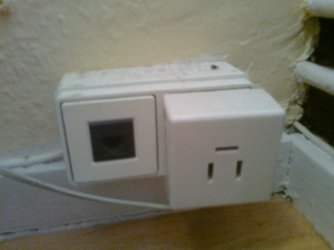
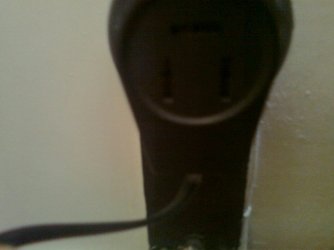
The black one was my old connection and the white is my current.
The Black Cable comming from the Black thing, is the Phone Cable.
The White Cable comming from the White thing is the Modern Cable(:
Both White & Black thing is plugged into another |¨| plugable thing(:
 

Attachments

  • Billede0073.jpg
    Billede0073.jpg
    148.9 KB · Views: 1
  • Billede0074.jpg
    Billede0074.jpg
    157.6 KB · Views: 1

My Computer

OS
Windows 7

My Computer

Computer type
PC/Desktop
Computer Manufacturer/Model Number
Dwarf Dwf/11/2012 r09/2013
OS
Windows 8.1 Pro RTM x64
CPU
Intel Core-i5-3570K 4-core @ 3.4GHz (Ivy Bridge) (OC 4.4GHz)
Motherboard
ASRock Z77 Extreme4-M
Memory
4 x 4GB DDR3-1600 Corsair Vengeance CMZ8GX3M2A1600C9B (16GB)
Graphics Card(s)
MSI GeForce GTX770 Gaming OC 2GB
Sound Card
Realtek High Definition on board solution (ALC 898)
Monitor(s) Displays
ViewSonic VA1912w Widescreen (VGA)
Screen Resolution
1440x900
Hard Drives
OCZ Agility 3 SSD 120GB SATA III x2 (RAID 0)
Samsung HD501LJ 500GB SATA II x2
Hitachi HDS721010CLA332 1TB SATA II
Iomega 1.5TB Ext USB 2.0
WD 2.0TB Ext USB 3.0
PSU
XFX Pro Series 850W Semi-Modular
Case
Gigabyte IF233
Cooling
1 x 120mm Front Inlet 1 x 120mm Rear Exhaust
Keyboard
Microsoft Comfort Curve Keyboard 3000 (USB)
Mouse
Microsoft Comfort Mouse 3000 for Business (USB)
Internet Speed
NetGear DG834Gv3 ADSL Modem/Router (Ethernet) ~4.0 Mb/s (O2)
Antivirus
Avast! 8.0.1497
Browser
IE 11
Other Info
Optical Drive: HL-DT-ST BD-RE BH10LS30 SATA Bluray
Lexmark S305 Printer/Scanner/Copier (USB)
WEI Score: 8.1/8.1/8.5/8.5/8.25
Asus Eee PC 1011PX Netbook (Windows 7 x86 Starter)
I think your problem might stem from a wiring problem of the phone lines in your house. I had exactly the same problem and after the phone company made some wiring changes, it worked. The way I understood it was that there is a primary outlet and the others are subordinate (I have 4 outlets). So the one where it works in your house may be the primary outlet.
Now all of this was in Germany. In other countries the situation may be different.

PS: In my house in the US I did not have that problem. I was at first working with individual filters per outlet, but then Bell South installed a central filter where the phone line comes into the house. But the lack of filters should not bring the internet down - it just produces noises in the phone line.
 

My Computer

Computer Manufacturer/Model Number
HP, Dell, Gateway, Toshiba - 4 laptops and 2 desktops
OS
Vista, Windows7, Mint Mate, Zorin, Windows 8
CPU
from 1.6GHz Duo to i7
Monitor(s) Displays
2x HP w2207
Hard Drives
5x HDD, 7x SSD, 12x Externals
Keyboard
with trackball - no mices
Mouse
Trackball mice
Internet Speed
DSL 6000
I think your problem might stem from a wiring problem of the phone lines in your house. I had exactly the same problem and after the phone company made some wiring changes, it worked. The way I understood it was that there is a primary outlet and the others are subordinate (I have 4 outlets). So the one where it works in your house may be the primary outlet.
Now all of this was in Germany. In other countries the situation may be different.

PS: In my house in the US I did not have that problem. I was at first working with individual filters per outlet, but then Bell South installed a central filter where the phone line comes into the house. But the lack of filters should not bring the internet down - it just produces noises in the phone line.

That also happend for my friend in turkey, they brought a new phone and connected it to another plugable thing and worked lol..
Should i try move my moderm to the Living room & connect with wireless internet?
 

My Computer

OS
Windows 7
After reading the link Dwarf provided it sound like my not having the modem but having the phones on filters is why I have no weird noise, but I do have internet cut offs. I'm going to mess with it later and see what I can find out for my own problem. spit, good luck with your issue. I'll post back in here if I find a resolution, since it might work for you too.
 

My Computer

Computer type
Laptop
Computer Manufacturer/Model Number
Toshiba P775-S7100
OS
Windows 7 Professional SP1 64-bit
CPU
Intel Core i5-2450M @2.5 GHz
Memory
6 GB DDR3 1333MHz
Graphics Card(s)
Intel HD 3000
Monitor(s) Displays
Built-in 17.3" LED; 22" Insignia NS-L22Q-10A
Screen Resolution
1600x900; 1360x768
Hard Drives
750 GB Hitachi
1TB Seagate FreeAgent External
Internet Speed
Verizon DSL Speed(Down/Up): 3360 Kbps / 800 Kbps
Antivirus
MSE and MBAM Pro
Browser
IE10
Back
Top