Internet Diagnostic Service not executing.

T7388

New member
Local time
10:02 AM
Messages
16
Recently my laptop crashed (BSoD) with a language pack fault. I fixed it by restoring it to a working point but since doing that my laptop won't connect to a WiFi I usually connect to (not a home WiF).

I tried to run a Diagnostic on it but got the error that my diagnostic tool was not executing.

This problem is similar but the IP Reset file did not work on my laptop.

I can upload a .txt of my ipconfig /all later as I'm currently on my mobile.
 

My Computer

Computer type
Laptop
Computer Manufacturer/Model Number
Lenovo
OS
Windows 7 Ultimate x64
CPU
Intel(R) Core(TM) i7-4700MQ CPU @ 2.40GHz (8 CPUs) ~2.4GHz
Memory
8192MB RAM
Graphics Card(s)
Intel(R) HD Graphics 4600
What security software are you using? Post ipconfig results when you get the chance.

Try run cmd as admin:
Code:
sfc /scannow

- Remove and reconnect to the wireless network - http://www.sevenforums.com/tutorials/120670-wireless-network-remove.html
- Check wireless IP settings (set auto IP and DNS server)
- Run in cmd as admin: netsh winsock reset
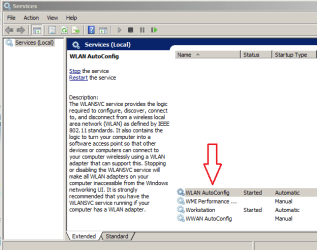
- Check whether "WLAN AutoConfig" service is Automatic and started.
 

My Computer

Computer type
PC/Desktop
Computer Manufacturer/Model Number
Custom Build
OS
Windows 7 Ultimate x64 SP1
CPU
AMD Phenom 2 1090T
Motherboard
Gigabyte GA-890FXA-UD5
Memory
2x8GB Kingston HyperX Fury Black 1600Mhz Unganged
Graphics Card(s)
MSI GTX 970 Gaming 4G
Sound Card
Realtek On-Board HD 7.1 Audio / Logitech G35
Monitor(s) Displays
3xAcer GD245HQ
Screen Resolution
1920x1080
Hard Drives
Samsung 850 Pro 512GB SSD - OS /
WD Caviar Black SATA 3 - 1 TBx2 - Dynamic RAID 0 /
WD Caviar Green SATA 2 - 640GBx2 - Dynamic RAID 0 /
WD Caviar Green SATA 2 - 640GB - Internal Backup /
Seagate Barracude SATA 3 - 3TB - External Backup/ Sync
PSU
HighPower 1000W
Case
Cooler Master HAF 932
Cooling
Noctua NH-D14
Keyboard
Logitech G19
Mouse
Logitech G500
Internet Speed
100/4 Mbit Cable (100GB quota)
Antivirus
ZoneAlarm Extreme Security / MBAM Pro / MBAE Free / SAS Free
Browser
IE 11 - Firefox - Chrome
Other Info
Logitech F710/ G27/ G940/ Z5500 // TrackIR 5 // Nvidia 3D Surround Vision
IPConfig is in Spanish, as that's the original lamguage of the Computer I use. I'll post details of the "sfc /scannow" as soon as it's done.

Did the Reset, will restart when the scan is done.

Do I check the "WLAN AutoConfig" in "cmd.exe", "services.msc", "msconfig.exe" or somewhere else?

Configuración IP de Windows


Adaptador de LAN inalámbrica Conexión de red inalámbrica 2:

Estado de los medios. . . . . . . . . . . : medios desconectados
Sufijo DNS específico para la conexión. . :

Adaptador de Ethernet Conexión de área local:

Estado de los medios. . . . . . . . . . . : medios desconectados
Sufijo DNS específico para la conexión. . :

Adaptador de Ethernet Conexión de red Bluetooth:

Estado de los medios. . . . . . . . . . . : medios desconectados
Sufijo DNS específico para la conexión. . :

Adaptador de LAN inalámbrica Conexión de red inalámbrica:

Sufijo DNS específico para la conexión. . :
Dirección IPv6 . . . . . . . . . . : ::885f:7a34:a72b:469
Dirección IPv6 temporal. . . . . . : ::7442:55c8:2c14:aaff
Vínculo: dirección IPv6 local. . . : fe80::885f:7a34:a72b:469%10
Dirección IPv4 de configuración automática: 169.254.4.105
Máscara de subred . . . . . . . . . . . . : 255.255.0.0
Puerta de enlace predeterminada . . . . . :

Adaptador de Ethernet VMware Network Adapter VMnet1:

Sufijo DNS específico para la conexión. . :
Vínculo: dirección IPv6 local. . . : fe80::1d49:9b70:a68e:10f4%24
Dirección IPv4 de configuración automática: 169.254.16.244
Máscara de subred . . . . . . . . . . . . : 255.255.0.0
Puerta de enlace predeterminada . . . . . :

Adaptador de Ethernet VMware Network Adapter VMnet8:

Sufijo DNS específico para la conexión. . :
Vínculo: dirección IPv6 local. . . : fe80::15a8:32b3:d677:33e9%25
Dirección IPv4 de configuración automática: 169.254.51.233
Máscara de subred . . . . . . . . . . . . : 255.255.0.0
Puerta de enlace predeterminada . . . . . :

Adaptador de túnel Conexión de área local* 14:

Estado de los medios. . . . . . . . . . . : medios desconectados
Sufijo DNS específico para la conexión. . :

Adaptador de túnel isatap.{C03467BD-B000-4559-9D10-429337F83F36}:

Estado de los medios. . . . . . . . . . . : medios desconectados
Sufijo DNS específico para la conexión. . :

Adaptador de túnel isatap.{79BBA7BB-2CFA-4C66-9181-2AB6379D87C5}:

Estado de los medios. . . . . . . . . . . : medios desconectados
Sufijo DNS específico para la conexión. . :

Adaptador de túnel isatap.{C361E1E0-4C9F-47F5-BBCF-FAF390ADB907}:

Estado de los medios. . . . . . . . . . . : medios desconectados
Sufijo DNS específico para la conexión. . :

Adaptador de túnel Reusable ISATAP Interface {E1220A39-98CD-4407-A8AE-6CF8436322
1C}:

Estado de los medios. . . . . . . . . . . : medios desconectados
Sufijo DNS específico para la conexión. . :

Adaptador de túnel isatap.{EEBA6EFD-FB8B-4B98-86CA-0A132EB05983}:

Estado de los medios. . . . . . . . . . . : medios desconectados
Sufijo DNS específico para la conexión. . :

Adaptador de túnel isatap.{A5C88F24-56D5-4AD5-87A0-BDE766A2796D}:

Estado de los medios. . . . . . . . . . . : medios desconectados
Sufijo DNS específico para la conexión. . :
 

My Computer

Computer type
Laptop
Computer Manufacturer/Model Number
Lenovo
OS
Windows 7 Ultimate x64
CPU
Intel(R) Core(TM) i7-4700MQ CPU @ 2.40GHz (8 CPUs) ~2.4GHz
Memory
8192MB RAM
Graphics Card(s)
Intel(R) HD Graphics 4600
Double posted, sorry.

Sfc /scannow result:

windows found damaged archives and repaired them successfull.

Am rebooting as per directed from the Reset.

Edit:
No change at all in the Internet Diagnostic Directive.
 
Last edited:

My Computer

Computer type
Laptop
Computer Manufacturer/Model Number
Lenovo
OS
Windows 7 Ultimate x64
CPU
Intel(R) Core(TM) i7-4700MQ CPU @ 2.40GHz (8 CPUs) ~2.4GHz
Memory
8192MB RAM
Graphics Card(s)
Intel(R) HD Graphics 4600
What security software are you using? Try uninstalling it.

WLAN AutoConfig is in services.msc
 

My Computer

Computer type
PC/Desktop
Computer Manufacturer/Model Number
Custom Build
OS
Windows 7 Ultimate x64 SP1
CPU
AMD Phenom 2 1090T
Motherboard
Gigabyte GA-890FXA-UD5
Memory
2x8GB Kingston HyperX Fury Black 1600Mhz Unganged
Graphics Card(s)
MSI GTX 970 Gaming 4G
Sound Card
Realtek On-Board HD 7.1 Audio / Logitech G35
Monitor(s) Displays
3xAcer GD245HQ
Screen Resolution
1920x1080
Hard Drives
Samsung 850 Pro 512GB SSD - OS /
WD Caviar Black SATA 3 - 1 TBx2 - Dynamic RAID 0 /
WD Caviar Green SATA 2 - 640GBx2 - Dynamic RAID 0 /
WD Caviar Green SATA 2 - 640GB - Internal Backup /
Seagate Barracude SATA 3 - 3TB - External Backup/ Sync
PSU
HighPower 1000W
Case
Cooler Master HAF 932
Cooling
Noctua NH-D14
Keyboard
Logitech G19
Mouse
Logitech G500
Internet Speed
100/4 Mbit Cable (100GB quota)
Antivirus
ZoneAlarm Extreme Security / MBAM Pro / MBAE Free / SAS Free
Browser
IE 11 - Firefox - Chrome
Other Info
Logitech F710/ G27/ G940/ Z5500 // TrackIR 5 // Nvidia 3D Surround Vision
T7388,
I do not see where you have completed the steps to "Remove and reconnect to the wireless network" requested in post #2.

Also, please run SFC/SCANNOW a second time.
 

My Computer

Computer type
Laptop
Computer Manufacturer/Model Number
Employer provided Dell Latitude
OS
W7 Pro SP1 64bit
CPU
i7
Memory
8GB
Graphics Card(s)
Intel HD Graphics
Hard Drives
crappy SSD
Antivirus
Employer mandated Symantec Endpoint Protection
Browser
Pale Moon 64bit, IE11 64bit & Chrome 64bit
GokAy - AVG free, 2015 edition. I'll try that as soon as I get home. Unfortunately I don't see WLAN AutoConfig in services.msc??

UsernameIssues - I forgot to reply to that, I have attempted those steps on various WiFis, no difference. Will run sfc /scannow when I get home aswell.

Any other thoughts?
 

My Computer

Computer type
Laptop
Computer Manufacturer/Model Number
Lenovo
OS
Windows 7 Ultimate x64
CPU
Intel(R) Core(TM) i7-4700MQ CPU @ 2.40GHz (8 CPUs) ~2.4GHz
Memory
8192MB RAM
Graphics Card(s)
Intel(R) HD Graphics 4600
If the WLAN service is missing, then that might explain your issue of not connecting to a Wireless Access Point:

WLAN.png

I'm not sure how best to restore that service.
 

My Computer

Computer type
Laptop
Computer Manufacturer/Model Number
Employer provided Dell Latitude
OS
W7 Pro SP1 64bit
CPU
i7
Memory
8GB
Graphics Card(s)
Intel HD Graphics
Hard Drives
crappy SSD
Antivirus
Employer mandated Symantec Endpoint Protection
Browser
Pale Moon 64bit, IE11 64bit & Chrome 64bit

My Computer

Computer type
PC/Desktop
Computer Manufacturer/Model Number
Custom Build
OS
Windows 7 Ultimate x64 SP1
CPU
AMD Phenom 2 1090T
Motherboard
Gigabyte GA-890FXA-UD5
Memory
2x8GB Kingston HyperX Fury Black 1600Mhz Unganged
Graphics Card(s)
MSI GTX 970 Gaming 4G
Sound Card
Realtek On-Board HD 7.1 Audio / Logitech G35
Monitor(s) Displays
3xAcer GD245HQ
Screen Resolution
1920x1080
Hard Drives
Samsung 850 Pro 512GB SSD - OS /
WD Caviar Black SATA 3 - 1 TBx2 - Dynamic RAID 0 /
WD Caviar Green SATA 2 - 640GBx2 - Dynamic RAID 0 /
WD Caviar Green SATA 2 - 640GB - Internal Backup /
Seagate Barracude SATA 3 - 3TB - External Backup/ Sync
PSU
HighPower 1000W
Case
Cooler Master HAF 932
Cooling
Noctua NH-D14
Keyboard
Logitech G19
Mouse
Logitech G500
Internet Speed
100/4 Mbit Cable (100GB quota)
Antivirus
ZoneAlarm Extreme Security / MBAM Pro / MBAE Free / SAS Free
Browser
IE 11 - Firefox - Chrome
Other Info
Logitech F710/ G27/ G940/ Z5500 // TrackIR 5 // Nvidia 3D Surround Vision
WLAN AytoConfig is started without problem, thanks for the .reg file GokAy

Second sfc /scannow result is:

Windows resource protection encountered damaged files and repaired them correctly. To obtain more details, consult CBS.Log.

Problem still persists.
 

My Computer

Computer type
Laptop
Computer Manufacturer/Model Number
Lenovo
OS
Windows 7 Ultimate x64
CPU
Intel(R) Core(TM) i7-4700MQ CPU @ 2.40GHz (8 CPUs) ~2.4GHz
Memory
8192MB RAM
Graphics Card(s)
Intel(R) HD Graphics 4600

My Computer

Computer type
Laptop
Computer Manufacturer/Model Number
Employer provided Dell Latitude
OS
W7 Pro SP1 64bit
CPU
i7
Memory
8GB
Graphics Card(s)
Intel HD Graphics
Hard Drives
crappy SSD
Antivirus
Employer mandated Symantec Endpoint Protection
Browser
Pale Moon 64bit, IE11 64bit & Chrome 64bit
Everytime I try that command it tells me that it can't find the specified route, that ""[SR]"" isn't a recognized internal or external command, or an outright "access denied"
 

My Computer

Computer type
Laptop
Computer Manufacturer/Model Number
Lenovo
OS
Windows 7 Ultimate x64
CPU
Intel(R) Core(TM) i7-4700MQ CPU @ 2.40GHz (8 CPUs) ~2.4GHz
Memory
8192MB RAM
Graphics Card(s)
Intel(R) HD Graphics 4600
Please post a screenshot of the cmd window rather than typing out the error that you see.

192748d1326380124-sfc-scannow-command-system-file-checker-sfcdetails.jpg


You should be able to copy the command line from the tutorial and paste it into the cmd window.
findstr should be the first part of the command, not "[SR]".
 

My Computer

Computer type
Laptop
Computer Manufacturer/Model Number
Employer provided Dell Latitude
OS
W7 Pro SP1 64bit
CPU
i7
Memory
8GB
Graphics Card(s)
Intel HD Graphics
Hard Drives
crappy SSD
Antivirus
Employer mandated Symantec Endpoint Protection
Browser
Pale Moon 64bit, IE11 64bit & Chrome 64bit
Maybe need to run cmd as admin if you skipped that step.
 

My Computer

Computer type
PC/Desktop
Computer Manufacturer/Model Number
Custom Build
OS
Windows 7 Ultimate x64 SP1
CPU
AMD Phenom 2 1090T
Motherboard
Gigabyte GA-890FXA-UD5
Memory
2x8GB Kingston HyperX Fury Black 1600Mhz Unganged
Graphics Card(s)
MSI GTX 970 Gaming 4G
Sound Card
Realtek On-Board HD 7.1 Audio / Logitech G35
Monitor(s) Displays
3xAcer GD245HQ
Screen Resolution
1920x1080
Hard Drives
Samsung 850 Pro 512GB SSD - OS /
WD Caviar Black SATA 3 - 1 TBx2 - Dynamic RAID 0 /
WD Caviar Green SATA 2 - 640GBx2 - Dynamic RAID 0 /
WD Caviar Green SATA 2 - 640GB - Internal Backup /
Seagate Barracude SATA 3 - 3TB - External Backup/ Sync
PSU
HighPower 1000W
Case
Cooler Master HAF 932
Cooling
Noctua NH-D14
Keyboard
Logitech G19
Mouse
Logitech G500
Internet Speed
100/4 Mbit Cable (100GB quota)
Antivirus
ZoneAlarm Extreme Security / MBAM Pro / MBAE Free / SAS Free
Browser
IE 11 - Firefox - Chrome
Other Info
Logitech F710/ G27/ G940/ Z5500 // TrackIR 5 // Nvidia 3D Surround Vision
Got it.

As I'm on a mobile, the forum will only allow pictures to be attached so I'll find a way to upload said file shortly.
 

Attachments

Last edited:

My Computer

Computer type
Laptop
Computer Manufacturer/Model Number
Lenovo
OS
Windows 7 Ultimate x64
CPU
Intel(R) Core(TM) i7-4700MQ CPU @ 2.40GHz (8 CPUs) ~2.4GHz
Memory
8192MB RAM
Graphics Card(s)
Intel(R) HD Graphics 4600
WLAN AytoConfig is started without problem, thanks for the .reg file GokAy

Second sfc /scannow result is:

Windows resource protection encountered damaged files and repaired them correctly. To obtain more details, consult CBS.Log.

Problem still persists.
Which problem still persists?
The Wi-Fi problem or the SFC problem?
Or both?


Got it.

As I'm on a mobile, the forum will only allow pictures to be attached so I'll find a way to upload said file shortly.
The file mentioned in the scan results should have no impact on the Wi-Fi problem. The SFC issue can be dealt with after the Wi-Fi issue is fixed.
 

My Computer

Computer type
Laptop
Computer Manufacturer/Model Number
Employer provided Dell Latitude
OS
W7 Pro SP1 64bit
CPU
i7
Memory
8GB
Graphics Card(s)
Intel HD Graphics
Hard Drives
crappy SSD
Antivirus
Employer mandated Symantec Endpoint Protection
Browser
Pale Moon 64bit, IE11 64bit & Chrome 64bit
WiFi problem still persists. I can see WiFis, just when I try to connect it says I'm connected but doesn't really connect.
 

My Computer

Computer type
Laptop
Computer Manufacturer/Model Number
Lenovo
OS
Windows 7 Ultimate x64
CPU
Intel(R) Core(TM) i7-4700MQ CPU @ 2.40GHz (8 CPUs) ~2.4GHz
Memory
8192MB RAM
Graphics Card(s)
Intel(R) HD Graphics 4600
Are you still getting a "169" IP address?

Code:
Adaptador de LAN inalámbrica Conexión de red inalámbrica:

   Sufijo DNS específico para la conexión. . :
   Dirección IPv6 . . . . . . . . . . : ::885f:7a34:a72b:469
   Dirección IPv6 temporal. . . . . . : ::7442:55c8:2c14:aaff
   Vínculo: dirección IPv6 local. . . : fe80::885f:7a34:a72b:469%10
   [COLOR=Red]Dirección IPv4 de configuración automática: 169.254.4.105[/COLOR]
   Máscara de subred . . . . . . . . . . . . : 255.255.0.0
   Puerta de enlace predeterminada . . . . . :
 

My Computer

Computer type
Laptop
Computer Manufacturer/Model Number
Employer provided Dell Latitude
OS
W7 Pro SP1 64bit
CPU
i7
Memory
8GB
Graphics Card(s)
Intel HD Graphics
Hard Drives
crappy SSD
Antivirus
Employer mandated Symantec Endpoint Protection
Browser
Pale Moon 64bit, IE11 64bit & Chrome 64bit
IPv4 address is exactly the same.
 

My Computer

Computer type
Laptop
Computer Manufacturer/Model Number
Lenovo
OS
Windows 7 Ultimate x64
CPU
Intel(R) Core(TM) i7-4700MQ CPU @ 2.40GHz (8 CPUs) ~2.4GHz
Memory
8192MB RAM
Graphics Card(s)
Intel(R) HD Graphics 4600
Just as a test:
If you know what the IP range is supposed to be, manually assign the wireless network adapter a static IP in that range and see if Internet connectivity is restored.
 

My Computer

Computer type
Laptop
Computer Manufacturer/Model Number
Employer provided Dell Latitude
OS
W7 Pro SP1 64bit
CPU
i7
Memory
8GB
Graphics Card(s)
Intel HD Graphics
Hard Drives
crappy SSD
Antivirus
Employer mandated Symantec Endpoint Protection
Browser
Pale Moon 64bit, IE11 64bit & Chrome 64bit
Back
Top