Internet Disconnects randomly

gstratto

New member
Local time
7:07 AM
Messages
13
Im back, and i've had sleep! :eek: So i have checked everything I can about this issue.

Internet disconnects a lot, I get the yellow "Searching for connection" icon down the bottom right on my network icon in the system toolbar. The Dsl light goes out on my modem, Siemens Speedstream 4200, and im getting some strange error messages in event viewer.

r75csx.jpg

I've checked my memory settings in Task manager and I have plenty.

Im running Windows 7 Build 7600 with 4gb of ram.
I am the main computer on my home network and another family member has a Windows Vista 32bit PC that is wired to mine on the lan and shared through ICS on my machine.

Any help would be awesome, if u need me to post any logs at all i am prepared to put them up.

Thanks in advance,
Gstratto.
 

My Computer

Computer Manufacturer/Model Number
Gigabyte
OS
Win 7 Ultimate Build 7600
CPU
Intel Core 2 Duo E6550 2.33GHZ
Motherboard
P35-ds3p
Memory
4 GB
Graphics Card(s)
2 x Radeon HD3850 Crossfire
Sound Card
Onboard
Monitor(s) Displays
32 Inch Panasonic Viera LCD
Hard Drives
200gb wd
200gb wd
500gb wd
1000gb wd
PSU
650 watt crossfire certified psu
Case
Coolmaster
Looks like an ISP issue, give them a call and see if there are outages in your area.
 

My Computer

Computer type
PC/Desktop
Computer Manufacturer/Model Number
Me
OS
Windows 7 Home Premium x64
CPU
AMD Bulldozer FX-8 8120 Black Edition @ 4GHz
Motherboard
Asus Crosshair V Formula 990FX
Memory
Corsair Vengeance 16GB DDR3 PC3-12800C9 1600MHz
Graphics Card(s)
MSI nVidia Geforce GTX 670 OC 2048MB GDDR5
Sound Card
Sound Blaster X-Fi 2 MB 2
Monitor(s) Displays
Samsung SyncMaster SA350 22" LED HDMI
Screen Resolution
1920x1080
Hard Drives
Seagate Barracuda SATA II 500GB 16MB Cache 7200.12
PSU
Corsair Professional Series Gold AX1200 (1200Watts)
Case
Antec 1200 Ultimate Gaming Case
Cooling
Antec Kuhler H20 620
Keyboard
Logitech G510
Mouse
Microsoft Wireless 3000
Internet Speed
Upto 40Mb/s Fibre Optic Broadband
Looks like an ISP issue, give them a call and see if there are outages in your area.

I would say this may be the case, had it not been running perfectly on Windows XP pro, a few days ago before I installed Windows 7 Ultimate.

I have phoned my ISP and there has been no outages in my area, I even got them to do a line test and they say its all fine from thier end.

I can only conclude, from reading other forums and seeing that many users are having similar, if not the same problems, that it is Windows 7 Network Related.

Although I did find this just now, looks like a DHCP lease error.

x4nl1w.jpg


Any ideas? :confused:

Gstratto
 

My Computer

Computer Manufacturer/Model Number
Gigabyte
OS
Win 7 Ultimate Build 7600
CPU
Intel Core 2 Duo E6550 2.33GHZ
Motherboard
P35-ds3p
Memory
4 GB
Graphics Card(s)
2 x Radeon HD3850 Crossfire
Sound Card
Onboard
Monitor(s) Displays
32 Inch Panasonic Viera LCD
Hard Drives
200gb wd
200gb wd
500gb wd
1000gb wd
PSU
650 watt crossfire certified psu
Case
Coolmaster
In fact ive been through event viewer and these are the events that happen every time the internet resets and i lose all my connections.

1. Name resolution for the name dns.msftncsi.com timed out after none of the configured DNS servers responded.

2. Name resolution for the name www.msftncsi.com timed out after none of the configured DNS servers responded.

3. The DNS proxy agent was unable to allocate 0 bytes of memory. This may indicate that the system is low on virtual memory, or that the memory manager has encountered an internal error.

4. The browser has forced an election on network \Device\NetBT_Tcpip_{03B8A046-1B0E-4F98-A347-23D2E40DD9A0} because a master browser was stopped.

5. DHCPv4 client service is stopped. ShutDown Flag value is 1

6. The ICS_IPV6 failed to configure IPv6 stack.

7. The DHCP allocator has disabled itself on IP address 169.254.53.179, since the IP address is outside the 192.168.137.0/255.255.255.0 scope from which addresses are being allocated to DHCP clients. To enable the DHCP allocator on this IP address, change the scope to include the IP address, or change the IP address to fall within the scope.

hope this helps?
 

My Computer

Computer Manufacturer/Model Number
Gigabyte
OS
Win 7 Ultimate Build 7600
CPU
Intel Core 2 Duo E6550 2.33GHZ
Motherboard
P35-ds3p
Memory
4 GB
Graphics Card(s)
2 x Radeon HD3850 Crossfire
Sound Card
Onboard
Monitor(s) Displays
32 Inch Panasonic Viera LCD
Hard Drives
200gb wd
200gb wd
500gb wd
1000gb wd
PSU
650 watt crossfire certified psu
Case
Coolmaster
3. The DNS proxy agent was unable to allocate 0 bytes of memory. This may indicate that the system is low on virtual memory, or that the memory manager has encountered an internal error.


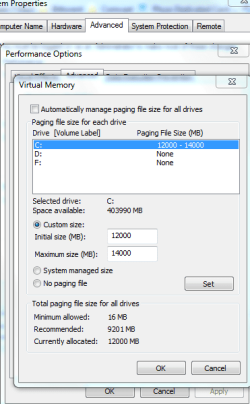
Whats your virtual memory set too? should be 1.5 times your physical memory, Its under Control panel>system and security>system>advance system settings on left > advanced tab> performance settings> advanced, there youll see virtual memory, I was disconnecting with RC build but when i updated my drivers and changed this had no disco's, so one or the other fixed mine.
 

My Computer

Computer type
PC/Desktop
Computer Manufacturer/Model Number
Custom
OS
Windows 7 64bit
CPU
Intel I7 4770k @4.5
Motherboard
Asus z87-pro
Memory
16GB corsair Vengence
Graphics Card(s)
EVGA GTX 980 TI SC acx2.0
Sound Card
XFI fatality gamer
Monitor(s) Displays
Samsung
Screen Resolution
1920 x 1080
Hard Drives
OCZ ssd Baracuda 1tb x2
PSU
Corsair 1200 watt
Case
NZXT Noctis 450
Cooling
Kraken X61
Keyboard
Logitech G510
Mouse
Razer naga
Internet Speed
100 down 25 up
Other Info
Nzxt Hue +
Its at 4094

w9e1c8.jpg
 

My Computer

Computer Manufacturer/Model Number
Gigabyte
OS
Win 7 Ultimate Build 7600
CPU
Intel Core 2 Duo E6550 2.33GHZ
Motherboard
P35-ds3p
Memory
4 GB
Graphics Card(s)
2 x Radeon HD3850 Crossfire
Sound Card
Onboard
Monitor(s) Displays
32 Inch Panasonic Viera LCD
Hard Drives
200gb wd
200gb wd
500gb wd
1000gb wd
PSU
650 watt crossfire certified psu
Case
Coolmaster
Thats your physical memory im talking about virtual memory, Follow the steps to see what it is set at
 

Attachments

  • virt.PNG
    virt.PNG
    20.1 KB · Views: 225

My Computer

Computer type
PC/Desktop
Computer Manufacturer/Model Number
Custom
OS
Windows 7 64bit
CPU
Intel I7 4770k @4.5
Motherboard
Asus z87-pro
Memory
16GB corsair Vengence
Graphics Card(s)
EVGA GTX 980 TI SC acx2.0
Sound Card
XFI fatality gamer
Monitor(s) Displays
Samsung
Screen Resolution
1920 x 1080
Hard Drives
OCZ ssd Baracuda 1tb x2
PSU
Corsair 1200 watt
Case
NZXT Noctis 450
Cooling
Kraken X61
Keyboard
Logitech G510
Mouse
Razer naga
Internet Speed
100 down 25 up
Other Info
Nzxt Hue +
First question for me with all that you have done, would be.
1. open all connections from the outside box.--check for tightness on connections.
2. ( I have in the past - removed ea wire and polished with fine emory cloth. helps make a good contact.)
3. once every connection to your MODEM is (in your opinion EXCELLENT.)
4. find an replace FILTERS.. a filter can go bad at any time...
(personal feelings..Win7 is much more sceptible to noise than XP or Vista.)
5. In your system do you have the ability to run a noise ratio check.

Noise is a killer -

I ran all new line from the ISP connection to my MODEM, and speed increased 1.50 x and disconnects stopped all to gether.
 
Same currently 4096

2qjwt4o.jpg
 

My Computer

Computer Manufacturer/Model Number
Gigabyte
OS
Win 7 Ultimate Build 7600
CPU
Intel Core 2 Duo E6550 2.33GHZ
Motherboard
P35-ds3p
Memory
4 GB
Graphics Card(s)
2 x Radeon HD3850 Crossfire
Sound Card
Onboard
Monitor(s) Displays
32 Inch Panasonic Viera LCD
Hard Drives
200gb wd
200gb wd
500gb wd
1000gb wd
PSU
650 watt crossfire certified psu
Case
Coolmaster
You have 4gb of ram change your virtual memory to custom, initial size 9000 and max 12000 and see if that helps
 

My Computer

Computer type
PC/Desktop
Computer Manufacturer/Model Number
Custom
OS
Windows 7 64bit
CPU
Intel I7 4770k @4.5
Motherboard
Asus z87-pro
Memory
16GB corsair Vengence
Graphics Card(s)
EVGA GTX 980 TI SC acx2.0
Sound Card
XFI fatality gamer
Monitor(s) Displays
Samsung
Screen Resolution
1920 x 1080
Hard Drives
OCZ ssd Baracuda 1tb x2
PSU
Corsair 1200 watt
Case
NZXT Noctis 450
Cooling
Kraken X61
Keyboard
Logitech G510
Mouse
Razer naga
Internet Speed
100 down 25 up
Other Info
Nzxt Hue +
First question for me with all that you have done, would be.
1. open all connections from the outside box.--check for tightness on connections.
2. ( I have in the past - removed ea wire and polished with fine emory cloth. helps make a good contact.)
3. once every connection to your MODEM is (in your opinion EXCELLENT.)
4. find an replace FILTERS.. a filter can go bad at any time...
(personal feelings..Win7 is much more sceptible to noise than XP or Vista.)
5. In your system do you have the ability to run a noise ratio check.

Noise is a killer -

I ran all new line from the ISP connection to my MODEM, and speed increased 1.50 x and disconnects stopped all to gether.


Good point i will clean up all my connections and get back to you a bit later. Thanks.
 

My Computer

Computer Manufacturer/Model Number
Gigabyte
OS
Win 7 Ultimate Build 7600
CPU
Intel Core 2 Duo E6550 2.33GHZ
Motherboard
P35-ds3p
Memory
4 GB
Graphics Card(s)
2 x Radeon HD3850 Crossfire
Sound Card
Onboard
Monitor(s) Displays
32 Inch Panasonic Viera LCD
Hard Drives
200gb wd
200gb wd
500gb wd
1000gb wd
PSU
650 watt crossfire certified psu
Case
Coolmaster
First question for me with all that you have done, would be.
1. open all connections from the outside box.--check for tightness on connections.
2. ( I have in the past - removed ea wire and polished with fine emory cloth. helps make a good contact.)
3. once every connection to your MODEM is (in your opinion EXCELLENT.)
4. find an replace FILTERS.. a filter can go bad at any time...
(personal feelings..Win7 is much more sceptible to noise than XP or Vista.)
5. In your system do you have the ability to run a noise ratio check.

Noise is a killer -

I ran all new line from the ISP connection to my MODEM, and speed increased 1.50 x and disconnects stopped all to gether.

What do you mean by Filters? If you mean the filter the isp puts on line you cant remove those (well can but can be fined by law) or do you mean the Splitter? Your internet connection should be off your first drop with your cable going straight to modem with no more splitters in-between. If you have already called your cable company and they can see no disturbance in noise from there end to your modem i doubt that is the problem, usually they have your internet running at the highest db in line strength because of it nature.
 

My Computer

Computer type
PC/Desktop
Computer Manufacturer/Model Number
Custom
OS
Windows 7 64bit
CPU
Intel I7 4770k @4.5
Motherboard
Asus z87-pro
Memory
16GB corsair Vengence
Graphics Card(s)
EVGA GTX 980 TI SC acx2.0
Sound Card
XFI fatality gamer
Monitor(s) Displays
Samsung
Screen Resolution
1920 x 1080
Hard Drives
OCZ ssd Baracuda 1tb x2
PSU
Corsair 1200 watt
Case
NZXT Noctis 450
Cooling
Kraken X61
Keyboard
Logitech G510
Mouse
Razer naga
Internet Speed
100 down 25 up
Other Info
Nzxt Hue +
Done will reset and see how it goes till morning.
Thankyou for all the help people.
Will report back if its crashed while im sleepin.
Cheers,
Gstratto
 

My Computer

Computer Manufacturer/Model Number
Gigabyte
OS
Win 7 Ultimate Build 7600
CPU
Intel Core 2 Duo E6550 2.33GHZ
Motherboard
P35-ds3p
Memory
4 GB
Graphics Card(s)
2 x Radeon HD3850 Crossfire
Sound Card
Onboard
Monitor(s) Displays
32 Inch Panasonic Viera LCD
Hard Drives
200gb wd
200gb wd
500gb wd
1000gb wd
PSU
650 watt crossfire certified psu
Case
Coolmaster
What do you mean by Filters? If you mean the filter the isp puts on line you cant remove those (well can but can be fined by law) or do you mean the Splitter?


I think he means the line filter also available as a splitter(if you have a phone coming off same port) that you plug into the phone socket so it cancels out noise from house phones etc
 

My Computer

Computer Manufacturer/Model Number
Gigabyte
OS
Win 7 Ultimate Build 7600
CPU
Intel Core 2 Duo E6550 2.33GHZ
Motherboard
P35-ds3p
Memory
4 GB
Graphics Card(s)
2 x Radeon HD3850 Crossfire
Sound Card
Onboard
Monitor(s) Displays
32 Inch Panasonic Viera LCD
Hard Drives
200gb wd
200gb wd
500gb wd
1000gb wd
PSU
650 watt crossfire certified psu
Case
Coolmaster
Ahh a dsl line sorry thought you were talking cable connection.
 

My Computer

Computer type
PC/Desktop
Computer Manufacturer/Model Number
Custom
OS
Windows 7 64bit
CPU
Intel I7 4770k @4.5
Motherboard
Asus z87-pro
Memory
16GB corsair Vengence
Graphics Card(s)
EVGA GTX 980 TI SC acx2.0
Sound Card
XFI fatality gamer
Monitor(s) Displays
Samsung
Screen Resolution
1920 x 1080
Hard Drives
OCZ ssd Baracuda 1tb x2
PSU
Corsair 1200 watt
Case
NZXT Noctis 450
Cooling
Kraken X61
Keyboard
Logitech G510
Mouse
Razer naga
Internet Speed
100 down 25 up
Other Info
Nzxt Hue +
Disable IPV6. Could be killing your router.
 

My Computer

Computer Manufacturer/Model Number
Home Built
OS
Windows 7 SP1 x64
CPU
AMD 9850 X4
Motherboard
ASUS
Memory
Corsair
Graphics Card(s)
ATI Radeon
Sound Card
Sigmatel
Monitor(s) Displays
Dell
Screen Resolution
1600X900
Hard Drives
(1) WD 1TB
Cooling
Corsair H60
Internet Speed
UVerse 12MB
I disabled IPv6 on both lan connections earlier, but it still disconnected after that. seems to be going ok atm though.
 

My Computer

Computer Manufacturer/Model Number
Gigabyte
OS
Win 7 Ultimate Build 7600
CPU
Intel Core 2 Duo E6550 2.33GHZ
Motherboard
P35-ds3p
Memory
4 GB
Graphics Card(s)
2 x Radeon HD3850 Crossfire
Sound Card
Onboard
Monitor(s) Displays
32 Inch Panasonic Viera LCD
Hard Drives
200gb wd
200gb wd
500gb wd
1000gb wd
PSU
650 watt crossfire certified psu
Case
Coolmaster
Did you change the virtual memory
 

My Computer

Computer type
PC/Desktop
Computer Manufacturer/Model Number
Custom
OS
Windows 7 64bit
CPU
Intel I7 4770k @4.5
Motherboard
Asus z87-pro
Memory
16GB corsair Vengence
Graphics Card(s)
EVGA GTX 980 TI SC acx2.0
Sound Card
XFI fatality gamer
Monitor(s) Displays
Samsung
Screen Resolution
1920 x 1080
Hard Drives
OCZ ssd Baracuda 1tb x2
PSU
Corsair 1200 watt
Case
NZXT Noctis 450
Cooling
Kraken X61
Keyboard
Logitech G510
Mouse
Razer naga
Internet Speed
100 down 25 up
Other Info
Nzxt Hue +
I did :o

Also I have woken up to find that my Machine has not Disconnected once through the night.

Usually its sitting on the login screen from recovered from a serious windows error.

So knock on wood, it looks to be fixed. I will post back in a few hours of gameplay and networking to conclude :)

Gstratto
 

My Computer

Computer Manufacturer/Model Number
Gigabyte
OS
Win 7 Ultimate Build 7600
CPU
Intel Core 2 Duo E6550 2.33GHZ
Motherboard
P35-ds3p
Memory
4 GB
Graphics Card(s)
2 x Radeon HD3850 Crossfire
Sound Card
Onboard
Monitor(s) Displays
32 Inch Panasonic Viera LCD
Hard Drives
200gb wd
200gb wd
500gb wd
1000gb wd
PSU
650 watt crossfire certified psu
Case
Coolmaster
Random DC today :(

Heres what the event viewer looks like.

jb0kuu.jpg


I dont get it
DNS error tells me im out of Virtual memory, so We upped that.
System tells of a IPv6 error so we disable that.

and still the errors.

This is the Warning at 4:47:55
Name resolution for the name messenger.hotmail.com timed out after none of the configured DNS servers responded.

Im beginning to think that Windows 7 has more bugs than vista.

On top of this. IE keeps crashing and recovering tabs of sites that i am going to. I watch a movie or something through Mediaplayer and it crashes 10 mins through, getting a lot of application hangs and not responding errors on msn, MSoutlook 2007 and other programs.

Also the killer is it updates and reboots when it wants. right in the middle of stuff. Im sure this can be set to not auto reboot. but between the errors and the reboots.. i guess im hoping a update will actually fix the OS. Come to think of it.. all these problems started after the first or second lot of updates after original install.

gstratto
 

My Computer

Computer Manufacturer/Model Number
Gigabyte
OS
Win 7 Ultimate Build 7600
CPU
Intel Core 2 Duo E6550 2.33GHZ
Motherboard
P35-ds3p
Memory
4 GB
Graphics Card(s)
2 x Radeon HD3850 Crossfire
Sound Card
Onboard
Monitor(s) Displays
32 Inch Panasonic Viera LCD
Hard Drives
200gb wd
200gb wd
500gb wd
1000gb wd
PSU
650 watt crossfire certified psu
Case
Coolmaster
Back
Top