Internet doesn't work on all browsers

Girom

New member
Member
VIP
Local time
5:50 PM
Messages
170
Internet only works well on QTWeb browser and doesn't work on FF IE Opera. On Avant, it partially works. Can't access archive.org for example.

Nevermind, it works now after running Adwcleaner.

Edit: it's not working again. (for all browsers except avant and qt web)

It seemed to work for a little on Firefox, but doesn't work again.
 
Last edited:

My Computer

Computer type
PC/Desktop
Computer Manufacturer/Model Number
HP
OS
Windows 8
CPU
AMD A8-4500M APU with Radeon(tm) HD Graphics
Motherboard
Hewlett-Packard 184B
Memory
4.00 GB
Graphics Card(s)
AMD Radeon HD 7640G
Sound Card
(1) AMD High Definition Audio Device (2) IDT High Definiti
Keyboard
Logitech K120
Mouse
Kensington
hi
upgrade or reinstall any browser with your uninstaller and etc that doent work.
 

My Computer

Computer type
PC/Desktop
OS
8 32bit
If it's not caused by malware then you could try flushing your DNS. Just Google 'flush dns' if you're not familiar with the procedure.
 

My Computer

Computer type
PC/Desktop
Computer Manufacturer/Model Number
System Builder
OS
Windows 7 Professional x64 (Retail)
CPU
AMD Phenom II X3 720
Motherboard
Asus M3A78-EM
Memory
8GB Patriot 800MHz DDR2 4-4-4-12
Graphics Card(s)
ATI 3200 (onboard)
Sound Card
Realtek onboard & M-Audio Delta 66
Monitor(s) Displays
Dell 2209WA
Hard Drives
Sandisk 2240GB SSD
Several non-raid SATA drives for storage
PSU
Antec 400W
Case
Antec
Cooling
Arctic Cooling
Keyboard
Logitech Illuminated
Mouse
Microsoft Comgort Mouse 6000
Internet Speed
Verizon FiOS 50/25
I tried flushing DNS but it didn't work. Now Avant doesn't work neither. No browsers work. So I am using another user account and all browsers all on this account. I would like to fix up the internet though on that account because it has all my programs there.
 

My Computer

Computer type
PC/Desktop
Computer Manufacturer/Model Number
HP
OS
Windows 8
CPU
AMD A8-4500M APU with Radeon(tm) HD Graphics
Motherboard
Hewlett-Packard 184B
Memory
4.00 GB
Graphics Card(s)
AMD Radeon HD 7640G
Sound Card
(1) AMD High Definition Audio Device (2) IDT High Definiti
Keyboard
Logitech K120
Mouse
Kensington
i especially need the internet connection because i need some epub files to sync on dropbox. I have a lot of work saved there. i suppose i could put them in public documents folder and access it from the other user account, but still.
 

My Computer

Computer type
PC/Desktop
Computer Manufacturer/Model Number
HP
OS
Windows 8
CPU
AMD A8-4500M APU with Radeon(tm) HD Graphics
Motherboard
Hewlett-Packard 184B
Memory
4.00 GB
Graphics Card(s)
AMD Radeon HD 7640G
Sound Card
(1) AMD High Definition Audio Device (2) IDT High Definiti
Keyboard
Logitech K120
Mouse
Kensington
OK, you say the internet doesn't work. Let's be specific. I know it's multiple browsers, but let's us IE as an example. If we locate the problem, any fix will apply to all.

You try to visit, say, Seven Forums with IE...what happens, does it never connect? Do you get an error message? Post screenshots where possible

http://www.sevenforums.com/tutorials/9733-screenshots-files-upload-post-seven-forums.html

Assuming you can't connect to Seven Forums, now ping Seven Forums

Search> In search box type cmd> Enter> In command prompt type ping www.sevenforums.com> Enter

Post a screenshot of the results.

You mention AdwCleaner finding and correcting some issues. Suggest you download the free Malwarebytes, and Superantispyware and run some scans.

I'd make sure you are not infected first, as any infection could easily explain any internet issues.

A Guy
 

My Computer

Computer type
PC/Desktop
OS
Windows 10 Home x64
CPU
INTEL Core i5-750 Quad-Core 3.37GHz
Motherboard
ASUS P7P55D
Memory
HyperX Fury Black Series 8GB (2 x 4GB) 1866Mhz
Graphics Card(s)
EVGA GeForce GTX 750 Superclocked 1GB 128-Bit GDDR5
Monitor(s) Displays
LG 32MA68HY 32" IPS
Screen Resolution
1920 x 1080
Hard Drives
Samsung 840 Evo 120GB, SEAGATE 500GB Barracuda® 7200.12, SATA 3 Gb/s, 7200 RPM, 16MB cache
PSU
ANTEC TruePower New TP-550, 80 PLUS, 550W
Case
ANTEC Three Hundred Illusion
Cooling
COOLER MASTER Hyper 212 Plus, 4 x 120mm 1 x 140mm Noctua's
Internet Speed
85 + Mbps
Antivirus
Avast
Browser
Vivaldi
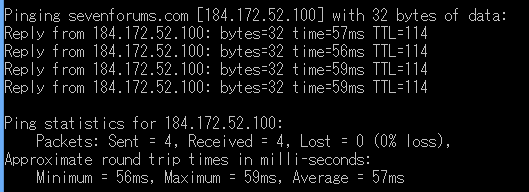
This is the ping result.
 

Attachments

  • Cap 2013-12-03 17-51-32-702.png
    Cap 2013-12-03 17-51-32-702.png
    2.3 KB · Views: 34

My Computer

Computer type
PC/Desktop
Computer Manufacturer/Model Number
HP
OS
Windows 8
CPU
AMD A8-4500M APU with Radeon(tm) HD Graphics
Motherboard
Hewlett-Packard 184B
Memory
4.00 GB
Graphics Card(s)
AMD Radeon HD 7640G
Sound Card
(1) AMD High Definition Audio Device (2) IDT High Definiti
Keyboard
Logitech K120
Mouse
Kensington
You can ping SevenForums.com fine looking at that screenshot.
What happens when you try to browse to SevenForums.com in Internet Explorer?
Do you get any error messages?

Have you tried any of the following Bill suggested?
Suggest you download the free Malwarebytes, and Superantispyware and run some scans.

I'd make sure you are not infected first, as any infection could easily explain any internet issues.
A Guy

Regards,
Jamie
 

My Computer

Computer type
PC/Desktop
Computer Manufacturer/Model Number
Self Built
OS
Windows 8.1 Pro x64
CPU
Intel Core i5-2500K @ 3.30GHz - S1155
Motherboard
Asus P8P67 LE Rev3, Intel P67, S115
Memory
8GB Corsair DDR3 XMS3, PC3-12800
Graphics Card(s)
NVIDIA GeForce GTX 650
Sound Card
On-Board
Monitor(s) Displays
3 x 24" {Extended Display}
Screen Resolution
1920 x 1080
Hard Drives
300GB Seagate Barracuda 7200
PSU
550W Coolermaster GX550
Case
Silverstone Precision PS04B
Cooling
Stock
Keyboard
Logitech K120
Mouse
World of Warcraft Cataclysm MMO Gaming Mouse
Internet Speed
80 MB
Antivirus
MSE / Windows Defender
Browser
Chrome
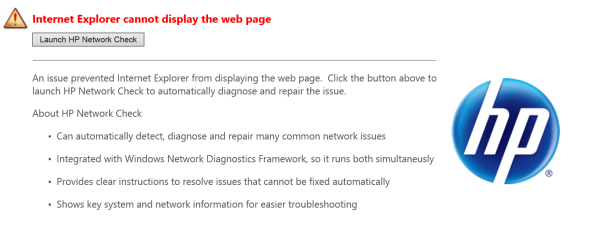
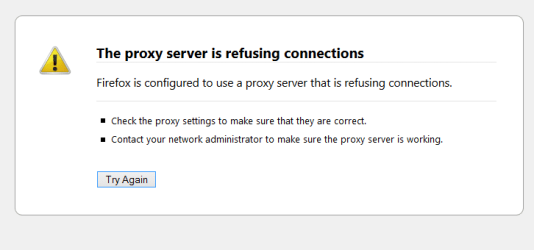
I ran Malware bytes and deleted everything it scanned. The error message mentions proxy, so I think this problem is probably from proxy softwares that I downloaded (most of them didn't work and kept affecting the the internet connection even when I closed them because it kept running in the background, so I ended up deleting them but the problem continues)
 

Attachments

  • Cap 2013-12-04 09-56-40-766.png
    Cap 2013-12-04 09-56-40-766.png
    998 bytes · Views: 29
  • Cap 2013-12-04 09-56-48-256.png
    Cap 2013-12-04 09-56-48-256.png
    45.4 KB · Views: 1
  • Cap 2013-12-04 09-57-13-019.png
    Cap 2013-12-04 09-57-13-019.png
    6 KB · Views: 1

My Computer

Computer type
PC/Desktop
Computer Manufacturer/Model Number
HP
OS
Windows 8
CPU
AMD A8-4500M APU with Radeon(tm) HD Graphics
Motherboard
Hewlett-Packard 184B
Memory
4.00 GB
Graphics Card(s)
AMD Radeon HD 7640G
Sound Card
(1) AMD High Definition Audio Device (2) IDT High Definiti
Keyboard
Logitech K120
Mouse
Kensington
Open FF> Tools> Options> Advanced tab> Network tab> Connection: Configure how Firefox connects to the internet> Settings button> Configure Proxies to Access the Internet> Put a check next to No proxy> OK your way out

157ojnb.jpg


3341yip.jpg


Go back in and confirm the setting took. Try it now. A Guy
 

My Computer

Computer type
PC/Desktop
OS
Windows 10 Home x64
CPU
INTEL Core i5-750 Quad-Core 3.37GHz
Motherboard
ASUS P7P55D
Memory
HyperX Fury Black Series 8GB (2 x 4GB) 1866Mhz
Graphics Card(s)
EVGA GeForce GTX 750 Superclocked 1GB 128-Bit GDDR5
Monitor(s) Displays
LG 32MA68HY 32" IPS
Screen Resolution
1920 x 1080
Hard Drives
Samsung 840 Evo 120GB, SEAGATE 500GB Barracuda® 7200.12, SATA 3 Gb/s, 7200 RPM, 16MB cache
PSU
ANTEC TruePower New TP-550, 80 PLUS, 550W
Case
ANTEC Three Hundred Illusion
Cooling
COOLER MASTER Hyper 212 Plus, 4 x 120mm 1 x 140mm Noctua's
Internet Speed
85 + Mbps
Antivirus
Avast
Browser
Vivaldi
It works for FF now but how do you make it work for IE too? Also, does this make all proxy programs not work at all?

Weird.. I just ran ultrasurf and the internet started working on IE as well.
 

My Computer

Computer type
PC/Desktop
Computer Manufacturer/Model Number
HP
OS
Windows 8
CPU
AMD A8-4500M APU with Radeon(tm) HD Graphics
Motherboard
Hewlett-Packard 184B
Memory
4.00 GB
Graphics Card(s)
AMD Radeon HD 7640G
Sound Card
(1) AMD High Definition Audio Device (2) IDT High Definiti
Keyboard
Logitech K120
Mouse
Kensington

My Computer

Computer type
PC/Desktop
OS
Windows 10 Home x64
CPU
INTEL Core i5-750 Quad-Core 3.37GHz
Motherboard
ASUS P7P55D
Memory
HyperX Fury Black Series 8GB (2 x 4GB) 1866Mhz
Graphics Card(s)
EVGA GeForce GTX 750 Superclocked 1GB 128-Bit GDDR5
Monitor(s) Displays
LG 32MA68HY 32" IPS
Screen Resolution
1920 x 1080
Hard Drives
Samsung 840 Evo 120GB, SEAGATE 500GB Barracuda® 7200.12, SATA 3 Gb/s, 7200 RPM, 16MB cache
PSU
ANTEC TruePower New TP-550, 80 PLUS, 550W
Case
ANTEC Three Hundred Illusion
Cooling
COOLER MASTER Hyper 212 Plus, 4 x 120mm 1 x 140mm Noctua's
Internet Speed
85 + Mbps
Antivirus
Avast
Browser
Vivaldi
Ok I'll try doing all of that. But to update, when I was running ultrasurf, suddenly the internet did not work for IE. I went to Opera browser and Avant browser, and the internet seemed to work for a brief while on both but then stopped. On Opera th internet stopped as the page was still loading. And then I thought at least FF would work so I launched FF again but it didn't work and when I checked the setting it was not set to 'no proxy' even though I set it to that just a while ago. Can it change itself like that normally or is it work of malware?
 

My Computer

Computer type
PC/Desktop
Computer Manufacturer/Model Number
HP
OS
Windows 8
CPU
AMD A8-4500M APU with Radeon(tm) HD Graphics
Motherboard
Hewlett-Packard 184B
Memory
4.00 GB
Graphics Card(s)
AMD Radeon HD 7640G
Sound Card
(1) AMD High Definition Audio Device (2) IDT High Definiti
Keyboard
Logitech K120
Mouse
Kensington
I ran junkware removal, but I still have the same problem. Whenever FF is closed and I have to re launch it, I have to click the checkbox for 'no proxy'. AdwCleaner won't run. (It keeps saying 'pending') I have the version 3.010.
 

My Computer

Computer type
PC/Desktop
Computer Manufacturer/Model Number
HP
OS
Windows 8
CPU
AMD A8-4500M APU with Radeon(tm) HD Graphics
Motherboard
Hewlett-Packard 184B
Memory
4.00 GB
Graphics Card(s)
AMD Radeon HD 7640G
Sound Card
(1) AMD High Definition Audio Device (2) IDT High Definiti
Keyboard
Logitech K120
Mouse
Kensington

My Computer

Computer type
PC/Desktop
OS
Windows 10 Home x64
CPU
INTEL Core i5-750 Quad-Core 3.37GHz
Motherboard
ASUS P7P55D
Memory
HyperX Fury Black Series 8GB (2 x 4GB) 1866Mhz
Graphics Card(s)
EVGA GeForce GTX 750 Superclocked 1GB 128-Bit GDDR5
Monitor(s) Displays
LG 32MA68HY 32" IPS
Screen Resolution
1920 x 1080
Hard Drives
Samsung 840 Evo 120GB, SEAGATE 500GB Barracuda® 7200.12, SATA 3 Gb/s, 7200 RPM, 16MB cache
PSU
ANTEC TruePower New TP-550, 80 PLUS, 550W
Case
ANTEC Three Hundred Illusion
Cooling
COOLER MASTER Hyper 212 Plus, 4 x 120mm 1 x 140mm Noctua's
Internet Speed
85 + Mbps
Antivirus
Avast
Browser
Vivaldi
I ran Windows Defender and it didn't catch anything. I made the notepad file and ran Farbar and it said this (Yahoo is offline): Internet Services: ============ Connection Status: ============== Localhost is accessible. LAN connected. Google IP is accessible. Google.com is accessible. Attempt to access Yahoo.com returned error: Yahoo.com is offline IE proxy is enabled. ProxyServer: http=182.253.72.86:80 Windows Firewall: ============= Firewall Disabled Policy: ================== System Restore: ============ System Restore Disabled Policy: ======================== Action Center: ============ Windows Update: ============ Windows Autoupdate Disabled Policy: ============================ Windows Defender: ============== Other Services: ============== File Check: ======== C:\Windows\System32\nsisvc.dll [2013-08-22 08:25] - [2013-08-22 08:25] - 0029184 ____A (Microsoft Corporation) 6E2271ED0C3E95B8E29F3752B91B9E84 C:\Windows\System32\drivers\nsiproxy.sys => MD5 is legit C:\Windows\System32\dhcpcore.dll => MD5 is legit C:\Windows\System32\drivers\afd.sys => MD5 is legit C:\Windows\System32\drivers\tdx.sys => MD5 is legit C:\Windows\System32\Drivers\tcpip.sys [2013-12-03 15:30] - [2013-12-03 15:30] - 2551640 ____A (Microsoft Corporation) 6617F44D2432C529B2249A0498B6B40A C:\Windows\System32\dnsrslvr.dll [2013-12-03 15:30] - [2013-12-03 15:30] - 0255488 ____A (Microsoft Corporation) 5BAF7714E68F93515A937A3FA8587EF9 C:\Windows\System32\mpssvc.dll => MD5 is legit C:\Windows\System32\bfe.dll [2013-12-03 15:26] - [2013-12-03 15:26] - 0828416 ____A (Microsoft Corporation) 6468B696C65775D51A06615830E0E79D C:\Windows\System32\drivers\mpsdrv.sys => MD5 is legit C:\Windows\System32\wscsvc.dll => MD5 is legit C:\Windows\System32\wbem\WMIsvc.dll => MD5 is legit C:\Windows\System32\wuaueng.dll [2013-12-03 15:30] - [2013-12-03 15:30] - 3532288 ____A (Microsoft Corporation) 86D0BF4F792053A50D6EE43DFA5837A5 C:\Windows\System32\qmgr.dll => MD5 is legit C:\Windows\System32\es.dll => MD5 is legit C:\Windows\System32\cryptsvc.dll => MD5 is legit C:\Program Files\Windows Defender\MpSvc.dll => MD5 is legit C:\Program Files\Windows Defender\MsMpEng.exe => MD5 is legit C:\Windows\System32\ipnathlp.dll [2013-12-03 15:30] - [2013-12-03 15:30] - 0433664 ____A (Microsoft Corporation) F4414F57DF2CECB8FC969AA43A6B0D50 C:\Windows\System32\iphlpsvc.dll [2013-12-03 15:30] - [2013-12-03 15:30] - 0903168 ____A (Microsoft Corporation) DFC4050D58565ADBEE793A8D4AEBDAE6 C:\Windows\System32\svchost.exe => MD5 is legit C:\Windows\System32\rpcss.dll => MD5 is legit **** End of log ****
 

My Computer

Computer type
PC/Desktop
Computer Manufacturer/Model Number
HP
OS
Windows 8
CPU
AMD A8-4500M APU with Radeon(tm) HD Graphics
Motherboard
Hewlett-Packard 184B
Memory
4.00 GB
Graphics Card(s)
AMD Radeon HD 7640G
Sound Card
(1) AMD High Definition Audio Device (2) IDT High Definiti
Keyboard
Logitech K120
Mouse
Kensington

My Computer

Computer type
PC/Desktop
OS
Windows 10 Home x64
CPU
INTEL Core i5-750 Quad-Core 3.37GHz
Motherboard
ASUS P7P55D
Memory
HyperX Fury Black Series 8GB (2 x 4GB) 1866Mhz
Graphics Card(s)
EVGA GeForce GTX 750 Superclocked 1GB 128-Bit GDDR5
Monitor(s) Displays
LG 32MA68HY 32" IPS
Screen Resolution
1920 x 1080
Hard Drives
Samsung 840 Evo 120GB, SEAGATE 500GB Barracuda® 7200.12, SATA 3 Gb/s, 7200 RPM, 16MB cache
PSU
ANTEC TruePower New TP-550, 80 PLUS, 550W
Case
ANTEC Three Hundred Illusion
Cooling
COOLER MASTER Hyper 212 Plus, 4 x 120mm 1 x 140mm Noctua's
Internet Speed
85 + Mbps
Antivirus
Avast
Browser
Vivaldi
I'm not entirely sure this is a malware problem. Is this your first time working with proxies, tunnels, and vpn's?

After reading through the ultrasurf web site there seems to be a lot of hoops to jump through in order for you to surf the web anonymously, and it makes changes automatically (without user intervention) by default when started or used.

Did you install ultrasurf or are you using it from a flash drive as suggested?
We also encourage users to store Ultrasurf on a flash drive or other external device, and run the tool from that rather than saving it on the computer, especially important for use on public computers or in internet cafes. There is a short cut Ctl+Alt+D to quit Ultrasurf and delete all temporary files, then quit Ultrasurf properly before unplugging the drive.

Source: Your Security
Can you post a screenshot of your startup programs? Use Method Three to see your startup programs: http://www.sevenforums.com/tutorials/1401-startup-programs-change.html

How to: http://www.sevenforums.com/tutorials/9733-screenshots-files-upload-post-seven-forums.html

If you did install it on your machine and it is a startup program disable it and see how it goes, if there is no change re-check the startup page, ultrasurf may have re-enabled itself.

If that's the case then uninstall it to check your internet connectivity. If it improves you will have to try and understand how ultrasurf needs to be setup in order for it to work properly on your machine before you re-install it.

If you used a flash drive, its making changes on the fly that your browsers can't handle and they will need to be set up properly. Did you read the part about using it on FireFox?
Add-on for Firefox
Firefox users need to download the firefox add-on besides the above software:

Source: Ultrasurf Support and Download Instructions
Did you add the Add-On??


There are better programs out that will do what you want without all the hassles. Internet Security or DNS Service for your Business or Home - OpenDNS comes to mind.

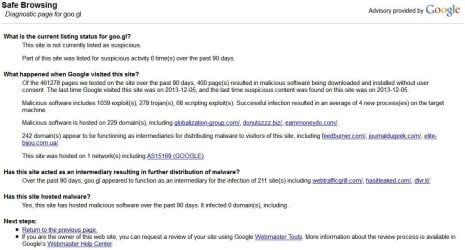
I could be wrong about that malware though, as an afterthought I pulled a google Safe Browsing Diagnostic and this is what popped up:
ultra.JPG
malicious software being downloaded and installed without user consent.
Hmm....that doesn't sound good to me.

 

My Computer

Computer type
PC/Desktop
Computer Manufacturer/Model Number
Gateway DX4831-01e (Mid-Tower Desktop)
OS
Originally Win 7 Hm Prem x64 Ver 6.1.7600 Build 7601-SP1 | Upgraded to Windows 10 December 14, 2019
CPU
Intel i3 530 2.93GHz, 2933MHz 2 Cores 4 Logical Processors
Motherboard
Gateway H57M01 133 megahertz
Memory
6GB of 1,333MHz DDR3 SDRAM
Graphics Card(s)
32MB Intel Graphics Media Accelerator HD IGChip
Sound Card
Realtek High Definition Audio
Monitor(s) Displays
Gateway HX2000 20inch TFT active matrix TN
Screen Resolution
1600 x 900 x 59 hertz
Hard Drives
WDC WD10EADS-00M2B0 [HDD] (1000.20 GB) -- drive 0,
HL-DT-ST DVDRAM GH41N [CD-ROM dr]
Four card readers, and Four USB 2.0
PSU
300watts.
Case
Mid-Tower Desktop
Cooling
Stock from Gateway
Keyboard
Natural Ergonomic Keyboard 4000, see Other Info
Mouse
Orig. Gateway wore out now using Insignia USB wired optical
Internet Speed
Vz FIOS 10ms png 57.64Mbps down 65.53Mbps up Speedtest.org
Antivirus
Zamana Anti-logger with Anti-malware, MSE, Windows Firewall,
Browser
IE11.0.9600.19399-Upd ver11.0.135, Firefox 68.0.1 x64
Other Info
System Specs by Belarc.

BIOS: American Megatrends Inc. P01-A0 11/17/2009

Replaced the MS 'Natural' Standard PS/2 Enhanced 101-102 Keyboard with a new Natural Ergonomic Keyboard 4000 on August 1st 2014.

Canon Pixma MG3222 Printer.

Updated to IE11 on 12102015 | Fios Quantum Router g1100

Additional AV: SpywareBlaster, manual Mbam, SAS
Ultrasurf? Yikes, an important bit of info :rolleyes:

A Guy
 

My Computer

Computer type
PC/Desktop
OS
Windows 10 Home x64
CPU
INTEL Core i5-750 Quad-Core 3.37GHz
Motherboard
ASUS P7P55D
Memory
HyperX Fury Black Series 8GB (2 x 4GB) 1866Mhz
Graphics Card(s)
EVGA GeForce GTX 750 Superclocked 1GB 128-Bit GDDR5
Monitor(s) Displays
LG 32MA68HY 32" IPS
Screen Resolution
1920 x 1080
Hard Drives
Samsung 840 Evo 120GB, SEAGATE 500GB Barracuda® 7200.12, SATA 3 Gb/s, 7200 RPM, 16MB cache
PSU
ANTEC TruePower New TP-550, 80 PLUS, 550W
Case
ANTEC Three Hundred Illusion
Cooling
COOLER MASTER Hyper 212 Plus, 4 x 120mm 1 x 140mm Noctua's
Internet Speed
85 + Mbps
Antivirus
Avast
Browser
Vivaldi

My Computer

Computer type
PC/Desktop
Computer Manufacturer/Model Number
Own build (new) Desk1 / Asus ROG Win 7 / Desk2 1st build
OS
Desk1 7 Home Prem / Desk2 10 Pro / Main lap Asus ROG 10 Pro 2 laptop Toshiba 7 Pro Asus P2520 7 & 10
CPU
Desk1 i5 3750K / Laptop i7 GTX 860M / Desk2 i5 2500
Motherboard
Desk1 Asus P877-V / Desk2 Gigabyte H67 UD3H / Laptop ?
Memory
Desk1 8GB (1866) / Desk2 16GB (1333) / Laptop 8Gb DDR3
Graphics Card(s)
Desk 1& 2NVidia GTX 650 & Laptops on board Intel
Sound Card
Desk 1 & 2 -XONAR DG Realtek High Def audio Laptop
Monitor(s) Displays
Desk 1 Benq HD 2450 / Desk2 Philips 24" / Laptop 17.5"
Screen Resolution
1920x1080 D1 & D2 & Laptop 1
Hard Drives
Desk1 Samsung 120GB 830 SSD
Asus ROG 256GB 850 Pro SSD
Desk2 Samsung 840 256 SSD
Toshiba 120GB EVO
PSU
Desk 1 Corsair HX 1050/ Laptop ? / Desk 2 Corsair HX 650
Case
Desk 1 Cooler HAF XM ? Toshiba laptop / Desk2 Coolermaster
Cooling
Fans on all Desk1 -2 Desk2 - all Coolermasters 5 Laptop ?
Keyboard
Desk 1 MS Sidewinder X6 Desk 2 MS Sidewinder X 4
Mouse
Desk 1&2 - Gigabyte MS 900 gamer - laptop - Logitec wireless
Internet Speed
ADSL2+
Other Info
One other Desktop (tester) and spare Toshba laptop both with SSD's
Running Kaspersky 2016 ISS on all machines config'd identically
Logitec audio stereo systems on each machine (x3)
Canon MG5250MFC
Router/modem TP-Link running WPA2SK
Back
Top