Internet doesn't work

Eul0

New member
Local time
5:50 PM
Messages
2
Hi!

When I start XP mode my wirless Internet connection stops working, it's says "limited access". The Internet doesn't either work on the virtual machine. To get the Internet to work again I must restart my computer. My networking configuration on the virtual machine is "NAT". Why is it not working? Thanks!
 

My Computer

Computer Manufacturer/Model Number
M860TU
OS
Windows 7 Ultimate
CPU
P9700
Motherboard
Clevo
Memory
4096MB
Graphics Card(s)
Nvidia GeForce GTX 260M
Hi!

When I start XP mode my wirless Internet connection stops working, it's says "limited access". The Internet doesn't either work on the virtual machine. To get the Internet to work again I must restart my computer. My networking configuration on the virtual machine is "NAT". Why is it not working? Thanks!


We could use some further information. can you run ipconfig /all from a cmd window and upload the output??
 

My Computer

Computer Manufacturer/Model Number
HP Pavillion dv-7 1005 Tx
OS
Win 8 Release candidate 8400
CPU
[email protected]
Memory
4 gigs
Graphics Card(s)
Nvidia 9600M
Sound Card
HD built-in
Monitor(s) Displays
17" Wxga
Screen Resolution
1440x900
Cooling
none
Internet Speed
45Mb down 5Mb up
Hello Eul0, welcome to the Seven Forums.

Try to change the XP Mode network adapter. It just might fix your issue.

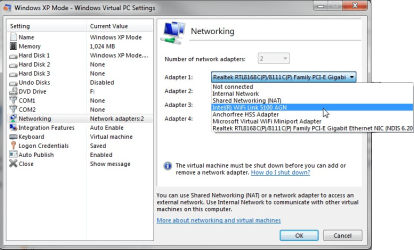
First, shut down the XP Mode completely, not hibernate it. Open then XP Mode settings, choose Networking from the left pane, click Adapter 1 drop down list and choose your WiFi adapter. Click OK.

Kari
 

Attachments

  • XPM_NIC1.png
    XPM_NIC1.png
    107.5 KB · Views: 14

My Computer

Computer type
Laptop
Computer Manufacturer/Model Number
HP ENVY 17-1150eg
OS
Windows 10 Pro x64 EN-GB
CPU
1.6 GHz Intel Core i7-720QM Processor
Memory
6 GB
Graphics Card(s)
ATI Mobility Radeon HD 5850 Graphics
Sound Card
Beats sound system with integrated subwoofer
Monitor(s) Displays
17" laptop display, 22" LED and 32" Full HD TV through HDMI
Screen Resolution
1600*900 (1), 1920*1080 (2&3)
Hard Drives
Internal: 2 x 500 GB SATA Hard Disk Drive 7200 rpm
External: 2TB for backups, 3TB USB3 network drive for media
Cooling
As Envy runs a bit warm, I have it on a Cooler Master pad
Keyboard
Logitech diNovo Media Desktop Laser (bluetooth)
Mouse
Logitech Performance Mouse MX
Internet Speed
50/10 Mbps VDSL
Antivirus
Windows Defender 4.3.9431.0
Browser
Maxthon 3.5.2., IE11
Hi guys! Thanks for the help!

Kari I have tried that and it doesn't work.

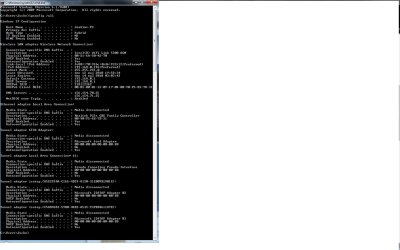
This picture is when I run XP mode and run CMD in Win7 with the command "ipconfig /all":

Untitled.jpg

Hope it helps!
 

My Computer

Computer Manufacturer/Model Number
M860TU
OS
Windows 7 Ultimate
CPU
P9700
Motherboard
Clevo
Memory
4096MB
Graphics Card(s)
Nvidia GeForce GTX 260M
Back
Top