
Solved Internet download freezing and restarting on one system

writhziden

Closed by request.
Local time
6:46 AM
Messages
11,269
Location
Colorado
I have three PC systems in my place. All share the same wireless router, which is a Linksys WRT54GS v.2 with SpeedBooster. Two of the PC systems are working fine with no issues.

Problem Description: Every few seconds, the internet seems to pause and then start again on my desktop computer. Specs included in my profile.

Ways I have tested:
  • My girlfriend was playing her online game and it kept freezing and starting up again (this is how I became aware of the problem to begin with).
  • Downloaded the Windows 7 x64 SP1 integrated ISO and the download also freezes and then starts again. The system itself is not freezing and starting, just to be clear. The amount of data currently downloaded will freeze for a few seconds, and then it will start accumulating again.
  • Downloaded the Windows 7 x64 SP1 integrated ISO on the other two systems, and it accumulates normally at ~ 1.5 Megabytes per second.

So far what I have done:
  • fully uninstalled and re-installed the wireless adapter drivers,
  • replaced my antivirus with Microsoft Security Essentials to run with Windows Firewall,
  • ran an sfc /scannow that yielded no integrity violations,
  • ran system restore to a date prior to when the problem first occurred,
  • and restarted the computer between each of these steps.

Any further suggestions would be appreciated.
 
Last edited:

My Computer My Computer

At a glance

Windows 7 Home Premium 64 BitIntel(R) Core(TM)2 Quad CPU Q9550 @ 2.83GHz6.00 GB Hundai HMT125U6BFR8C-H9ATI Radeon HD 4850
Computer Manufacturer/Model Number
HP Pavilion e9110t
OS
Windows 7 Home Premium 64 Bit
CPU
Intel(R) Core(TM)2 Quad CPU Q9550 @ 2.83GHz
Motherboard
Pegatron IPIEL-LA3
Memory
6.00 GB Hundai HMT125U6BFR8C-H9
Graphics Card(s)
ATI Radeon HD 4850
Sound Card
Realtek High Definition Audio/ATI High Definition Audio
Monitor(s) Displays
Acer AL2216W
Screen Resolution
1680x1050
Hard Drives
Hitachi HDP725050GLA360 ATA Device 500 GB
PSU
Unknown/installed by HP
Case
HP generic case
Cooling
Intel Stock Cooling
Keyboard
HP Keyboard
Mouse
HP Mouse
Internet Speed
Download: 19.15 Mbps Upload: 1.67 Mbps
Other Info
Network Adapter Realtek RTL8168D/8111D Family PCI-E Gigabit Ethernet NIC (NDIS 6.20)
Network Adapter 802.11n Wireless PCI Express Card LAN Adapter
Hi writhziden,

Have you tested her computer on a wired connection? Please connect it directly to the router? Also, connect it directly to the Modem bypassing the router.

Do issue only persist when she's gaming and downloading? All well when she's only browsing?

Linksys router has the latest firmware?

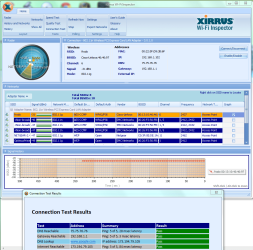
Can you please post a capture of the Xirrus Wi-Fi Inspector Tool?

An update will be nice.
 

My Computer My Computer

At a glance

Win7 & Win8 64bitIntel i5
Computer Manufacturer/Model Number
Lenovo Desktop/Samsung Laptop
OS
Win7 & Win8 64bit
CPU
Intel i5
Internet Speed
Charter-20 Mbps
Antivirus
Avast
Browser
FF, IE9 and Chrome
Thank you for the response, 2xg. Everything looks good now. I restored to a system image from a week ago and it seems to have resolved it. At first, I thought the system image did not work either because on cold boot, I was having the same problem. Based on this new information: I suspect that this is software related and probably due to a service or startup program conflict that caused more conflicts over time or caused problems after an update. If so, I think the problem may return eventually, in which case I will post back.


Now, to answer your questions: Have not tried a wired connection since I do not have an Ethernet cable long enough, but I will look into getting one.

Issues seemed prevalent during downloading or gaming. Browsing is a little more difficult to determine since hiccups there are less noticeable, but browsing did not seem affected.

Linksys router has the latest firmware for version 2.0; there does not seem to be a firmware update available for this model anymore. On Linksys, it says there is No firmware/driver download available for v.2, although my firmware version says v4.71.4, Oct. 31, 2007. I am not entirely sure when I got the update to v4, but I also do not find firmware that matches for the current firmware update. Obviously, I do not want to do a firmware upgrade that does not take or causes the unit to stop working, so I am leaning toward caution on this. Linksys by Cisco - WRT54GS Support

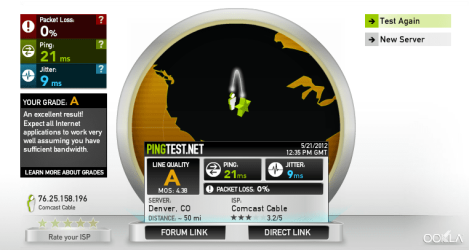
As to the images you requested:

XIRRUS.PNG XIRRUS2.PNG XIRRUS3.PNG
 

My Computer My Computer

At a glance

Windows 7 Home Premium 64 BitIntel(R) Core(TM)2 Quad CPU Q9550 @ 2.83GHz6.00 GB Hundai HMT125U6BFR8C-H9ATI Radeon HD 4850
Computer Manufacturer/Model Number
HP Pavilion e9110t
OS
Windows 7 Home Premium 64 Bit
CPU
Intel(R) Core(TM)2 Quad CPU Q9550 @ 2.83GHz
Motherboard
Pegatron IPIEL-LA3
Memory
6.00 GB Hundai HMT125U6BFR8C-H9
Graphics Card(s)
ATI Radeon HD 4850
Sound Card
Realtek High Definition Audio/ATI High Definition Audio
Monitor(s) Displays
Acer AL2216W
Screen Resolution
1680x1050
Hard Drives
Hitachi HDP725050GLA360 ATA Device 500 GB
PSU
Unknown/installed by HP
Case
HP generic case
Cooling
Intel Stock Cooling
Keyboard
HP Keyboard
Mouse
HP Mouse
Internet Speed
Download: 19.15 Mbps Upload: 1.67 Mbps
Other Info
Network Adapter Realtek RTL8168D/8111D Family PCI-E Gigabit Ethernet NIC (NDIS 6.20)
Network Adapter 802.11n Wireless PCI Express Card LAN Adapter
Glad to hear that restoring a backup image sorted things out for you. :)

As far as router firmware updates are concern, I respect your opinion on taking precautions on firmware updates. Luckily I have not had any bad experience on updating router's firmware which I have done it on different brands of routers and firewall devices (particularly Sonicwalls).

Thanks for the captures, the Xirrus capture looks great and no issue there. Please let us know if the issue comes back.
 

My Computer My Computer

At a glance

Win7 & Win8 64bitIntel i5
Computer Manufacturer/Model Number
Lenovo Desktop/Samsung Laptop
OS
Win7 & Win8 64bit
CPU
Intel i5
Internet Speed
Charter-20 Mbps
Antivirus
Avast
Browser
FF, IE9 and Chrome
Does not appear the problem will be returning. I am going to mark the thread solved. Thank you for the helpful tools, though. I will add them to my repertoire. :)
 

My Computer My Computer

At a glance

Windows 7 Home Premium 64 BitIntel(R) Core(TM)2 Quad CPU Q9550 @ 2.83GHz6.00 GB Hundai HMT125U6BFR8C-H9ATI Radeon HD 4850
Computer Manufacturer/Model Number
HP Pavilion e9110t
OS
Windows 7 Home Premium 64 Bit
CPU
Intel(R) Core(TM)2 Quad CPU Q9550 @ 2.83GHz
Motherboard
Pegatron IPIEL-LA3
Memory
6.00 GB Hundai HMT125U6BFR8C-H9
Graphics Card(s)
ATI Radeon HD 4850
Sound Card
Realtek High Definition Audio/ATI High Definition Audio
Monitor(s) Displays
Acer AL2216W
Screen Resolution
1680x1050
Hard Drives
Hitachi HDP725050GLA360 ATA Device 500 GB
PSU
Unknown/installed by HP
Case
HP generic case
Cooling
Intel Stock Cooling
Keyboard
HP Keyboard
Mouse
HP Mouse
Internet Speed
Download: 19.15 Mbps Upload: 1.67 Mbps
Other Info
Network Adapter Realtek RTL8168D/8111D Family PCI-E Gigabit Ethernet NIC (NDIS 6.20)
Network Adapter 802.11n Wireless PCI Express Card LAN Adapter
Thanks for the update. Glad that all is sorted. :)
Does not appear the problem will be returning. I am going to mark the thread solved. Thank you for the helpful tools, though. I will add them to my repertoire. :)
 

My Computer My Computer

At a glance

Win7 & Win8 64bitIntel i5
Computer Manufacturer/Model Number
Lenovo Desktop/Samsung Laptop
OS
Win7 & Win8 64bit
CPU
Intel i5
Internet Speed
Charter-20 Mbps
Antivirus
Avast
Browser
FF, IE9 and Chrome
You're welcome. I too am glad. :party:
 

My Computer My Computer

At a glance

Windows 7 Home Premium 64 BitIntel(R) Core(TM)2 Quad CPU Q9550 @ 2.83GHz6.00 GB Hundai HMT125U6BFR8C-H9ATI Radeon HD 4850
Computer Manufacturer/Model Number
HP Pavilion e9110t
OS
Windows 7 Home Premium 64 Bit
CPU
Intel(R) Core(TM)2 Quad CPU Q9550 @ 2.83GHz
Motherboard
Pegatron IPIEL-LA3
Memory
6.00 GB Hundai HMT125U6BFR8C-H9
Graphics Card(s)
ATI Radeon HD 4850
Sound Card
Realtek High Definition Audio/ATI High Definition Audio
Monitor(s) Displays
Acer AL2216W
Screen Resolution
1680x1050
Hard Drives
Hitachi HDP725050GLA360 ATA Device 500 GB
PSU
Unknown/installed by HP
Case
HP generic case
Cooling
Intel Stock Cooling
Keyboard
HP Keyboard
Mouse
HP Mouse
Internet Speed
Download: 19.15 Mbps Upload: 1.67 Mbps
Other Info
Network Adapter Realtek RTL8168D/8111D Family PCI-E Gigabit Ethernet NIC (NDIS 6.20)
Network Adapter 802.11n Wireless PCI Express Card LAN Adapter
Back
Top