Solved Internet Explorer 10 & Adobe Flash Problem

spywriter007

New member
Member
Local time
9:55 AM
Messages
40
Hi Guys :D

I am using Windows 7 Home Premium 64 bit Service Pack 1, Internet Explorer Version 10.0.9200.16521 RTM, Firefox Version 19.0.2 and the latest version of Flash Player Version 11.6.602.180

Anyway I have noticed that some websites say I don't have Flash installed.... regardless of whether I am using IE or Firefox. :rolleyes:

Others do not display items I could previously see when I was using IE-8. :rolleyes:

So my question is this:

1. Is this a website problem? e.g. the web developer has not upgraded their website to be compatible with the latest versions of Flash, Firefox and IE or what? I am just wondering because most websites seem to be just fine... and I don't have any problems with displaying Flash.

Here are the websites I am having problems with:

https://support.skype.com/en/user-guides#troubleshooting
(When I try to play any of the videos listed on the page in IE or Firefox it says that No Flash Player can be detected)


KENKEN Puzzles - NYTimes.com
Ken-Ken puzzles are not displaying in IE or Firefox. Used to get this page to display the puzzles in IE-8 32 bit.... later could see it in IE-8 64 bit too.


Playtonium Daily Jigsaw | Play Playtonium Daily Jigsaw Free Online on AT&T Games Games
Flash Jigsaw Puzzle game doesn't load in IE or Firefox


Anyway... I would be curious to see if anyone else who is using Windows 7 and IE 10 and Firefox 19 can get these to pages to work as I have uninstalled Flash and reinstalled it, cleaned out my Flash caches, unchecked hardware acceleration in Flash... and yet I still can't get these pages to work for me... no matter which browser I am using.

Cricket
 

My Computer

Computer type
PC/Desktop
Computer Manufacturer/Model Number
HP Pavilion a4316f
OS
Windows 7 Home Premum 64bit Service Pack 1
CPU
AMD Athlon II X4 620 2.6 Gigahertz
Motherboard
M2N78-LA (Violet6)
Memory
6 Gigs DDR3
Graphics Card(s)
Nvidia GEForce 9100 Integrated Graphics
Sound Card
Integrated Realtek ALC888S Audio
Monitor(s) Displays
HP 2009m LCD 20"
Screen Resolution
1400 x 900
Hard Drives
Western Digital Caviar Green 1 TB
Nice post. Good details. Thanks for the sample websites.

The Skype site does not work for me in:
IE8, IE9, IE10w/32bit-tabs, IE10w/64bit-tabs or Firefox 19.02.

KENKEN and the Puzzles both work in:
IE8, IE9, IE10w/32bit-tabs, IE10w/64bit-tabs and Firefox 19.02.

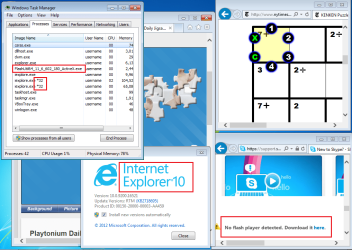
32bit-tabs
IE10-32bit-tabs.png

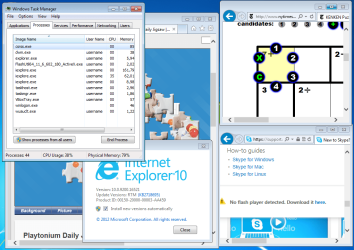
64bit-tabs
IE10-64bit-tabs.png
 

My Computer

Computer type
Laptop
Computer Manufacturer/Model Number
Employer provided Dell Latitude
OS
W7 Pro SP1 64bit
CPU
i7
Memory
8GB
Graphics Card(s)
Intel HD Graphics
Hard Drives
crappy SSD
Antivirus
Employer mandated Symantec Endpoint Protection
Browser
Pale Moon 64bit, IE11 64bit & Chrome 64bit
Hi Username Issues,

OK... so it looks like the Skype page is a web developer/website issue.... but the other two sites prove that something is not working correctly on my computer or there is a problem with my settings...

So the question I have now is how do I fix?

When I go to the Ken-ken page all I am seeing is advertisments but no puzzle... so my Flash is working for some things. And the Jigsaw puzzle never loads... I see "loading...." but that is it.

I am using a high speed internet connection... so I am stumped as to how or where to begin to troubleshoot.

Also... where does your computer show IE10 32bit and 64bit? I used to see a 32bit and a 64 bit version of IE-8 when I would go Start/All Programs... but I am only seeing just one IE10.

Cricket
 

My Computer

Computer type
PC/Desktop
Computer Manufacturer/Model Number
HP Pavilion a4316f
OS
Windows 7 Home Premum 64bit Service Pack 1
CPU
AMD Athlon II X4 620 2.6 Gigahertz
Motherboard
M2N78-LA (Violet6)
Memory
6 Gigs DDR3
Graphics Card(s)
Nvidia GEForce 9100 Integrated Graphics
Sound Card
Integrated Realtek ALC888S Audio
Monitor(s) Displays
HP 2009m LCD 20"
Screen Resolution
1400 x 900
Hard Drives
Western Digital Caviar Green 1 TB
[FONT=&quot]Hi,[/FONT]
[FONT=&quot] [/FONT]
[FONT=&quot]Same problem for me, I am using Windows 7 PRO x64 SP1, Internet Explorer Version 10.0.9200.16521 RTM and Flash Player Version 11.6.602.180.[/FONT]
[FONT=&quot]IE 9 works perfectly. I did the update this morning and since Flash does not work.[/FONT]
[FONT=&quot]I am using Firefox 19.0.2 and I have no problem.[/FONT]
[FONT=&quot]Do you see the flash animation on this page : http://get.adobe.com/fr/flashplayer/completion/aih/?exitcode=0&type=install&appid=200
Thanks for your help.[/FONT]

[FONT=&quot] [/FONT]
[FONT=&quot]Alex[/FONT]
 

My Computer

Computer type
PC/Desktop
OS
Windows 7 PRO SP1 x64
Yes I do see the animation,
Compatibility mode often confuses websites,
Try the F12 key and browser mode and see what is being used,
ie10 regular works well,
You might even try Internet options/ Advanced/ check the top box,
Use software rendering/ Apply and Okay.
 

My Computer

Computer type
PC/Desktop
Computer Manufacturer/Model Number
Custom assembled by me :}
OS
Win-7-Pro64bit 7-H-Prem-64bit
CPU
i7-5930K 2nd i9-9940x both water blocked VRM's too
Motherboard
ASUS SABERTOOTH X99 2nd ASUS x299 Apex
Memory
Trident-z 3200C14 2nd Trident-z 3600C16
Graphics Card(s)
EVGA 1080ti ftw3 2nd Titan Xp both water blocked
Sound Card
Built-in Realtek
Monitor(s) Displays
1-AOC G2460PG 24"G-Sync 144Hz/ 2nd 1-ASUS VG248QE 24" 144Hz
Screen Resolution
1920 x 1080 144Hz
Hard Drives
2-Samsung M.2 Evo & Evo Plus
2-Samsung 850 EVO 500GB SSD's/ 3-2.5 W.D. Black 1tb-&3-1tb/3-3.5 WD Black 1tb hdd's
PSU
EVGA SuperNOVA 1000-P2 2nd 1200-P2
Case
2-Corsair Obsidian Series 450D Black ATX Mid Tower
Cooling
Custom water loops
Keyboard
Logitech G710+/ 2nd Logitech G910
Mouse
2-RedDragon M901 Perdition 16400 dpi Gaming mouse = wired
Internet Speed
Comcast Ping 19ms 89.31mbps download speed 6.12mbps upload
Antivirus
Malwarebytes Pro/ Superantispyware Pro
Browser
FireFox & Pale moon
Other Info
2nd ASUS X299 Apex/Intel i9-9940x with Custom water loop/7H-Prem-x64/Corsair 450D case/Ram Trident-z 3600C16 4x8gb / Samsung970Evo plus 500gb SSD/Dual ssd EZ swap evo/PSU EVGA SuperNova 1200w-P2 80+Platinum/GPU Titan Xp /8-ML-140 on push-pull on 2-280GTX rads
...So the question I have now is how do I fix?...
I wish that I knew. I'm working on another computer that cannot always play YouTube videos via IE9, but on that computer, Chrome randomly fails too.


...so my Flash is working for some things....
Uninstall flash per these steps:
Uninstall Flash Player | Windows
Do not skip step 3.d.
Restart the computer
Install flash again from here: Adobe - Install Adobe Flash Player


...Also... where does your computer show IE10 32bit and 64bit? I used to see a 32bit and a 64 bit version of IE-8 when I would go Start/All Programs... but I am only seeing just one IE10.

Cricket
On a 64 bit W7 OS, IE10 will start a 64bit version of IE as the parent process. Even if you manually start IE10 32bit via Windows (file) Explorer, it will just launch the 64bit version and then exit. The default settings cause that 64bit version to launch a child process of IE10 that is 32bit so that most plug ins will work. (If you open enough tabs, you should get more 32bit instances of IE10. It is the 32bit instances that do the actual "surfing".) If you don't use many plug ins, then you can turn on "64bit tabs" via the info in this tutorial:
http://www.sevenforums.com/tutorial...10-enable-32-bit-64-bit-ie10-windows-7-a.html
(See my videos in that thread. You can use Task Manager instead of Process Explorer to see the "children".)
 

My Computer

Computer type
Laptop
Computer Manufacturer/Model Number
Employer provided Dell Latitude
OS
W7 Pro SP1 64bit
CPU
i7
Memory
8GB
Graphics Card(s)
Intel HD Graphics
Hard Drives
crappy SSD
Antivirus
Employer mandated Symantec Endpoint Protection
Browser
Pale Moon 64bit, IE11 64bit & Chrome 64bit
Hi Username Issues :D

Well I got Adobe Flash to work in IE-10 and Firefox.. Yay! :D I did the uninstallation steps from Adobe that you outlined in your last post and that did the trick. The two links I previously posted for the New York Times Ken-Ken puzzle and also the jigsaw puzzle now work in both browsers....

I can even see some advertisements that I couldn't see before... haha... though it'd be nice to turn those off, lol... but anyway I got it to work.... so many thanks for your help.

I remember when I got the Windows Update for IE-10 that I also had a flash update the very same day directly after IE-10... so I am thinking that all that must have corrupted Flash or something. Glad it is fixed now.

Cricket
 

My Computer

Computer type
PC/Desktop
Computer Manufacturer/Model Number
HP Pavilion a4316f
OS
Windows 7 Home Premum 64bit Service Pack 1
CPU
AMD Athlon II X4 620 2.6 Gigahertz
Motherboard
M2N78-LA (Violet6)
Memory
6 Gigs DDR3
Graphics Card(s)
Nvidia GEForce 9100 Integrated Graphics
Sound Card
Integrated Realtek ALC888S Audio
Monitor(s) Displays
HP 2009m LCD 20"
Screen Resolution
1400 x 900
Hard Drives
Western Digital Caviar Green 1 TB
You are welcome - glad that it worked for you :-)

Thanks for posting back with your results.
 

My Computer

Computer type
Laptop
Computer Manufacturer/Model Number
Employer provided Dell Latitude
OS
W7 Pro SP1 64bit
CPU
i7
Memory
8GB
Graphics Card(s)
Intel HD Graphics
Hard Drives
crappy SSD
Antivirus
Employer mandated Symantec Endpoint Protection
Browser
Pale Moon 64bit, IE11 64bit & Chrome 64bit
I've had that uninstall flash link for a Long time and did try it after I read the post,
No joy on my end,
Still can't play the darn Skype videos but youtube is fine and dandy so I suppose it's no big loss because I don't use Skype,
Still very odd.
 

My Computer

Computer type
PC/Desktop
Computer Manufacturer/Model Number
Custom assembled by me :}
OS
Win-7-Pro64bit 7-H-Prem-64bit
CPU
i7-5930K 2nd i9-9940x both water blocked VRM's too
Motherboard
ASUS SABERTOOTH X99 2nd ASUS x299 Apex
Memory
Trident-z 3200C14 2nd Trident-z 3600C16
Graphics Card(s)
EVGA 1080ti ftw3 2nd Titan Xp both water blocked
Sound Card
Built-in Realtek
Monitor(s) Displays
1-AOC G2460PG 24"G-Sync 144Hz/ 2nd 1-ASUS VG248QE 24" 144Hz
Screen Resolution
1920 x 1080 144Hz
Hard Drives
2-Samsung M.2 Evo & Evo Plus
2-Samsung 850 EVO 500GB SSD's/ 3-2.5 W.D. Black 1tb-&3-1tb/3-3.5 WD Black 1tb hdd's
PSU
EVGA SuperNOVA 1000-P2 2nd 1200-P2
Case
2-Corsair Obsidian Series 450D Black ATX Mid Tower
Cooling
Custom water loops
Keyboard
Logitech G710+/ 2nd Logitech G910
Mouse
2-RedDragon M901 Perdition 16400 dpi Gaming mouse = wired
Internet Speed
Comcast Ping 19ms 89.31mbps download speed 6.12mbps upload
Antivirus
Malwarebytes Pro/ Superantispyware Pro
Browser
FireFox & Pale moon
Other Info
2nd ASUS X299 Apex/Intel i9-9940x with Custom water loop/7H-Prem-x64/Corsair 450D case/Ram Trident-z 3600C16 4x8gb / Samsung970Evo plus 500gb SSD/Dual ssd EZ swap evo/PSU EVGA SuperNova 1200w-P2 80+Platinum/GPU Titan Xp /8-ML-140 on push-pull on 2-280GTX rads
Hi ThrashZone,

I think the Skype video webpage link in my original post (O.P.) is a web developer issue because others couldn't get it to work either... however they could get the other links in my O.P. to work just fine.

If you can get the puzzles links to work, then I'd say your Flash is working just fine. :D

Cricket
 

My Computer

Computer type
PC/Desktop
Computer Manufacturer/Model Number
HP Pavilion a4316f
OS
Windows 7 Home Premum 64bit Service Pack 1
CPU
AMD Athlon II X4 620 2.6 Gigahertz
Motherboard
M2N78-LA (Violet6)
Memory
6 Gigs DDR3
Graphics Card(s)
Nvidia GEForce 9100 Integrated Graphics
Sound Card
Integrated Realtek ALC888S Audio
Monitor(s) Displays
HP 2009m LCD 20"
Screen Resolution
1400 x 900
Hard Drives
Western Digital Caviar Green 1 TB
I asked on TechNet and that was the first observation that it was poorly designed with flash ?
At first glance I really didn't know what to do with the games ? but the controls seemed to function.
Cheers.
 

My Computer

Computer type
PC/Desktop
Computer Manufacturer/Model Number
Custom assembled by me :}
OS
Win-7-Pro64bit 7-H-Prem-64bit
CPU
i7-5930K 2nd i9-9940x both water blocked VRM's too
Motherboard
ASUS SABERTOOTH X99 2nd ASUS x299 Apex
Memory
Trident-z 3200C14 2nd Trident-z 3600C16
Graphics Card(s)
EVGA 1080ti ftw3 2nd Titan Xp both water blocked
Sound Card
Built-in Realtek
Monitor(s) Displays
1-AOC G2460PG 24"G-Sync 144Hz/ 2nd 1-ASUS VG248QE 24" 144Hz
Screen Resolution
1920 x 1080 144Hz
Hard Drives
2-Samsung M.2 Evo & Evo Plus
2-Samsung 850 EVO 500GB SSD's/ 3-2.5 W.D. Black 1tb-&3-1tb/3-3.5 WD Black 1tb hdd's
PSU
EVGA SuperNOVA 1000-P2 2nd 1200-P2
Case
2-Corsair Obsidian Series 450D Black ATX Mid Tower
Cooling
Custom water loops
Keyboard
Logitech G710+/ 2nd Logitech G910
Mouse
2-RedDragon M901 Perdition 16400 dpi Gaming mouse = wired
Internet Speed
Comcast Ping 19ms 89.31mbps download speed 6.12mbps upload
Antivirus
Malwarebytes Pro/ Superantispyware Pro
Browser
FireFox & Pale moon
Other Info
2nd ASUS X299 Apex/Intel i9-9940x with Custom water loop/7H-Prem-x64/Corsair 450D case/Ram Trident-z 3600C16 4x8gb / Samsung970Evo plus 500gb SSD/Dual ssd EZ swap evo/PSU EVGA SuperNova 1200w-P2 80+Platinum/GPU Titan Xp /8-ML-140 on push-pull on 2-280GTX rads
Back
Top