
Internet Explorer 10 - Install or Uninstall in Windows 7

How to Install or Uninstall Internet Explorer 10 (IE10) in Windows 7


   Information
This tutorial will show you how to either install or uninstall Internet Explorer 10 (IE10) to return to Internet Explorer 9 (IE9) for all users in Windows 7.

You must be logged in as an administrator to be able to install or uninstall IE10.

For more information about IE10, see:

   Note
In 32-bit Windows 7, Internet Explorer 10 (IE10) is still only a 32-bit browser.

In 64-bit Windows 7, Internet Explorer 10 (IE10) has 32-bit and 64-bit together in one browser now. The IE10 browser frame process runs 64-bit, but for compatibility with plug-ins, IE10 runs 32-bit tabs by default. If the user turns on “Enhanced Protected Mode”, they will have 64-bit tabs by default for IE10.

For more information about 32-bit and 64-bit IE10, see:
How to Enable 32-bit or 64-bit Internet Explorer 10 (IE10) in Windows 7


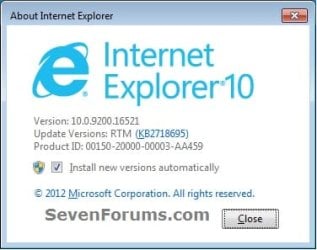
EXAMPLE: About Internet Explorer 10 (IE10)
NOTE: In Internet Explorer, click on Help (Menu bar) and About Internet Explorer to see this. You will notice that the about IE10 is the same whether you open iexplorer.exe from either the "Program Files" or "Program Files (x86)" location. about_IE10_W7.jpg


OPTION ONE

To Install IE10 in Windows 7 through Windows Update


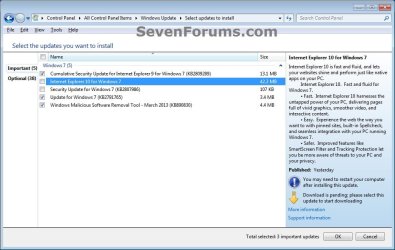
NOTE: If you didn't want to install IE10, then you could hide the "Internet Explorer 10" update to not see it anymore in Windows Update instead. 1. Open the Control Panel (icons view), and click on the Windows Update icon.

2. Check for new Windows Updates. If not already installed, select (check) Internet Explorer 10 for Windows 7, click on OK and Install updates. (see screenshot below) IE10_Windows_Update-1.jpg
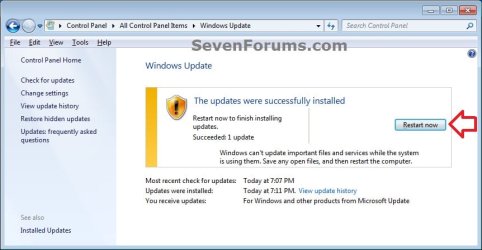
3. When Windows Update is finished, you will need to restart the computer to finish installing IE10. (see screenshot below) IE10_Windows_Update-2.jpg


OPTION TWO

To Download a Standalone IE10 .exe File to Install in Windows 7

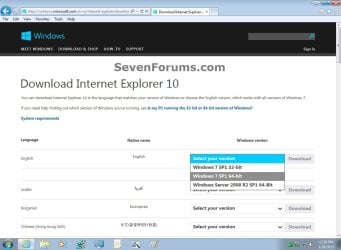
1. Click on the Download button below to go to the Microsoft site below to download the standalone IE10 .exe file to your desktop, and run the .exe file.
NOTE: You can download Internet Explorer 10 in the language that matches your version of Windows or choose the English version, which works with all versions of Windows 7.
   Note
If you have 64-bit Windows 7, then you need to use the Windows 7 SP1 64-bit installer for IE10.

If you have 32-bit Windows 7, then you need to use the Windows 7 SP1 32-bit installer for IE10.

Download


Windows_7_Download_IE10.jpg
2. If prompted by UAC, click on Yes.

3. Click on Install to start installing IE10. (see screenshot below) IE10_StandAlone_Install-1.jpg

4. If prompted, click on Continue. (see screenshot below) IE10_StandAlone_Install-2.jpg
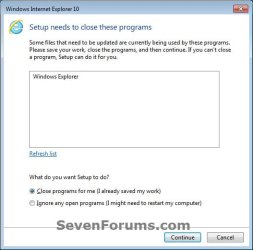
5. When IE10 has finished installing, Explorer will be restarted automatically. (see screenshot below) IE10_StandAlone_Install-3.jpg


OPTION THREE

To Uninstall IE10 in "View installed updates" Windows 7

1. Open the Control Panel (icons view), and click/tap on the Programs and Features icon.

2. In Programs and Features, click on the View installed updates link on the left side. (see screenshot below) IE10_Uninstall-1.jpg
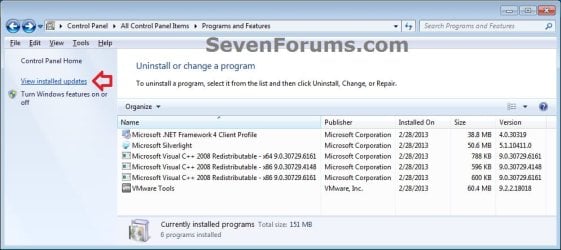
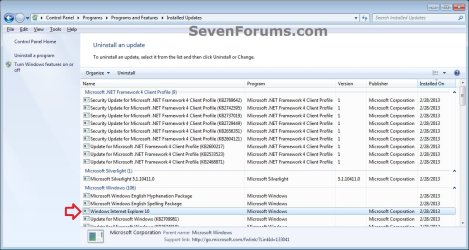
3. In Installed Updates, double click on Windows Internet Explorer 10. (see screenshot below) IE10_Uninstall-2.jpg
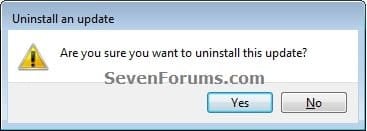
4. Click on Yes. (see screenshot below) IE10_Uninstall-3.jpg
5. If prompted by UAC, click on Yes.

6. When IE10 has finished being uninstalled, click on Restart Now to apply. (see screenshots below) IE10_Uninstall-4.jpg
   Tip
You may now also wish to hide the IE10 update to prevent it from being reinstalled.

http://www.sevenforums.com/tutorials/24376-windows-update-hide-restore-hidden-updates.html


OPTION FOUR

To Uninstall IE10 in an Elevated Command Prompt

1. Open an elevated command prompt.

2. Copy the command below, and close all instances of IE10.

Code:
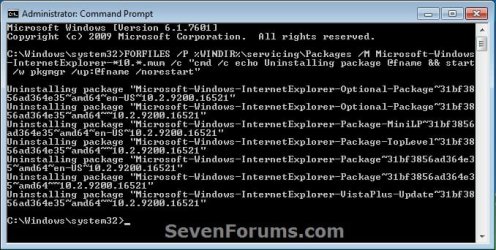
FORFILES /P %WINDIR%\servicing\Packages /M Microsoft-Windows-InternetExplorer-*10.*.mum /c "cmd /c echo Uninstalling package @fname && start /w pkgmgr /up:@fname /norestart"
3. In the elevated command prompt, paste the command from above, and press Enter in the command prompt. (see screenshot below step 5)

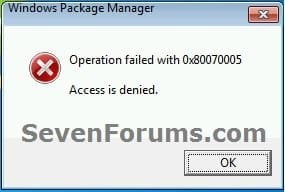
4. If you get any error messages like below, then click on OK to continue. You may get a few. These are fine. (see screenshot below) Uninstall_IE10_CMD-2.jpg
5. When finished, restart the computer. (see screenshot below) Uninstall_IE10_CMD-1.jpg
   Tip
You may now also wish to hide the IE10 update to prevent it from being reinstalled.

http://www.sevenforums.com/tutorials/24376-windows-update-hide-restore-hidden-updates.html


That's it,
Shawn


Last edited:
Thanks!

No...nothing. No errors messages and no "updates have successfully installed" or anything.

When I try to install it from a Windows update, it immediately suggests I download the update again after it's finished.

Personally, I would recommend to reinstall Windows from scratch. :(
 

My Computer

Computer type
PC/Desktop
Computer Manufacturer/Model Number
Self built custom
OS
64-bit Windows 11 Pro for Workstations
CPU
Intel i7-8700K OC'd to 5 GHz
Motherboard
ASUS ROG Maximus XI Formula Z390
Memory
64 GB (4x16GB) G.SKILL TridentZ RGB DDR4 3600 MHz
Graphics Card(s)
ASUS ROG-STRIX-GTX1080TI-O11G-GAMING
Sound Card
Integrated
Monitor(s) Displays
2 x Samsung Odyssey G7 27"
Screen Resolution
2560x1440
Hard Drives
1TB Samsung 990 PRO M.2,
4TB Samsung 990 PRO PRO M.2,
TerraMaster F8 SSD Plus NAS
PSU
Seasonic Prime Titanium 850W
Case
Thermaltake Core P3
Cooling
Corsair Hydro H115i
Keyboard
Logitech wireless K800
Mouse
Logitech MX Master 4
Internet Speed
2 Gb/s Download and 100 Mb/s Upload
Antivirus
Malwarebyte Anti-Malware Premium
Browser
Google Chrome
Other Info
Logitech Z625 speaker system,
Logitech BRIO 4K Pro webcam,
HP Color LaserJet Pro MFP M477fdn,
APC SMART-UPS RT 1000 XL - SURT1000XLI,
Galaxy S23 Plus phone
Eww....not too excited about that.

Any other suggestions first?
 

My Computer

Computer type
PC/Desktop
OS
Windows 7
You could try resetting Windows Update to see if they may install properly and not repeat afterwards.

Do you have a 3rd party AV program installed that may be blocking the installation of the newer version of IE? If so, then you might temporarily uninstall or disable it to see if you are able to install IE afterwards.
 

My Computer

Computer type
PC/Desktop
Computer Manufacturer/Model Number
Self built custom
OS
64-bit Windows 11 Pro for Workstations
CPU
Intel i7-8700K OC'd to 5 GHz
Motherboard
ASUS ROG Maximus XI Formula Z390
Memory
64 GB (4x16GB) G.SKILL TridentZ RGB DDR4 3600 MHz
Graphics Card(s)
ASUS ROG-STRIX-GTX1080TI-O11G-GAMING
Sound Card
Integrated
Monitor(s) Displays
2 x Samsung Odyssey G7 27"
Screen Resolution
2560x1440
Hard Drives
1TB Samsung 990 PRO M.2,
4TB Samsung 990 PRO PRO M.2,
TerraMaster F8 SSD Plus NAS
PSU
Seasonic Prime Titanium 850W
Case
Thermaltake Core P3
Cooling
Corsair Hydro H115i
Keyboard
Logitech wireless K800
Mouse
Logitech MX Master 4
Internet Speed
2 Gb/s Download and 100 Mb/s Upload
Antivirus
Malwarebyte Anti-Malware Premium
Browser
Google Chrome
Other Info
Logitech Z625 speaker system,
Logitech BRIO 4K Pro webcam,
HP Color LaserJet Pro MFP M477fdn,
APC SMART-UPS RT 1000 XL - SURT1000XLI,
Galaxy S23 Plus phone
I don't have any anti-virus stuff running. Just WinPatrol and Microsoft Security Essentials.

Would I do: "OPTION TWO
To Reset and Re-register Windows Update Components"

in regards to resetting Windows Updates?

And THanks!
 

My Computer

Computer type
PC/Desktop
OS
Windows 7
Correct, that would be Option Two there. :)
 

My Computer

Computer type
PC/Desktop
Computer Manufacturer/Model Number
Self built custom
OS
64-bit Windows 11 Pro for Workstations
CPU
Intel i7-8700K OC'd to 5 GHz
Motherboard
ASUS ROG Maximus XI Formula Z390
Memory
64 GB (4x16GB) G.SKILL TridentZ RGB DDR4 3600 MHz
Graphics Card(s)
ASUS ROG-STRIX-GTX1080TI-O11G-GAMING
Sound Card
Integrated
Monitor(s) Displays
2 x Samsung Odyssey G7 27"
Screen Resolution
2560x1440
Hard Drives
1TB Samsung 990 PRO M.2,
4TB Samsung 990 PRO PRO M.2,
TerraMaster F8 SSD Plus NAS
PSU
Seasonic Prime Titanium 850W
Case
Thermaltake Core P3
Cooling
Corsair Hydro H115i
Keyboard
Logitech wireless K800
Mouse
Logitech MX Master 4
Internet Speed
2 Gb/s Download and 100 Mb/s Upload
Antivirus
Malwarebyte Anti-Malware Premium
Browser
Google Chrome
Other Info
Logitech Z625 speaker system,
Logitech BRIO 4K Pro webcam,
HP Color LaserJet Pro MFP M477fdn,
APC SMART-UPS RT 1000 XL - SURT1000XLI,
Galaxy S23 Plus phone
No change. :(

I was wrong earlier, I do get a notification saying "1 upgrade was successfully installed." Then after a short pause it tells me another update is available.

Maybe I should just live with IE 9?
 

My Computer

Computer type
PC/Desktop
OS
Windows 7
That or another browser like Firefox or Chrome until you have time to do a clean install to sort this.
 

My Computer

Computer type
PC/Desktop
Computer Manufacturer/Model Number
Self built custom
OS
64-bit Windows 11 Pro for Workstations
CPU
Intel i7-8700K OC'd to 5 GHz
Motherboard
ASUS ROG Maximus XI Formula Z390
Memory
64 GB (4x16GB) G.SKILL TridentZ RGB DDR4 3600 MHz
Graphics Card(s)
ASUS ROG-STRIX-GTX1080TI-O11G-GAMING
Sound Card
Integrated
Monitor(s) Displays
2 x Samsung Odyssey G7 27"
Screen Resolution
2560x1440
Hard Drives
1TB Samsung 990 PRO M.2,
4TB Samsung 990 PRO PRO M.2,
TerraMaster F8 SSD Plus NAS
PSU
Seasonic Prime Titanium 850W
Case
Thermaltake Core P3
Cooling
Corsair Hydro H115i
Keyboard
Logitech wireless K800
Mouse
Logitech MX Master 4
Internet Speed
2 Gb/s Download and 100 Mb/s Upload
Antivirus
Malwarebyte Anti-Malware Premium
Browser
Google Chrome
Other Info
Logitech Z625 speaker system,
Logitech BRIO 4K Pro webcam,
HP Color LaserJet Pro MFP M477fdn,
APC SMART-UPS RT 1000 XL - SURT1000XLI,
Galaxy S23 Plus phone
Ok...I can live with that.

I use Chrome for most everything...but I stream sports on IE because it's way better. IE 9 is sufficient for now.

Thanks for your help!
 

My Computer

Computer type
PC/Desktop
OS
Windows 7
Hi Brink ever think about adding a tutorial or an option Five command prompt to roll back to ie10 from ie11 ?
Seems it might be a popular item :D
Someone offered the string to use but as always your so exact and easy to follow it would be a great referral if you did it,
Cheers.
Happy Thanksgiving
 

My Computer

Computer type
PC/Desktop
Computer Manufacturer/Model Number
Custom assembled by me :}
OS
Win-7-Pro64bit 7-H-Prem-64bit
CPU
i7-5930K 2nd i9-9940x both water blocked VRM's too
Motherboard
ASUS SABERTOOTH X99 2nd ASUS x299 Apex
Memory
Trident-z 3200C14 2nd Trident-z 3600C16
Graphics Card(s)
EVGA 1080ti ftw3 2nd Titan Xp both water blocked
Sound Card
Built-in Realtek
Monitor(s) Displays
1-AOC G2460PG 24"G-Sync 144Hz/ 2nd 1-ASUS VG248QE 24" 144Hz
Screen Resolution
1920 x 1080 144Hz
Hard Drives
2-Samsung M.2 Evo & Evo Plus
2-Samsung 850 EVO 500GB SSD's/ 3-2.5 W.D. Black 1tb-&3-1tb/3-3.5 WD Black 1tb hdd's
PSU
EVGA SuperNOVA 1000-P2 2nd 1200-P2
Case
2-Corsair Obsidian Series 450D Black ATX Mid Tower
Cooling
Custom water loops
Keyboard
Logitech G710+/ 2nd Logitech G910
Mouse
2-RedDragon M901 Perdition 16400 dpi Gaming mouse = wired
Internet Speed
Comcast Ping 19ms 89.31mbps download speed 6.12mbps upload
Antivirus
Malwarebytes Pro/ Superantispyware Pro
Browser
FireFox & Pale moon
Other Info
2nd ASUS X299 Apex/Intel i9-9940x with Custom water loop/7H-Prem-x64/Corsair 450D case/Ram Trident-z 3600C16 4x8gb / Samsung970Evo plus 500gb SSD/Dual ssd EZ swap evo/PSU EVGA SuperNova 1200w-P2 80+Platinum/GPU Titan Xp /8-ML-140 on push-pull on 2-280GTX rads
Hey Mike,

I shall add it to my list of to dos. :)
 

My Computer

Computer type
PC/Desktop
Computer Manufacturer/Model Number
Self built custom
OS
64-bit Windows 11 Pro for Workstations
CPU
Intel i7-8700K OC'd to 5 GHz
Motherboard
ASUS ROG Maximus XI Formula Z390
Memory
64 GB (4x16GB) G.SKILL TridentZ RGB DDR4 3600 MHz
Graphics Card(s)
ASUS ROG-STRIX-GTX1080TI-O11G-GAMING
Sound Card
Integrated
Monitor(s) Displays
2 x Samsung Odyssey G7 27"
Screen Resolution
2560x1440
Hard Drives
1TB Samsung 990 PRO M.2,
4TB Samsung 990 PRO PRO M.2,
TerraMaster F8 SSD Plus NAS
PSU
Seasonic Prime Titanium 850W
Case
Thermaltake Core P3
Cooling
Corsair Hydro H115i
Keyboard
Logitech wireless K800
Mouse
Logitech MX Master 4
Internet Speed
2 Gb/s Download and 100 Mb/s Upload
Antivirus
Malwarebyte Anti-Malware Premium
Browser
Google Chrome
Other Info
Logitech Z625 speaker system,
Logitech BRIO 4K Pro webcam,
HP Color LaserJet Pro MFP M477fdn,
APC SMART-UPS RT 1000 XL - SURT1000XLI,
Galaxy S23 Plus phone
Sweet,
Much appreciated,
Cheers.
 

My Computer

Computer type
PC/Desktop
Computer Manufacturer/Model Number
Custom assembled by me :}
OS
Win-7-Pro64bit 7-H-Prem-64bit
CPU
i7-5930K 2nd i9-9940x both water blocked VRM's too
Motherboard
ASUS SABERTOOTH X99 2nd ASUS x299 Apex
Memory
Trident-z 3200C14 2nd Trident-z 3600C16
Graphics Card(s)
EVGA 1080ti ftw3 2nd Titan Xp both water blocked
Sound Card
Built-in Realtek
Monitor(s) Displays
1-AOC G2460PG 24"G-Sync 144Hz/ 2nd 1-ASUS VG248QE 24" 144Hz
Screen Resolution
1920 x 1080 144Hz
Hard Drives
2-Samsung M.2 Evo & Evo Plus
2-Samsung 850 EVO 500GB SSD's/ 3-2.5 W.D. Black 1tb-&3-1tb/3-3.5 WD Black 1tb hdd's
PSU
EVGA SuperNOVA 1000-P2 2nd 1200-P2
Case
2-Corsair Obsidian Series 450D Black ATX Mid Tower
Cooling
Custom water loops
Keyboard
Logitech G710+/ 2nd Logitech G910
Mouse
2-RedDragon M901 Perdition 16400 dpi Gaming mouse = wired
Internet Speed
Comcast Ping 19ms 89.31mbps download speed 6.12mbps upload
Antivirus
Malwarebytes Pro/ Superantispyware Pro
Browser
FireFox & Pale moon
Other Info
2nd ASUS X299 Apex/Intel i9-9940x with Custom water loop/7H-Prem-x64/Corsair 450D case/Ram Trident-z 3600C16 4x8gb / Samsung970Evo plus 500gb SSD/Dual ssd EZ swap evo/PSU EVGA SuperNova 1200w-P2 80+Platinum/GPU Titan Xp /8-ML-140 on push-pull on 2-280GTX rads

My Computer

Computer type
PC/Desktop
Computer Manufacturer/Model Number
Self built custom
OS
64-bit Windows 11 Pro for Workstations
CPU
Intel i7-8700K OC'd to 5 GHz
Motherboard
ASUS ROG Maximus XI Formula Z390
Memory
64 GB (4x16GB) G.SKILL TridentZ RGB DDR4 3600 MHz
Graphics Card(s)
ASUS ROG-STRIX-GTX1080TI-O11G-GAMING
Sound Card
Integrated
Monitor(s) Displays
2 x Samsung Odyssey G7 27"
Screen Resolution
2560x1440
Hard Drives
1TB Samsung 990 PRO M.2,
4TB Samsung 990 PRO PRO M.2,
TerraMaster F8 SSD Plus NAS
PSU
Seasonic Prime Titanium 850W
Case
Thermaltake Core P3
Cooling
Corsair Hydro H115i
Keyboard
Logitech wireless K800
Mouse
Logitech MX Master 4
Internet Speed
2 Gb/s Download and 100 Mb/s Upload
Antivirus
Malwarebyte Anti-Malware Premium
Browser
Google Chrome
Other Info
Logitech Z625 speaker system,
Logitech BRIO 4K Pro webcam,
HP Color LaserJet Pro MFP M477fdn,
APC SMART-UPS RT 1000 XL - SURT1000XLI,
Galaxy S23 Plus phone
Back
Top