Internet Explorer 8...Constantly stops Responding

Banker41

New member
Local time
6:58 PM
Messages
10
Good People,

I continue to have issues using any internet browser. I am currently using Windows 7 64 bit RC. I consistantly have issues with internet explorer not responding or crashing. I am attaching the messages I get when this problem occurs, but it really happens with any browser, I have tried Firefox, Opera and Chrome with the same results. Does anyone have any ideas or suggestions. I have tried just about everything that has been suggested, Any help would be greatly appreciated.

Just so you know I have done the following:

Run without add ons, check for viruses and spyware using Malbytes and Avast. Reset internet explorer settings to original state, cleared all temp files etc etc. But I still have the same issues, faulting modules seem to mostly be related to .dll files, either MSHTML.dll or NTDLL.dll or OLE32.dll and stackhash errors.

Below are some of the messages I see in the Reliability monitor....

Description
Faulting Application Path: C:\Program Files (x86)\Internet Explorer\iexplore.exe

Problem signature
Problem Event Name: APPCRASH
Application Name: iexplore.exe
Application Version: 8.0.7100.0
Application Timestamp: 49ee9200
Fault Module Name: RPCRT4.dll
Fault Module Version: 6.1.7100.0
Fault Module Timestamp: 49eea707
Exception Code: c0000005
Exception Offset: 00039bc9
OS Version: 6.1.7100.2.0.0.256.1
Locale ID: 1033
Additional Information 1: 3790
Additional Information 2: 379024954014d8cedb8a861556633711
Additional Information 3: 3790
Additional Information 4: 379024954014d8cedb8a861556633711

Extra information about the problem
Bucket ID: 1410637033

Description
Faulting Application Path: C:\Program Files (x86)\Internet Explorer\iexplore.exe

Problem signature
Problem Event Name: BEX
Application Name: iexplore.exe
Application Version: 8.0.7100.0
Application Timestamp: 49ee9200
Fault Module Name: StackHash_0a9e
Fault Module Version: 0.0.0.0
Fault Module Timestamp: 00000000
Exception Offset: 710eae93
Exception Code: c0000005
Exception Data: 00000008
OS Version: 6.1.7100.2.0.0.256.1
Locale ID: 1033
Additional Information 1: 0a9e
Additional Information 2: 0a9e372d3b4ad19135b953a78882e789
Additional Information 3: 0a9e
Additional Information 4: 0a9e372d3b4ad19135b953a78882e789

Description
Faulting Application Path: C:\Program Files (x86)\Internet Explorer\iexplore.exe

Problem signature
Problem Event Name: APPCRASH
Application Name: iexplore.exe
Application Version: 8.0.7100.0
Application Timestamp: 49ee9200
Fault Module Name: mshtml.dll
Fault Module Version: 8.0.7100.4129
Fault Module Timestamp: 4a6a7a57
Exception Code: c0000005
Exception Offset: 0024b6d6
OS Version: 6.1.7100.2.0.0.256.1
Locale ID: 1033
Additional Information 1: 0a9e
Additional Information 2: 0a9e372d3b4ad19135b953a78882e789
Additional Information 3: 0a9e
Additional Information 4: 0a9e372d3b4ad19135b953a78882e789

Extra information about the problem
Bucket ID: 1411311710

Description
Faulting Application Path: C:\Program Files (x86)\Internet Explorer\iexplore.exe

Problem signature
Problem Event Name: APPCRASH
Application Name: iexplore.exe
Application Version: 8.0.7100.0
Application Timestamp: 49ee9200
Fault Module Name: ole32.dll
Fault Module Version: 6.1.7100.0
Fault Module Timestamp: 49eea66c
Exception Code: c0000005
Exception Offset: 0003ae05
OS Version: 6.1.7100.2.0.0.256.1
Locale ID: 1033
Additional Information 1: a7aa
Additional Information 2: a7aa91f17ea749d42a4de3b390fa5b3d
Additional Information 3: a7aa
Additional Information 4: a7aa91f17ea749d42a4de3b390fa5b3d

Extra information about the problem
Bucket ID: 1274282752
 

My Computer

Computer Manufacturer/Model Number
Dell XPS 630i
OS
Windows 7 RC 64 bit
CPU
Intel Core2 Quad Q8200
Motherboard
Nvidia 650 sli
Memory
4 GB
Graphics Card(s)
Nvidia 9800 GT
Sound Card
Realtek onboard
Monitor(s) Displays
Dell 1800fp LCD

My Computer

Computer Manufacturer/Model Number
Intel WBIBX10J
OS
Linux (Debian, Android)
CPU
Intel Core i7 860
Motherboard
Intel DP55WB
Memory
2x 2GB Kingston DDR3-1333
Graphics Card(s)
AMD Radeon HD 5750
Sound Card
Realtek ALC888
Monitor(s) Displays
2x Dell Inc. E248WFP
Screen Resolution
3840x1200
Hard Drives
Intel X25-V
Samsung HD103SJ
PSU
Corsair CX400
Case
Silverstone GD05
Cooling
Stock
Keyboard
Dell Inc. Bluetooth Wireless
Internet Speed
30 Mbps
If this was a hardware issue, what hardware would be impacting IE8? It is the only function on Windows 7 I have an issue with. Any idea on what hardware would be making this crash would be appreciated.
 

My Computer

Computer Manufacturer/Model Number
Dell XPS 630i
OS
Windows 7 RC 64 bit
CPU
Intel Core2 Quad Q8200
Motherboard
Nvidia 650 sli
Memory
4 GB
Graphics Card(s)
Nvidia 9800 GT
Sound Card
Realtek onboard
Monitor(s) Displays
Dell 1800fp LCD
Did you try the sfc /scannow as suggested above?

Have you tried reinstalling IE8?

I'm ruling out hardware atm.
 

My Computer

Computer type
PC/Desktop
Computer Manufacturer/Model Number
DELL VOSTRO 3650
OS
Windows 8.1 PRO
CPU
3rd Generation Intel Core i7‐3612QM CPU @ 2.10GHZ
Memory
8GB DDR3
Graphics Card(s)
NVIDIA GeForce GT 525M (128 bit), 1GB Grpahics
Screen Resolution
1920X1080
Hard Drives
750GB 5400RPM
ive been having the same problem for a while now... i figured it was because of the wireless adapter i was using, so i went out and got a x64 compatible one, a belkin one... still have the problem just as often.... and its a lot.... if you find an anwser to it .... post up!
 

My Computer

Computer Manufacturer/Model Number
Custom Built - TheTeZ
OS
Windows 7 -x6
CPU
Intel Core 2 Extreme QX9650 Processor- (Quad)
Motherboard
Asus P5N-D Motherboard
Memory
OCZ Platnum 8gb(2gbx4) PC 6400 DDR2 800MHz
Graphics Card(s)
EVGA 01G-P3-1145-TR GeForce GTS 250 Video Card
Sound Card
Realtek ALC883
Monitor(s) Displays
19" WideScreen Mag Innovision & Acer X203H Vertical Mount
Screen Resolution
1440x900 & 1600x900
Hard Drives
Western Digital WD7500AADS Caviar Green Hard Drive - 750GB
Western Digital WD500
Hitachi 1TB Serial ATA HD
PSU
Kingwin Mach 1 Modular Power Supply
Case
NZXT Tempest ATX Mid-Tower Case -- AKA Flow Master
Cooling
Thermaltake SpinQ CPU Cooler - Aerocool Touch 1000 LCD Panel
Have you guys with this problem tried using the 64 bit IE to see if the problem is still there? If it's only happening to the 32 bit IE I have an idea what the problem is.
 

My Computer

Computer type
PC/Desktop
Computer Manufacturer/Model Number
Home built
OS
Windows 7 Ult, Windows 8.1 Pro,
CPU
Q9650-4.275GHz, E8600 4.5GHz, E6750-3.8GHz
Motherboard
Evga 780i FTW
Memory
G.Skill PC2 9600 1200Mhz 5 5 5 15 2T
Graphics Card(s)
GTX480
Sound Card
Asus Xonar D2
Monitor(s) Displays
HannsG
Screen Resolution
1680X1050
Hard Drives
GSkill Phoenix Pro 120GB SSD
PSU
ThermalTake Toughpower 1000Watt modular
Case
ThermalTake XaserV
Cooling
Xigmatek S1283
Keyboard
Logitech G15
Mouse
Logitech G9
Internet Speed
T1
I do not get crashes with the 64 bit version of IE8. However as you know you cannot really experience all the Internet has to offer with the 64 bit version. Most of the media content is through Flashplayer or Shockwave and Adobe has made no version for IE8 64 bit only a new I guess beta release for Linux 64 bit.
 

My Computer

Computer Manufacturer/Model Number
Dell XPS 630i
OS
Windows 7 RC 64 bit
CPU
Intel Core2 Quad Q8200
Motherboard
Nvidia 650 sli
Memory
4 GB
Graphics Card(s)
Nvidia 9800 GT
Sound Card
Realtek onboard
Monitor(s) Displays
Dell 1800fp LCD
Have you guys with this problem tried using the 64 bit IE to see if the problem is still there? If it's only happening to the 32 bit IE I have an idea what the problem is.

Happens with the x64 as well.....
 

My Computer

Computer Manufacturer/Model Number
Custom Built - TheTeZ
OS
Windows 7 -x6
CPU
Intel Core 2 Extreme QX9650 Processor- (Quad)
Motherboard
Asus P5N-D Motherboard
Memory
OCZ Platnum 8gb(2gbx4) PC 6400 DDR2 800MHz
Graphics Card(s)
EVGA 01G-P3-1145-TR GeForce GTS 250 Video Card
Sound Card
Realtek ALC883
Monitor(s) Displays
19" WideScreen Mag Innovision & Acer X203H Vertical Mount
Screen Resolution
1440x900 & 1600x900
Hard Drives
Western Digital WD7500AADS Caviar Green Hard Drive - 750GB
Western Digital WD500
Hitachi 1TB Serial ATA HD
PSU
Kingwin Mach 1 Modular Power Supply
Case
NZXT Tempest ATX Mid-Tower Case -- AKA Flow Master
Cooling
Thermaltake SpinQ CPU Cooler - Aerocool Touch 1000 LCD Panel
There are two workaround for this issue which are listed here,
Fix MSI Installer/Windows Explorer/Windows Update has stopped Working

Method 1: Registry Edit

1. Click on start and Type regedit on search bar (on RUN command)
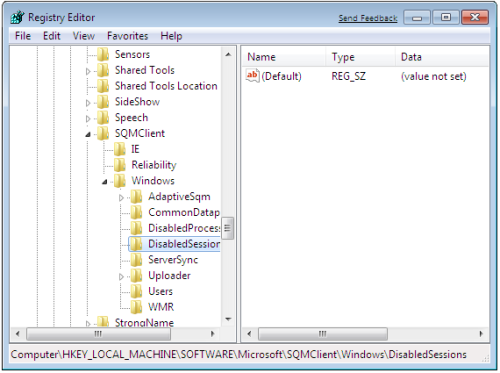
2. Navigate to following key
HKLM\Software\Microsoft\SQMClient\Windows\DisabledSessions
Click this bar to view the full image.
3. Now delete all string key except default inside “DisabledSessions”

Method 2: Disabling CEIP Customer Experience Improvement Program

1. Click start and type gpedit.msc on search bar or on RUN command
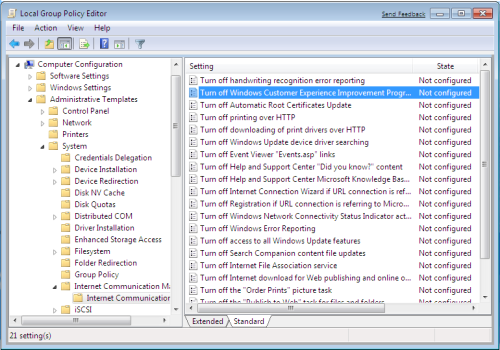
2. Now navigate to
Computer Configuration -> Administrative Templates -> System -> Internet Communication Management, and then click Internet Communication settings
Click this bar to view the full image.
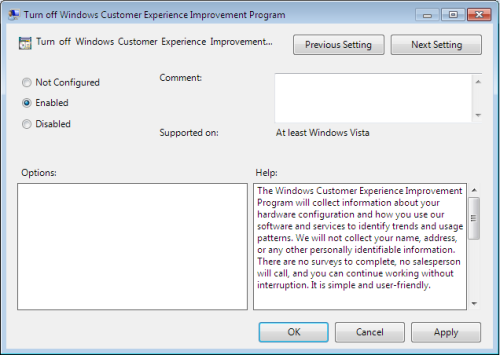
3. Locate Turn off Windows Customer Experience Improvement Program, double click or right click edit.
4. Click on Enable. Apply and Ok and close gpedit window.
Click this bar to view the full image.
We need to wait until Microsoft fixes the issue and issues a hotfix
 
Did you try the sfc /scannow as suggested above?

Have you tried reinstalling IE8?

I'm ruling out hardware atm.

I have completed it ! but Im still got this problem ! Can everybody give me further way to resolve it ! Thanks all :)
 

My Computer

Computer Manufacturer/Model Number
TOSHIBA/L305-S5883
OS
Windows Seven
CPU
T5750
Memory
4GB
Graphics Card(s)
X3100
does anyone seem to be having this problem with the retail release? i havent had it yet.
 

My Computer

Computer Manufacturer/Model Number
Custom Built - TheTeZ
OS
Windows 7 -x6
CPU
Intel Core 2 Extreme QX9650 Processor- (Quad)
Motherboard
Asus P5N-D Motherboard
Memory
OCZ Platnum 8gb(2gbx4) PC 6400 DDR2 800MHz
Graphics Card(s)
EVGA 01G-P3-1145-TR GeForce GTS 250 Video Card
Sound Card
Realtek ALC883
Monitor(s) Displays
19" WideScreen Mag Innovision & Acer X203H Vertical Mount
Screen Resolution
1440x900 & 1600x900
Hard Drives
Western Digital WD7500AADS Caviar Green Hard Drive - 750GB
Western Digital WD500
Hitachi 1TB Serial ATA HD
PSU
Kingwin Mach 1 Modular Power Supply
Case
NZXT Tempest ATX Mid-Tower Case -- AKA Flow Master
Cooling
Thermaltake SpinQ CPU Cooler - Aerocool Touch 1000 LCD Panel
Are you talking about IE8 (32bit) just locking up before it opens, and the only way to get things back is to use task manager and end process? If so, I just experienced that today. I had an image backup I made 3 hours before, so am restoring it now.
 

My Computer

OS
Win 7 x64
CPU
i7 920 @ 4Ghz
Motherboard
Asus P6T Deluxe v2
Memory
6 Gb
Graphics Card(s)
ATI 4770
Hard Drives
1 ea 750 GB
1 ea 1TB
1 ea 750 GB
1 ea 750 GB
No Raid, all SATA
PSU
Corsair TX750
Case
Coolermaster ATCS 840
Cooling
Prolimatech Megahalem
Internet Speed
30
I had the same problem (IE8 not responding). I Uninstalled Microsoft Silverlight since it was the last thing I installed before the problems started. That did the trick for me, try it and let us know please.
 

My Computer

OS
Windows 7 64 Bit, Windows 7 32 Bit, Windows XP SP3
I just about pulled out the remaining portions of my hair trying to figure out why Windows 7 64-bit Pro kept freezing on me randomly every 5 mins to 45 mins. It had worked fine for months, then started with the freezing. After that, I was testing Ram, flashing Bios, did a full re-install, removing/re-adding updates, changing keyboards and mice -- for WEEKS!

I finally learned that it was a USB wifi dongle that was going bad and/or was damaged.
 

My Computer

OS
Windows 7 64-bit Pro
CPU
Core I-5 750
Motherboard
Asrock P55m pro
Memory
4 Gig G-skill 7-7-7-21
Graphics Card(s)
ATI 4550
Monitor(s) Displays
LG W2353V Flatron
Hard Drives
WD Green 1TB
Well, unfortunately, I have learned that there is more to it than the USB dongle. I still don't have Win7 working right. Did temp tests on CPU and GPU today, and they're fine. Still getting random freezes. Everything was just fine for 3 months, now this. I still suspect some form of update issue.
 

My Computer

OS
Windows 7 64-bit Pro
CPU
Core I-5 750
Motherboard
Asrock P55m pro
Memory
4 Gig G-skill 7-7-7-21
Graphics Card(s)
ATI 4550
Monitor(s) Displays
LG W2353V Flatron
Hard Drives
WD Green 1TB
Sad to see this dead end. I am having this problem suddenly on a PC that was working just fine until hours ago, no third-party installs, only windows updates performed.
 

My Computer

Computer type
Laptop
Computer Manufacturer/Model Number
Dell Insprion 7559 next to a Toshiba Portege
OS
Win 7 Pro 64-bit
CPU
Intel Core i5
Motherboard
Intel
Memory
16 GB Dell, 6 GB Toshiba
Graphics Card(s)
Intel crap on both but Dell also has nVidia GeForce GTX960M
Sound Card
RealTek
Monitor(s) Displays
internal and external ACER KA270H 27"
Screen Resolution
1920x1080
Hard Drives
SSD 256 GB plus numerous WD Red or Purple on USB3 docks. Used to buy a lot of Seagate but tossed them the second time I got unrecoverable disc corruption in the midst of use.
Keyboard
Garage Mouse SW and some cheap Amazon China made USB device
Mouse
Garage Mouse and some cheap Amazon China made USB device
Internet Speed
50 Mbps (allegedly, depends on server)
Antivirus
Defender, Malwarebytes Premium and Kaspersky
Browser
IE 11, and Chrome something
Hi,

Thought I'd update...

turned out that my hard drive was going bad. The Western Digital scanning program didn't catch the problem, but it was indeed the HDD. I swapped it out for a new one, reinstalled windows, and all has been just fine for a month since.

What gave it away were the continual drive controller errors listed under the Windows Event Viewer. If you search on Event Viewer, you can see what the critical errors are. I actually swapped the mainboard and graphics card before finally changing the HDD... would have done that far earlier if the WD HDD checking program hadn't been telling me it was working OK. It wasn't!
 

My Computer

OS
Windows 7 64-bit Pro
CPU
Core I-5 750
Motherboard
Asrock P55m pro
Memory
4 Gig G-skill 7-7-7-21
Graphics Card(s)
ATI 4550
Monitor(s) Displays
LG W2353V Flatron
Hard Drives
WD Green 1TB
IE hangs.
It hangs in 32-bit.
It hangs in 64-bit.
It hangs without addons.

Sidebar: I wonder if Technorati would accept a Suess-like rhyme about IE.

This problem started today and is easily reproducable on my PC. I have not installed any new software other than Windows updates for the last 48 hours prior to the first problem. I have verified that all Microsoft updates have been applied and that there are no new udpates from my PC manufacturer. My PC is about a week or so old/new (see profile).
The problem is easily and immediately reproducable when scrolling while editing any Google Site page on any Google Site. The hang has occurred in other situations unrelated to Google Sites, but this test reproduces the problem every time.
Chrome and Mozilla operate correctly.
Description
A problem caused this program to stop interacting with Windows.
Faulting Application Path: C:\Program Files (x86)\Internet Explorer\iexplore.exe
Problem signature
Problem Event Name: AppHangXProcB1
Application Name: iexplore.exe
Application Version: 8.0.7600.16385
Application Timestamp: 4a5bc69e
Hang Signature: 9c29
Hang Type: 32
Waiting on Application Name: iexplore.exe
Waiting on Application Version: 8.0.7600.16385
OS Version: 6.1.7600.2.0.0.768.3
Locale ID: 1033
Additional Hang Signature 1: 9c29812c68be0254c5ffd3914cdd69cd
Additional Hang Signature 2: a0ff
Additional Hang Signature 3: a0ffbbe5f9a169a12b19f74342727165
Additional Hang Signature 4: 9c29
Additional Hang Signature 5: 9c29812c68be0254c5ffd3914cdd69cd
Additional Hang Signature 6: a0ff
Additional Hang Signature 7: a0ffbbe5f9a169a12b19f74342727165
Extra information about the problem
Bucket ID: 646587220
Steps taken:
Cleared cache.
Verified all Microsoft updates are applied to the PC.
Verified there are no newer manufacturer updates for the PC.
Tried to find if there are any critical fixes for IE via the Action Center:
Control > Action Center > Maintenance > Check for Solutions
Result: No new solutions found
Tried disabling all addons. Tried enabling all addons.
Tried the Microsoft Fix-IT program Mats_run.IEAddon.exe
Uninstalled and reinstalled all Adobe products, Reader, AIR, Flash, Shockwave.
Uninstalled 6.20 Java and installed 6.21 Java.
Reviewed event logs for something that might have been the cause, but didn't spot anything that might be related.
Reset IE back to default settings.
Several reboots.
Problably a few other things that I can't remember.
Oh Yeah, SFC /SCANNOW
Resinstalled IE just prior to this post. No mojo.
Suggestions?


My Computer

Computer type
Laptop
Computer Manufacturer/Model Number
Dell Insprion 7559 next to a Toshiba Portege
OS
Win 7 Pro 64-bit
CPU
Intel Core i5
Motherboard
Intel
Memory
16 GB Dell, 6 GB Toshiba
Graphics Card(s)
Intel crap on both but Dell also has nVidia GeForce GTX960M
Sound Card
RealTek
Monitor(s) Displays
internal and external ACER KA270H 27"
Screen Resolution
1920x1080
Hard Drives
SSD 256 GB plus numerous WD Red or Purple on USB3 docks. Used to buy a lot of Seagate but tossed them the second time I got unrecoverable disc corruption in the midst of use.
Keyboard
Garage Mouse SW and some cheap Amazon China made USB device
Mouse
Garage Mouse and some cheap Amazon China made USB device
Internet Speed
50 Mbps (allegedly, depends on server)
Antivirus
Defender, Malwarebytes Premium and Kaspersky
Browser
IE 11, and Chrome something
IE hangs.
It hangs in 32-bit.
It hangs in 64-bit.
It hangs without addons...
...I have not installed any new software other than Windows updates for the last 48 hours prior to the first problem. I have verified that all Microsoft updates have been applied and that there are no new udpates from my PC manufacturer. My PC is about a week or so old/new (see profile).

1) You could try operating in "clean boot" mode by using msconfig to uncheck all startup tab items and all services left after "hiding Microsoft" services.

2) Is there a restore point available from before the 2 days you installed the Windows updates? If so you could go back to verify an update caused the problem. Then reinstall the updates in "clean boot" mode, a few at a time, rebooting after each small group.
 

My Computer

Computer type
PC/Desktop
Computer Manufacturer/Model Number
OQO 2+
OS
Windows 8 Pro w/MC 32-bit
CPU
Intel Atom 1.86 GHz
Motherboard
OQO 2+
Memory
2 GB
Graphics Card(s)
Intel GMA 500
Sound Card
IDT
Monitor(s) Displays
LCD
Screen Resolution
800 x 480 (portable) 1280 x 1024 (docked)
Hard Drives
64 GB SSD
PSU
9 Ah Battery (portable) or OQO Brick (docked)
Case
Shirt Pocket Sized
Cooling
Tiny Fan
Keyboard
Slide out (portable) DiNovo Edge (docked)
Mouse
Eraser head (portable) Logitech Bluetooth (docked)
Internet Speed
WWAN or 802.11G (portable) T1 (docked)
Browser
IE 10
Other Info
DVD-RW OQO Docking Station
Personally, if you've been through this much with it, I would suggest a clean reinstall after backing-up your important files.
 

My Computer

OS
Windows 7 64-bit Pro
CPU
Core I-5 750
Motherboard
Asrock P55m pro
Memory
4 Gig G-skill 7-7-7-21
Graphics Card(s)
ATI 4550
Monitor(s) Displays
LG W2353V Flatron
Hard Drives
WD Green 1TB
Back
Top