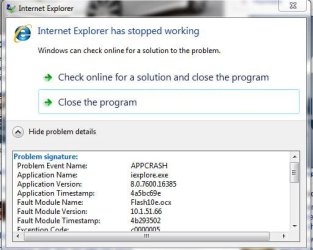
Internet Explorer 8 Crashing!!!

Soul02

Banned
Local time
2:06 PM
Messages
27
Location
Shenyang, China
Hey, just joined the forums so hi to everyone :D

Now to tell you about my problem as its getting really annoying now, when ever im
in the IE8 and ive got a few tabs open, if i ever close a tab ill get a box saying 'internet exploarer not found' whatever .. and i can either cancel or close the box! now when i do anything im downloading cancels, really realyl annoying!
Now another thing is sometimes when im browsing the IE stops responding! if i click anything or try to close the IE the IE goes white-ish and askes me if i want to restart, close, the IE .. etc!
Now when i close it i go back on to the IE and restore my previouse sesion!

But man!!! this is annoying as hell! lol .. its happening every other time.

Please help.

Thanks :)
 

My Computer

Computer Manufacturer/Model Number
Custom Built
OS
Windows 7 Pro 32bit
CPU
AMD Phenom 8650 Triple-Core
Motherboard
ASUS M3A78
Memory
Kingston 4gb DDR2
Graphics Card(s)
NVIDIA GeForce GTS 250 (512mb)
Monitor(s) Displays
Acer
Screen Resolution
1440 x 900
Hard Drives
X2 Seagate 7200RPM 500GB h/d
Cooling
Cooler Master
Keyboard
Merc Stealth Zboard
Mouse
LogitechG9 Gaming Mouse
Hey, just joined the forums so hi to everyone :D

Now to tell you about my problem as its getting really annoying now, when ever im
in the IE8 and ive got a few tabs open, if i ever close a tab ill get a box saying 'internet exploarer not found' whatever .. and i can either cancel or close the box! now when i do anything im downloading cancels, really realyl annoying!
Now another thing is sometimes when im browsing the IE stops responding! if i click anything or try to close the IE the IE goes white-ish and askes me if i want to restart, close, the IE .. etc!
Now when i close it i go back on to the IE and restore my previouse sesion!

But man!!! this is annoying as hell! lol .. its happening every other time.

Please help.

Thanks :)


Hi and welcome

First thing you need to do is find out why. Type eventvwr in search. go to the windows log>application tab. You need to look for critical errors (they have red in the left hand column) that have app hang, or app crash in them. There will be a ton. what we need is the event ID, and source code from the errors.

Let us lnow if you need help

Ken
 

My Computer

Computer Manufacturer/Model Number
HP Pavillion dv-7 1005 Tx
OS
Win 8 Release candidate 8400
CPU
[email protected]
Memory
4 gigs
Graphics Card(s)
Nvidia 9600M
Sound Card
HD built-in
Monitor(s) Displays
17" Wxga
Screen Resolution
1440x900
Cooling
none
Internet Speed
45Mb down 5Mb up
Hi and welcome

First thing you need to do is find out why. Type eventvwr in search. go to the windows log>application tab. You need to look for critical errors (they have red in the left hand column) that have app hang, or app crash in them. There will be a ton. what we need is the event ID, and source code from the errors.

Let us lnow if you need help

Ken

Wow... talk about many! yeah hundreds! lol.
Here is the code with the latest crash:
Code:
Faulting application name: iexplore.exe, version: 8.0.7600.16385, time stamp: 0x4a5bc69e
Faulting module name: mshtml.dll, version: 8.0.7600.16490, time stamp: 0x4b2c9557
Exception code: 0xc0000005
Fault offset: 0x001b6661
Faulting process id: 0x1f24
Faulting application start time: 0x01caac00ec8dbf65
Faulting application path: C:\Program Files\Internet Explorer\iexplore.exe
Faulting module path: C:\Windows\System32\mshtml.dll
Is that what you mean? if not ill keep looking.

Thanks for the swift reply too :geek:

Edit: just found this post and trying it out, hopefully this will help, do please post what other ways i can fix it too! thx.
 
Last edited:

My Computer

Computer Manufacturer/Model Number
Custom Built
OS
Windows 7 Pro 32bit
CPU
AMD Phenom 8650 Triple-Core
Motherboard
ASUS M3A78
Memory
Kingston 4gb DDR2
Graphics Card(s)
NVIDIA GeForce GTS 250 (512mb)
Monitor(s) Displays
Acer
Screen Resolution
1440 x 900
Hard Drives
X2 Seagate 7200RPM 500GB h/d
Cooling
Cooler Master
Keyboard
Merc Stealth Zboard
Mouse
LogitechG9 Gaming Mouse

My Computer

Computer type
PC/Desktop
Computer Manufacturer/Model Number
Self built custom
OS
64-bit Windows 11 Pro for Workstations
CPU
Intel i7-8700K OC'd to 5 GHz
Motherboard
ASUS ROG Maximus XI Formula Z390
Memory
64 GB (4x16GB) G.SKILL TridentZ RGB DDR4 3600 MHz
Graphics Card(s)
ASUS ROG-STRIX-GTX1080TI-O11G-GAMING
Sound Card
Integrated
Monitor(s) Displays
2 x Samsung Odyssey G7 27"
Screen Resolution
2560x1440
Hard Drives
1TB Samsung 990 PRO M.2,
4TB Samsung 990 PRO PRO M.2,
TerraMaster F8 SSD Plus NAS
PSU
Seasonic Prime Titanium 850W
Case
Thermaltake Core P3
Cooling
Corsair Hydro H115i
Keyboard
Logitech wireless K800
Mouse
Logitech MX Master 4
Internet Speed
2 Gb/s Download and 100 Mb/s Upload
Antivirus
Malwarebyte Anti-Malware Premium
Browser
Google Chrome
Other Info
Logitech Z625 speaker system,
Logitech BRIO 4K Pro webcam,
HP Color LaserJet Pro MFP M477fdn,
APC SMART-UPS RT 1000 XL - SURT1000XLI,
Galaxy S23 Plus phone
Using Adobe flash 10.1 beta maybe? I can get a reproducible crash in IE8 with 4 or more tabs open then close out of the browser, close all tabs.

Capture[-p-.JPG

Not sure if it happens with regular flash 10.0..

Just another possibility...
 

My Computer

Computer type
PC/Desktop
Computer Manufacturer/Model Number
Airbot 2.0
OS
Windows 7 Ultimate x64 SP1
CPU
Core i7 920 (D0) @ 4Ghz, *26c idle *65c full load on air
Motherboard
Asus P6X58D Premium - Sata 6Gb/s - USB 3.0
Memory
12GB DDR3 Corsair Dominator -CMD12GX3M6A1600C8 at 1600MHz
Graphics Card(s)
Zotac Geforce GTX 770
Sound Card
ASUS Xonar D2X
Monitor(s) Displays
1 LG 24" Flatron W2453V-PF 1 Samsung 24" P2450H both 2ms RT
Screen Resolution
1920x1080@60hz
Hard Drives
1 Samsung 250GB 840 Evo SSD
1 OCZ Vertex2 180GB SSD
1 TB Samsung Spinpoint F1 7200RPM 32MB cache
2 500GB WD Caviar Blacks 7200RPM 32MB cache (WD5001AALS)

Pioneer DVD Burner DVR-S18M
PSU
Corsair HX1000W
Case
Cooler Master HAF 932
Cooling
Case Fans *3 230mm, *1 140mm/CPU - *Tuniq Tower 120 Extreme
Keyboard
Logitech Wireless MK700
Mouse
Logitech Wireless MK700
Internet Speed
DL 15 Mbps UL 0.98 Mbps
Antivirus
None
Browser
Firefox Nightly
Other Info
Processor-7.7 *RAM- 7.9 *Graphics-7.9 *Gaming Graphics- 7.9 *SSD- 7.8 W.E.I final score= 7.7
*Phone- LG Nexus 5
Hey, seems all fine now! its really perfect! not had a crash in ages, since i just turned on ''display all websites in compatabilaty view'' thanks for all your help guys :D
 

My Computer

Computer Manufacturer/Model Number
Custom Built
OS
Windows 7 Pro 32bit
CPU
AMD Phenom 8650 Triple-Core
Motherboard
ASUS M3A78
Memory
Kingston 4gb DDR2
Graphics Card(s)
NVIDIA GeForce GTS 250 (512mb)
Monitor(s) Displays
Acer
Screen Resolution
1440 x 900
Hard Drives
X2 Seagate 7200RPM 500GB h/d
Cooling
Cooler Master
Keyboard
Merc Stealth Zboard
Mouse
LogitechG9 Gaming Mouse
Ok, sorry about this but .. problem seems to still be here! though its not as bad as before!
Its mostly when i close a tab or go from one page to another, it comes up with internet explorer not found box! where you press cancel or wait for it then press close!
Like i said its not so bad, but whys it doing this? you guys said before about a bad addon? what type of addon your on about? as far as i know ive got none!

Lost ... :confused:

Edit: ive just found the addons part, and ive disabled Skype as ive heard that causes alot of problems anyway, and as i dont use Skype there is no need for it.
Any others you guys think i should disable? thanks.
 

My Computer

Computer Manufacturer/Model Number
Custom Built
OS
Windows 7 Pro 32bit
CPU
AMD Phenom 8650 Triple-Core
Motherboard
ASUS M3A78
Memory
Kingston 4gb DDR2
Graphics Card(s)
NVIDIA GeForce GTS 250 (512mb)
Monitor(s) Displays
Acer
Screen Resolution
1440 x 900
Hard Drives
X2 Seagate 7200RPM 500GB h/d
Cooling
Cooler Master
Keyboard
Merc Stealth Zboard
Mouse
LogitechG9 Gaming Mouse
If you are having trouble browsings, I also recommend disabling any add-ons with more than a .2 sec load time.
Kyler
IE8 Outreach Team
 

My Computer

OS
Windows 7
Back
Top