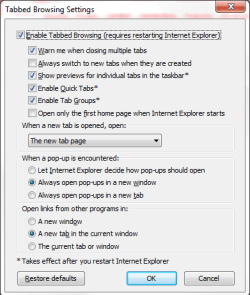
Internet Explorer 8.
This may be real simple for some. But I can't figure it out.
I may be using incorrect terminology or words here but I hope someone can get the gist of what I am seeking.
In Internet Explorer 8.
I open. Go to any website. For simplicity sake I will make up names.
I go to Awebsite.com - That website opens correctly.
Then I go to Bwebsite.com - That website opens correctly (Awebsite closes).
Then I go to Cwebsite.com - That website opens correctly. (Bwebsite closes).
Here is the issue:
After I open Awebsite.com and then open Bwebsite.com, I lose (or it goes away) Awebsite.com. And if I open Cwebsite.com - both Awebsite.com and Bwebsite.com all go away.
In other words, I can only have one website open at one time.
I used to be able to open multiple websites and they would be listed across the top of screen and be listed in the large blue E on bottom of screen. In other words all the open websites were accesible. I could open dozens of websites and they were just a click away and listed left to right in the gray area near top of screen and be listed in the large E (Internet Explorer) on bottom left of screen.
Now, I open one website, it appears properly, then if I open another website, the first website closes (or disappears) and I can only have one website available at one time.
I used to be able to have multiple web pages listed across top of screen in Internet Explorer and be listed in the large blue E on bottom left of screen.
I have looked and checked and unchecked all sort of boxes in TOOLS but nothing seems to make this happen.
I did take Internet Explorer back to the default setting.
Anyone got any ideas?
This may be real simple for some. But I can't figure it out.
I may be using incorrect terminology or words here but I hope someone can get the gist of what I am seeking.
In Internet Explorer 8.
I open. Go to any website. For simplicity sake I will make up names.
I go to Awebsite.com - That website opens correctly.
Then I go to Bwebsite.com - That website opens correctly (Awebsite closes).
Then I go to Cwebsite.com - That website opens correctly. (Bwebsite closes).
Here is the issue:
After I open Awebsite.com and then open Bwebsite.com, I lose (or it goes away) Awebsite.com. And if I open Cwebsite.com - both Awebsite.com and Bwebsite.com all go away.
In other words, I can only have one website open at one time.
I used to be able to open multiple websites and they would be listed across the top of screen and be listed in the large blue E on bottom of screen. In other words all the open websites were accesible. I could open dozens of websites and they were just a click away and listed left to right in the gray area near top of screen and be listed in the large E (Internet Explorer) on bottom left of screen.
Now, I open one website, it appears properly, then if I open another website, the first website closes (or disappears) and I can only have one website available at one time.
I used to be able to have multiple web pages listed across top of screen in Internet Explorer and be listed in the large blue E on bottom left of screen.
I have looked and checked and unchecked all sort of boxes in TOOLS but nothing seems to make this happen.
I did take Internet Explorer back to the default setting.
Anyone got any ideas?
My Computer
- Computer Manufacturer/Model Number
- Dell XPS 410
- OS
- Windows 7
- CPU
- unknow
- Motherboard
- unkown
- Memory
- 2
- Graphics Card(s)
- LE
- Sound Card
- LE
- Monitor(s) Displays
- Samsung
- Hard Drives
- Unknow
- PSU
- What is PSU?
- Case
- Plastic
- Cooling
- Fan