Internet Explorer 9 Available now!

Status
Not open for further replies.
Nothing yet, but I'll keep waiting for the update ....hopefully soon!
 

My Computer My Computer

Computer type
PC/Desktop
Computer Manufacturer/Model Number
Micro Stars Int. / U230 Light-087US
OS
Windows 7 Home Premium 64bit SP1
CPU
AMD Athlon™ Neo MV-40 Processor Technology 1.60 GHz
Motherboard
AMD RS-880MN+SB710
Memory
4 GB
Graphics Card(s)
ATI Radeon HD3200
Monitor(s) Displays
LCD 11.6" HD
Screen Resolution
1366 x 768
Hard Drives
250GB SATA
Internet Speed
Gigabit LAN 10/100/1000
Other Info
3.3 lbs (with 4hour 6 cell battery)
1.3 MP Webcam
USB2.0 X 3
HDMI out

My Computer My Computer

Computer type
PC/Desktop
Computer Manufacturer/Model Number
Custom Build
OS
Microsoft Windows 7 Ultimate 64 bits 7601 Multiprocessor Free Service Pack 1
CPU
Intel(R) Core(TM) i7-3770K CPU @ 3.50GHz
Motherboard
ASUSTeK Computer INC. P8Z68-V PRO GEN3
Memory
8.00 GB
Graphics Card(s)
NVIDIA GeForce GTX 670
Sound Card
Omega Striker
Monitor(s) Displays
Viewsonic vx2250wm
Screen Resolution
1920 x 1080 x 32 bits (4294967296 colors) @ 60 Hz
Hard Drives
V9CPETXT
Seagate 1TB.
PSU
Corsair Gold Series AX850
Case
nvidia 690 advanced II
Cooling
Air
Well, after extensive use of IE9 I'm thinking that I'll be better off with Chrome or FF :mad:

The performance is complete poo! Even with Accelerated graphics turned off and Compatability mode on!

I don't have a bad system, 3GB 32Bit machine but runs everything else fine. I can even get Falout: New Vegas running (sluggish, but running) yet IE9 can't even perform with basic flash content (like games in facebook).

For years I've been a big fan of IE but until they sort out it's diabolical performance I wont be using it.

I may be planning to upgrade my Video hardware but I don't see why I'd need to just to use a poxy browser :mad2:
 

My Computer My Computer

Computer Manufacturer/Model Number
Compaq Desktop
OS
Windows 7 Ultimate x64
CPU
AMD Sempron Dual Core
Memory
3GB
Graphics Card(s)
NVIDIA GeForce 6150SE nForce 430
Screen Resolution
1024x768
Hard Drives
150GB Sata
So any news when this appears on Windows Updates?
 

My Computer My Computer

Computer type
PC/Desktop
Computer Manufacturer/Model Number
Custom Build
OS
Windows 7 Ultimate x64 Service Pack 1
CPU
AMD Athlon II x4 Propus 2.9 GHz
Motherboard
ASRock N68C-GS FX
Memory
2 x 4GB Corsair XMS 3 DDR3 -1600 CL9
Graphics Card(s)
AMD Radeon HD 5850 1GB GDDR5
Sound Card
On-board 6-Channel HD Audio
Monitor(s) Displays
18' LG Flatron E1942TC-BN on DVI, 18' Chimei 95ND on HDMI
Screen Resolution
1366 x 768 x 2
Hard Drives
1 x 500 GB Seagate
1 x 1 TB Western Digital Caviar Green
1 x 1 TB Hitachi Touro Mobile USB 3
PSU
Seasonic S12II 520W
Case
Generic with Cable Management
Cooling
Deep Cool Gammaxx 200
Keyboard
Dragonwar Desert Eagle
Mouse
Logitech B85
Internet Speed
5Mb/s DL, 0.9Mb/s UL
Antivirus
ESET Nod32
Browser
Google Chrome 64 Bit
Other Info
LG G4 H818P - Rooted with Xposed Framework
Here's a quote from the MS Patch Mailing List
We're working to correct this miscommunication.

To be clear, IE9 RTW released to AU/WU today for IE9 Beta and RC users only. Only AU/WU machines with IE9 Beta or RC will see this update -- and it will be un-selected by default. Which is why there's no broad communications yet (perhaps there should have been).

For machines not managed by WSUS, SMS, or SCCM, IE9 is not yet available since we don't release pre-release content (or, in this case, specifically targeted updates to a subset of machines) to WSUS.

I can't speak to future release dates, but I encourage all admins to deploy the IE9 Blocker Toolkit to unmanaged machines where they need to block the installation of IE9 for AppCompat or testing reasons.

Source

Looks like Beta & RC users will get it first as test users of the original beta.
 

My Computer My Computer

Computer Manufacturer/Model Number
Compaq Desktop
OS
Windows 7 Ultimate x64
CPU
AMD Sempron Dual Core
Memory
3GB
Graphics Card(s)
NVIDIA GeForce 6150SE nForce 430
Screen Resolution
1024x768
Hard Drives
150GB Sata
Thanks for the info. I'm still thinking whether to deploy it in my Desktop. I have a multiple user environment and the other two users use IE frequently. I guess I'll wait for it to appear then. I'm sticking to IE8, which is what the users are used to.
 

My Computer My Computer

Computer type
PC/Desktop
Computer Manufacturer/Model Number
Custom Build
OS
Windows 7 Ultimate x64 Service Pack 1
CPU
AMD Athlon II x4 Propus 2.9 GHz
Motherboard
ASRock N68C-GS FX
Memory
2 x 4GB Corsair XMS 3 DDR3 -1600 CL9
Graphics Card(s)
AMD Radeon HD 5850 1GB GDDR5
Sound Card
On-board 6-Channel HD Audio
Monitor(s) Displays
18' LG Flatron E1942TC-BN on DVI, 18' Chimei 95ND on HDMI
Screen Resolution
1366 x 768 x 2
Hard Drives
1 x 500 GB Seagate
1 x 1 TB Western Digital Caviar Green
1 x 1 TB Hitachi Touro Mobile USB 3
PSU
Seasonic S12II 520W
Case
Generic with Cable Management
Cooling
Deep Cool Gammaxx 200
Keyboard
Dragonwar Desert Eagle
Mouse
Logitech B85
Internet Speed
5Mb/s DL, 0.9Mb/s UL
Antivirus
ESET Nod32
Browser
Google Chrome 64 Bit
Other Info
LG G4 H818P - Rooted with Xposed Framework
IE8 is superb and really stable. If you're happy with it and can wait then I'd suggest you do just that :)
 

My Computer My Computer

Computer Manufacturer/Model Number
Compaq Desktop
OS
Windows 7 Ultimate x64
CPU
AMD Sempron Dual Core
Memory
3GB
Graphics Card(s)
NVIDIA GeForce 6150SE nForce 430
Screen Resolution
1024x768
Hard Drives
150GB Sata
I have IE9 RC installed and up until now I have not seen the final or RTW on Windows Update.
 

My Computer My Computer

Computer Manufacturer/Model Number
Dell Inspiron 530
OS
Windows 7 Ultimate (x64)
CPU
Q6600
Memory
8 GB
Graphics Card(s)
ATI Radeon HD 2600 XT
Monitor(s) Displays
Samsung Syncmaster P2450
Screen Resolution
1920x1080
Hard Drives
Samsung HD103UJ
Samsung HD501LJ
Internet Speed
25 Mb/s
I downloaded it from MS download centre. Works just fine and is realy much faster than it's predecessor. Can't understand as to why some guys are waiting for it to appear in WU? ;)
 
Last edited:

My Computer My Computer

OS
windows 7 ultimate X64 bit
I downloaded it from MS download centre. Works just fine and is realy much faster the it's predecessor. Can't understand as to why some guys are waiting for it to appear in WU? ;)

No idea. I honestly don't use IE at all and all my updates go through that channel. Force of habit I guess.
 

My Computer My Computer

Computer type
PC/Desktop
Computer Manufacturer/Model Number
Custom Build
OS
Windows 7 Ultimate x64 Service Pack 1
CPU
AMD Athlon II x4 Propus 2.9 GHz
Motherboard
ASRock N68C-GS FX
Memory
2 x 4GB Corsair XMS 3 DDR3 -1600 CL9
Graphics Card(s)
AMD Radeon HD 5850 1GB GDDR5
Sound Card
On-board 6-Channel HD Audio
Monitor(s) Displays
18' LG Flatron E1942TC-BN on DVI, 18' Chimei 95ND on HDMI
Screen Resolution
1366 x 768 x 2
Hard Drives
1 x 500 GB Seagate
1 x 1 TB Western Digital Caviar Green
1 x 1 TB Hitachi Touro Mobile USB 3
PSU
Seasonic S12II 520W
Case
Generic with Cable Management
Cooling
Deep Cool Gammaxx 200
Keyboard
Dragonwar Desert Eagle
Mouse
Logitech B85
Internet Speed
5Mb/s DL, 0.9Mb/s UL
Antivirus
ESET Nod32
Browser
Google Chrome 64 Bit
Other Info
LG G4 H818P - Rooted with Xposed Framework
IE8 is superb and really stable. If you're happy with it and can wait then I'd suggest you do just that :)

Hi there
Agreed - about IE8 works fine.

Also when you install a Language pack and change the display language the IE8 menus also are displayed in the language you have selected.

IE9 menus are still in ENGLISH -- OK not a mega problem but some users would prefer to have the menus in their own language which IE8 does nicely- and IE8 doesn't need a separate language version either.

(This applies when you install additional language packs over say a Base English W7 install -- in the control panel you can then change the display languages etc to the one you have installed or want to use).

Cheers
jimbo
 

My Computer My Computer

Computer type
PC/Desktop
Computer Manufacturer/Model Number
Custom built, several laptops HP/ASUS
OS
Linux CENTOS 7 / various Windows OS'es and servers
CPU
Intel i7 Intel i5
Memory
8GB, 16GB
Graphics Card(s)
On Motherboard
Sound Card
Realtek HD audio
Monitor(s) Displays
Apple Cinema display, Samsung LCD
Screen Resolution
1920 X 1080
Hard Drives
4 X 1TB SATA
Mouse
Toshiba wireless laser
Internet Speed
> 20MB up
Have IE9 installed. Don't think I've used it yet, but have had it installed for a little while now (version 9.0.8112.26421 64 bit edition, update version RTM KB 982861 ..... same information for 32 bit version) No problems as yet but as I said not even sure if I've used it. Doubtful if I will because Opera takes care of all I need , browser-wise.
 

My Computer My Computer

Computer type
Laptop
Computer Manufacturer/Model Number
MSI GE72VR Apache Pro-416
OS
Windows 10x64 Build 1709
CPU
Intel i7 7700HQ Kaby Lake
Motherboard
Micro-Star Intl. MS-179B (U3C1)
Memory
16 GB DDR4 @2400
Graphics Card(s)
Nvidia Geforce GTX 1060
Screen Resolution
1920x1080 120Hz
Hard Drives
256 GB Nvme M.2 SSD

1TB HDD@7200
Cooling
Cooler Blast 4
Keyboard
Steel Series
Antivirus
Bit Defender Free
Browser
Edge
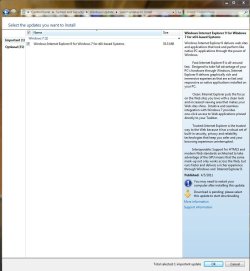
Well, through the usual Tuesday Windows Updates, comes Internet Explorer 9. I'm currently downloading it.

IE9 WU.JPG
 

My Computer My Computer

Computer type
PC/Desktop
Computer Manufacturer/Model Number
Custom Build
OS
Windows 7 Ultimate x64 Service Pack 1
CPU
AMD Athlon II x4 Propus 2.9 GHz
Motherboard
ASRock N68C-GS FX
Memory
2 x 4GB Corsair XMS 3 DDR3 -1600 CL9
Graphics Card(s)
AMD Radeon HD 5850 1GB GDDR5
Sound Card
On-board 6-Channel HD Audio
Monitor(s) Displays
18' LG Flatron E1942TC-BN on DVI, 18' Chimei 95ND on HDMI
Screen Resolution
1366 x 768 x 2
Hard Drives
1 x 500 GB Seagate
1 x 1 TB Western Digital Caviar Green
1 x 1 TB Hitachi Touro Mobile USB 3
PSU
Seasonic S12II 520W
Case
Generic with Cable Management
Cooling
Deep Cool Gammaxx 200
Keyboard
Dragonwar Desert Eagle
Mouse
Logitech B85
Internet Speed
5Mb/s DL, 0.9Mb/s UL
Antivirus
ESET Nod32
Browser
Google Chrome 64 Bit
Other Info
LG G4 H818P - Rooted with Xposed Framework

My Computer My Computer

Computer type
PC/Desktop
Computer Manufacturer/Model Number
Custom Build
OS
Windows 7 Ultimate x64 Service Pack 1
CPU
AMD Athlon II x4 Propus 2.9 GHz
Motherboard
ASRock N68C-GS FX
Memory
2 x 4GB Corsair XMS 3 DDR3 -1600 CL9
Graphics Card(s)
AMD Radeon HD 5850 1GB GDDR5
Sound Card
On-board 6-Channel HD Audio
Monitor(s) Displays
18' LG Flatron E1942TC-BN on DVI, 18' Chimei 95ND on HDMI
Screen Resolution
1366 x 768 x 2
Hard Drives
1 x 500 GB Seagate
1 x 1 TB Western Digital Caviar Green
1 x 1 TB Hitachi Touro Mobile USB 3
PSU
Seasonic S12II 520W
Case
Generic with Cable Management
Cooling
Deep Cool Gammaxx 200
Keyboard
Dragonwar Desert Eagle
Mouse
Logitech B85
Internet Speed
5Mb/s DL, 0.9Mb/s UL
Antivirus
ESET Nod32
Browser
Google Chrome 64 Bit
Other Info
LG G4 H818P - Rooted with Xposed Framework
Yep, i got that update yesterday, via Windows Update! installed it, didn't use it, though. :p
 

My Computer My Computer

Computer type
PC/Desktop
OS
Windows
Well, apparently, it takes time to install. Now, it's stuck on 0% (Installing) for the past 20 minutes. LOL :huh:
 

My Computer My Computer

Computer type
PC/Desktop
Computer Manufacturer/Model Number
Custom Build
OS
Windows 7 Ultimate x64 Service Pack 1
CPU
AMD Athlon II x4 Propus 2.9 GHz
Motherboard
ASRock N68C-GS FX
Memory
2 x 4GB Corsair XMS 3 DDR3 -1600 CL9
Graphics Card(s)
AMD Radeon HD 5850 1GB GDDR5
Sound Card
On-board 6-Channel HD Audio
Monitor(s) Displays
18' LG Flatron E1942TC-BN on DVI, 18' Chimei 95ND on HDMI
Screen Resolution
1366 x 768 x 2
Hard Drives
1 x 500 GB Seagate
1 x 1 TB Western Digital Caviar Green
1 x 1 TB Hitachi Touro Mobile USB 3
PSU
Seasonic S12II 520W
Case
Generic with Cable Management
Cooling
Deep Cool Gammaxx 200
Keyboard
Dragonwar Desert Eagle
Mouse
Logitech B85
Internet Speed
5Mb/s DL, 0.9Mb/s UL
Antivirus
ESET Nod32
Browser
Google Chrome 64 Bit
Other Info
LG G4 H818P - Rooted with Xposed Framework
I've had plenty of experience with updates that stay at 0% for ages...They soon jump to xx% but 20 mins is a long time. Might want to look at downloading the standalone installer from post #1 ;)
 

My Computer My Computer

Computer Manufacturer/Model Number
Compaq Desktop
OS
Windows 7 Ultimate x64
CPU
AMD Sempron Dual Core
Memory
3GB
Graphics Card(s)
NVIDIA GeForce 6150SE nForce 430
Screen Resolution
1024x768
Hard Drives
150GB Sata
I've had plenty of experience with updates that stay at 0% for ages...They soon jump to xx% but 20 mins is a long time. Might want to look at downloading the standalone installer from post #1 ;)

Well, here's something odd. I clicked "Stop Installation" and it proceeded to show that it succeeded. :shock:

After a required restart, I arrive at a pretty good browser. I might actually consider using IE. It's very, very snappy.

Posting this from IE.
 

My Computer My Computer

Computer type
PC/Desktop
Computer Manufacturer/Model Number
Custom Build
OS
Windows 7 Ultimate x64 Service Pack 1
CPU
AMD Athlon II x4 Propus 2.9 GHz
Motherboard
ASRock N68C-GS FX
Memory
2 x 4GB Corsair XMS 3 DDR3 -1600 CL9
Graphics Card(s)
AMD Radeon HD 5850 1GB GDDR5
Sound Card
On-board 6-Channel HD Audio
Monitor(s) Displays
18' LG Flatron E1942TC-BN on DVI, 18' Chimei 95ND on HDMI
Screen Resolution
1366 x 768 x 2
Hard Drives
1 x 500 GB Seagate
1 x 1 TB Western Digital Caviar Green
1 x 1 TB Hitachi Touro Mobile USB 3
PSU
Seasonic S12II 520W
Case
Generic with Cable Management
Cooling
Deep Cool Gammaxx 200
Keyboard
Dragonwar Desert Eagle
Mouse
Logitech B85
Internet Speed
5Mb/s DL, 0.9Mb/s UL
Antivirus
ESET Nod32
Browser
Google Chrome 64 Bit
Other Info
LG G4 H818P - Rooted with Xposed Framework
I'm glad that it worked :)

As for why it completed but showing 0% that's a new 1 on me :confused:
 

My Computer My Computer

Computer Manufacturer/Model Number
Compaq Desktop
OS
Windows 7 Ultimate x64
CPU
AMD Sempron Dual Core
Memory
3GB
Graphics Card(s)
NVIDIA GeForce 6150SE nForce 430
Screen Resolution
1024x768
Hard Drives
150GB Sata
Status
Not open for further replies.
Back
Top