
Solved Internet Explorer 9 for Windows 7 - Problems

Muirfield

New member
Local time
5:54 PM
Messages
21
Location
South Africa
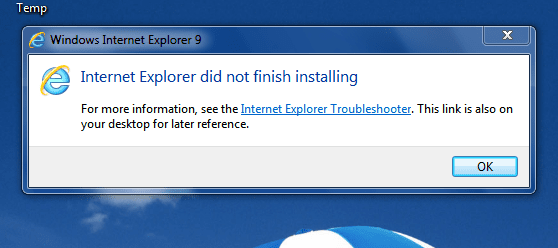
I have a PC desktop (HP Compaq 500B MT), running Windows 7 Professional. The system is completely up to date and running well. However when I try to install Internet Explorer 9 the installation stops half way with the message: "did not finalize installation'. (see attachment) I have gone through all the information; KB2399238, KB 2454826, KB2409098. I have downloaded the program from different sites. I have tried to install normally and as administrator. I have contacted the local MS Office, who haven't come across this problem. I have rebooted several times. I have not uninstalled I.E.8.
Does anyone have any suggestion??
Tony
 

Attachments
  • Capture-2.PNG
    Capture-2.PNG
    25.2 KB · Views: 110

My Computer

Computer Manufacturer/Model Number
HP Compaq 500B MT
OS
Windows 7
I have a PC desktop (HP Compaq 500B MT), running Windows 7 Professional. The system is completely up to date and running well. However when I try to install Internet Explorer 9 the installation stops half way with the message: "did not finalize installation'. (see attachment) I have gone through all the information; KB2399238, KB 2454826, KB2409098. I have downloaded the program from different sites. I have tried to install normally and as administrator. I have contacted the local MS Office, who haven't come across this problem. I have rebooted several times. I have not uninstalled I.E.8.
Does anyone have any suggestion??
Tony

Hello Tony,

Go to Start | under search type in Event Viewer | expand Windows Logs then Application and tell us if you find any error message.
 

My Computer

Computer Manufacturer/Model Number
Samsung NP550P5C-S02IN
OS
Windows 7 Ultimate - 64-bit | Windows 8 Pro - 64-bit
CPU
Intel® Core™ i7 Processor 3,610QM (2.30Hz, 6MB L3 Cach
Memory
8 GB
Graphics Card(s)
NVIDIA® GeForce® GT 650M 2GB Graphics, Optimus™ techno
Sound Card
SoundAlive™ JBL 3 Speakers (With sub-Woofer)
Monitor(s) Displays
39.62cm (15.6) SuperBright 300nit HD+ LED Display
Screen Resolution
1,600 x 900, Anti-Reflective
Hard Drives
1TB S-ATA II Hard Drive (5,400RPM)
IE and Windows 7

Thanks for the suggestion. I checked the Event Viewer. There is nothing there.
Tony
 

My Computer

Computer Manufacturer/Model Number
HP Compaq 500B MT
OS
Windows 7
I did as you suggested but could find nothing relevant.
Tony
 

My Computer

Computer Manufacturer/Model Number
HP Compaq 500B MT
OS
Windows 7
I tried again and found the following which is only gibberish to me.
[FONT=&quot] [/FONT]
[FONT=&quot] [/FONT]
[FONT=&quot] [/FONT]
[FONT=&quot]C:\Windows\Logs\CBS\CbsPersist_20110210092155.cab C:\Windows\Logs\CBS\CbsPersist_20110218065310.cab C:\Windows\Logs\CBS\CbsPersist_20110223071501.cab C:\Windows\Logs\CBS\CbsPersist_20110316055030.cab C:\Windows\Logs\CBS\CbsPersist_20110317095900.cab C:\Windows\Logs\CBS\CBS.log C:\Windows\servicing\Sessions\Sessions.xml C:\Windows\winsxs\poqexec.log C:\Windows\inf\setupapi.dev.log[/FONT]
[FONT=&quot] [/FONT]
[FONT=&quot] [/FONT]
[FONT=&quot] [/FONT]
[FONT=&quot] [/FONT]
[FONT=&quot]C:\ProgramData\Microsoft\Windows\WER\ReportQueue\Critical_6.1.7600.16385_d6bb334d0e6d5b65d821daf3114359997ae39b_cab_10c937b4[/FONT]
Any suggestions?
Tony
 

My Computer

Computer Manufacturer/Model Number
HP Compaq 500B MT
OS
Windows 7
I have a PC desktop (HP Compaq 500B MT), running Windows 7 Professional. The system is completely up to date and running well. However when I try to install Internet Explorer 9 the installation stops half way with the message: "did not finalize installation'. (see attachment) I have gone through all the information; KB2399238, KB 2454826, KB2409098. I have downloaded the program from different sites. I have tried to install normally and as administrator. I have contacted the local MS Office, who haven't come across this problem. I have rebooted several times. I have not uninstalled I.E.8.
Does anyone have any suggestion??
Tony
Hi:
You shouldn't have any previous release of internet explorer in your PC, for example Internet Explorer 9.0 RC/Internet Explorer 9.0 Beta or ...
so if you have any of this versions you should uninstall it.
For doing that go to -> Start -> Control Panel -> Program and Features -> Installed Updates -> Right Click on Internet Explorer 9 -> choose Uninstall.
Now do a clean and fresh install of IE9.
Hope it helped.
--------
Unknown01​
 

My Computer

OS
Windows 8 RTM Professional X64
CPU
Intel Core 2 Duo E8400 3.0GHz
Motherboard
Gigabyte EP43-DS3
Memory
4GB OCZ
Graphics Card(s)
EVGA GTX 275
Monitor(s) Displays
Samsung SyncMaster T200
Screen Resolution
1680x1050
Keyboard
Logitech
Mouse
Logitech
Hi again
I checked and I have no previous IE 9. Nor do I have SP 1. I found the following from Microsoft:-

"How to get SP1
The recommended (and easiest) way to get SP1 is to turn on automatic updating in Windows Update in Control Panel, and wait for Windows 7 to notify you that SP1 is ready to install. It takes about 30 minutes to install, and you'll need to restart your computer about halfway through the installation."

I guess I netter just wait.
Thanks for all your trouble.
Tony
 

My Computer

Computer Manufacturer/Model Number
HP Compaq 500B MT
OS
Windows 7
Hi there,

Disable all your security settings. Then click on

Start | under search type in Troubleshoot
Under Troubleshoot select System and Security
Under there Select Windows Update and run the troubleshoot and see if that fixes or finds any problem.

If that didn't resolve check this article Troubleshoot IE9 Installation Issues on Windows 7 | Captain Debugger

Hope this helps,
Captain
 
Last edited:

My Computer

Computer Manufacturer/Model Number
Samsung NP550P5C-S02IN
OS
Windows 7 Ultimate - 64-bit | Windows 8 Pro - 64-bit
CPU
Intel® Core™ i7 Processor 3,610QM (2.30Hz, 6MB L3 Cach
Memory
8 GB
Graphics Card(s)
NVIDIA® GeForce® GT 650M 2GB Graphics, Optimus™ techno
Sound Card
SoundAlive™ JBL 3 Speakers (With sub-Woofer)
Monitor(s) Displays
39.62cm (15.6) SuperBright 300nit HD+ LED Display
Screen Resolution
1,600 x 900, Anti-Reflective
Hard Drives
1TB S-ATA II Hard Drive (5,400RPM)
Many thanks to everyone. Success at last. I followed Capt. Jack Sparrows advice and downloaded and followed - in detail - The trouble shoot list. The SFC /sannow did find some corrupted files, so I downloaded and ran KB947821. I reran the install file and, lo and behold, it succeeded.
Once again many thanks
Sincerely
Tony
 

My Computer

Computer Manufacturer/Model Number
HP Compaq 500B MT
OS
Windows 7

My Computer

Computer type
PC/Desktop
Computer Manufacturer/Model Number
OQO 2+
OS
Windows 8 Pro w/MC 32-bit
CPU
Intel Atom 1.86 GHz
Motherboard
OQO 2+
Memory
2 GB
Graphics Card(s)
Intel GMA 500
Sound Card
IDT
Monitor(s) Displays
LCD
Screen Resolution
800 x 480 (portable) 1280 x 1024 (docked)
Hard Drives
64 GB SSD
PSU
9 Ah Battery (portable) or OQO Brick (docked)
Case
Shirt Pocket Sized
Cooling
Tiny Fan
Keyboard
Slide out (portable) DiNovo Edge (docked)
Mouse
Eraser head (portable) Logitech Bluetooth (docked)
Internet Speed
WWAN or 802.11G (portable) T1 (docked)
Browser
IE 10
Other Info
DVD-RW OQO Docking Station

My Computer

Computer Manufacturer/Model Number
Samsung NP550P5C-S02IN
OS
Windows 7 Ultimate - 64-bit | Windows 8 Pro - 64-bit
CPU
Intel® Core™ i7 Processor 3,610QM (2.30Hz, 6MB L3 Cach
Memory
8 GB
Graphics Card(s)
NVIDIA® GeForce® GT 650M 2GB Graphics, Optimus™ techno
Sound Card
SoundAlive™ JBL 3 Speakers (With sub-Woofer)
Monitor(s) Displays
39.62cm (15.6) SuperBright 300nit HD+ LED Display
Screen Resolution
1,600 x 900, Anti-Reflective
Hard Drives
1TB S-ATA II Hard Drive (5,400RPM)
Back
Top