- Local time
- 6:56 PM
- Messages
- 142
Well..at least DISCUS works now. And this forum works now too!!!! The only remaining problem is Gmail (for me).
My Computer
At a glance
Win 7 Professional 64bit
- OS
- Win 7 Professional 64bit


Installed the IE9 RC that was released today, February 10, 2011. Lightning fast but flashplayer won't work. Keeps telling you that you need the latest version which I already have (10.2.152.26). Uninstalled, reinstalled, downloaded the .exe file to the hard drive and tried to install. Nothing will work.
Tried the adobe help forum and can't even get connected. I am sure they are getting swamped with people trying to get the flashplayer working. I confirmed the problem by installing IE9 on my netbook with the same results. Anybody receiving information on a fix please post.

FORFILES /P %WINDIR%\servicing\Packages /M Microsoft-Windows-InternetExplorer-*9.*.mum /c "cmd /c echo Uninstalling package @fname && start /w pkgmgr /up:@fname /norestart"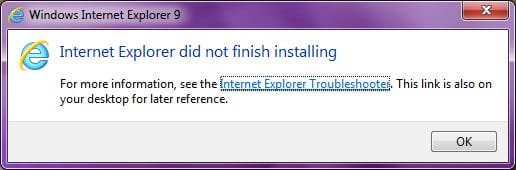

I don't seem to be able to install Internet Explorer 9 RC, even after following all recommended method of installation prescribed by Microsoft:
And all method of uninstalling the IE9 Beta require me to go into Control Panel -> Programs -> Installed Updates to remove it, but the BETA does not show in the list.
- Method 1: Make sure that your system meets the minimum operating system requirements
- Method 2: Try an alternative Internet Explorer 9 installer
- Method 3: Make sure that Internet Explorer 9 prerequisites are installed
- Method 4: Make sure that installation of other updates or a restart is not pending
The following command (from admin CMD) does not work:
I keep getting this message:Code:FORFILES /P %WINDIR%\servicing\Packages /M Microsoft-Windows-InternetExplorer-*9.*.mum /c "cmd /c echo Uninstalling package @fname && start /w pkgmgr /up:@fname /norestart"
I've used both the download links from Method 2 above in a vain attempt to install IE9 RC - to no avail!
:mad2:
I suffered the same errors multiple times.In the end i uninstalled the BETA from installed updates rebooted and installed the full version with the all required updates included from a link earlier in this thread.It then installed fine
Danny
I suffered the same errors multiple times.In the end i uninstalled the BETA from installed updates rebooted and installed the full version with the all required updates included from a link earlier in this thread.It then installed fine
Danny
Danny, thats my problem! IE9BETA does not show in the Installed Updates list. I'll be trying the Windows Update Installers posted by ie9:

Which BETA version was you running the 2nd(updated) version was actually labelled as RC in installed updates

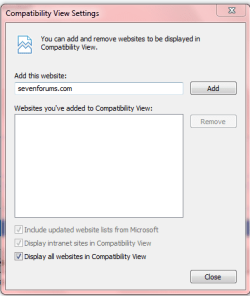
Open IE Click on Tools go down list to "Compatability View settings" and click. Not Compatability View.Re-installed ie9 twice today, also reset the internet explorer settings, problems at the moment are:
a) Will not work in google maps street view (keeps shutting down).
b)The writing on the AOL UK web site is all jumbled.
c)Will not let me access my AOL mail site (keeps shutting down).
All the above work fine on chrome and ie8.
Newbie to the site and apologise if this is the wrong area to ask for help.
Regards
Northerner
Which BETA version was you running the 2nd(updated) version was actually labelled as RC in installed updates
Version 9.0.7930.16406

Open IE Click on Tools go down list to "Compatability View settings" and click. Not Compatability View.Re-installed ie9 twice today, also reset the internet explorer settings, problems at the moment are:
a) Will not work in google maps street view (keeps shutting down).
b)The writing on the AOL UK web site is all jumbled.
c)Will not let me access my AOL mail site (keeps shutting down).
All the above work fine on chrome and ie8.
Newbie to the site and apologise if this is the wrong area to ask for help.
Regards
Northerner
Then check mark all three boxes at the bottom as in picture below. Click close.
Now it will view all pages automatically in Comp. view.

with only 1- 2 IE-RC open it use more then 200MB RAM but FF and Chroome use less then 90MB RAM,
so no i don't like much this RC IE9
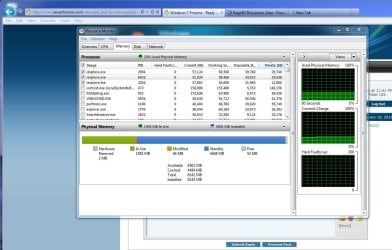

it also depends on what you've got loaded in the tabs at the time...


No problems for me. I downloaded the installers and then installed the appropriate version after closing all open programs. I didn't need to uninstall the Beta version, I just needed to restart when prompted to complete the installation.Re-installed ie9 twice today, also reset the internet explorer settings, problems at the moment are:
a) Will not work in google maps street view (keeps shutting down).
b)The writing on the AOL UK web site is all jumbled.
c)Will not let me access my AOL mail site (keeps shutting down).
All the above work fine on chrome and ie8.
Newbie to the site and apologise if this is the wrong area to ask for help.
Regards
Northerner

Posted for Northerner and those it may help.Open IE Click on Tools go down list to "Compatability View settings" and click. Not Compatability View.Re-installed ie9 twice today, also reset the internet explorer settings, problems at the moment are:
a) Will not work in google maps street view (keeps shutting down).
b)The writing on the AOL UK web site is all jumbled.
c)Will not let me access my AOL mail site (keeps shutting down).
All the above work fine on chrome and ie8.
Newbie to the site and apologise if this is the wrong area to ask for help.
Regards
Northerner
Then check mark all three boxes at the bottom as in picture below. Click close.
Now it will view all pages automatically in Comp. view.
You do realize that some sites like Gmail don't like the compatibility view right?