
Internet Explorer Accelerator button - Turn On or Off

Turn "Display Accelerator Button on Selection" On or Off in Internet Explorer

   Information
This tutorial will show you how to have the Accelerator button to display or not when text is selected or highlighted in IE8, IE9, or IE10.


EXAMPLE: Display Accelerator button on selection ON
NOTE: When turned on, you can click on the accelerator blue arrow button displayed when selecting text in Internet Explorer to see and select from any enabled accelerator add-on.
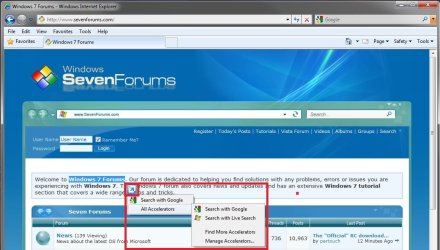
W7_Display.jpg
EXAMPLE: Display Accelerator button on selection OFF
NOTE: When turned off, you can still right click on the selected text in Internet Explorer to see and select from any enabled accelerator add-on.
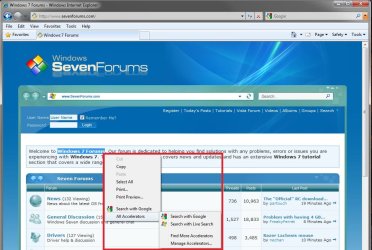
W7_No_Display.jpg


Here's How:
1. Open Internet Explorer.
A) Click/tap on the Tools Command Bar icon button or Menu Bar item and click on Internet Options.

B) Go to step 3.
OR

2. Open the Control Panel (icons view) .
A) Click/tap on the Internet Options icon.
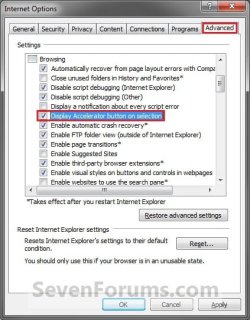
3. Click/tap on the Advanced tab. (See screenshot below)
W7_Options.jpg
4. To Turn On Display Accelerator Button on Selection
A) Check the Display Accelerator button on selection box, then click/tap on OK. (See screenshot above)
5. To Turn Off Display Accelerator Button on Selection
A) Uncheck the Display Accelerator button on selection box, then click/tap on OK. (See screenshot below step 3)
That's it,
Shawn


Last edited:
problem with adding accelerators

I have tried to add accelerators from the IE8 accelerator page. Nothing happens when I click on the Add To Internet Explorer button. I have checked all of my settings and options and nothing jumps out at me as far as errors. Does anyone have any idea what I can do to fix this? Thanks in advance for any help supplied.
 

My Computer

OS
Windows XP SP3
Your running XP SP3?
 

My Computer

Computer Manufacturer/Model Number
NVIDIA
OS
Windows 7 Enterprise x64
CPU
AMD Athlon 64X2 Dual Core 3800+
Motherboard
GeForce 6100-M9
Memory
OCZ Platinum Dual Channel - 4x1Gb
Graphics Card(s)
NVIDIA GeForce 8800 GT PCI Express x16
Sound Card
Creative Audigy Sound Blaster Extreme PCI
Monitor(s) Displays
Compaq 7500
Screen Resolution
1024x768
Hard Drives
C: Seagate ST3250318AS SataII - 250Gb

D: Seagate ST3500418AS SataII - 500Gb
PSU
OCZ 600w Dual 12v Rails
Case
Thermaltake
Cooling
OCZ Heatsinks, Fans, and Thermal Paste on CPU & Chipsets
Keyboard
Logitech
Mouse
Radio Shack PS2
Internet Speed
Cable
Other Info
Dual Pioneer DVD/RW optical drives. LG CD/RW optical drive.

My Computer

Computer type
PC/Desktop
Computer Manufacturer/Model Number
Self built custom
OS
64-bit Windows 11 Pro for Workstations
CPU
Intel i7-8700K OC'd to 5 GHz
Motherboard
ASUS ROG Maximus XI Formula Z390
Memory
64 GB (4x16GB) G.SKILL TridentZ RGB DDR4 3600 MHz
Graphics Card(s)
ASUS ROG-STRIX-GTX1080TI-O11G-GAMING
Sound Card
Integrated
Monitor(s) Displays
2 x Samsung Odyssey G7 27"
Screen Resolution
2560x1440
Hard Drives
1TB Samsung 990 PRO M.2,
4TB Samsung 990 PRO PRO M.2,
TerraMaster F8 SSD Plus NAS
PSU
Seasonic Prime Titanium 850W
Case
Thermaltake Core P3
Cooling
Corsair Hydro H115i
Keyboard
Logitech wireless K800
Mouse
Logitech MX Master 4
Internet Speed
2 Gb/s Download and 100 Mb/s Upload
Antivirus
Malwarebyte Anti-Malware Premium
Browser
Google Chrome
Other Info
Logitech Z625 speaker system,
Logitech BRIO 4K Pro webcam,
HP Color LaserJet Pro MFP M477fdn,
APC SMART-UPS RT 1000 XL - SURT1000XLI,
Galaxy S23 Plus phone
Adding accelerators

Thank you for the replies. I do run SP3. I had run through all of the steps a number of times trying to add more of them, but every time I pressed the button to add the accelerator nothing would happen. IE8 started to act quite bizarre so I just went ahead and uninstalled and re-installed it. Now everything is working fine. Thanks again for all of the replies.
 

My Computer

OS
Windows XP SP3
I'm happy to hear that you got it sorted Sparhawk. Thank you for posting back with your results. :)
 

My Computer

Computer type
PC/Desktop
Computer Manufacturer/Model Number
Self built custom
OS
64-bit Windows 11 Pro for Workstations
CPU
Intel i7-8700K OC'd to 5 GHz
Motherboard
ASUS ROG Maximus XI Formula Z390
Memory
64 GB (4x16GB) G.SKILL TridentZ RGB DDR4 3600 MHz
Graphics Card(s)
ASUS ROG-STRIX-GTX1080TI-O11G-GAMING
Sound Card
Integrated
Monitor(s) Displays
2 x Samsung Odyssey G7 27"
Screen Resolution
2560x1440
Hard Drives
1TB Samsung 990 PRO M.2,
4TB Samsung 990 PRO PRO M.2,
TerraMaster F8 SSD Plus NAS
PSU
Seasonic Prime Titanium 850W
Case
Thermaltake Core P3
Cooling
Corsair Hydro H115i
Keyboard
Logitech wireless K800
Mouse
Logitech MX Master 4
Internet Speed
2 Gb/s Download and 100 Mb/s Upload
Antivirus
Malwarebyte Anti-Malware Premium
Browser
Google Chrome
Other Info
Logitech Z625 speaker system,
Logitech BRIO 4K Pro webcam,
HP Color LaserJet Pro MFP M477fdn,
APC SMART-UPS RT 1000 XL - SURT1000XLI,
Galaxy S23 Plus phone
Back
Top