Internet Explorer disappears momentarily

robintheilade

New member
Local time
10:39 PM
Messages
8
Hi,

Recently my girlfriend purchased a new computer without preinstalled Windows. I did the installation of Windows afterwards.

She quickly ran into an issue with Internet Explorer. At seemingly random occasions it chooses to disappear and then reappears a short while later. (Video of the issue https://www.youtube.com/watch?v=YPEdUB_WiYI)

We don't know if there are any other windowed applications that behaves the same way as the computer is mostly used for browsing and fullscreen gaming.

What I have tried:
* disabled the peek desktop feature in the lower right corner thinking it was causing the issue.
* ran memtest+ 5.01 which returned no errors.
* reinstalled Windows from scratch, recreating and formatting the partitions in the process.
* disabled all the addons in Internet Explorer.
* used msconfig to disable non-ms services and startups
* ensured all drivers are up to date
* ensured all Windows updates are installed
* used Realtemp to heat test the system

System:
* Windows 7 Home Premium SP1 Danish
* Internet Explorer 11.0.9600.17914
* Intel I7 4790 3.6GHz
* 16GB DDR3 1600MHz RAM (2X8GB)
* NVIDIA GTX970 4GB
* Seagate Barracuda ST2000DM001 - 3.5″ SATA-600 2TB
* Mouse and keyboard does not have any fancy hotkey/media buttons

Besides returning the computer to the store I'm fresh out of ideas of what to try. Any ideas?

Best regards,
Robin
 
Last edited:

My Computer

Computer type
PC/Desktop
OS
Windows 10 Home
Hi and welcome to SevenForums,
Click the start button and type in the search box
internet options
Click on the suggestion
Advanced section and check the top box Use software rendering instead of gpu rendering Apply and okay.

Was the laptop designed with win-7 to be installed ?
Did it come with a drivers disk with touchpad.... on it ?

Have you tried Pale moon or similar to test with ?
I would if you do try another browser go to it's settings and Uncheck use hardware acceleration when available too.
 

My Computer

Computer type
PC/Desktop
Computer Manufacturer/Model Number
Custom assembled by me :}
OS
Win-7-Pro64bit 7-H-Prem-64bit
CPU
i7-5930K 2nd i9-9940x both water blocked VRM's too
Motherboard
ASUS SABERTOOTH X99 2nd ASUS x299 Apex
Memory
Trident-z 3200C14 2nd Trident-z 3600C16
Graphics Card(s)
EVGA 1080ti ftw3 2nd Titan Xp both water blocked
Sound Card
Built-in Realtek
Monitor(s) Displays
1-AOC G2460PG 24"G-Sync 144Hz/ 2nd 1-ASUS VG248QE 24" 144Hz
Screen Resolution
1920 x 1080 144Hz
Hard Drives
2-Samsung M.2 Evo & Evo Plus
2-Samsung 850 EVO 500GB SSD's/ 3-2.5 W.D. Black 1tb-&3-1tb/3-3.5 WD Black 1tb hdd's
PSU
EVGA SuperNOVA 1000-P2 2nd 1200-P2
Case
2-Corsair Obsidian Series 450D Black ATX Mid Tower
Cooling
Custom water loops
Keyboard
Logitech G710+/ 2nd Logitech G910
Mouse
2-RedDragon M901 Perdition 16400 dpi Gaming mouse = wired
Internet Speed
Comcast Ping 19ms 89.31mbps download speed 6.12mbps upload
Antivirus
Malwarebytes Pro/ Superantispyware Pro
Browser
FireFox & Pale moon
Other Info
2nd ASUS X299 Apex/Intel i9-9940x with Custom water loop/7H-Prem-x64/Corsair 450D case/Ram Trident-z 3600C16 4x8gb / Samsung970Evo plus 500gb SSD/Dual ssd EZ swap evo/PSU EVGA SuperNova 1200w-P2 80+Platinum/GPU Titan Xp /8-ML-140 on push-pull on 2-280GTX rads
Hi TrashZone,

Thanks for the suggestions. Disabling HW rendering seems like something worth trying. If that does not work we'll try another browser.
Does Pale Moon come with any specific diagnostics tool that you have in mind or is it simply you're favorite browser?

BR,
Robin
 

My Computer

Computer type
PC/Desktop
OS
Windows 10 Home
Hi,
Well Pale moon is my second preference 1st being ie10
I have not upgraded to ie11 which is another thing to try just uninstall the ie11 windows update,
Then check for updates and hide ie11 when it appears again,
Then check again and probably ie10 and 9 will appear,
Load ie9 and all security updates for it and then load ie10 and all security updates for it.
 

My Computer

Computer type
PC/Desktop
Computer Manufacturer/Model Number
Custom assembled by me :}
OS
Win-7-Pro64bit 7-H-Prem-64bit
CPU
i7-5930K 2nd i9-9940x both water blocked VRM's too
Motherboard
ASUS SABERTOOTH X99 2nd ASUS x299 Apex
Memory
Trident-z 3200C14 2nd Trident-z 3600C16
Graphics Card(s)
EVGA 1080ti ftw3 2nd Titan Xp both water blocked
Sound Card
Built-in Realtek
Monitor(s) Displays
1-AOC G2460PG 24"G-Sync 144Hz/ 2nd 1-ASUS VG248QE 24" 144Hz
Screen Resolution
1920 x 1080 144Hz
Hard Drives
2-Samsung M.2 Evo & Evo Plus
2-Samsung 850 EVO 500GB SSD's/ 3-2.5 W.D. Black 1tb-&3-1tb/3-3.5 WD Black 1tb hdd's
PSU
EVGA SuperNOVA 1000-P2 2nd 1200-P2
Case
2-Corsair Obsidian Series 450D Black ATX Mid Tower
Cooling
Custom water loops
Keyboard
Logitech G710+/ 2nd Logitech G910
Mouse
2-RedDragon M901 Perdition 16400 dpi Gaming mouse = wired
Internet Speed
Comcast Ping 19ms 89.31mbps download speed 6.12mbps upload
Antivirus
Malwarebytes Pro/ Superantispyware Pro
Browser
FireFox & Pale moon
Other Info
2nd ASUS X299 Apex/Intel i9-9940x with Custom water loop/7H-Prem-x64/Corsair 450D case/Ram Trident-z 3600C16 4x8gb / Samsung970Evo plus 500gb SSD/Dual ssd EZ swap evo/PSU EVGA SuperNova 1200w-P2 80+Platinum/GPU Titan Xp /8-ML-140 on push-pull on 2-280GTX rads
My I suggest that you might have a corrupt instillation of Windows 7.

Where did you get Windows 7 and how did you install it?
Did you activate Windows 7 properly?
 

My Computer

Computer type
PC/Desktop
Computer Manufacturer/Model Number
Home made Desktop
OS
Windows 10 Pro. 64/ version 1709 Windows 7 Pro/64
CPU
Intel i7-6800K @ 4.3
Motherboard
ASUS X-99 Deluxe II
Memory
Corsair Platinum 16 gig @2400
Graphics Card(s)
EVGA GTX 1070 OC
Monitor(s) Displays
Asus 27" LED LCD/VE278Q
Screen Resolution
1920-1080 or 1280-720 HDMI
Hard Drives
INTEL SSD 730-240 Gb Sata 3.0/
PSU
EVGA Platium 1200W
Case
Phanteks Luxe Tempered Glass 8 fans/ one radiator
Cooling
XSPC/ Water Cooled CPU
Keyboard
Das 4 Professional
Mouse
Logitech M705/MX Anywhere 2-S
Internet Speed
100 mbits
Antivirus
Microsoft Security Essentials/ Malwarebytes Premium 3.0/ SAS
Browser
I.E. 11 default/Firefox/ ISP Time Warner Cable/Spectrum
Other Info
LG BluRay Burner/
Sound system-KLipsch-THX/
Icy Dock ssd Hot Swap bays.
Click the start button and type in the search box
internet options
Click on the suggestion
Advanced section and check the top box Use software rendering instead of gpu rendering Apply and okay.

This didn't help. Trying Chrome browser for a while to see if it behaves differently.

My I suggest that you might have a corrupt instillation of Windows 7.

I did reinstall Windows to make sure that wasn't the problem.

Where did you get Windows 7 and how did you install it?
Did you activate Windows 7 properly?

Purchased the Windows license at a computer store in Copenhagen. I installed it by booting on the CD, creating partitions, formatting drive, completed the installation wizard, installed all the stuff from the ASUS CD, except from the bloatware (sad to see that you can't trust ASUS with your computer anymore) and lastly I installed all the Windows updates until it would no longer find any new updates.

BR,
Robin
 

My Computer

Computer type
PC/Desktop
OS
Windows 10 Home
Hi,
Pretty weird stuff let us know if Chrome does the same thing :/

Also did you try to roll back to 9 or 10 and see if the same issue exists ?
 

My Computer

Computer type
PC/Desktop
Computer Manufacturer/Model Number
Custom assembled by me :}
OS
Win-7-Pro64bit 7-H-Prem-64bit
CPU
i7-5930K 2nd i9-9940x both water blocked VRM's too
Motherboard
ASUS SABERTOOTH X99 2nd ASUS x299 Apex
Memory
Trident-z 3200C14 2nd Trident-z 3600C16
Graphics Card(s)
EVGA 1080ti ftw3 2nd Titan Xp both water blocked
Sound Card
Built-in Realtek
Monitor(s) Displays
1-AOC G2460PG 24"G-Sync 144Hz/ 2nd 1-ASUS VG248QE 24" 144Hz
Screen Resolution
1920 x 1080 144Hz
Hard Drives
2-Samsung M.2 Evo & Evo Plus
2-Samsung 850 EVO 500GB SSD's/ 3-2.5 W.D. Black 1tb-&3-1tb/3-3.5 WD Black 1tb hdd's
PSU
EVGA SuperNOVA 1000-P2 2nd 1200-P2
Case
2-Corsair Obsidian Series 450D Black ATX Mid Tower
Cooling
Custom water loops
Keyboard
Logitech G710+/ 2nd Logitech G910
Mouse
2-RedDragon M901 Perdition 16400 dpi Gaming mouse = wired
Internet Speed
Comcast Ping 19ms 89.31mbps download speed 6.12mbps upload
Antivirus
Malwarebytes Pro/ Superantispyware Pro
Browser
FireFox & Pale moon
Other Info
2nd ASUS X299 Apex/Intel i9-9940x with Custom water loop/7H-Prem-x64/Corsair 450D case/Ram Trident-z 3600C16 4x8gb / Samsung970Evo plus 500gb SSD/Dual ssd EZ swap evo/PSU EVGA SuperNova 1200w-P2 80+Platinum/GPU Titan Xp /8-ML-140 on push-pull on 2-280GTX rads
Click the start button and type in the search box
internet options
Click on the suggestion
Advanced section and check the top box Use software rendering instead of gpu rendering Apply and okay.

This didn't help. Trying Chrome browser for a while to see if it behaves differently.

My I suggest that you might have a corrupt instillation of Windows 7.

I did reinstall Windows to make sure that wasn't the problem.

Where did you get Windows 7 and how did you install it?
Did you activate Windows 7 properly?

Purchased the Windows license at a computer store in Copenhagen. I installed it by booting on the CD, creating partitions, formatting drive, completed the installation wizard, installed all the stuff from the ASUS CD, except from the bloatware (sad to see that you can't trust ASUS with your computer anymore) and lastly I installed all the Windows updates until it would no longer find any new updates.

BR,
Robin

Looks like you did things properly.
 

My Computer

Computer type
PC/Desktop
Computer Manufacturer/Model Number
Home made Desktop
OS
Windows 10 Pro. 64/ version 1709 Windows 7 Pro/64
CPU
Intel i7-6800K @ 4.3
Motherboard
ASUS X-99 Deluxe II
Memory
Corsair Platinum 16 gig @2400
Graphics Card(s)
EVGA GTX 1070 OC
Monitor(s) Displays
Asus 27" LED LCD/VE278Q
Screen Resolution
1920-1080 or 1280-720 HDMI
Hard Drives
INTEL SSD 730-240 Gb Sata 3.0/
PSU
EVGA Platium 1200W
Case
Phanteks Luxe Tempered Glass 8 fans/ one radiator
Cooling
XSPC/ Water Cooled CPU
Keyboard
Das 4 Professional
Mouse
Logitech M705/MX Anywhere 2-S
Internet Speed
100 mbits
Antivirus
Microsoft Security Essentials/ Malwarebytes Premium 3.0/ SAS
Browser
I.E. 11 default/Firefox/ ISP Time Warner Cable/Spectrum
Other Info
LG BluRay Burner/
Sound system-KLipsch-THX/
Icy Dock ssd Hot Swap bays.
Hi,
Pretty weird stuff let us know if Chrome does the same thing :/

Also did you try to roll back to 9 or 10 and see if the same issue exists ?

My girlfriend have been running Chrome instead of Internet Explorer for a few days now without experiencing the same issue.

Next up is to try uninstalling IE11 and use IE10 for a few days. I'll get back to you when I know how that played out.
 

My Computer

Computer type
PC/Desktop
OS
Windows 10 Home
Hi,

It seems that IE 10 does not have the same issue as 11 on my girlfriend's machine. Does that lead us with any clues to what is wrong?

BR,
Robin
 

My Computer

Computer type
PC/Desktop
OS
Windows 10 Home
Hi
Not really you haven't given us much info on what antivirus program is installed...
Use Clean boot,
http://www.sevenforums.com/tutorial...ation-conflicts-performing-clean-startup.html
Click Start and type in the search box,
msconfig
Click on the suggestion on top or hit the Enter key,
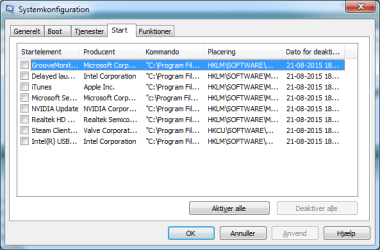
Go to the Startup section and take some screen shots for a complete list,
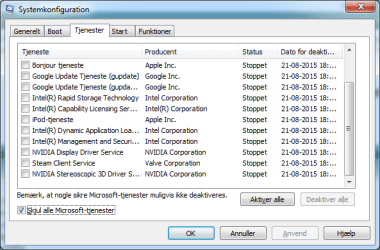
Go to the Services section and on the bottom left Check the box to Hide All Microsoft services,
Repeat the screen shots,
See the links above my signature on how to take and upload screen shots here,
Cheers.
 

My Computer

Computer type
PC/Desktop
Computer Manufacturer/Model Number
Custom assembled by me :}
OS
Win-7-Pro64bit 7-H-Prem-64bit
CPU
i7-5930K 2nd i9-9940x both water blocked VRM's too
Motherboard
ASUS SABERTOOTH X99 2nd ASUS x299 Apex
Memory
Trident-z 3200C14 2nd Trident-z 3600C16
Graphics Card(s)
EVGA 1080ti ftw3 2nd Titan Xp both water blocked
Sound Card
Built-in Realtek
Monitor(s) Displays
1-AOC G2460PG 24"G-Sync 144Hz/ 2nd 1-ASUS VG248QE 24" 144Hz
Screen Resolution
1920 x 1080 144Hz
Hard Drives
2-Samsung M.2 Evo & Evo Plus
2-Samsung 850 EVO 500GB SSD's/ 3-2.5 W.D. Black 1tb-&3-1tb/3-3.5 WD Black 1tb hdd's
PSU
EVGA SuperNOVA 1000-P2 2nd 1200-P2
Case
2-Corsair Obsidian Series 450D Black ATX Mid Tower
Cooling
Custom water loops
Keyboard
Logitech G710+/ 2nd Logitech G910
Mouse
2-RedDragon M901 Perdition 16400 dpi Gaming mouse = wired
Internet Speed
Comcast Ping 19ms 89.31mbps download speed 6.12mbps upload
Antivirus
Malwarebytes Pro/ Superantispyware Pro
Browser
FireFox & Pale moon
Other Info
2nd ASUS X299 Apex/Intel i9-9940x with Custom water loop/7H-Prem-x64/Corsair 450D case/Ram Trident-z 3600C16 4x8gb / Samsung970Evo plus 500gb SSD/Dual ssd EZ swap evo/PSU EVGA SuperNova 1200w-P2 80+Platinum/GPU Titan Xp /8-ML-140 on push-pull on 2-280GTX rads
Hi again,

Attached is screenshots of msconfig Startup and Services. Sorry for them being in Danish, though I'm sure you'll manage.

BR,
Robin
 

Attachments

  • 20150821 - msconfig - Services 1.png
    20150821 - msconfig - Services 1.png
    16.6 KB · Views: 16
  • 20150821 - msconfig - Services 2.png
    20150821 - msconfig - Services 2.png
    16.2 KB · Views: 16
  • 20150821 - msconfig - Startup.png
    20150821 - msconfig - Startup.png
    15 KB · Views: 16

My Computer

Computer type
PC/Desktop
OS
Windows 10 Home
Nice video in the original post. It is hard to tell for sure, but it looks like the IE window minimizes and restores. The IE shortcut that it pinned to the task bar shows two IE windows. Does this happen if only one IE window is open?

The original post states that this IE11 window event is seemingly random... but how frequent? Every few minutes? Hours? Days? The frequency helps us determine what tools to use to find the culprit. I would start with Process Explorer. http://www.sevenforums.com/tutorial...er-virustotal-check-all-processes-50-avs.html

I would remove most of the columns just to lighten the load on what Process Explorer has to update.

Leave/add the column for Process, PID, VirusTotal and Command Line.

Select Options > Difference Highlight Duration and set the to 9 seconds.

Select View > Update Speed and set that for 0.5 seconds.

Leave Process Explorer up and running* while surfing with IE.

*I would leave it full screened and behind IE's window.

If/when IE's window minimizes, you can press the space bar to pause** Process Explorer.

**let's hope that Process Explorer comes into focus and that the space pauses the data collection. The status bar at the bottom of Process Explorer's window should say "Paused". If need be, select the Process Explorer window and pause it via the space bar.

See if there is a line in green which indicates that a process recently started... or even some read lines that indicate some process recently ended.

Frankly, I don't hold out much hope that Process Explorer will find the culprit. But it is a relatively easy thing to check and Process Explorer is a tool worth having. If need be, we can move on to much more complicated tools.


One more question: Is the UAC turned on?
http://www.sevenforums.com/tutorials/299-user-account-control-uac-change-notification-settings.html
 

My Computer

Computer type
Laptop
Computer Manufacturer/Model Number
Employer provided Dell Latitude
OS
W7 Pro SP1 64bit
CPU
i7
Memory
8GB
Graphics Card(s)
Intel HD Graphics
Hard Drives
crappy SSD
Antivirus
Employer mandated Symantec Endpoint Protection
Browser
Pale Moon 64bit, IE11 64bit & Chrome 64bit

My Computer

Computer type
PC/Desktop
Computer Manufacturer/Model Number
Custom assembled by me :}
OS
Win-7-Pro64bit 7-H-Prem-64bit
CPU
i7-5930K 2nd i9-9940x both water blocked VRM's too
Motherboard
ASUS SABERTOOTH X99 2nd ASUS x299 Apex
Memory
Trident-z 3200C14 2nd Trident-z 3600C16
Graphics Card(s)
EVGA 1080ti ftw3 2nd Titan Xp both water blocked
Sound Card
Built-in Realtek
Monitor(s) Displays
1-AOC G2460PG 24"G-Sync 144Hz/ 2nd 1-ASUS VG248QE 24" 144Hz
Screen Resolution
1920 x 1080 144Hz
Hard Drives
2-Samsung M.2 Evo & Evo Plus
2-Samsung 850 EVO 500GB SSD's/ 3-2.5 W.D. Black 1tb-&3-1tb/3-3.5 WD Black 1tb hdd's
PSU
EVGA SuperNOVA 1000-P2 2nd 1200-P2
Case
2-Corsair Obsidian Series 450D Black ATX Mid Tower
Cooling
Custom water loops
Keyboard
Logitech G710+/ 2nd Logitech G910
Mouse
2-RedDragon M901 Perdition 16400 dpi Gaming mouse = wired
Internet Speed
Comcast Ping 19ms 89.31mbps download speed 6.12mbps upload
Antivirus
Malwarebytes Pro/ Superantispyware Pro
Browser
FireFox & Pale moon
Other Info
2nd ASUS X299 Apex/Intel i9-9940x with Custom water loop/7H-Prem-x64/Corsair 450D case/Ram Trident-z 3600C16 4x8gb / Samsung970Evo plus 500gb SSD/Dual ssd EZ swap evo/PSU EVGA SuperNova 1200w-P2 80+Platinum/GPU Titan Xp /8-ML-140 on push-pull on 2-280GTX rads
Nice video in the original post. It is hard to tell for sure, but it looks like the IE window minimizes and restores. The IE shortcut that it pinned to the task bar shows two IE windows. Does this happen if only one IE window is open?

The original post states that this IE11 window event is seemingly random... but how frequent? Every few minutes? Hours? Days? The frequency helps us determine what tools to use to find the culprit. I would start with Process Explorer. http://www.sevenforums.com/tutorial...er-virustotal-check-all-processes-50-avs.html

I would remove most of the columns just to lighten the load on what Process Explorer has to update.

Leave/add the column for Process, PID, VirusTotal and Command Line.

Select Options > Difference Highlight Duration and set the to 9 seconds.

Select View > Update Speed and set that for 0.5 seconds.

Leave Process Explorer up and running* while surfing with IE.

*I would leave it full screened and behind IE's window.

If/when IE's window minimizes, you can press the space bar to pause** Process Explorer.

**let's hope that Process Explorer comes into focus and that the space pauses the data collection. The status bar at the bottom of Process Explorer's window should say "Paused". If need be, select the Process Explorer window and pause it via the space bar.

See if there is a line in green which indicates that a process recently started... or even some read lines that indicate some process recently ended.

Frankly, I don't hold out much hope that Process Explorer will find the culprit. But it is a relatively easy thing to check and Process Explorer is a tool worth having. If need be, we can move on to much more complicated tools.


One more question: Is the UAC turned on?
http://www.sevenforums.com/tutorials/299-user-account-control-uac-change-notification-settings.html

We've haven't taken notice if it is only with one IE window or multiple.

The frequency is in hours.

We will test with Process Explorer but only after trying to run IE 11 with "Intel Management and Security" disabled.

Hi and thanks,
Bonjour can be checked and uninstalled if you don't use it
Usually only adds problems then gives features

I've never seen a Intel Management and Security listing before :/
This could be Intel's rebranding of it's awful Mcafee security = Please confirm ?
http://www.sevenforums.com/security-news/317574-intel-kills-off-mcafee-security-brand.html

I could not confirm if it is indeed McAfee related. The details of the .exe does not state so and the binary contents of the file likewise. That said Intel could very well have been thorough when search replacing the McAfee name. The non-Microsoft services are still disabled after I took the screenshots so I have re-upgraded to IE 11 to see if that changes anything.
 

My Computer

Computer type
PC/Desktop
OS
Windows 10 Home
You can read about that Intel software here. It has been around for more than a decade. It is used by Help Desk staff. You can uninstall it via Programs and Features. You will never miss it. You mentioned that you installed stuff from the Asus CD. It probably came from there.

As far as the McAfee question - the answer is yes and no :-)
The Intel Management and Security software is not an antivirus app. It is a remote management app that can gather data to be sent to the server side of the software suite. The Help Desk version of this Intel software (Intel Active Management Technology) can be used to connect to the client version of this Intel software (Intel Management and Security) to inventory software, update drivers and remotely do other tasks.

Some McAfee help desk tools can also interface with Intel Active Management Technology which in turn connects to the Intel Management and Security software to encrypt the hard drive of a lost computer.

Some Microsoft tools (like SCCM) can interface directly with the Intel Management and Security software.

None of this is needed in a home environment. Even if you contacted Asus for help, they probably would not use Intel Management and Security software to solve issues.
 

My Computer

Computer type
Laptop
Computer Manufacturer/Model Number
Employer provided Dell Latitude
OS
W7 Pro SP1 64bit
CPU
i7
Memory
8GB
Graphics Card(s)
Intel HD Graphics
Hard Drives
crappy SSD
Antivirus
Employer mandated Symantec Endpoint Protection
Browser
Pale Moon 64bit, IE11 64bit & Chrome 64bit
Status update

IE11 have been running fine with all non-Windows services disabled. I've re-activated the Intel Management and Security service again to see if that is the culprit. If not I will move on the Bonjour and the rest of the services one by one. This may take a while.
 

My Computer

Computer type
PC/Desktop
OS
Windows 10 Home
Yep that's the way you do it :)
 

My Computer

Computer type
PC/Desktop
Computer Manufacturer/Model Number
Custom assembled by me :}
OS
Win-7-Pro64bit 7-H-Prem-64bit
CPU
i7-5930K 2nd i9-9940x both water blocked VRM's too
Motherboard
ASUS SABERTOOTH X99 2nd ASUS x299 Apex
Memory
Trident-z 3200C14 2nd Trident-z 3600C16
Graphics Card(s)
EVGA 1080ti ftw3 2nd Titan Xp both water blocked
Sound Card
Built-in Realtek
Monitor(s) Displays
1-AOC G2460PG 24"G-Sync 144Hz/ 2nd 1-ASUS VG248QE 24" 144Hz
Screen Resolution
1920 x 1080 144Hz
Hard Drives
2-Samsung M.2 Evo & Evo Plus
2-Samsung 850 EVO 500GB SSD's/ 3-2.5 W.D. Black 1tb-&3-1tb/3-3.5 WD Black 1tb hdd's
PSU
EVGA SuperNOVA 1000-P2 2nd 1200-P2
Case
2-Corsair Obsidian Series 450D Black ATX Mid Tower
Cooling
Custom water loops
Keyboard
Logitech G710+/ 2nd Logitech G910
Mouse
2-RedDragon M901 Perdition 16400 dpi Gaming mouse = wired
Internet Speed
Comcast Ping 19ms 89.31mbps download speed 6.12mbps upload
Antivirus
Malwarebytes Pro/ Superantispyware Pro
Browser
FireFox & Pale moon
Other Info
2nd ASUS X299 Apex/Intel i9-9940x with Custom water loop/7H-Prem-x64/Corsair 450D case/Ram Trident-z 3600C16 4x8gb / Samsung970Evo plus 500gb SSD/Dual ssd EZ swap evo/PSU EVGA SuperNova 1200w-P2 80+Platinum/GPU Titan Xp /8-ML-140 on push-pull on 2-280GTX rads
Back
Top