Internet Explorer Individual Taskbar Previews - Enable or Disable

How to Enable or Disable Internet Explorer Individual Tabbed Browsing Taskbar Preview Windows

   Information
This tutorial will show you how to enable or disable the individual taskbar preview windows in IE8, IE9, and IE10 when using tabbed browsing in Windows 7 and Windows 8.

If enabled, each tab used will have it's own individual preview window when you hover over the IE icon on the taskbar. If disabled, only one preview window will show on the taskbar when you hover over the IE icon, no matter how many tabs you are using.
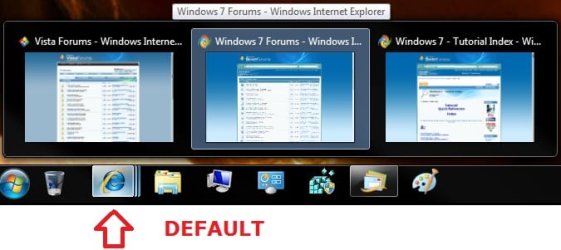
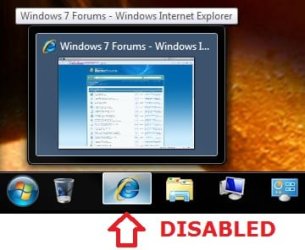

Default.jpgDisabled.jpg


Here's How:

1. Go to Tools in the Menu Bar in IE8, IE9, or IE10 and select Internet Options.
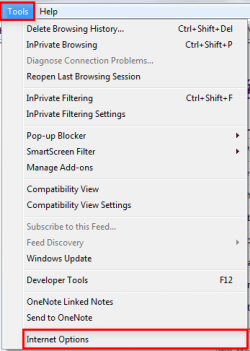
2010-04-16_022050.png
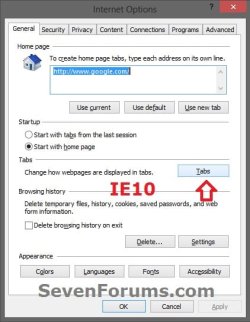
2. In the General tab, go to Tabs, and click/tap on the Settings (IE8/IE9) or Tabs (IE10) button.
2010-04-16_030025enable2.pngIE10.jpg
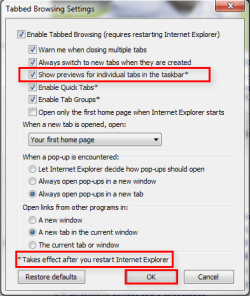
3. To Enable "Show Previews for Individual Tabs in the Taskbar"
NOTE: This is the default setting.
A) Check the Show Previews for Individual Tabs in the Taskbar box, click/tap on OK, and go to step 5 below.
2010-04-16_02590enable.png
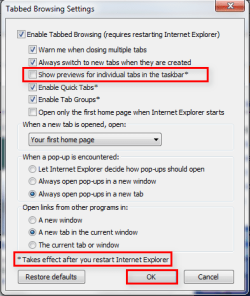
4. To Disable "Show Previews for Individual Tabs in the Taskbar"
A) Uncheck the Show Previews for Individual Tabs in the Taskbar box, click/tap on OK, and go to step 5 below.
2010-04-16_021852.png
6. Click/tap on OK. (see screenshots below step 2)

7. Close and restart Internet Explorer to apply.


That's it.


Attachments

  • Untitled.png
    Untitled.png
    16.8 KB · Views: 36
Last edited by a moderator:
Wow... never noticed that option was there.
Not sure why one would turn this feature off, but nice tutorial! +reps coming!
 

My Computer

Computer Manufacturer/Model Number
Homebrew PC - "Alpha_Dawg"
OS
Windows 7 Ultimate 64 bit Steve Ballmer Signature Edition
CPU
Intel Core 2 Quad - Q9550 - 2.83GHz stock - OC'd to 3.6GHz
Motherboard
Gigabyte EP45-UD3P
Memory
4GB DDR2 800MHz (PC6400) OCZ Reaper
Graphics Card(s)
Nvidia GE Force 8800 GTS
Sound Card
Asus Xonar DX
Monitor(s) Displays
Samsung SyncMaster 2333HD
Screen Resolution
1920 x 1080
Hard Drives
WD Caviar Black 750GB - 7200RPM - 32MB cache
WD Caviar Green 1.5TB - 5400RPM - 64MB cache
WD Caviar Green 2.0TB - 5400RPM - 64MB cache
PSU
PC Power & Cooling Silencer 750
Case
Gigabyte 3D Aurora
Cooling
Case is Air - 5ea. 120mm fans (mix of Arctic and Xigmatec)
Keyboard
MS Natural Wireless KB
Mouse
MS Wireless Mouse
Internet Speed
50 mbps down/5 mbps up
Other Info
AVerMedia - AVerTVHD G2 Dual Tuner Card
Thanks. I made it because someone asked how to do it in a post. I was a little surprised it wasn't already made long ago.
 

My Computer

Computer type
PC/Desktop
Computer Manufacturer/Model Number
Airbot 2.0
OS
Windows 7 Ultimate x64 SP1
CPU
Core i7 920 (D0) @ 4Ghz, *26c idle *65c full load on air
Motherboard
Asus P6X58D Premium - Sata 6Gb/s - USB 3.0
Memory
12GB DDR3 Corsair Dominator -CMD12GX3M6A1600C8 at 1600MHz
Graphics Card(s)
Zotac Geforce GTX 770
Sound Card
ASUS Xonar D2X
Monitor(s) Displays
1 LG 24" Flatron W2453V-PF 1 Samsung 24" P2450H both 2ms RT
Screen Resolution
1920x1080@60hz
Hard Drives
1 Samsung 250GB 840 Evo SSD
1 OCZ Vertex2 180GB SSD
1 TB Samsung Spinpoint F1 7200RPM 32MB cache
2 500GB WD Caviar Blacks 7200RPM 32MB cache (WD5001AALS)

Pioneer DVD Burner DVR-S18M
PSU
Corsair HX1000W
Case
Cooler Master HAF 932
Cooling
Case Fans *3 230mm, *1 140mm/CPU - *Tuniq Tower 120 Extreme
Keyboard
Logitech Wireless MK700
Mouse
Logitech Wireless MK700
Internet Speed
DL 15 Mbps UL 0.98 Mbps
Antivirus
None
Browser
Firefox Nightly
Other Info
Processor-7.7 *RAM- 7.9 *Graphics-7.9 *Gaming Graphics- 7.9 *SSD- 7.8 W.E.I final score= 7.7
*Phone- LG Nexus 5
Wow... never noticed that option was there.
Not sure why one would turn this feature off, but nice tutorial! +reps coming!

I never noticed this was here either... until I wanted it haha. People, or at least me, want this disabled so that you can minimize it by simply clicking on the taskbar icon while multiple tabs are open, rather than having to click on the minimize button at the top of the window...
 

My Computer

Computer type
PC/Desktop
OS
win 7 pro x64
Back
Top