
Internet Explorer processes left open

imaddicted2u

New member
Local time
7:26 PM
Messages
47
This has been a problem for a long time. I have been looking for a solution. It's a pain in the rear so I rarely use IE. I'm using Windows 7 Ultimate and IE11 with most recent updates.
When I close and reopen internet explorer it doesn't re-open my tabs although the settings are correct. In Task Manager I find there are two IE processes still running after closing IE, iexplore.exe and iexplore.exe*32. If I close IE and end the processes left behind before reopening IE the tabs reopen correctly. If I just re-open IE without ending the processes, only one homepage tab opens. I can open a new tab and reopen last session to get my tabs back.
Anyone know if there is a fix for this yet?
 

My Computer

Computer type
PC/Desktop
Computer Manufacturer/Model Number
HP DV5 Laptop
OS
Microsoft Windows 7 Ultimate 64-bit 7601 Multiprocessor Free Service Pack 1
CPU
AMD Turion(tm) X2 Ultra Dual-Core Mobile ZM-80
Motherboard
Quanta 3600
Memory
3.00 GB
Graphics Card(s)
ATI Mobility Radeon HD 3400 Series
Sound Card
(1) AMD High Definition Audio Device (2) Bluetooth Hands-f
Screen Resolution
1280 x 800 x 32 bits (4294967296 colors) @ 59 Hz
Hard Drives
(1) ST1000LM024 HN-M101MBB ATA Device (2) JMCR SD/MMC SCSI Disk Device
Hi and welcome to SevenForums,
How many homepages do you have exactly ?
As a test Close ie,
Use Start and type in the search box
internet options
General section and Check the box to Delete browser history on exit,
Click on the Delete button,
Uncheck everything then click on Delete,
Note nothing is actually deleted except for the top section at this point or on exit.
Test that and give us an update,
Cheers.
 

My Computer

Computer type
PC/Desktop
Computer Manufacturer/Model Number
Custom assembled by me :}
OS
Win-7-Pro64bit 7-H-Prem-64bit
CPU
i7-5930K 2nd i9-9940x both water blocked VRM's too
Motherboard
ASUS SABERTOOTH X99 2nd ASUS x299 Apex
Memory
Trident-z 3200C14 2nd Trident-z 3600C16
Graphics Card(s)
EVGA 1080ti ftw3 2nd Titan Xp both water blocked
Sound Card
Built-in Realtek
Monitor(s) Displays
1-AOC G2460PG 24"G-Sync 144Hz/ 2nd 1-ASUS VG248QE 24" 144Hz
Screen Resolution
1920 x 1080 144Hz
Hard Drives
2-Samsung M.2 Evo & Evo Plus
2-Samsung 850 EVO 500GB SSD's/ 3-2.5 W.D. Black 1tb-&3-1tb/3-3.5 WD Black 1tb hdd's
PSU
EVGA SuperNOVA 1000-P2 2nd 1200-P2
Case
2-Corsair Obsidian Series 450D Black ATX Mid Tower
Cooling
Custom water loops
Keyboard
Logitech G710+/ 2nd Logitech G910
Mouse
2-RedDragon M901 Perdition 16400 dpi Gaming mouse = wired
Internet Speed
Comcast Ping 19ms 89.31mbps download speed 6.12mbps upload
Antivirus
Malwarebytes Pro/ Superantispyware Pro
Browser
FireFox & Pale moon
Other Info
2nd ASUS X299 Apex/Intel i9-9940x with Custom water loop/7H-Prem-x64/Corsair 450D case/Ram Trident-z 3600C16 4x8gb / Samsung970Evo plus 500gb SSD/Dual ssd EZ swap evo/PSU EVGA SuperNova 1200w-P2 80+Platinum/GPU Titan Xp /8-ML-140 on push-pull on 2-280GTX rads
Hi and welcome to SevenForums,
How many homepages do you have exactly ?
As a test Close ie,
Use Start and type in the search box
internet options
General section and Check the box to Delete browser history on exit,
Click on the Delete button,
Uncheck everything then click on Delete,
Note nothing is actually deleted except for the top section at this point or on exit.
Test that and give us an update,
Cheers.
Thanks
Only have one home page.
Maybe I'm misunderstanding but after I open Internet Options and click on delete in General and then I Uncheck everything the delete button becomes greyed out, so can't click it.
With Delete browser history on exit checked and all boxes in the delete browsing history window unchecked, confirmed in Task Manager that iexplore.exe and and 2 iexplore.exe*32 processes were not running. I opened IE, my previous tabs appeared. Closed IE, iexplore.exe and iexplore.exe*32 processes remained in Task Manager, reopened IE, only one tab opened with my home page. Looking in Task Manager now I have 2 iexplore.exe and and 2 iexplore.exe*32 processes. Close IE again, Task manager still had iexplore.exe and iexplore.exe*32 processes running. I ended iexplore.exe and iexplore.exe*32 ended.
Opened IE again, opened a bunch of tabs, closed IE, ended iexplore.exe and iexplore.exe*32, Opened IE again, my previous tabs reopened. So, as long as I close the iexplore.exe and iexplore.exe*32 processes before reopening IE my tabs reopen every time.
 

My Computer

Computer type
PC/Desktop
Computer Manufacturer/Model Number
HP DV5 Laptop
OS
Microsoft Windows 7 Ultimate 64-bit 7601 Multiprocessor Free Service Pack 1
CPU
AMD Turion(tm) X2 Ultra Dual-Core Mobile ZM-80
Motherboard
Quanta 3600
Memory
3.00 GB
Graphics Card(s)
ATI Mobility Radeon HD 3400 Series
Sound Card
(1) AMD High Definition Audio Device (2) Bluetooth Hands-f
Screen Resolution
1280 x 800 x 32 bits (4294967296 colors) @ 59 Hz
Hard Drives
(1) ST1000LM024 HN-M101MBB ATA Device (2) JMCR SD/MMC SCSI Disk Device
Hi,
Okay go back to Internet options/ General section,
Click on the Settings button next to the delete button,
Temporary internet files section,
Check the box Every time I visit a webpage, then Okay
Click on the delete button again this time check the box for temp files,
Delete and apply and okay.
See what that does,
Cheers.
 

My Computer

Computer type
PC/Desktop
Computer Manufacturer/Model Number
Custom assembled by me :}
OS
Win-7-Pro64bit 7-H-Prem-64bit
CPU
i7-5930K 2nd i9-9940x both water blocked VRM's too
Motherboard
ASUS SABERTOOTH X99 2nd ASUS x299 Apex
Memory
Trident-z 3200C14 2nd Trident-z 3600C16
Graphics Card(s)
EVGA 1080ti ftw3 2nd Titan Xp both water blocked
Sound Card
Built-in Realtek
Monitor(s) Displays
1-AOC G2460PG 24"G-Sync 144Hz/ 2nd 1-ASUS VG248QE 24" 144Hz
Screen Resolution
1920 x 1080 144Hz
Hard Drives
2-Samsung M.2 Evo & Evo Plus
2-Samsung 850 EVO 500GB SSD's/ 3-2.5 W.D. Black 1tb-&3-1tb/3-3.5 WD Black 1tb hdd's
PSU
EVGA SuperNOVA 1000-P2 2nd 1200-P2
Case
2-Corsair Obsidian Series 450D Black ATX Mid Tower
Cooling
Custom water loops
Keyboard
Logitech G710+/ 2nd Logitech G910
Mouse
2-RedDragon M901 Perdition 16400 dpi Gaming mouse = wired
Internet Speed
Comcast Ping 19ms 89.31mbps download speed 6.12mbps upload
Antivirus
Malwarebytes Pro/ Superantispyware Pro
Browser
FireFox & Pale moon
Other Info
2nd ASUS X299 Apex/Intel i9-9940x with Custom water loop/7H-Prem-x64/Corsair 450D case/Ram Trident-z 3600C16 4x8gb / Samsung970Evo plus 500gb SSD/Dual ssd EZ swap evo/PSU EVGA SuperNova 1200w-P2 80+Platinum/GPU Titan Xp /8-ML-140 on push-pull on 2-280GTX rads
Hi,
Okay go back to Internet options/ General section,
Click on the Settings button next to the delete button,
Temporary internet files section,
Check the box Every time I visit a webpage, then Okay
Click on the delete button again this time check the box for temp files,
Delete and apply and okay.
See what that does,
Cheers.

Thanks again for your assistance.
Deleting temp files and checking for new page versions on every visit didn't change anything.
Still opens to one tab if iexplore.exe and iexplore.exe*32 are running.
 

My Computer

Computer type
PC/Desktop
Computer Manufacturer/Model Number
HP DV5 Laptop
OS
Microsoft Windows 7 Ultimate 64-bit 7601 Multiprocessor Free Service Pack 1
CPU
AMD Turion(tm) X2 Ultra Dual-Core Mobile ZM-80
Motherboard
Quanta 3600
Memory
3.00 GB
Graphics Card(s)
ATI Mobility Radeon HD 3400 Series
Sound Card
(1) AMD High Definition Audio Device (2) Bluetooth Hands-f
Screen Resolution
1280 x 800 x 32 bits (4294967296 colors) @ 59 Hz
Hard Drives
(1) ST1000LM024 HN-M101MBB ATA Device (2) JMCR SD/MMC SCSI Disk Device
Hi I see what you mean in your post #3
Delete is grayed out that a new one the action used to just delete the top section :/
Do this one instead,
View attachment 343625
 
Last edited:

My Computer

Computer type
PC/Desktop
Computer Manufacturer/Model Number
Custom assembled by me :}
OS
Win-7-Pro64bit 7-H-Prem-64bit
CPU
i7-5930K 2nd i9-9940x both water blocked VRM's too
Motherboard
ASUS SABERTOOTH X99 2nd ASUS x299 Apex
Memory
Trident-z 3200C14 2nd Trident-z 3600C16
Graphics Card(s)
EVGA 1080ti ftw3 2nd Titan Xp both water blocked
Sound Card
Built-in Realtek
Monitor(s) Displays
1-AOC G2460PG 24"G-Sync 144Hz/ 2nd 1-ASUS VG248QE 24" 144Hz
Screen Resolution
1920 x 1080 144Hz
Hard Drives
2-Samsung M.2 Evo & Evo Plus
2-Samsung 850 EVO 500GB SSD's/ 3-2.5 W.D. Black 1tb-&3-1tb/3-3.5 WD Black 1tb hdd's
PSU
EVGA SuperNOVA 1000-P2 2nd 1200-P2
Case
2-Corsair Obsidian Series 450D Black ATX Mid Tower
Cooling
Custom water loops
Keyboard
Logitech G710+/ 2nd Logitech G910
Mouse
2-RedDragon M901 Perdition 16400 dpi Gaming mouse = wired
Internet Speed
Comcast Ping 19ms 89.31mbps download speed 6.12mbps upload
Antivirus
Malwarebytes Pro/ Superantispyware Pro
Browser
FireFox & Pale moon
Other Info
2nd ASUS X299 Apex/Intel i9-9940x with Custom water loop/7H-Prem-x64/Corsair 450D case/Ram Trident-z 3600C16 4x8gb / Samsung970Evo plus 500gb SSD/Dual ssd EZ swap evo/PSU EVGA SuperNova 1200w-P2 80+Platinum/GPU Titan Xp /8-ML-140 on push-pull on 2-280GTX rads
.
In Task Manager I find there are two IE processes still running after closing IE
They are probably not 'running' - they are just cached. Look into the CPU column whether they use any CPU time - I bet it is zero.
 

My Computer

Computer Manufacturer/Model Number
HP, Dell, Gateway, Toshiba - 4 laptops and 2 desktops
OS
Vista, Windows7, Mint Mate, Zorin, Windows 8
CPU
from 1.6GHz Duo to i7
Monitor(s) Displays
2x HP w2207
Hard Drives
5x HDD, 7x SSD, 12x Externals
Keyboard
with trackball - no mices
Mouse
Trackball mice
Internet Speed
DSL 6000
Could be my processes usually take less than 10 seconds to drop off after closing,
If it takes longer than that you might have a add-on that's sticking or something,
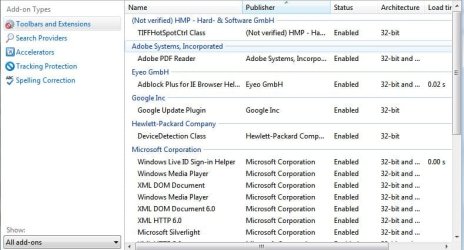
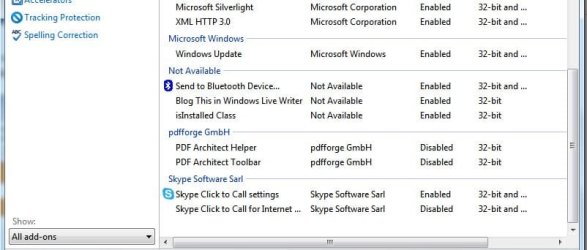
Post a screen shot of you Manage add-ons page by clicking on the Gear symbol on the top right and click on the option,

Toolbars and extensions on the top left column and at the bottom switch to Show all add-ons,
See the link above my signature on how to take and upload screen shots here :)
Cheers.
 

My Computer

Computer type
PC/Desktop
Computer Manufacturer/Model Number
Custom assembled by me :}
OS
Win-7-Pro64bit 7-H-Prem-64bit
CPU
i7-5930K 2nd i9-9940x both water blocked VRM's too
Motherboard
ASUS SABERTOOTH X99 2nd ASUS x299 Apex
Memory
Trident-z 3200C14 2nd Trident-z 3600C16
Graphics Card(s)
EVGA 1080ti ftw3 2nd Titan Xp both water blocked
Sound Card
Built-in Realtek
Monitor(s) Displays
1-AOC G2460PG 24"G-Sync 144Hz/ 2nd 1-ASUS VG248QE 24" 144Hz
Screen Resolution
1920 x 1080 144Hz
Hard Drives
2-Samsung M.2 Evo & Evo Plus
2-Samsung 850 EVO 500GB SSD's/ 3-2.5 W.D. Black 1tb-&3-1tb/3-3.5 WD Black 1tb hdd's
PSU
EVGA SuperNOVA 1000-P2 2nd 1200-P2
Case
2-Corsair Obsidian Series 450D Black ATX Mid Tower
Cooling
Custom water loops
Keyboard
Logitech G710+/ 2nd Logitech G910
Mouse
2-RedDragon M901 Perdition 16400 dpi Gaming mouse = wired
Internet Speed
Comcast Ping 19ms 89.31mbps download speed 6.12mbps upload
Antivirus
Malwarebytes Pro/ Superantispyware Pro
Browser
FireFox & Pale moon
Other Info
2nd ASUS X299 Apex/Intel i9-9940x with Custom water loop/7H-Prem-x64/Corsair 450D case/Ram Trident-z 3600C16 4x8gb / Samsung970Evo plus 500gb SSD/Dual ssd EZ swap evo/PSU EVGA SuperNova 1200w-P2 80+Platinum/GPU Titan Xp /8-ML-140 on push-pull on 2-280GTX rads
Hi I see what you mean in your post #3
Delete is grayed out that a new one the action used to just delete the top section :/
Do this one instead,
View attachment 343625

Nope, same thing. I had to set to reopen tabs on startup again but after doing the above and it seemed worked once but next time the two processes were left behind again.
 

My Computer

Computer type
PC/Desktop
Computer Manufacturer/Model Number
HP DV5 Laptop
OS
Microsoft Windows 7 Ultimate 64-bit 7601 Multiprocessor Free Service Pack 1
CPU
AMD Turion(tm) X2 Ultra Dual-Core Mobile ZM-80
Motherboard
Quanta 3600
Memory
3.00 GB
Graphics Card(s)
ATI Mobility Radeon HD 3400 Series
Sound Card
(1) AMD High Definition Audio Device (2) Bluetooth Hands-f
Screen Resolution
1280 x 800 x 32 bits (4294967296 colors) @ 59 Hz
Hard Drives
(1) ST1000LM024 HN-M101MBB ATA Device (2) JMCR SD/MMC SCSI Disk Device
.
In Task Manager I find there are two IE processes still running after closing IE
They are probably not 'running' - they are just cached. Look into the CPU column whether they use any CPU time - I bet it is zero.
You are correct, zero cpu usage. However, if I end them IE reopens tabs correctly every time. I figure IE must see them on startup and thinks it's already running so it just opens one tab.
 

My Computer

Computer type
PC/Desktop
Computer Manufacturer/Model Number
HP DV5 Laptop
OS
Microsoft Windows 7 Ultimate 64-bit 7601 Multiprocessor Free Service Pack 1
CPU
AMD Turion(tm) X2 Ultra Dual-Core Mobile ZM-80
Motherboard
Quanta 3600
Memory
3.00 GB
Graphics Card(s)
ATI Mobility Radeon HD 3400 Series
Sound Card
(1) AMD High Definition Audio Device (2) Bluetooth Hands-f
Screen Resolution
1280 x 800 x 32 bits (4294967296 colors) @ 59 Hz
Hard Drives
(1) ST1000LM024 HN-M101MBB ATA Device (2) JMCR SD/MMC SCSI Disk Device
Hi,
Post your show all add-ons page,
Cheers.
 

My Computer

Computer type
PC/Desktop
Computer Manufacturer/Model Number
Custom assembled by me :}
OS
Win-7-Pro64bit 7-H-Prem-64bit
CPU
i7-5930K 2nd i9-9940x both water blocked VRM's too
Motherboard
ASUS SABERTOOTH X99 2nd ASUS x299 Apex
Memory
Trident-z 3200C14 2nd Trident-z 3600C16
Graphics Card(s)
EVGA 1080ti ftw3 2nd Titan Xp both water blocked
Sound Card
Built-in Realtek
Monitor(s) Displays
1-AOC G2460PG 24"G-Sync 144Hz/ 2nd 1-ASUS VG248QE 24" 144Hz
Screen Resolution
1920 x 1080 144Hz
Hard Drives
2-Samsung M.2 Evo & Evo Plus
2-Samsung 850 EVO 500GB SSD's/ 3-2.5 W.D. Black 1tb-&3-1tb/3-3.5 WD Black 1tb hdd's
PSU
EVGA SuperNOVA 1000-P2 2nd 1200-P2
Case
2-Corsair Obsidian Series 450D Black ATX Mid Tower
Cooling
Custom water loops
Keyboard
Logitech G710+/ 2nd Logitech G910
Mouse
2-RedDragon M901 Perdition 16400 dpi Gaming mouse = wired
Internet Speed
Comcast Ping 19ms 89.31mbps download speed 6.12mbps upload
Antivirus
Malwarebytes Pro/ Superantispyware Pro
Browser
FireFox & Pale moon
Other Info
2nd ASUS X299 Apex/Intel i9-9940x with Custom water loop/7H-Prem-x64/Corsair 450D case/Ram Trident-z 3600C16 4x8gb / Samsung970Evo plus 500gb SSD/Dual ssd EZ swap evo/PSU EVGA SuperNova 1200w-P2 80+Platinum/GPU Titan Xp /8-ML-140 on push-pull on 2-280GTX rads
The caching is only for faster loading. The IE is then not fetched from the disk but from RAM. Those will disappear if they age enough and the cache is being reclaimed by newer programs. That happens when the system runs out of empty RAM space for caching.
 
Last edited:

My Computer

Computer Manufacturer/Model Number
HP, Dell, Gateway, Toshiba - 4 laptops and 2 desktops
OS
Vista, Windows7, Mint Mate, Zorin, Windows 8
CPU
from 1.6GHz Duo to i7
Monitor(s) Displays
2x HP w2207
Hard Drives
5x HDD, 7x SSD, 12x Externals
Keyboard
with trackball - no mices
Mouse
Trackball mice
Internet Speed
DSL 6000
Makes sense this was a windows 7 basic computer which probably only has 2 gigs of ram :/
Use the link in my signature to Fill in your system spec's page
Cheers.
 

My Computer

Computer type
PC/Desktop
Computer Manufacturer/Model Number
Custom assembled by me :}
OS
Win-7-Pro64bit 7-H-Prem-64bit
CPU
i7-5930K 2nd i9-9940x both water blocked VRM's too
Motherboard
ASUS SABERTOOTH X99 2nd ASUS x299 Apex
Memory
Trident-z 3200C14 2nd Trident-z 3600C16
Graphics Card(s)
EVGA 1080ti ftw3 2nd Titan Xp both water blocked
Sound Card
Built-in Realtek
Monitor(s) Displays
1-AOC G2460PG 24"G-Sync 144Hz/ 2nd 1-ASUS VG248QE 24" 144Hz
Screen Resolution
1920 x 1080 144Hz
Hard Drives
2-Samsung M.2 Evo & Evo Plus
2-Samsung 850 EVO 500GB SSD's/ 3-2.5 W.D. Black 1tb-&3-1tb/3-3.5 WD Black 1tb hdd's
PSU
EVGA SuperNOVA 1000-P2 2nd 1200-P2
Case
2-Corsair Obsidian Series 450D Black ATX Mid Tower
Cooling
Custom water loops
Keyboard
Logitech G710+/ 2nd Logitech G910
Mouse
2-RedDragon M901 Perdition 16400 dpi Gaming mouse = wired
Internet Speed
Comcast Ping 19ms 89.31mbps download speed 6.12mbps upload
Antivirus
Malwarebytes Pro/ Superantispyware Pro
Browser
FireFox & Pale moon
Other Info
2nd ASUS X299 Apex/Intel i9-9940x with Custom water loop/7H-Prem-x64/Corsair 450D case/Ram Trident-z 3600C16 4x8gb / Samsung970Evo plus 500gb SSD/Dual ssd EZ swap evo/PSU EVGA SuperNova 1200w-P2 80+Platinum/GPU Titan Xp /8-ML-140 on push-pull on 2-280GTX rads

Attachments

  • ieaddonsp1.JPG
    ieaddonsp1.JPG
    61.2 KB · Views: 0
  • ieaddonsp2.JPG
    ieaddonsp2.JPG
    45 KB · Views: 0

My Computer

Computer type
PC/Desktop
Computer Manufacturer/Model Number
HP DV5 Laptop
OS
Microsoft Windows 7 Ultimate 64-bit 7601 Multiprocessor Free Service Pack 1
CPU
AMD Turion(tm) X2 Ultra Dual-Core Mobile ZM-80
Motherboard
Quanta 3600
Memory
3.00 GB
Graphics Card(s)
ATI Mobility Radeon HD 3400 Series
Sound Card
(1) AMD High Definition Audio Device (2) Bluetooth Hands-f
Screen Resolution
1280 x 800 x 32 bits (4294967296 colors) @ 59 Hz
Hard Drives
(1) ST1000LM024 HN-M101MBB ATA Device (2) JMCR SD/MMC SCSI Disk Device

Oops I might of been thinking of another thread about the 7 basic thing :/
 

My Computer

Computer type
PC/Desktop
Computer Manufacturer/Model Number
Custom assembled by me :}
OS
Win-7-Pro64bit 7-H-Prem-64bit
CPU
i7-5930K 2nd i9-9940x both water blocked VRM's too
Motherboard
ASUS SABERTOOTH X99 2nd ASUS x299 Apex
Memory
Trident-z 3200C14 2nd Trident-z 3600C16
Graphics Card(s)
EVGA 1080ti ftw3 2nd Titan Xp both water blocked
Sound Card
Built-in Realtek
Monitor(s) Displays
1-AOC G2460PG 24"G-Sync 144Hz/ 2nd 1-ASUS VG248QE 24" 144Hz
Screen Resolution
1920 x 1080 144Hz
Hard Drives
2-Samsung M.2 Evo & Evo Plus
2-Samsung 850 EVO 500GB SSD's/ 3-2.5 W.D. Black 1tb-&3-1tb/3-3.5 WD Black 1tb hdd's
PSU
EVGA SuperNOVA 1000-P2 2nd 1200-P2
Case
2-Corsair Obsidian Series 450D Black ATX Mid Tower
Cooling
Custom water loops
Keyboard
Logitech G710+/ 2nd Logitech G910
Mouse
2-RedDragon M901 Perdition 16400 dpi Gaming mouse = wired
Internet Speed
Comcast Ping 19ms 89.31mbps download speed 6.12mbps upload
Antivirus
Malwarebytes Pro/ Superantispyware Pro
Browser
FireFox & Pale moon
Other Info
2nd ASUS X299 Apex/Intel i9-9940x with Custom water loop/7H-Prem-x64/Corsair 450D case/Ram Trident-z 3600C16 4x8gb / Samsung970Evo plus 500gb SSD/Dual ssd EZ swap evo/PSU EVGA SuperNova 1200w-P2 80+Platinum/GPU Titan Xp /8-ML-140 on push-pull on 2-280GTX rads

My Computer

Computer type
PC/Desktop
Computer Manufacturer/Model Number
Custom assembled by me :}
OS
Win-7-Pro64bit 7-H-Prem-64bit
CPU
i7-5930K 2nd i9-9940x both water blocked VRM's too
Motherboard
ASUS SABERTOOTH X99 2nd ASUS x299 Apex
Memory
Trident-z 3200C14 2nd Trident-z 3600C16
Graphics Card(s)
EVGA 1080ti ftw3 2nd Titan Xp both water blocked
Sound Card
Built-in Realtek
Monitor(s) Displays
1-AOC G2460PG 24"G-Sync 144Hz/ 2nd 1-ASUS VG248QE 24" 144Hz
Screen Resolution
1920 x 1080 144Hz
Hard Drives
2-Samsung M.2 Evo & Evo Plus
2-Samsung 850 EVO 500GB SSD's/ 3-2.5 W.D. Black 1tb-&3-1tb/3-3.5 WD Black 1tb hdd's
PSU
EVGA SuperNOVA 1000-P2 2nd 1200-P2
Case
2-Corsair Obsidian Series 450D Black ATX Mid Tower
Cooling
Custom water loops
Keyboard
Logitech G710+/ 2nd Logitech G910
Mouse
2-RedDragon M901 Perdition 16400 dpi Gaming mouse = wired
Internet Speed
Comcast Ping 19ms 89.31mbps download speed 6.12mbps upload
Antivirus
Malwarebytes Pro/ Superantispyware Pro
Browser
FireFox & Pale moon
Other Info
2nd ASUS X299 Apex/Intel i9-9940x with Custom water loop/7H-Prem-x64/Corsair 450D case/Ram Trident-z 3600C16 4x8gb / Samsung970Evo plus 500gb SSD/Dual ssd EZ swap evo/PSU EVGA SuperNova 1200w-P2 80+Platinum/GPU Titan Xp /8-ML-140 on push-pull on 2-280GTX rads
Makes sense this was a windows 7 basic computer which probably only has 2 gigs of ram :/
Use the link in my signature to Fill in your system spec's page
Cheers.
Spec filled in.
 

My Computer

Computer type
PC/Desktop
Computer Manufacturer/Model Number
HP DV5 Laptop
OS
Microsoft Windows 7 Ultimate 64-bit 7601 Multiprocessor Free Service Pack 1
CPU
AMD Turion(tm) X2 Ultra Dual-Core Mobile ZM-80
Motherboard
Quanta 3600
Memory
3.00 GB
Graphics Card(s)
ATI Mobility Radeon HD 3400 Series
Sound Card
(1) AMD High Definition Audio Device (2) Bluetooth Hands-f
Screen Resolution
1280 x 800 x 32 bits (4294967296 colors) @ 59 Hz
Hard Drives
(1) ST1000LM024 HN-M101MBB ATA Device (2) JMCR SD/MMC SCSI Disk Device
Ok, so if the two iexplore processes are left behind (cached) to speed up reopening IE until they time out...why are two more processes being opened when I reopen IE?
Snip from Task Manager.
 

Attachments

  • iexplore task manager.JPG
    iexplore task manager.JPG
    12.6 KB · Views: 7

My Computer

Computer type
PC/Desktop
Computer Manufacturer/Model Number
HP DV5 Laptop
OS
Microsoft Windows 7 Ultimate 64-bit 7601 Multiprocessor Free Service Pack 1
CPU
AMD Turion(tm) X2 Ultra Dual-Core Mobile ZM-80
Motherboard
Quanta 3600
Memory
3.00 GB
Graphics Card(s)
ATI Mobility Radeon HD 3400 Series
Sound Card
(1) AMD High Definition Audio Device (2) Bluetooth Hands-f
Screen Resolution
1280 x 800 x 32 bits (4294967296 colors) @ 59 Hz
Hard Drives
(1) ST1000LM024 HN-M101MBB ATA Device (2) JMCR SD/MMC SCSI Disk Device
Okay thanks whs might need to take a look at them 3 gig's on 7 Ultimate 64 bit :/
 

My Computer

Computer type
PC/Desktop
Computer Manufacturer/Model Number
Custom assembled by me :}
OS
Win-7-Pro64bit 7-H-Prem-64bit
CPU
i7-5930K 2nd i9-9940x both water blocked VRM's too
Motherboard
ASUS SABERTOOTH X99 2nd ASUS x299 Apex
Memory
Trident-z 3200C14 2nd Trident-z 3600C16
Graphics Card(s)
EVGA 1080ti ftw3 2nd Titan Xp both water blocked
Sound Card
Built-in Realtek
Monitor(s) Displays
1-AOC G2460PG 24"G-Sync 144Hz/ 2nd 1-ASUS VG248QE 24" 144Hz
Screen Resolution
1920 x 1080 144Hz
Hard Drives
2-Samsung M.2 Evo & Evo Plus
2-Samsung 850 EVO 500GB SSD's/ 3-2.5 W.D. Black 1tb-&3-1tb/3-3.5 WD Black 1tb hdd's
PSU
EVGA SuperNOVA 1000-P2 2nd 1200-P2
Case
2-Corsair Obsidian Series 450D Black ATX Mid Tower
Cooling
Custom water loops
Keyboard
Logitech G710+/ 2nd Logitech G910
Mouse
2-RedDragon M901 Perdition 16400 dpi Gaming mouse = wired
Internet Speed
Comcast Ping 19ms 89.31mbps download speed 6.12mbps upload
Antivirus
Malwarebytes Pro/ Superantispyware Pro
Browser
FireFox & Pale moon
Other Info
2nd ASUS X299 Apex/Intel i9-9940x with Custom water loop/7H-Prem-x64/Corsair 450D case/Ram Trident-z 3600C16 4x8gb / Samsung970Evo plus 500gb SSD/Dual ssd EZ swap evo/PSU EVGA SuperNova 1200w-P2 80+Platinum/GPU Titan Xp /8-ML-140 on push-pull on 2-280GTX rads

My Computer

Computer type
PC/Desktop
Computer Manufacturer/Model Number
HP DV5 Laptop
OS
Microsoft Windows 7 Ultimate 64-bit 7601 Multiprocessor Free Service Pack 1
CPU
AMD Turion(tm) X2 Ultra Dual-Core Mobile ZM-80
Motherboard
Quanta 3600
Memory
3.00 GB
Graphics Card(s)
ATI Mobility Radeon HD 3400 Series
Sound Card
(1) AMD High Definition Audio Device (2) Bluetooth Hands-f
Screen Resolution
1280 x 800 x 32 bits (4294967296 colors) @ 59 Hz
Hard Drives
(1) ST1000LM024 HN-M101MBB ATA Device (2) JMCR SD/MMC SCSI Disk Device
Back
Top