
Internet Explorer - Reset

How to Reset Internet Explorer to Default

   Information
This tutorial will show you how to reset Internet Explorer settings to back their default state when Windows was first installed on your computer.

This is useful for troubleshooting problems that might be caused by settings that were changed after installation.

   Warning
When you delete personal settings, some webpages that rely on previously stored cookies, form data, passwords, or previously installed browser add-ons might not work correctly.

Resetting Internet Explorer's settings is not reversible. After a reset, all previous settings are lost and cannot be recovered.

   Note
Resetting Internet Explorer to its default settings does not delete your favorites, feeds, Web Slices, and a few other personalized settings. See the table below for a complete list of all settings and information about whether they are reset or maintained. All add-ons installed by you will be disabled though.
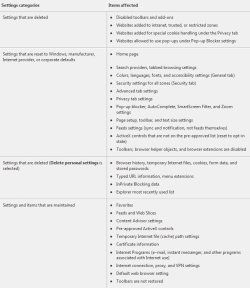
table.jpg


Here's How:
1. Do step 2 or 3 below for what you would like to do.

2. Open Internet Explorer, click/tap on Tools (gear icon "ALT+X") and Internet Options, then go to step 4 below.
NOTE: In Windows 8 and 8.1, this would only apply to the desktop IE10 or IE11, and not the modern IE10/IE11.

3. Open the Control Panel (icons view), click/tap on the Internet Options icon. Close all open Internet Explorer windows, and go to step 4 below.

4. Click/tap on the Advanced tab, and then click/tap on the Reset button. (see screenshot below)
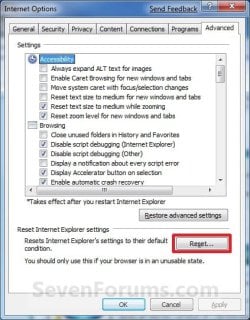
Internet_Options.jpg
5. To Completely Reset Internet Explorer
A) If you also wanted to delete your personal settings, then check/tap the box as well, otherwise leave the box unchecked. (see screenshot below)
NOTE: See the table at the top of the tutorial for what will be affected by this. You should check this for a complete reset though.
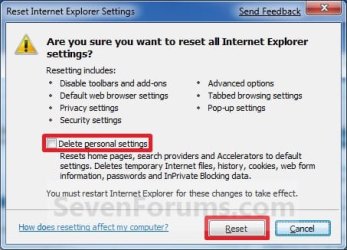
Reset.jpg
6. Click/tap on the Reset button. (see screenshot above)

7. Click/tap on the Close button. (see screenshot below)
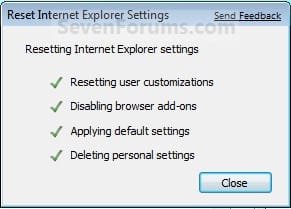
In_IE7_Close.jpg
8. Click/tap on OK. (see screenshot below)
NOTE: You will not see this if you opened Internet Options from the Control Panel (step 2).
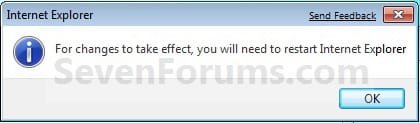
Restart_IE.jpg
9. Close Internet Explorer.
NOTE: You will not need to do this if you opened Internet Options from the Control Panel (step 3) since it should alread be closed.

10. The reset will take effect the next time you open Internet Explorer.

11. You will now need to enable any toolbars and add-ons that you want back. Be sure to only enable them one by one to see if one may have been a cause for any issue you may have had with Internet Explorer.
That's it,
Shawn


Last edited:
Yes, my goodness that is the rather simple way to do it. I suppose the fact that I had been doing all this oc'ing that caused the problem to begin with was in the wee hours of the night likely make for my not resetting it from the advanced options.

As well as that in my frustration I put the 32bit IE in the recycle bin and deleted it...ohhh nooo~!

Suppose resetting at this point would availe nothing, I will have to do the restore point going back previous to the happening...:cry:

It's o.k. as I have use the resore in W7 before already for something else. Might add that the restore is reminisant of xps restore points, can't say I remember vista ever having restore points or perhaps I just did not have a need for it within vista.

At any rate it comes in handy for events such as this yeaaaa;)
 

My Computer

Computer Manufacturer/Model Number
Self-Build
OS
Windows 7 RC 7100
CPU
Intel c2q6600 oc'd @4239Mhz 1.68v w/mod'd VapoChill LS
Motherboard
Asus Rampage Extreme
Memory
2gb Ocz Flex II DDR3 2000 8-8-8-24 2.2v
Graphics Card(s)
2x Asus 3870x2 Tops in quad xfire
Sound Card
Asus SupremeFX X-FI
Monitor(s) Displays
1-HP 2408 24'' LCD & 1-Viewsonic VG2230wm 22'' LCD
Screen Resolution
1920x1200 & 1600x1200
Hard Drives
2x WD Caviar 160gb in Raid0
1x 1TB backup

Opticals:

Sony optical drive
Samsung optical drive
PSU
1x Apevia 680watt & 1x Logisys 550watt
Case
2x Custom Plexiglass cases 1-PC & 1- LS Phase Change
Cooling
Aqua Computer 360xt single loop north/south & Flex II DDR3
Keyboard
Logitech Di Novo Edge Keyboard & Optimus Mini 3 Keyboard
Mouse
Saitek Obsidian mouse & 3D Connexion Space Pilot 3D mouse
Internet Speed
not worth mentioning
Other Info
Upek Fingerprint reader
Plantronic 590 Bluetooth headset
HP 7550 Photo Printer
HP 4670 See-Thru Scanner
NextEngine 3D Scanner
Enzotech north, south and mosfet blocks, 4xDanger Den Maze-5 vga blocks, //UPGRADES COMING SOON//
Koolance liquid-cooled psu, i7 975, Rampage II Extreme
Hello Thunder,

Since IE is considered a system file, you could also run a sfc /scannow command to restore the 32-bit Internet Explorer file.

Another option, would be to use Previous Versions to restore it in the original folder.

Hope this helps,
Shawn
 

My Computer

Computer type
PC/Desktop
Computer Manufacturer/Model Number
Self built custom
OS
64-bit Windows 11 Pro for Workstations
CPU
Intel i7-8700K OC'd to 5 GHz
Motherboard
ASUS ROG Maximus XI Formula Z390
Memory
64 GB (4x16GB) G.SKILL TridentZ RGB DDR4 3600 MHz
Graphics Card(s)
ASUS ROG-STRIX-GTX1080TI-O11G-GAMING
Sound Card
Integrated
Monitor(s) Displays
2 x Samsung Odyssey G7 27"
Screen Resolution
2560x1440
Hard Drives
1TB Samsung 990 PRO M.2,
4TB Samsung 990 PRO PRO M.2,
TerraMaster F8 SSD Plus NAS
PSU
Seasonic Prime Titanium 850W
Case
Thermaltake Core P3
Cooling
Corsair Hydro H115i
Keyboard
Logitech wireless K800
Mouse
Logitech MX Master 4
Internet Speed
2 Gb/s Download and 100 Mb/s Upload
Antivirus
Malwarebyte Anti-Malware Premium
Browser
Google Chrome
Other Info
Logitech Z625 speaker system,
Logitech BRIO 4K Pro webcam,
HP Color LaserJet Pro MFP M477fdn,
APC SMART-UPS RT 1000 XL - SURT1000XLI,
Galaxy S23 Plus phone
Well I did the sfc, for whatever reason it said all files were alright but still no 32bit os. Since I have out grown my 80gb back-up drive as I now have 170+gb usage, I am not likely to do any fresh os installs or restore points as I would lose data(programs) with restore point.

So, now the moment I am using alternate browsers for flash related media usage...such as Max which btw while 32bit is faster than MSN 64bit browser~!!!
 

My Computer

Computer Manufacturer/Model Number
Self-Build
OS
Windows 7 RC 7100
CPU
Intel c2q6600 oc'd @4239Mhz 1.68v w/mod'd VapoChill LS
Motherboard
Asus Rampage Extreme
Memory
2gb Ocz Flex II DDR3 2000 8-8-8-24 2.2v
Graphics Card(s)
2x Asus 3870x2 Tops in quad xfire
Sound Card
Asus SupremeFX X-FI
Monitor(s) Displays
1-HP 2408 24'' LCD & 1-Viewsonic VG2230wm 22'' LCD
Screen Resolution
1920x1200 & 1600x1200
Hard Drives
2x WD Caviar 160gb in Raid0
1x 1TB backup

Opticals:

Sony optical drive
Samsung optical drive
PSU
1x Apevia 680watt & 1x Logisys 550watt
Case
2x Custom Plexiglass cases 1-PC & 1- LS Phase Change
Cooling
Aqua Computer 360xt single loop north/south & Flex II DDR3
Keyboard
Logitech Di Novo Edge Keyboard & Optimus Mini 3 Keyboard
Mouse
Saitek Obsidian mouse & 3D Connexion Space Pilot 3D mouse
Internet Speed
not worth mentioning
Other Info
Upek Fingerprint reader
Plantronic 590 Bluetooth headset
HP 7550 Photo Printer
HP 4670 See-Thru Scanner
NextEngine 3D Scanner
Enzotech north, south and mosfet blocks, 4xDanger Den Maze-5 vga blocks, //UPGRADES COMING SOON//
Koolance liquid-cooled psu, i7 975, Rampage II Extreme
Thunder,

Here is a copy of the Internet Explorer folder from my 64-bit Windows 7 C:\Program Files (x86) folder with all of it's default filee. I hope it can help.
 

Attachments

My Computer

Computer type
PC/Desktop
Computer Manufacturer/Model Number
Self built custom
OS
64-bit Windows 11 Pro for Workstations
CPU
Intel i7-8700K OC'd to 5 GHz
Motherboard
ASUS ROG Maximus XI Formula Z390
Memory
64 GB (4x16GB) G.SKILL TridentZ RGB DDR4 3600 MHz
Graphics Card(s)
ASUS ROG-STRIX-GTX1080TI-O11G-GAMING
Sound Card
Integrated
Monitor(s) Displays
2 x Samsung Odyssey G7 27"
Screen Resolution
2560x1440
Hard Drives
1TB Samsung 990 PRO M.2,
4TB Samsung 990 PRO PRO M.2,
TerraMaster F8 SSD Plus NAS
PSU
Seasonic Prime Titanium 850W
Case
Thermaltake Core P3
Cooling
Corsair Hydro H115i
Keyboard
Logitech wireless K800
Mouse
Logitech MX Master 4
Internet Speed
2 Gb/s Download and 100 Mb/s Upload
Antivirus
Malwarebyte Anti-Malware Premium
Browser
Google Chrome
Other Info
Logitech Z625 speaker system,
Logitech BRIO 4K Pro webcam,
HP Color LaserJet Pro MFP M477fdn,
APC SMART-UPS RT 1000 XL - SURT1000XLI,
Galaxy S23 Plus phone
Hmm, that was the direct folder that I put into the recycle bin. I did not check that location after doing the sfc which must have replaced it ahh. Just goes to show you that sleep is something that prevents missteps and keeps one thorough.
 

My Computer

Computer Manufacturer/Model Number
Self-Build
OS
Windows 7 RC 7100
CPU
Intel c2q6600 oc'd @4239Mhz 1.68v w/mod'd VapoChill LS
Motherboard
Asus Rampage Extreme
Memory
2gb Ocz Flex II DDR3 2000 8-8-8-24 2.2v
Graphics Card(s)
2x Asus 3870x2 Tops in quad xfire
Sound Card
Asus SupremeFX X-FI
Monitor(s) Displays
1-HP 2408 24'' LCD & 1-Viewsonic VG2230wm 22'' LCD
Screen Resolution
1920x1200 & 1600x1200
Hard Drives
2x WD Caviar 160gb in Raid0
1x 1TB backup

Opticals:

Sony optical drive
Samsung optical drive
PSU
1x Apevia 680watt & 1x Logisys 550watt
Case
2x Custom Plexiglass cases 1-PC & 1- LS Phase Change
Cooling
Aqua Computer 360xt single loop north/south & Flex II DDR3
Keyboard
Logitech Di Novo Edge Keyboard & Optimus Mini 3 Keyboard
Mouse
Saitek Obsidian mouse & 3D Connexion Space Pilot 3D mouse
Internet Speed
not worth mentioning
Other Info
Upek Fingerprint reader
Plantronic 590 Bluetooth headset
HP 7550 Photo Printer
HP 4670 See-Thru Scanner
NextEngine 3D Scanner
Enzotech north, south and mosfet blocks, 4xDanger Den Maze-5 vga blocks, //UPGRADES COMING SOON//
Koolance liquid-cooled psu, i7 975, Rampage II Extreme
LOL, I hear that Thunder. I'm happy to hear that you have the file back. :)
 

My Computer

Computer type
PC/Desktop
Computer Manufacturer/Model Number
Self built custom
OS
64-bit Windows 11 Pro for Workstations
CPU
Intel i7-8700K OC'd to 5 GHz
Motherboard
ASUS ROG Maximus XI Formula Z390
Memory
64 GB (4x16GB) G.SKILL TridentZ RGB DDR4 3600 MHz
Graphics Card(s)
ASUS ROG-STRIX-GTX1080TI-O11G-GAMING
Sound Card
Integrated
Monitor(s) Displays
2 x Samsung Odyssey G7 27"
Screen Resolution
2560x1440
Hard Drives
1TB Samsung 990 PRO M.2,
4TB Samsung 990 PRO PRO M.2,
TerraMaster F8 SSD Plus NAS
PSU
Seasonic Prime Titanium 850W
Case
Thermaltake Core P3
Cooling
Corsair Hydro H115i
Keyboard
Logitech wireless K800
Mouse
Logitech MX Master 4
Internet Speed
2 Gb/s Download and 100 Mb/s Upload
Antivirus
Malwarebyte Anti-Malware Premium
Browser
Google Chrome
Other Info
Logitech Z625 speaker system,
Logitech BRIO 4K Pro webcam,
HP Color LaserJet Pro MFP M477fdn,
APC SMART-UPS RT 1000 XL - SURT1000XLI,
Galaxy S23 Plus phone
Yes...again thank you :)P
 

My Computer

Computer Manufacturer/Model Number
Self-Build
OS
Windows 7 RC 7100
CPU
Intel c2q6600 oc'd @4239Mhz 1.68v w/mod'd VapoChill LS
Motherboard
Asus Rampage Extreme
Memory
2gb Ocz Flex II DDR3 2000 8-8-8-24 2.2v
Graphics Card(s)
2x Asus 3870x2 Tops in quad xfire
Sound Card
Asus SupremeFX X-FI
Monitor(s) Displays
1-HP 2408 24'' LCD & 1-Viewsonic VG2230wm 22'' LCD
Screen Resolution
1920x1200 & 1600x1200
Hard Drives
2x WD Caviar 160gb in Raid0
1x 1TB backup

Opticals:

Sony optical drive
Samsung optical drive
PSU
1x Apevia 680watt & 1x Logisys 550watt
Case
2x Custom Plexiglass cases 1-PC & 1- LS Phase Change
Cooling
Aqua Computer 360xt single loop north/south & Flex II DDR3
Keyboard
Logitech Di Novo Edge Keyboard & Optimus Mini 3 Keyboard
Mouse
Saitek Obsidian mouse & 3D Connexion Space Pilot 3D mouse
Internet Speed
not worth mentioning
Other Info
Upek Fingerprint reader
Plantronic 590 Bluetooth headset
HP 7550 Photo Printer
HP 4670 See-Thru Scanner
NextEngine 3D Scanner
Enzotech north, south and mosfet blocks, 4xDanger Den Maze-5 vga blocks, //UPGRADES COMING SOON//
Koolance liquid-cooled psu, i7 975, Rampage II Extreme
I have tried to open Internet Options in Control Panel. Nothing open up the Internet Options so I can reset the Internet Explorer which I have serious problem with this.

John
 

My Computer

Computer type
PC/Desktop
OS
Windows 7 Home Premium 64bit

My Computer

Computer type
PC/Desktop
Computer Manufacturer/Model Number
Self built custom
OS
64-bit Windows 11 Pro for Workstations
CPU
Intel i7-8700K OC'd to 5 GHz
Motherboard
ASUS ROG Maximus XI Formula Z390
Memory
64 GB (4x16GB) G.SKILL TridentZ RGB DDR4 3600 MHz
Graphics Card(s)
ASUS ROG-STRIX-GTX1080TI-O11G-GAMING
Sound Card
Integrated
Monitor(s) Displays
2 x Samsung Odyssey G7 27"
Screen Resolution
2560x1440
Hard Drives
1TB Samsung 990 PRO M.2,
4TB Samsung 990 PRO PRO M.2,
TerraMaster F8 SSD Plus NAS
PSU
Seasonic Prime Titanium 850W
Case
Thermaltake Core P3
Cooling
Corsair Hydro H115i
Keyboard
Logitech wireless K800
Mouse
Logitech MX Master 4
Internet Speed
2 Gb/s Download and 100 Mb/s Upload
Antivirus
Malwarebyte Anti-Malware Premium
Browser
Google Chrome
Other Info
Logitech Z625 speaker system,
Logitech BRIO 4K Pro webcam,
HP Color LaserJet Pro MFP M477fdn,
APC SMART-UPS RT 1000 XL - SURT1000XLI,
Galaxy S23 Plus phone
Yes the same issue with Internet Explorer hangs for few minutes like around between 1 or 2 minutes before the link finally show on the browser that I typed. Also I tried to go to Tools then click Internet Options after that nothing show with Internet Options. I was hoping that I can reset this browser. The other thing is that I went on to check Windows Update to see " Installed Updates " and nothing show with Internet Explorer 11 and plan to uninstall this browser. I am not sure what else to do with this browser. Is there another way to uninstall Internet Explorer 11 or no way to do.

John
 

My Computer

Computer type
PC/Desktop
OS
Windows 7 Home Premium 64bit

My Computer

Computer type
PC/Desktop
Computer Manufacturer/Model Number
Self built custom
OS
64-bit Windows 11 Pro for Workstations
CPU
Intel i7-8700K OC'd to 5 GHz
Motherboard
ASUS ROG Maximus XI Formula Z390
Memory
64 GB (4x16GB) G.SKILL TridentZ RGB DDR4 3600 MHz
Graphics Card(s)
ASUS ROG-STRIX-GTX1080TI-O11G-GAMING
Sound Card
Integrated
Monitor(s) Displays
2 x Samsung Odyssey G7 27"
Screen Resolution
2560x1440
Hard Drives
1TB Samsung 990 PRO M.2,
4TB Samsung 990 PRO PRO M.2,
TerraMaster F8 SSD Plus NAS
PSU
Seasonic Prime Titanium 850W
Case
Thermaltake Core P3
Cooling
Corsair Hydro H115i
Keyboard
Logitech wireless K800
Mouse
Logitech MX Master 4
Internet Speed
2 Gb/s Download and 100 Mb/s Upload
Antivirus
Malwarebyte Anti-Malware Premium
Browser
Google Chrome
Other Info
Logitech Z625 speaker system,
Logitech BRIO 4K Pro webcam,
HP Color LaserJet Pro MFP M477fdn,
APC SMART-UPS RT 1000 XL - SURT1000XLI,
Galaxy S23 Plus phone
On my 4 week old Lenovo laptop (e540) IE is very unstable. It alerts MS web-pages (and Australian Tax Office) as unsafe.
- and even safe websites that include a link to a section on the same page. If I press IE to try again the link opens ok.

Windows has not been updated ... it is default Win-7 PRO sp1 x64, out-of-the-Lenovo factory, bog basic except for Bitdefender Internet Security 2016 installed.

Typing this post I cannot "cut", but can "copy" as long as text is selected from end to start, not start to end.
- on occasions I cannot "copy" text unless I restart IE.
- cut, copy paste is faultless in Notepad, so I assume IE is the problem.

I cannot "show" my AV either from shortcuts or direct from the executable run as admin.
- I have repaired my AV (as instructed by Bitdefender) but I still cannot "show" BD.

IE has been very unstable for about 2 weeks, so I am assuming IE might be the problem with Bitdefender.
- a long shot I know, the alternative is to clean install Bitdefender and manually register my entire whitelists.
- a mammoth task.:cry:

The Lenovo has only the default IE and no email atall. I am wanting to install all my preferred tools, but want to try simple (maybe) possible fixes.
If the IE repair/reset is not the solution ... I will create a new thread in more appropriate SevensForums sub-forum

Am I on the right track ? Thank you :)

----------------
Lenovo Think Pad e540
Win-7 PRO x64
Default Start menu ... no Classic Start, nor have themes been fiddled with.
- no addons, no email, no 3rd party browsers
 

My Computer

Computer type
PC/Desktop
Computer Manufacturer/Model Number
Toshiba, Lenovo (laptops) + 4 rigs
OS
XP Pro (x86) | 7 HP (x86) & (x64) | 7 Pro (x64)
Hello Russell, :)

You could start by installing all Windows Updates to see if that may help.

For now, you might consider using a different browser (ex: Google Chrome or Firefox) until you can get IE11 sorted.
 

My Computer

Computer type
PC/Desktop
Computer Manufacturer/Model Number
Self built custom
OS
64-bit Windows 11 Pro for Workstations
CPU
Intel i7-8700K OC'd to 5 GHz
Motherboard
ASUS ROG Maximus XI Formula Z390
Memory
64 GB (4x16GB) G.SKILL TridentZ RGB DDR4 3600 MHz
Graphics Card(s)
ASUS ROG-STRIX-GTX1080TI-O11G-GAMING
Sound Card
Integrated
Monitor(s) Displays
2 x Samsung Odyssey G7 27"
Screen Resolution
2560x1440
Hard Drives
1TB Samsung 990 PRO M.2,
4TB Samsung 990 PRO PRO M.2,
TerraMaster F8 SSD Plus NAS
PSU
Seasonic Prime Titanium 850W
Case
Thermaltake Core P3
Cooling
Corsair Hydro H115i
Keyboard
Logitech wireless K800
Mouse
Logitech MX Master 4
Internet Speed
2 Gb/s Download and 100 Mb/s Upload
Antivirus
Malwarebyte Anti-Malware Premium
Browser
Google Chrome
Other Info
Logitech Z625 speaker system,
Logitech BRIO 4K Pro webcam,
HP Color LaserJet Pro MFP M477fdn,
APC SMART-UPS RT 1000 XL - SURT1000XLI,
Galaxy S23 Plus phone
Back
Top