Internet Explorer Won't Close

REEDandRAYact

New member
Local time
8:22 PM
Messages
6
So I don't know if this has anything to do with it, but I recently hooked my computer up to my TV with a VGA cable and tried out IE on the TV screen for a few minutes to see what it looked like. Then I moved it back onto my screen and ever since then I've been trying to figure out how to close it. When I try to close it it just makes a bell noise and although I can open and close tabs, I can't close the original tab even when others are open. I'm getting really pissed off. I usually use Firefox but I have it optimized for my netbook and I had to use IE to drag over onto the other screen so I just want to get this program off my screen and probably off my computer next.

EDIT: Also I don't know what this means, but I'm running Windows 7 and I just noticed that when I scroll over the IE icon at the bottom it shows each tab open, but I have 3 tabs open and it's only showing the two that will close. The other doesn't show up.
 

My Computer

OS
Windows XP
Last edited by a moderator:

My Computer

Computer type
PC/Desktop
Computer Manufacturer/Model Number
Dell XPS 420
OS
Windows 10, Home Clean Install
CPU
Intel Core2 processsor Q8200(2.33Ghz 1333FSB) Quad Core Tech
Motherboard
Dell
Memory
6 gb
Graphics Card(s)
ATI Radeon 256MB HD3650
Sound Card
Intergrated 7.1 Channel Audio
Monitor(s) Displays
Dell SP2009W 20"
Hard Drives
640 GB Serial ATA Hard drive
Cooling
Fan
Keyboard
Dell USB Keyboard
Mouse
Dell Premium Optical USB
Internet Speed
DSL 2.85

My Computer

Computer type
PC/Desktop
OS
Windows 10 Home x64
CPU
INTEL Core i5-750 Quad-Core 3.37GHz
Motherboard
ASUS P7P55D
Memory
HyperX Fury Black Series 8GB (2 x 4GB) 1866Mhz
Graphics Card(s)
EVGA GeForce GTX 750 Superclocked 1GB 128-Bit GDDR5
Monitor(s) Displays
LG 32MA68HY 32" IPS
Screen Resolution
1920 x 1080
Hard Drives
Samsung 840 Evo 120GB, SEAGATE 500GB Barracuda® 7200.12, SATA 3 Gb/s, 7200 RPM, 16MB cache
PSU
ANTEC TruePower New TP-550, 80 PLUS, 550W
Case
ANTEC Three Hundred Illusion
Cooling
COOLER MASTER Hyper 212 Plus, 4 x 120mm 1 x 140mm Noctua's
Internet Speed
85 + Mbps
Antivirus
Avast
Browser
Vivaldi
...ever since then I've been trying to figure out how to close it. When I try to close it it just makes a bell noise and although I can open and close tabs, I can't close the original tab even when others are open...
Even after you reboot? (If you can't reboot normally, use ctrl-alt-del to get a new screen with a red shut down button.)
 

My Computer

Computer type
PC/Desktop
Computer Manufacturer/Model Number
OQO 2+
OS
Windows 8 Pro w/MC 32-bit
CPU
Intel Atom 1.86 GHz
Motherboard
OQO 2+
Memory
2 GB
Graphics Card(s)
Intel GMA 500
Sound Card
IDT
Monitor(s) Displays
LCD
Screen Resolution
800 x 480 (portable) 1280 x 1024 (docked)
Hard Drives
64 GB SSD
PSU
9 Ah Battery (portable) or OQO Brick (docked)
Case
Shirt Pocket Sized
Cooling
Tiny Fan
Keyboard
Slide out (portable) DiNovo Edge (docked)
Mouse
Eraser head (portable) Logitech Bluetooth (docked)
Internet Speed
WWAN or 802.11G (portable) T1 (docked)
Browser
IE 10
Other Info
DVD-RW OQO Docking Station
seems windows 7 does this alot it will lock up the IE with me it gives a a/v warning but if i turn gamer mode on which disables most of the a/v the IE goes back to normal

I was experiencing this as well but you can thank your A/V for locking up the IE
and if you have a feature to turn some of the A/V scans off you will be able to continue

I found that the only way it will unlock itself
 

My Computer

Computer type
PC/Desktop
Computer Manufacturer/Model Number
CoreI7-6700K MrFingerIII Special Builds
OS
Windows 10 Home Premium 64bit sp1
CPU
Intel I7-6700K @ 4.6 Ghz 1.344 volts everyday OC
Motherboard
Asrock Fatality K6 Z170 Socket 1151
Memory
32GB G-Skill TridentZ 3200mhz 16-18-18-38 DDR4
Graphics Card(s)
Sli Gigabyte Windforce GTX 980 G1
Sound Card
AC97 Creative Rage Tactic 3D Headphones Bluetooth
Monitor(s) Displays
27" Asus ROG Swift PG278Q G-Sync 48" Vizio Smart HD TV
Screen Resolution
2560x1440p 27"- 48" Currently Gaming at 2560x1440p Res 2K
Hard Drives
250GB Samsung Evo840SSD Seagate baracuda 500 GB WD Mybook 500Gb 1TB Seagate Barracuda
PSU
HX1050w Corsair Silver 80plus certified crosfire/sli
Case
Enthod Pro Full Tower
Cooling
Corsair H110i GT 280 mm High Performance WaterBlock
Keyboard
Logitech wireless keyboard
Mouse
Logitech wireless mouse
Internet Speed
Cox Cable 100+ mb
Antivirus
WebRoot Spysweeper with Antivirus
Browser
IE-10, Chrome, Opera
Other Info
My Other Rig is a AMD FX8320E @4.6Ghz 16GB Ballistic Sport Ram
Mobo Asrock Fatality 990FX 120GB OCZ SSD 1TB Seagate Barracuda Corsair H75 Cooling PSU Corsair CX750
GPU GTX Gigabyte 970G1
Please elp, I can't start the reset or download the link because it wants me to close all open windows which is exactly what I can't do!
 

My Computer

Computer Manufacturer/Model Number
Dell
OS
Wndows 7 64 bit
cntrl alt del at the same time go to task manager force a close
 

My Computer

Computer type
PC/Desktop
Computer Manufacturer/Model Number
CoreI7-6700K MrFingerIII Special Builds
OS
Windows 10 Home Premium 64bit sp1
CPU
Intel I7-6700K @ 4.6 Ghz 1.344 volts everyday OC
Motherboard
Asrock Fatality K6 Z170 Socket 1151
Memory
32GB G-Skill TridentZ 3200mhz 16-18-18-38 DDR4
Graphics Card(s)
Sli Gigabyte Windforce GTX 980 G1
Sound Card
AC97 Creative Rage Tactic 3D Headphones Bluetooth
Monitor(s) Displays
27" Asus ROG Swift PG278Q G-Sync 48" Vizio Smart HD TV
Screen Resolution
2560x1440p 27"- 48" Currently Gaming at 2560x1440p Res 2K
Hard Drives
250GB Samsung Evo840SSD Seagate baracuda 500 GB WD Mybook 500Gb 1TB Seagate Barracuda
PSU
HX1050w Corsair Silver 80plus certified crosfire/sli
Case
Enthod Pro Full Tower
Cooling
Corsair H110i GT 280 mm High Performance WaterBlock
Keyboard
Logitech wireless keyboard
Mouse
Logitech wireless mouse
Internet Speed
Cox Cable 100+ mb
Antivirus
WebRoot Spysweeper with Antivirus
Browser
IE-10, Chrome, Opera
Other Info
My Other Rig is a AMD FX8320E @4.6Ghz 16GB Ballistic Sport Ram
Mobo Asrock Fatality 990FX 120GB OCZ SSD 1TB Seagate Barracuda Corsair H75 Cooling PSU Corsair CX750
GPU GTX Gigabyte 970G1
Please elp, I can't start the reset or download the link because it wants me to close all open windows which is exactly what I can't do!

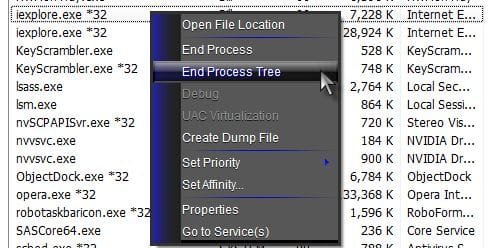
Press Ctrl+Shift+Esc to bring up task manager. On processes tab, right click iexplore.exe and left click end process tree.

ie.jpg

A Guy
 

My Computer

Computer type
PC/Desktop
OS
Windows 10 Home x64
CPU
INTEL Core i5-750 Quad-Core 3.37GHz
Motherboard
ASUS P7P55D
Memory
HyperX Fury Black Series 8GB (2 x 4GB) 1866Mhz
Graphics Card(s)
EVGA GeForce GTX 750 Superclocked 1GB 128-Bit GDDR5
Monitor(s) Displays
LG 32MA68HY 32" IPS
Screen Resolution
1920 x 1080
Hard Drives
Samsung 840 Evo 120GB, SEAGATE 500GB Barracuda® 7200.12, SATA 3 Gb/s, 7200 RPM, 16MB cache
PSU
ANTEC TruePower New TP-550, 80 PLUS, 550W
Case
ANTEC Three Hundred Illusion
Cooling
COOLER MASTER Hyper 212 Plus, 4 x 120mm 1 x 140mm Noctua's
Internet Speed
85 + Mbps
Antivirus
Avast
Browser
Vivaldi
Win7 leaves IE processes running

I have multiple Win7 systems, and having IExplore processes running after you exit the browser is the NORM.

Sometimes there wil be 5 or 7 iexplore.exe processes running with the browser window closed. Seems there's a problem killing IE processes on exit.

No, this is NOT an infection, adware, add-on, or anything similar. It's a BUG in IE.
 

My Computer

OS
Win 7 Ultimate x64
...It's a BUG in IE.
Welcome to the Seven Forums.

Which version of IE are you seeing this happen in? IE8 or IE9? 32bit or 64?

If it is a bug, then others should be able to reproduce it. I don't see this happen on any of the W7 systems that I work with. What steps should I try to see what you are seeing?
 

My Computer

Computer type
Laptop
Computer Manufacturer/Model Number
Employer provided Dell Latitude
OS
W7 Pro SP1 64bit
CPU
i7
Memory
8GB
Graphics Card(s)
Intel HD Graphics
Hard Drives
crappy SSD
Antivirus
Employer mandated Symantec Endpoint Protection
Browser
Pale Moon 64bit, IE11 64bit & Chrome 64bit
reply to version question

I have about 100 Win7 systems, mixed 32- and 64-bit, mostly AMD. Most are running IE9 v 9.0.8112.16421 update 9.0.6.

It seems to have something to do with the sites visited. Users viewing web-based videos (such as YouTube) report this more often.

The processes can be killed in task manager.
 

My Computer

OS
Win 7 Ultimate x64
Interesting. The next time you see this, add 3 columns to task manager's process tab:
tm.JPG
Then check to see of any of the IE processes show any IO activity. If they don't, the they are mostly likely hung. You can also check to see of there are any network connections. Of course, none of this matters to the end user experience... it just provides me with info.

If having IE hang like this is a problem for your users, then you can automatically kill each instance after the last IE window have been closed.
 
Last edited:

My Computer

Computer type
Laptop
Computer Manufacturer/Model Number
Employer provided Dell Latitude
OS
W7 Pro SP1 64bit
CPU
i7
Memory
8GB
Graphics Card(s)
Intel HD Graphics
Hard Drives
crappy SSD
Antivirus
Employer mandated Symantec Endpoint Protection
Browser
Pale Moon 64bit, IE11 64bit & Chrome 64bit
Still seeking a solution to IE 10 not ending on exit, mostly on 64 bit. Ending process in task manager is not a solution. Add-ons or no add ons, no difference. Its been a year with nothing from Microsoft. Why?
 

My Computer

Computer type
PC/Desktop
OS
South Carolina
Still seeking a solution to IE 10 not ending on exit, mostly on 64 bit. Ending process in task manager is not a solution. Add-ons or no add ons, no difference. Its been a year with nothing from Microsoft. Why?

Welcome to the Seven Forums.

Just to be clear:
Windows 7 Forums is an independent web site and has not been authorized,
sponsored, or otherwise approved by Microsoft Corporation.
"Windows 7" and related materials are trademarks of Microsoft Corp.
How long are you waiting for IE10 to exit? I've seen it take more than a minute on some systems.

Also, do you have IE set to "Delete browsing history on exit"?
If you do, then it may take IE even longer to exit RAM.


Have run a SFC scan?
http://www.sevenforums.com/tutorials/1538-sfc-scannow-command-system-file-checker.html
 

My Computer

Computer type
Laptop
Computer Manufacturer/Model Number
Employer provided Dell Latitude
OS
W7 Pro SP1 64bit
CPU
i7
Memory
8GB
Graphics Card(s)
Intel HD Graphics
Hard Drives
crappy SSD
Antivirus
Employer mandated Symantec Endpoint Protection
Browser
Pale Moon 64bit, IE11 64bit & Chrome 64bit
How long, it never ends unless I kill the process, so I will say hours, days. I do not have the history set to delete. There are no viruses, malware or anything else that might be external causing this on this system, it is simply IE being bad. Win 7 and IE are always up to date on fixes, I have attempted to find someone who can explain this on other tech sites including the MS forums, no luck and it does not seem to be an uncommon compliant. I've looked at the tab settings, but it has done this with after only a single tab being open. When neither Chrome or Firefox behave similar under the exact same conditions it must be a defect in IE code.
 

My Computer

Computer type
PC/Desktop
OS
South Carolina

My Computer

Computer type
Laptop
Computer Manufacturer/Model Number
Employer provided Dell Latitude
OS
W7 Pro SP1 64bit
CPU
i7
Memory
8GB
Graphics Card(s)
Intel HD Graphics
Hard Drives
crappy SSD
Antivirus
Employer mandated Symantec Endpoint Protection
Browser
Pale Moon 64bit, IE11 64bit & Chrome 64bit

No, IE is running in normal 32bit tabs, my understanding is EPM was not released until Win 8 and this has been going on when Win 8 was still a dream. I have run safe mode and initiated IE as the only application and encountered the same thing so it is highly unlikely there is an application conflict. This does not occur every single time, nor does it occur only on Flash sites. I am not certain restoring IE will accomplish much of anything as this occurred beginning day one after upgrading from IE9 which never had this problem.

I'm pretty much resigned to simply not using IE any longer once I move the balance of my needs to Chrome, which has its own annoying nuances related to prefetching. I miss the days of a simple browser
 

My Computer

Computer type
PC/Desktop
OS
South Carolina
You might try EPM with IE10 and see if it helps. What antivirus are you using?

I have an AutoIt script running all of the time. This script clears some things after IE leaves RAM. I see a notification when IE exits RAM and the script does its thing. I've been doing this since IE6/XP and I don't see IE hanging on exit. Something must have barfed during the move to IE10 for you and others.

I will say that once IE barfs, there is little hope of finding a one size fits all cure. There are several threads about various (rare) issues with IE. Reverting to a earlier version and then updating again fixes a few of the issues.

Does turning off "Predict network actions to improve page load performance" prevent Chrome's prefetch?
 

My Computer

Computer type
Laptop
Computer Manufacturer/Model Number
Employer provided Dell Latitude
OS
W7 Pro SP1 64bit
CPU
i7
Memory
8GB
Graphics Card(s)
Intel HD Graphics
Hard Drives
crappy SSD
Antivirus
Employer mandated Symantec Endpoint Protection
Browser
Pale Moon 64bit, IE11 64bit & Chrome 64bit
Using Avast antivirus, but this occurred even with Norton when I had that previously. I'm pretty well done with tinkering to fix a MS issue they should be addressing, but thanks for your concern and suggestions. On Chrome turning off the predict helps when going through Apple routers as they do the same prefetch so you double your trouble. :) Utilizing non -apple routers with or without the prefetching is better but neither is excellent. I am using a combination of Chrome and Firefox for various tasks, not overly satisfied with either because of their initial load times but at least I do not encounter the IE issue. I still recall the days of Navigator and IE 4 I believe it was when you clicked on them and up they came. I imagine the bloat in these browsers today is the price of extra security and fun features I never use.
 

My Computer

Computer type
PC/Desktop
OS
South Carolina
To rule out Avast interference use this method,
Avast has a bad record with bad browser add-ons as far as internet explorer goes,
Add the Run box to the Start menu list,
http://www.sevenforums.com/tutorials/559-start-menu-add-run-button.html

Open the Run command and Paste this into it and Okay,
"C:\Program Files\Internet Explorer\iexplore.exe" -extoff
 

My Computer

Computer type
PC/Desktop
Computer Manufacturer/Model Number
Custom assembled by me :}
OS
Win-7-Pro64bit 7-H-Prem-64bit
CPU
i7-5930K 2nd i9-9940x both water blocked VRM's too
Motherboard
ASUS SABERTOOTH X99 2nd ASUS x299 Apex
Memory
Trident-z 3200C14 2nd Trident-z 3600C16
Graphics Card(s)
EVGA 1080ti ftw3 2nd Titan Xp both water blocked
Sound Card
Built-in Realtek
Monitor(s) Displays
1-AOC G2460PG 24"G-Sync 144Hz/ 2nd 1-ASUS VG248QE 24" 144Hz
Screen Resolution
1920 x 1080 144Hz
Hard Drives
2-Samsung M.2 Evo & Evo Plus
2-Samsung 850 EVO 500GB SSD's/ 3-2.5 W.D. Black 1tb-&3-1tb/3-3.5 WD Black 1tb hdd's
PSU
EVGA SuperNOVA 1000-P2 2nd 1200-P2
Case
2-Corsair Obsidian Series 450D Black ATX Mid Tower
Cooling
Custom water loops
Keyboard
Logitech G710+/ 2nd Logitech G910
Mouse
2-RedDragon M901 Perdition 16400 dpi Gaming mouse = wired
Internet Speed
Comcast Ping 19ms 89.31mbps download speed 6.12mbps upload
Antivirus
Malwarebytes Pro/ Superantispyware Pro
Browser
FireFox & Pale moon
Other Info
2nd ASUS X299 Apex/Intel i9-9940x with Custom water loop/7H-Prem-x64/Corsair 450D case/Ram Trident-z 3600C16 4x8gb / Samsung970Evo plus 500gb SSD/Dual ssd EZ swap evo/PSU EVGA SuperNova 1200w-P2 80+Platinum/GPU Titan Xp /8-ML-140 on push-pull on 2-280GTX rads
Back
Top