Internet goes in and out only when online gaming.

maasjm

New member
Local time
3:53 PM
Messages
2
To start I want you to know I have windows 7 on bootcamp on an Imac.

I bought the game Star Wars the Old Republic, it was working fine until recently the internet cuts in and out and disconnects me from online games like SWTOR, and Call of Duty, but it works fine when browsing the web (the connection stays at four bars like usual).

What could be the issue? I only have these problems while playing games. Is this the right place to ask this question?

Also my windows update is failing to work, I tried the check for system update readiness tool, which doesn't work, and tried to manually install the service pack 1.

Also my the games are on my list to allow for the firewall. I tried turning off the firewall. I also ran a virus scan, no viruses detected.

Intel Core i7
ATI Radeon HD 5750
2.93ghz
4.00 g of ram
32bit
 

My Computer My Computer

At a glance

32 bit
OS
32 bit
so it's just when gaming or once in a while the net will disconnect for like 2 secs then connect back? Just wondering because i had a problem in the past were it would disconnect for like 2secs at random times
 

My Computer My Computer

At a glance

Windows 10 64bitAMD Phenom II X4 925 (Deneb)(2.8GHz) OC 3.4GHzCorsair Vengeance DDR3 4GBX2 (8192MB)XFX HD 6870 1GB (OC)- 940MHz core, mem 1150MHz
Computer type
PC/Desktop
Computer Manufacturer/Model Number
custom build
OS
Windows 10 64bit
CPU
AMD Phenom II X4 925 (Deneb)(2.8GHz) OC 3.4GHz
Motherboard
M5A78L-MLX Plus
Memory
Corsair Vengeance DDR3 4GBX2 (8192MB)
Graphics Card(s)
XFX HD 6870 1GB (OC)- 940MHz core, mem 1150MHz
Monitor(s) Displays
Vizio 26' 1920x1080 / Acer 1336x768
Screen Resolution
1920x1080 60Hz /1336x768
Hard Drives
Kingston Digital 60GB SSDNow V300/500gb HDD Western Digital 7200rpm (/WD 160GB HDD 7200rpm
PSU
CORSAIR CX600 600w
Case
AZZA Orion 202 EVO
Cooling
cooler master hyper TX3 cpu cooler
Keyboard
Razer DeathStalker
Mouse
Logitech Optical Gaming Mouse G400
Antivirus
Defualt on win 10
Browser
Firefox
Other Info
cpu is overclocked in bios
Only when gaming. How did you fix it?
 

My Computer My Computer

At a glance

32 bit
OS
32 bit
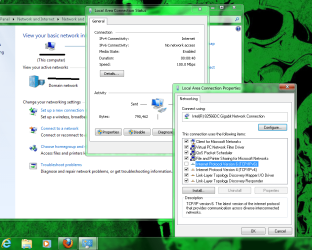
unticking the box for ivp6, for some reason that interfered with my net connection.

go to control panel then click network then click were it says local area connection. In local area connection click properties and then untick the box next to were it says internet protocol 6 [TCP/IPV6]. For some reason it bugs the connection on mine even though it's not suppose to :| Could possibly fix your problem and if it doesn't then you can tick it back.
 

Attachments

  • ggggg.png
    ggggg.png
    126.9 KB · Views: 142

My Computer My Computer

At a glance

Windows 10 64bitAMD Phenom II X4 925 (Deneb)(2.8GHz) OC 3.4GHzCorsair Vengeance DDR3 4GBX2 (8192MB)XFX HD 6870 1GB (OC)- 940MHz core, mem 1150MHz
Computer type
PC/Desktop
Computer Manufacturer/Model Number
custom build
OS
Windows 10 64bit
CPU
AMD Phenom II X4 925 (Deneb)(2.8GHz) OC 3.4GHz
Motherboard
M5A78L-MLX Plus
Memory
Corsair Vengeance DDR3 4GBX2 (8192MB)
Graphics Card(s)
XFX HD 6870 1GB (OC)- 940MHz core, mem 1150MHz
Monitor(s) Displays
Vizio 26' 1920x1080 / Acer 1336x768
Screen Resolution
1920x1080 60Hz /1336x768
Hard Drives
Kingston Digital 60GB SSDNow V300/500gb HDD Western Digital 7200rpm (/WD 160GB HDD 7200rpm
PSU
CORSAIR CX600 600w
Case
AZZA Orion 202 EVO
Cooling
cooler master hyper TX3 cpu cooler
Keyboard
Razer DeathStalker
Mouse
Logitech Optical Gaming Mouse G400
Antivirus
Defualt on win 10
Browser
Firefox
Other Info
cpu is overclocked in bios
Back
Top