Internet issues

anomality

New member
Local time
11:37 PM
Messages
5
Hey fellas, new user here, so, hi!
Now that the formalities are done with.

Straight to my little dilemma.
I've been experienceing some internet issues as of late and i've been looking around and i've seen others with the same/similar thing but haven't really found a solution that's worked for me.

Problem is that i can maybe maintain a stable internet connection for anywhere between 5 minutes to an hour then it just dies off. Things either load very slowly or they just straight up fail.
This issue is usually solved if i uninstall my network drivers and reboot, but it always returns sooner or later. And at more frustrating, rage indused times, spam clicking diagnose and/or deactivating and activating my nic provides varied results. Often me with a sore hand and a keyboard being replaced.

Actually managed to lock my computer up by opening too many diagnosis windows at the same time once.

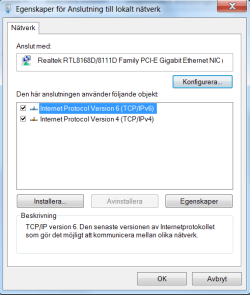
I've tried changing my duplex, unchecking ipv6, messing with my MTU, trying to have an open DNS/static IP i've even bought a cat6 ethernet cable, amongst a long list of various other things.


This is all before i sent my computer in for maintanence where they replaced my motherboard.
Got it back a couple of days ago and the problem persists.
I'm at my wits end and could use some help

/ckt
 

Attachments
  • 1.jpg
    1.jpg
    117.4 KB · Views: 12
  • 2.jpg
    2.jpg
    36.9 KB · Views: 8

My Computer

OS
Windows 7 Home Premium 64bit
CPU
i7 860
Memory
8 GB
Graphics Card(s)
ATI HD 5870
Internet Speed
100/10
Have you tried calling your service provider? It could be an issue at their end.
 

My Computer

Computer type
Laptop
Computer Manufacturer/Model Number
HP Pavilion g7-1260us Notebook
OS
Desk Top with Win 7 Home Premium 64 bit and Lap Top with Windows 8.1 Pro 64 bit
Memory
8Gig
Screen Resolution
1600x900
Thanks for the response Frank.

I called them before I sent it in for maintanence, and according to them everything was working fine. I also sent an e-mail before I found this forum, just waiting for a reply.
Thought i'd try my luck here while I was waiting.

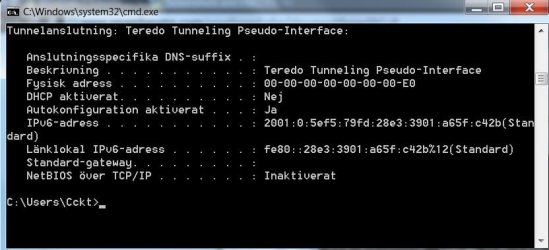
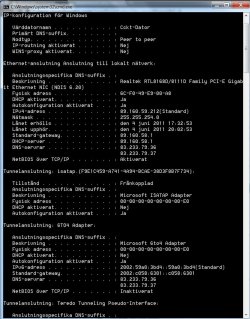
Also regarding my attachements, i'm running a swedish version of Windwos 7, but it should be pretty straightforward:

Ja = Yes
Nej = No
Frånkopplat = Disconnected
Inaktiverat = Disabled
Aktiverad = Enabled
Anslutning = Connection

Feel free to ask if i've overlooked something.

Also I just noticed that my "Lease obtained and expires date" is the same. Would that affect me in anyway? And my Node Type used to be on Hybrid but for some reason it changed to peer to peer. thing is i have a more solid connection now then when i had it on hybrid, well, solid-ish.

On a side note, in one of my recent rage tantrums I uninstalled everything but ipv4 and 6..

/ckt
 

Attachments

  • 3.png
    3.png
    15 KB · Views: 4

My Computer

OS
Windows 7 Home Premium 64bit
CPU
i7 860
Memory
8 GB
Graphics Card(s)
ATI HD 5870
Internet Speed
100/10
Hi anomality, welcome to sevenforums. Sometimes ISP's especially here in UK "strangle" your connection if you tryand download via p2p or file share during peak times. It may pay to read your ISP terms and conditions.
 

My Computer

OS
win7
Hello wilywombat. Thanks for the warm welcome.

I went to my ISP's homepage and conveniently they had what i was looking for in their FAQ's
Bredband2 - Arkiv - Begränsningar och spärrade portar - Sveriges största Fiber-Lan Leverantör i Öppna Stadsnät med närvaro på över 100 orter.

It is in swedish so i'll do my best at translating;

LIMITATIONS AND BLOCKED PORTS
We do not strangle or limit anyones internet traffic. And there are no extra fees for the amount of data transferred. This in turns mean that you can use your BB2-Subscription (BB2 being the name of the ISP) how ever much or little as you would like.

"Enligt god sed i branschen" (A sentence i don't quite know how to translate, but it basically means, more or less that they as a business is following an unwritten law) where they block off certain ports for outgoing and incoming traffic. The purpose for this is to block off virus attacks and windows bruteforcing attempts. This, under normal circumstances, will not affect your internet connectivity.

  • TCP 135 + TCP/UDP 137-139: Netbios
  • TCP+UDP 445: Microsoft-DS
  • TCP+UDP 1433

Following ports are only blocked for outgoing traffic:
  • TCP 25: SMTP


A little thing to note.
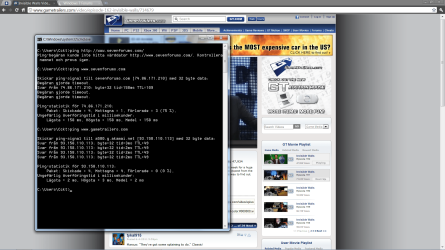
I was watching a video on gametrailers.com and mid watch (no pausing, just left it running) I decided to check up on this thread and continued on to my ISP's homepage to look for information about what you had talked about wombat, as I tried to load up this thread my internet connection failed and i could not load sevenforums.com or anything els, but the gametrailers one was still up and running at the time.
Did a couple of pings and thought that i might help you guys to pinpoint what exactly it is that may be causing these "interferences"
 

Attachments

  • 4.png
    4.png
    208.6 KB · Views: 6

My Computer

OS
Windows 7 Home Premium 64bit
CPU
i7 860
Memory
8 GB
Graphics Card(s)
ATI HD 5870
Internet Speed
100/10
Put me in the Same Boat

Washburner,

This issue is not related to ISPs ...I have not been able to get a Solution to my "Loss of Connection" using W7.
I had NO PROBLEMS with Win XP same ISP same Modem even bought new Modem.
Same Problem...'Loss of Connection" triggered by any sizable Download.
OR even viewing a Web Page with sophisticatedinter-active Advertising.
This issue ( for me anyway ) has to be related to Data Transfer at Download ! For some reason, W7 on my system
emachines EL1850 W7 64 Bit nVidia Graphics 315..cant hold on to the connection.

Anomality.. sorry I cant be of any help ,just thought I would add my input . I have a 6GB/month ISP account that I cant use at the moment. Luckily, I can read my eMails / Search for Jobs on Internet and send my CV online and Post a Reply here. Although, even Today while I was searching for Work on a Jobs message board ..I lost connection.

I am using WYZO as a Browser and a Wireless WiFi Modem ,which I have connected using a USB Port as this gives the Best Connection results at present.
 

My Computer

Computer Manufacturer/Model Number
Acer eMachines
OS
Win 7 Home Premium 64 Bit
CPU
Intel Pentium E5700
Motherboard
nVidia
Memory
4G DDR3
Graphics Card(s)
nVidia GeForce 315
Hey Washburner.

I too suspect Windows 7 to be the culprit. And you are actually describing my problem to a tee.
Before this started happening i would check my internet speed frequently and 9/10 times i would max my download and upload speeds. But as this started to happen only my upload would max out, and my download, if i was lucky, would maybe reach the mid 20s Mbit/s, and sometime even dip below 1Mbit/s. Having a 100/10 connection, those test results are more then appalling.
And as you described, the more "heavy" websites seems to fail while "lighter" ones like google seems to work fine, at times.
I however am not using any modems or switches.
 

My Computer

OS
Windows 7 Home Premium 64bit
CPU
i7 860
Memory
8 GB
Graphics Card(s)
ATI HD 5870
Internet Speed
100/10
Hi Anomality,

I am still looking everywhere for any indication of a solution to this issue and it's now been 1 week and it seems that this is going to be a bit of a Sleeper' . Surely, someone somewhere has at least a viable comment'.. I posted my problem two weeks ago and there was a few Looks but NO replies.! I still have this problem and tonight it was playin-up again on JOb-search sites that were previously fine ..regarding dropping connections. !!

Best regards
Washburner
 

My Computer

Computer Manufacturer/Model Number
Acer eMachines
OS
Win 7 Home Premium 64 Bit
CPU
Intel Pentium E5700
Motherboard
nVidia
Memory
4G DDR3
Graphics Card(s)
nVidia GeForce 315
Hey washburner,

To be frank with you, I got real tired of the problem, and admittedly I have somewhat of a rage problem. So to keep it short, I no longer possess the faulty computer.

I feel for you though, I really do, especially since you use it to apply/search for jobs.

A temporary solution could be dual-booting, that way you could atleast search for jobs uninterrupted. Or maybe get windows 8 when it gets released.


So all in all, this thread is now yours, i'm sorry i couldn't do anything to help you washburner.
 

My Computer

OS
Windows 7 Home Premium 64bit
CPU
i7 860
Memory
8 GB
Graphics Card(s)
ATI HD 5870
Internet Speed
100/10
Back
Top