Internet Issues

dmarz

New member
Local time
11:51 AM
Messages
6
Hello all, i've been snooping around and cannot get an answer for my problem.

I just built my pc about a month or so ago and the internet ran perfectly. I run 2 computers (hard-wired) through a router.

Here lately my computer if it rebooted it would take 1-2 days before the computer would actually let me access the internet. Sometimes it would try to load a page at painfully slow speeds and then die.

Now, if i plug my computer into the router the other computer can't access the internet at all either. So i plug my new pc directly into the modem and i can SUPER low/slow speeds to nothing at all.

I also had a USB to Ethernet plug that i had plugged into my front USB to try to access the internet and that created a whole new list of problems. But after removing that USB to Ethernet plug the issues went away. And it still didn't connect me online.

I have tried everything i can think of or find and still nothing works. I need some experts advice here...any help would be greatly appreciated!
 

My Computer

OS
Win7
CPU
Intel Core i3-540 Clarkdale 3.06GHz
Motherboard
ASRock H55DE3 LGA 1156 Intel H55 HDMI ATX Intel
Memory
OCZ Platinum 4GB (2 x 2GB) 240-Pin DDR3 SDRAM DDR3 1333
Graphics Card(s)
ATI Radeon HD 5770
Monitor(s) Displays
20" Acer
Hard Drives
Western Digital Caviar Black WD1002FAEX 1TB
PSU
Ultra 750W ATX
Case
Coolermaster HAF 922
Silly question... have you spoken to your ISP? the fact that both computers are suffering suggests its a problem on their end.
 

My Computer

Computer type
PC/Desktop
Computer Manufacturer/Model Number
Medion Erazer (note to self: insert model number) - with custom additions
OS
Windows 10 Pro x64
CPU
Intel Core i5 7400 @ 3.00GHz
Motherboard
OEM supllied with PC
Memory
8GB 2133Mhz DDR4 (OEM supplied)
Graphics Card(s)
Gygabyte Windforce GTX 1050Ti (Factory Overclocked)
Sound Card
Realtek
Monitor(s) Displays
Acer Al1980 + HKC
Screen Resolution
1360*768(HKC) / 1280*1024(Acer)
Hard Drives
1TB Toshiba
1TB WD Caviar Green
120GB Samsung Evo 840
PSU
OEM supplied (no power rating on case)
Case
OEM Supplied
Cooling
Stock
Keyboard
Logitech Wireless
Mouse
Logitect Wireless
Internet Speed
40Mb/s Down 10Mb/s Up
Antivirus
Defender
Browser
Firefox
I haven't called them. The internet works perfectly when i plug my other PC into either the router or straight to the modem. The problem comes in when i try to plugin my new PC to the router...then both can't access. And if i straight wire my new pc to the modem, it still won't access the net. It'll have a very low to no connection at all.
 

My Computer

OS
Win7
CPU
Intel Core i3-540 Clarkdale 3.06GHz
Motherboard
ASRock H55DE3 LGA 1156 Intel H55 HDMI ATX Intel
Memory
OCZ Platinum 4GB (2 x 2GB) 240-Pin DDR3 SDRAM DDR3 1333
Graphics Card(s)
ATI Radeon HD 5770
Monitor(s) Displays
20" Acer
Hard Drives
Western Digital Caviar Black WD1002FAEX 1TB
PSU
Ultra 750W ATX
Case
Coolermaster HAF 922
sorry i must have misread your post... is the system in your specs the machine your having issues with?
 

My Computer

Computer type
PC/Desktop
Computer Manufacturer/Model Number
Medion Erazer (note to self: insert model number) - with custom additions
OS
Windows 10 Pro x64
CPU
Intel Core i5 7400 @ 3.00GHz
Motherboard
OEM supllied with PC
Memory
8GB 2133Mhz DDR4 (OEM supplied)
Graphics Card(s)
Gygabyte Windforce GTX 1050Ti (Factory Overclocked)
Sound Card
Realtek
Monitor(s) Displays
Acer Al1980 + HKC
Screen Resolution
1360*768(HKC) / 1280*1024(Acer)
Hard Drives
1TB Toshiba
1TB WD Caviar Green
120GB Samsung Evo 840
PSU
OEM supplied (no power rating on case)
Case
OEM Supplied
Cooling
Stock
Keyboard
Logitech Wireless
Mouse
Logitect Wireless
Internet Speed
40Mb/s Down 10Mb/s Up
Antivirus
Defender
Browser
Firefox
Yes sir :)
 

My Computer

OS
Win7
CPU
Intel Core i3-540 Clarkdale 3.06GHz
Motherboard
ASRock H55DE3 LGA 1156 Intel H55 HDMI ATX Intel
Memory
OCZ Platinum 4GB (2 x 2GB) 240-Pin DDR3 SDRAM DDR3 1333
Graphics Card(s)
ATI Radeon HD 5770
Monitor(s) Displays
20" Acer
Hard Drives
Western Digital Caviar Black WD1002FAEX 1TB
PSU
Ultra 750W ATX
Case
Coolermaster HAF 922

My Computer

Computer type
PC/Desktop
Computer Manufacturer/Model Number
Medion Erazer (note to self: insert model number) - with custom additions
OS
Windows 10 Pro x64
CPU
Intel Core i5 7400 @ 3.00GHz
Motherboard
OEM supllied with PC
Memory
8GB 2133Mhz DDR4 (OEM supplied)
Graphics Card(s)
Gygabyte Windforce GTX 1050Ti (Factory Overclocked)
Sound Card
Realtek
Monitor(s) Displays
Acer Al1980 + HKC
Screen Resolution
1360*768(HKC) / 1280*1024(Acer)
Hard Drives
1TB Toshiba
1TB WD Caviar Green
120GB Samsung Evo 840
PSU
OEM supplied (no power rating on case)
Case
OEM Supplied
Cooling
Stock
Keyboard
Logitech Wireless
Mouse
Logitect Wireless
Internet Speed
40Mb/s Down 10Mb/s Up
Antivirus
Defender
Browser
Firefox
I'd did that a couple days ago..and oddly enough i'm on the new pc now.

It's really weird as how sometimes it works and sometimes it doesn't. I'll grab the LAN drivers again and maybe something can be done. And i'm on Home 64bit. Thanks for the help so far!
 

My Computer

OS
Win7
CPU
Intel Core i3-540 Clarkdale 3.06GHz
Motherboard
ASRock H55DE3 LGA 1156 Intel H55 HDMI ATX Intel
Memory
OCZ Platinum 4GB (2 x 2GB) 240-Pin DDR3 SDRAM DDR3 1333
Graphics Card(s)
ATI Radeon HD 5770
Monitor(s) Displays
20" Acer
Hard Drives
Western Digital Caviar Black WD1002FAEX 1TB
PSU
Ultra 750W ATX
Case
Coolermaster HAF 922
Faulty Cable maybe? change the ethernet cable out just to check.

edit: removed the router bit, i forgot about your modem issues too

I think I've given all the advice i can... im going to ask some of our other senior members to take a look see if they can suggest anything
 

My Computer

Computer type
PC/Desktop
Computer Manufacturer/Model Number
Medion Erazer (note to self: insert model number) - with custom additions
OS
Windows 10 Pro x64
CPU
Intel Core i5 7400 @ 3.00GHz
Motherboard
OEM supllied with PC
Memory
8GB 2133Mhz DDR4 (OEM supplied)
Graphics Card(s)
Gygabyte Windforce GTX 1050Ti (Factory Overclocked)
Sound Card
Realtek
Monitor(s) Displays
Acer Al1980 + HKC
Screen Resolution
1360*768(HKC) / 1280*1024(Acer)
Hard Drives
1TB Toshiba
1TB WD Caviar Green
120GB Samsung Evo 840
PSU
OEM supplied (no power rating on case)
Case
OEM Supplied
Cooling
Stock
Keyboard
Logitech Wireless
Mouse
Logitect Wireless
Internet Speed
40Mb/s Down 10Mb/s Up
Antivirus
Defender
Browser
Firefox
It sounds like a modem issue to me. I suggest contacting your ISP and getting a new one.

In the mean time, try aiming a fan at it, just to make sure it's not overheating.
 

My Computer

Computer Manufacturer/Model Number
Custom
OS
Windows 7 Professional x64
CPU
Intel i7 2600K OC'd @ 4620 MHz
Motherboard
Asus P8Z68-V Pro
Memory
16GB GSkill Sniper 2133 Mhz (4x4GB)
Graphics Card(s)
EVGA GeForce GTX 480 SuperClocked+
Sound Card
Realtek High Definition Audio
Monitor(s) Displays
2x Acer S273HLbmii 27"
Screen Resolution
2 x 1920x1080
Hard Drives
64GB Crucial M4 SSD

Storage: Hitachi 1TB 5400RPM, Samsung 1.5TB 5400RPM
PSU
Corsair HW Series 750w (modular)
Case
Cooler Master HAF 932 Advanced Blue Edition
Cooling
CM Hyper 212+ CPU cooler, 3x 230mm + 1x 140mm case fans
Keyboard
Logitech MK320 (wireless)
Mouse
Logitech MK320 (wireless)
Internet Speed
30 Mb/s : 2 Mb/s
I'll go out and grab new cables and possibly a router later today.

Thanks so much for all the help still!
 

My Computer

OS
Win7
CPU
Intel Core i3-540 Clarkdale 3.06GHz
Motherboard
ASRock H55DE3 LGA 1156 Intel H55 HDMI ATX Intel
Memory
OCZ Platinum 4GB (2 x 2GB) 240-Pin DDR3 SDRAM DDR3 1333
Graphics Card(s)
ATI Radeon HD 5770
Monitor(s) Displays
20" Acer
Hard Drives
Western Digital Caviar Black WD1002FAEX 1TB
PSU
Ultra 750W ATX
Case
Coolermaster HAF 922
just to see what's happening can you post the results of an IPconfig /all for both the working and problem machine, when the issue re-occurs ;)

you could also try entering the following into an elevated (admin) command prompt on the problem system when the issue is present.

netsh winsock reset
 

My Computers

System One System Two

  • Computer type
    PC/Desktop
    Computer Manufacturer/Model Number
    ChillBlast - Custom to my design
    OS
    Windows 11 Pro x64 [Latest Release and Release Preview]
    CPU
    Ryzen 9 5950X, 3.8 - 5.2 MHz
    Motherboard
    Asus Prime X570-Pro
    Memory
    64GB [2 x 32GB] DDR4 3200MHz
    Graphics Card(s)
    4GB NVIDIA GEFORCE GTX 1650 Ti
    Sound Card
    On-board SPDIF to 5.1 System + HDMI [5.1 system]
    Monitor(s) Displays
    32" UHD 32 Bit HDR Monitor + 43" UHD 4K 32Bit HDR TV
    Screen Resolution
    2 x 3840 x 2160 @60Hz
    Hard Drives
    1TB M2 SSD OS, 500GB Fast Access SSD, 2 x 8TB Data + Various Externals from 1TB to 4TB, 10TB NAS
    PSU
    NZXT C750 80 PLUS Gold 750W Modular PSU
    Case
    Workstation Case [Matt Black]
    Cooling
    NZXT Kraken X63 280mm CPU Cooler +2x Quiet Case fans
    Keyboard
    Logitech Wireless MX Keys & K400 + others
    Mouse
    Logitech Wireless MX Master 3S
    Internet Speed
    920 MB Down 50 MB Up
    Antivirus
    BitDefender Total Security Pro
    Browser
    Chrome (always run latest Non-Beta)
    Other Info
    Also run ...
    Laptop - Quad 8GB - Windows 10 Pro x64
    Nexus 7 Android tablet x2
    Samsung 10.2" tablet
    Blackview TAB 8 4G Android Tablet c/w Keyboard
    Wacom Intuos Pro Medium Pen Pad
    Wacom Intuos Pro Small Pen Pad
    Wacom Expresskeys Remote
    Loopdeck+ Graphics Controller
    Shuttle Pro v2 Control
  • Computer type
    Laptop
    System Manufacturer/Model Number
    Dell XPS 17 10750H
    OS
    Windows 11 Pro x64 Latest RP
    CPU
    Intel I7 10750H 5.0GHz
    Motherboard
    Dell XPS
    Memory
    32GB [2x16GB] DDR4 2933 MHz
    Graphics Card(s)
    nVidia GTX1650Ti 4 GB GDDR6
    Sound Card
    Stock [Realtek] 4 Speaker
    Monitor(s) Displays
    17" IPS UHD+ Infinity Edge Touchscreen
    Screen Resolution
    3840 x 2400
    Hard Drives
    2TB M2 NVMe, 4TB External + various 500GB & 1TB External NVMe (also have access to spinner HDD from
    PSU
    Stock
    Case
    Stock XPS Aluminium & Carbon Fibre
    Cooling
    Stock - Active Fan Control
    Keyboard
    Backlit + Various Logitech
    Mouse
    Stock Track Pad + Logitech MX Trackball
    Internet Speed
    72 MB Down 18MB Up
    Browser
    Chrome
    Other Info
    Also run ...
    Laptop - Quad 8GB - Windows 10 Pro x64
    Nexus 7 Android tablet x2
    10.2" tablet
    Sony Z3 Android Smartphone
    Wacom Intuos Pro Medium Pen Pad
    Wacom Intuos Pro Small Pen Pad
    Wacom Expresskeys Remote
    Loopdeck+ Graphics Controller
    Shuttle Pro v2 Control Pad
    10TB NAS
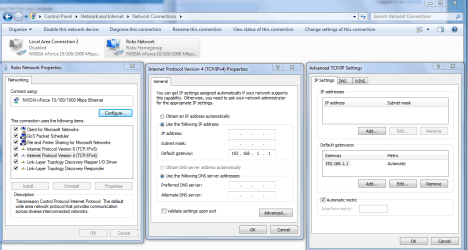
I would try entering the ipv4 info such as the default gateway, internal IP and DNS server manually by going into the properties of your IPv4 settings. Doing this will mostly eliminate any problems the router might be having with DHCP assignments in which case a firmware update may fix the problem. You might try typing ipconfig /all into your command prompt to get this info. Resetting the modem and router might also work but the problem might come back. Reinstalling the network drivers might be a good place to start.
 

Attachments

  • IPV4 properties manual default gateway entry.PNG
    IPV4 properties manual default gateway entry.PNG
    63.2 KB · Views: 5

My Computer

Computer type
PC/Desktop
Computer Manufacturer/Model Number
Home built
OS
Windows 7 Ult, Windows 8.1 Pro,
CPU
Q9650-4.275GHz, E8600 4.5GHz, E6750-3.8GHz
Motherboard
Evga 780i FTW
Memory
G.Skill PC2 9600 1200Mhz 5 5 5 15 2T
Graphics Card(s)
GTX480
Sound Card
Asus Xonar D2
Monitor(s) Displays
HannsG
Screen Resolution
1680X1050
Hard Drives
GSkill Phoenix Pro 120GB SSD
PSU
ThermalTake Toughpower 1000Watt modular
Case
ThermalTake XaserV
Cooling
Xigmatek S1283
Keyboard
Logitech G15
Mouse
Logitech G9
Internet Speed
T1
I went out and bought a new router and that cleared up the situation.

I wish i had done that weeks ago and saved ALOT of headache and frustration!

Thanks everyone who helped me out..come to find out it was my ignorance that was the only problem....well, that and a bad router.

Until my next Win7 mishap...take care!
 

My Computer

OS
Win7
CPU
Intel Core i3-540 Clarkdale 3.06GHz
Motherboard
ASRock H55DE3 LGA 1156 Intel H55 HDMI ATX Intel
Memory
OCZ Platinum 4GB (2 x 2GB) 240-Pin DDR3 SDRAM DDR3 1333
Graphics Card(s)
ATI Radeon HD 5770
Monitor(s) Displays
20" Acer
Hard Drives
Western Digital Caviar Black WD1002FAEX 1TB
PSU
Ultra 750W ATX
Case
Coolermaster HAF 922
I wasn't too far off then :) Glad you got it sorted anyway
 

My Computer

Computer type
PC/Desktop
Computer Manufacturer/Model Number
Medion Erazer (note to self: insert model number) - with custom additions
OS
Windows 10 Pro x64
CPU
Intel Core i5 7400 @ 3.00GHz
Motherboard
OEM supllied with PC
Memory
8GB 2133Mhz DDR4 (OEM supplied)
Graphics Card(s)
Gygabyte Windforce GTX 1050Ti (Factory Overclocked)
Sound Card
Realtek
Monitor(s) Displays
Acer Al1980 + HKC
Screen Resolution
1360*768(HKC) / 1280*1024(Acer)
Hard Drives
1TB Toshiba
1TB WD Caviar Green
120GB Samsung Evo 840
PSU
OEM supplied (no power rating on case)
Case
OEM Supplied
Cooling
Stock
Keyboard
Logitech Wireless
Mouse
Logitect Wireless
Internet Speed
40Mb/s Down 10Mb/s Up
Antivirus
Defender
Browser
Firefox
I went out and bought a new router and that cleared up the situation.

I wish i had done that weeks ago and saved ALOT of headache and frustration!

Thanks everyone who helped me out..come to find out it was my ignorance that was the only problem....well, that and a bad router.

Until my next Win7 mishap...take care!

I would try entering the ipv4 info such as the default gateway, internal IP and DNS server manually by going into the properties of your IPv4 settings. Doing this will mostly eliminate any problems the router might be having with DHCP assignments in which case a firmware update may fix the problem. You might try typing ipconfig /all into your command prompt to get this info. Resetting the modem and router might also work but the problem might come back. Reinstalling the network drivers might be a good place to start.

Glad to hear you fixed the problem it dmarz, although you might have tried performing the firmware update first as per my instructions.
 

My Computer

Computer type
PC/Desktop
Computer Manufacturer/Model Number
Home built
OS
Windows 7 Ult, Windows 8.1 Pro,
CPU
Q9650-4.275GHz, E8600 4.5GHz, E6750-3.8GHz
Motherboard
Evga 780i FTW
Memory
G.Skill PC2 9600 1200Mhz 5 5 5 15 2T
Graphics Card(s)
GTX480
Sound Card
Asus Xonar D2
Monitor(s) Displays
HannsG
Screen Resolution
1680X1050
Hard Drives
GSkill Phoenix Pro 120GB SSD
PSU
ThermalTake Toughpower 1000Watt modular
Case
ThermalTake XaserV
Cooling
Xigmatek S1283
Keyboard
Logitech G15
Mouse
Logitech G9
Internet Speed
T1
Back
Top