Internet just disappears randomly need help!

Roedy1

New member
Local time
3:55 AM
Messages
21
Hello all,

I got a serious problem :/

Basically im on wifi and internet just disappears randomly, first it disconnects and after that i get the red cross because there are no wifi connections available what so ever (normally i can see atleast 10).

Funny part is when i reboot, internet is back to normal again like nothing happend..

Im on a Sony vaio laptop win 7,

I got the same problem in 2 different countries on differents wifi's as well..

So i know it has to be a software problem, but what to do ? :(

Hope some one knows cos its getting annoying..

Thanks in advance
 

My Computer

Computer type
Laptop
OS
win7 64bit
Hello,

Just to confirm you get disconnected when are using different wireless networks on another country? Do you travel?
I got the same problem in 2 different countries on different wifi's as well..
It might be an issue with either your Wi-Fi adapter, distance or interference.
 

My Computer

Computer Manufacturer/Model Number
Lenovo Desktop/Samsung Laptop
OS
Win7 & Win8 64bit
CPU
Intel i5
Internet Speed
Charter-20 Mbps
Antivirus
Avast
Browser
FF, IE9 and Chrome
Correct 2xg, if its the wifi adapter what shall i do?

Btw when i restart my laptop its all good again, is that a software problem ?
 

My Computer

Computer type
Laptop
OS
win7 64bit
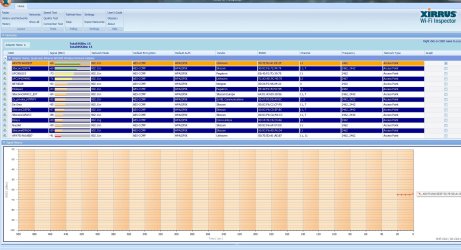
Can you please download Xirrus Wi-Fi Inspector and provide us a capture of it on your next post? See the prerequisites here.
 

My Computer

Computer Manufacturer/Model Number
Lenovo Desktop/Samsung Laptop
OS
Win7 & Win8 64bit
CPU
Intel i5
Internet Speed
Charter-20 Mbps
Antivirus
Avast
Browser
FF, IE9 and Chrome
Is this the correct screen?
 

Attachments

  • 1.jpg
    1.jpg
    288.6 KB · Views: 5

My Computer

Computer type
Laptop
OS
win7 64bit
Lots of wireless networks using channel 11 in your area, I'd say going to channel 1 in the routers settings would be the best bet here.

This should help with the connection drop out problem, at least in this particular area anyway, not so sure about the other locations.
 

My Computer

Computer type
PC/Desktop
Computer Manufacturer/Model Number
Home built
OS
Windows 7 Ult, Windows 8.1 Pro,
CPU
Q9650-4.275GHz, E8600 4.5GHz, E6750-3.8GHz
Motherboard
Evga 780i FTW
Memory
G.Skill PC2 9600 1200Mhz 5 5 5 15 2T
Graphics Card(s)
GTX480
Sound Card
Asus Xonar D2
Monitor(s) Displays
HannsG
Screen Resolution
1680X1050
Hard Drives
GSkill Phoenix Pro 120GB SSD
PSU
ThermalTake Toughpower 1000Watt modular
Case
ThermalTake XaserV
Cooling
Xigmatek S1283
Keyboard
Logitech G15
Mouse
Logitech G9
Internet Speed
T1
Very true! ;)
Lots of wireless networks using channel 11 in your area, I'd say going to channel 1 in the routers settings would be the best bet here.

This should help with the connection drop out problem, at least in this particular area anyway, not so sure about the other locations.
 

My Computer

Computer Manufacturer/Model Number
Lenovo Desktop/Samsung Laptop
OS
Win7 & Win8 64bit
CPU
Intel i5
Internet Speed
Charter-20 Mbps
Antivirus
Avast
Browser
FF, IE9 and Chrome
And how do we do this ? I dont think this problem has to do anything with wirelss i think this problem is on my computer so how can we check this... ?
 

My Computer

Computer type
Laptop
OS
win7 64bit
obv that aint the problem but some help pls ?
 

My Computer

Computer type
Laptop
OS
win7 64bit
And how do we do this ? I dont think this problem has to do anything with wirelss i think this problem is on my computer so how can we check this... ?

You would change the channel by going into the routers wireless settings. Your connection should work much better on channel 1 in your area though this may not be the only problem you are having. This needs to be done first in order to eliminate this potential problem.

If the problem is on your machine then to isolate the problem try starting up in safe mode with networking in order to determine if the problem is caused by an installed software or program.

http://www.sevenforums.com/tutorial...tworking-add-windows-boot-manager-screen.html
 

My Computer

Computer type
PC/Desktop
Computer Manufacturer/Model Number
Home built
OS
Windows 7 Ult, Windows 8.1 Pro,
CPU
Q9650-4.275GHz, E8600 4.5GHz, E6750-3.8GHz
Motherboard
Evga 780i FTW
Memory
G.Skill PC2 9600 1200Mhz 5 5 5 15 2T
Graphics Card(s)
GTX480
Sound Card
Asus Xonar D2
Monitor(s) Displays
HannsG
Screen Resolution
1680X1050
Hard Drives
GSkill Phoenix Pro 120GB SSD
PSU
ThermalTake Toughpower 1000Watt modular
Case
ThermalTake XaserV
Cooling
Xigmatek S1283
Keyboard
Logitech G15
Mouse
Logitech G9
Internet Speed
T1
OK sounds good but im aint no computer wizard so all the above you just said i have no idea what to do or how to do it :(
So how can i go change the channel ?
 

My Computer

Computer type
Laptop
OS
win7 64bit
Back
Top