internet not working in windows 7

kintomaniac

New member
Pro User
Local time
4:21 PM
Messages
139
Location
Pune
my internet suddenly stopped working. the modem isnt getting a valid ip address it seems. i booted through a ubuntu live cd n my internet works with ubuntu. i reinstalled windows but it still doesnt work. i installed all the drivers also. when i connect my modem to my frnds laptop running windows 7 internet works. pls help i hav

i hav asus p5gc-mx/1333 motherboard n atheros lan card. plz help:(
 

My Computer

OS
windows 7 Ultimate 32bit
CPU
intel c2d e7200 2.53ghz
Motherboard
asus p5gcmx/1333
Memory
2gb DDR2
Graphics Card(s)
nvidia GeForce 7300SE
Monitor(s) Displays
samsung sync master 793s
Screen Resolution
1280X1024
Hard Drives
250gb seagate
Case
Circle
Keyboard
iball
Mouse
iball
Internet Speed
512kbps
This probably isn't the problem but...
I had the same problem about 3 hours ago.I tried everything.
Searched around did reset of modem, used the Win troubleshooter for an hour. No valid IP address.

Then decided to check my firewall settings.
My Firewall was set to "Block all Internet traffic". I have no idea why.
Turned AV Internet block to off and everything started working.

Mike
 

My Computer

Computer Manufacturer/Model Number
Hopalong/ Godzilla
OS
Windows7 Pro 64bit SP-1; Windows XP Pro 32bit
CPU
Intel Core i7-870 Lynnfield 2.93GHz LGA 1156 95W Quad-Core
Motherboard
ASUS P7P55D-E PRO
Memory
8GB@1400MHz Crucial Ballistix DDR3-1600 4x2GB
Graphics Card(s)
ASUS ENGTX460 DirectCU/2DI/1GD5 1GB 256-bit GDDR5
Sound Card
VIA Onboard
Monitor(s) Displays
Asus VS248H-P 24"; Samsung SyncMaster 941BW 19"ws
Screen Resolution
1920x1080; 1440x900
Hard Drives
Samsung 830 120GB SSD
Intel 320 120GB SSD
Western Digital Caviar Black WD7501AALS 750GB 7200 RPM SATA 3.0Gb/s
Western Digital Caviar Black WD6401AALS 640GB 7200 RPM SATA 3.0Gb/s
PSU
COOLER MASTER Silent Pro RS850-AMBAJ3-US 850W Modular
Case
COOLER MASTER HAF 932 RC-932-KKN5-GP Black
Cooling
Scythe "Mugen-2 Rev.B" (2 ScytheKaze-Jyuni PWM fans)
Keyboard
Logitech K-320
Mouse
Kensington
Antivirus
Avast Inernet Suite
Browser
IE 9 ; Chrome
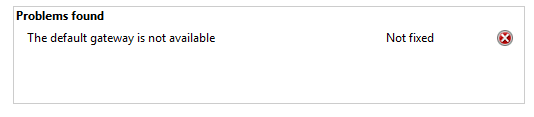
the invalid ip config error was the 1 i got when my modem stopped working. this
Capture.PNG
is the error windows network diagnostic showed
 

My Computer

OS
windows 7 Ultimate 32bit
CPU
intel c2d e7200 2.53ghz
Motherboard
asus p5gcmx/1333
Memory
2gb DDR2
Graphics Card(s)
nvidia GeForce 7300SE
Monitor(s) Displays
samsung sync master 793s
Screen Resolution
1280X1024
Hard Drives
250gb seagate
Case
Circle
Keyboard
iball
Mouse
iball
Internet Speed
512kbps
i think i have almost the same problem as kinto. My antivirus is avast i checked every setting that it had but nothing concerns about the blocking connection of internet are there other problems related to this?
 

My Computer

OS
Windows 7 Ultimate x64
I requested more help.

Hopefully you will get responses soon.

Mike
 
Last edited:

My Computer

Computer Manufacturer/Model Number
Hopalong/ Godzilla
OS
Windows7 Pro 64bit SP-1; Windows XP Pro 32bit
CPU
Intel Core i7-870 Lynnfield 2.93GHz LGA 1156 95W Quad-Core
Motherboard
ASUS P7P55D-E PRO
Memory
8GB@1400MHz Crucial Ballistix DDR3-1600 4x2GB
Graphics Card(s)
ASUS ENGTX460 DirectCU/2DI/1GD5 1GB 256-bit GDDR5
Sound Card
VIA Onboard
Monitor(s) Displays
Asus VS248H-P 24"; Samsung SyncMaster 941BW 19"ws
Screen Resolution
1920x1080; 1440x900
Hard Drives
Samsung 830 120GB SSD
Intel 320 120GB SSD
Western Digital Caviar Black WD7501AALS 750GB 7200 RPM SATA 3.0Gb/s
Western Digital Caviar Black WD6401AALS 640GB 7200 RPM SATA 3.0Gb/s
PSU
COOLER MASTER Silent Pro RS850-AMBAJ3-US 850W Modular
Case
COOLER MASTER HAF 932 RC-932-KKN5-GP Black
Cooling
Scythe "Mugen-2 Rev.B" (2 ScytheKaze-Jyuni PWM fans)
Keyboard
Logitech K-320
Mouse
Kensington
Antivirus
Avast Inernet Suite
Browser
IE 9 ; Chrome
Maybe something here:
invalid ip - Microsoft Answers

Sometimes when your Windows computer fails to connect to a nearby wireless router, you'll see the error message Invalid IP Address.
One common cause of this problem is, by the way, is mismatched encryption (WEP or WPA) setting between the computer and the router.
I suggest that you reset the IP address and check.
1. Click Start.
2. Type cmd.exe in the Start Search.
3. Right click on command Prompt.
4. Click on “Run as Administrator”.
5. Type the following commands: ipconfig /release. Hit Enter.
6. Now type the: ipconfig /renew. Hit enter.
Now check if can connect to internet without any issues or not.
ALSO:

Reset TCP/IP in Windows 7 and Windows Vista | Windows Reference

There may be instances when all possible solutions to fix your network internet problems may TCP/IP stack may help in this case. Microsoft has released a new tool to do this for you or you can manually reset TCP/IP.

Microsoft Fix it
The tool “Microsoft Fix it” should help reset TCP/IP in Windows 7. Click here to download from microsoft website.
Reset TCP/IP manually
To reset TCP/IP manually, run the following:
1.Click Start – type “cmd” in Search. Right-click “cmd” and select “Run as administrator”
2. From the command prompt,
netsh int ip reset logfile.txt
This should reset TCP/IP and log the changes to the log file (logfile.txt) in the current directory from where it was run. You may specifiy an absolute path like c:\logfile.txt.
3. Restart the computer for the changes to take effect.
 

My Computer

Computer type
PC/Desktop
Computer Manufacturer/Model Number
Packard Bell
OS
Windows 7 Home Premium 64bit
CPU
Intel(R) Core(TM) i3-2120 CPU @ 3.30GHz
Motherboard
Packard Bell IPISB-AG
Memory
3.00 GB
Graphics Card(s)
(1) Intel(R) HD Graphics (2) VNC Mirror Driver
Sound Card
Realtek High Definition Audio
Monitor(s) Displays
AIO LCD
Screen Resolution
1920 x 1080
Hard Drives
WDC WD10EADX-22TDHB0 ATA Device
Fixed hard disk media
4 partitions
931.51 GB
Keyboard
Wireless
Mouse
Wireless
Antivirus
Microsoft Security Essentials
Browser
IE; Firefox
Other Info
Also:
Samsung N220 Plus Netbook - Windows 7 Home
HP laptop
iPad 5
Thanks Irene for posting.:D
Mike
 

My Computer

Computer Manufacturer/Model Number
Hopalong/ Godzilla
OS
Windows7 Pro 64bit SP-1; Windows XP Pro 32bit
CPU
Intel Core i7-870 Lynnfield 2.93GHz LGA 1156 95W Quad-Core
Motherboard
ASUS P7P55D-E PRO
Memory
8GB@1400MHz Crucial Ballistix DDR3-1600 4x2GB
Graphics Card(s)
ASUS ENGTX460 DirectCU/2DI/1GD5 1GB 256-bit GDDR5
Sound Card
VIA Onboard
Monitor(s) Displays
Asus VS248H-P 24"; Samsung SyncMaster 941BW 19"ws
Screen Resolution
1920x1080; 1440x900
Hard Drives
Samsung 830 120GB SSD
Intel 320 120GB SSD
Western Digital Caviar Black WD7501AALS 750GB 7200 RPM SATA 3.0Gb/s
Western Digital Caviar Black WD6401AALS 640GB 7200 RPM SATA 3.0Gb/s
PSU
COOLER MASTER Silent Pro RS850-AMBAJ3-US 850W Modular
Case
COOLER MASTER HAF 932 RC-932-KKN5-GP Black
Cooling
Scythe "Mugen-2 Rev.B" (2 ScytheKaze-Jyuni PWM fans)
Keyboard
Logitech K-320
Mouse
Kensington
Antivirus
Avast Inernet Suite
Browser
IE 9 ; Chrome

My Computer

Computer type
PC/Desktop
Computer Manufacturer/Model Number
Packard Bell
OS
Windows 7 Home Premium 64bit
CPU
Intel(R) Core(TM) i3-2120 CPU @ 3.30GHz
Motherboard
Packard Bell IPISB-AG
Memory
3.00 GB
Graphics Card(s)
(1) Intel(R) HD Graphics (2) VNC Mirror Driver
Sound Card
Realtek High Definition Audio
Monitor(s) Displays
AIO LCD
Screen Resolution
1920 x 1080
Hard Drives
WDC WD10EADX-22TDHB0 ATA Device
Fixed hard disk media
4 partitions
931.51 GB
Keyboard
Wireless
Mouse
Wireless
Antivirus
Microsoft Security Essentials
Browser
IE; Firefox
Other Info
Also:
Samsung N220 Plus Netbook - Windows 7 Home
HP laptop
iPad 5
If its saying your default gateway cannot be found that has to do with your DHCP server (Normally your router) inst wanting to communicate with Windows properly.
 

My Computer

Computer Manufacturer/Model Number
SMN-Productions
OS
Windows 7 x86/x64, Server 2008r2, Web Server 2008
CPU
i7 v2 3930K Steping stone 2
Motherboard
ASUS Rampage IV Extreme
Memory
G.SKILL Ripjaws Z Series 32GB
Graphics Card(s)
AMD HD 5770
Monitor(s) Displays
Acer 21" and Samsung 20"
Hard Drives
Patriot Pyro 80GB
PSU
1000 Watt
Case
HAF-X
Cooling
4 Fans
Keyboard
Black Widow Ultimate
If its saying your default gateway cannot be found that has to do with your DHCP server (Normally your router) inst wanting to communicate with Windows properly.

is there any fix for that?

would disabling dhcp help?
 

My Computer

OS
windows 7 Ultimate 32bit
CPU
intel c2d e7200 2.53ghz
Motherboard
asus p5gcmx/1333
Memory
2gb DDR2
Graphics Card(s)
nvidia GeForce 7300SE
Monitor(s) Displays
samsung sync master 793s
Screen Resolution
1280X1024
Hard Drives
250gb seagate
Case
Circle
Keyboard
iball
Mouse
iball
Internet Speed
512kbps
The practical solution would be to set a static IP configuration on your PC. I have a very crappy modem/router that has a DHCP server that often fails so I've found the only solution has been to set static addresses and it works just fine. You would go under the Network and Sharing Center and then click on "Change adapter settings", right-click on your network adapter and click on "Properties" then double click on "Internet Protocol Version 4" and select where it says "Use the following IP address" and fill in the appropriate information.

If you're not sure what information to put in, you noted another computer works so simply get the information from the other computer and put it into this computer with the exception of the final octet (last part of the IP address) and change it. (Example: 172.16.0.100 would become 172.16.0.150). See if that works for you or not.
 

My Computer

OS
Windows 7 Ultimate x64 SP1
CPU
Intel Core i3 530 2.93 Ghz Clarkdale
Motherboard
ASRock P55 PRO/USB3 LGA 1156
Memory
4 GB OCZ DDR3 1600 (PC12800) Low Voltage Desktop Memory
Graphics Card(s)
Nvidia GeForce GTX 550 Ti with 1 GB of RAM
Sound Card
Realtek HD ALC892
Monitor(s) Displays
20'' eMachines E202HDbmd Glare Panel Widescreen
Screen Resolution
1600 x 900
Hard Drives
Western Digital 1 TB Caviar Black Edition (7200 RPM) SATA
Hitachi Deskstar 500 GB (7200 RPM) SATA
Samsung SpinPoint 400 GB (7200 RPM) SATA
PSU
Rosewill Xtreme Series RX750-D-B ATX12V v2.2 & EPS12V (750W)
Case
Cooler Master Centurion 534 RC-534-KKN2-GP Mid-Tower
Cooling
Standard Case Fans and Stock CPU Heatsink
Keyboard
Microsoft Wireless Optical Desktop Elite
Mouse
Microsoft Wireless Optical Desktop Elite
Internet Speed
7.1 Mbps Verizon DSL

My Computer

Computer type
PC/Desktop
Computer Manufacturer/Model Number
Packard Bell
OS
Windows 7 Home Premium 64bit
CPU
Intel(R) Core(TM) i3-2120 CPU @ 3.30GHz
Motherboard
Packard Bell IPISB-AG
Memory
3.00 GB
Graphics Card(s)
(1) Intel(R) HD Graphics (2) VNC Mirror Driver
Sound Card
Realtek High Definition Audio
Monitor(s) Displays
AIO LCD
Screen Resolution
1920 x 1080
Hard Drives
WDC WD10EADX-22TDHB0 ATA Device
Fixed hard disk media
4 partitions
931.51 GB
Keyboard
Wireless
Mouse
Wireless
Antivirus
Microsoft Security Essentials
Browser
IE; Firefox
Other Info
Also:
Samsung N220 Plus Netbook - Windows 7 Home
HP laptop
iPad 5
Hi,

Have you tried resetting your router? Most ISPs send updates to the router without notification and this can cause similar issues to what you're describing.
   Note
Please consult your router documentation for how to access the router homepage. Some/Most router homepages require you to enter a username/password, your documentation will give you this info


You can also run Command Prompt and type ipconfig then make a note of your default gateway address. Now if you open IE (or whatever browser you use) type in that address in the address bar.
 

My Computer

Computer Manufacturer/Model Number
Compaq Desktop
OS
Windows 7 Ultimate x64
CPU
AMD Sempron Dual Core
Memory
3GB
Graphics Card(s)
NVIDIA GeForce 6150SE nForce 430
Screen Resolution
1024x768
Hard Drives
150GB Sata
tried all of the above. still no luck:cry:
(i think i screwed my old modem by resetting it 5-6 times):(
 

My Computer

OS
windows 7 Ultimate 32bit
CPU
intel c2d e7200 2.53ghz
Motherboard
asus p5gcmx/1333
Memory
2gb DDR2
Graphics Card(s)
nvidia GeForce 7300SE
Monitor(s) Displays
samsung sync master 793s
Screen Resolution
1280X1024
Hard Drives
250gb seagate
Case
Circle
Keyboard
iball
Mouse
iball
Internet Speed
512kbps
interent not working

Asus notebook K60ij is connected to the internet but will not display any page. i have a COMPAQ Presario CQ62 connected to the same network and the internet works fine. HELP?
 

My Computer

Computer Manufacturer/Model Number
ASUS
OS
Windows 7 Home Premium x64
CPU
Pentium Dual-Core 2.2 GHz
Motherboard
K60IJ
Memory
4.00 GB
Weird problem here too

My friend has updated his Arch Linux install.
I have updated my Windows 7 (64 bit) install to SP1.
Both machines are desktops.

Now occasionally Windows claims the network is broken (No Internet access).

When I run the "fixer", it claims that there was an invalid IP configuration.
I am currently using DHCP, but I have set 2 default DNS addresses (local and ISP).

After the "fix", the machine IP and DNS addresses are unchanged, but the network works (ipconfig reports the same info before and after the fix). :confused:

Additional
This also happens with Windows 7 SP1 (32 bit).

The network problem seems to be triggered when my friend tries to copy files from my PC (Windows) to his PC (Arch Linux).
After a few seconds of copying, the network dies.
The only way to restart the network is to run the "fixer" (or reboot the PC).

This doesn't happen with "good old reliable" XP SP3 (it works perfectly).
I always laugh when people on flame blogs ask, "why would anyone use XP?" :D
 
Last edited:

My Computer

Computer type
PC/Desktop
Computer Manufacturer/Model Number
n/a
OS
W7 Ultimate SP1, LM19.2 MATE, W10 Home 1703, W10 Pro 1703 VM, #All 64 bit
CPU
AMD Phenom II x6 1100T, 3.3 GHz
Motherboard
ASUS M4A88T-M/USB3 (AM3)
Memory
12GB DDR3 1333 G-Skill (4GB x 2), G-Skill (2GB x 2)
Graphics Card(s)
NVIDIA GeForce GTX 660
Sound Card
Realtek?
Monitor(s) Displays
Samsung S23B350
Screen Resolution
1920x1080
Hard Drives
WD Green 2TB (SATA), WD Green 3TB (SATA), WD Blue 4TB (SATA), WD Blue 6TB (SATA)
PSU
Cooler Master
Case
Antec GX300 Tower
Cooling
3x Antec TRICOOL 120mm Fans
Mouse
Wired Optical
Internet Speed
DSL
Antivirus
Avast
Browser
Pale Moon (64 bit)
Other Info
2018-12-27 Upgraded HDDs
2015-12-10 Upgraded case, graphics card, storage
2015-08-15 Upgraded motherboard & RAM
2015-07-15 Upgraded LM17.1 to LM17.2
Hi,

Have you tried resetting your router? Most ISPs send updates to the router without notification and this can cause similar issues to what you're describing.
   Note
Please consult your router documentation for how to access the router homepage. Some/Most router homepages require you to enter a username/password, your documentation will give you this info


You can also run Command Prompt and type ipconfig then make a note of your default gateway address. Now if you open IE (or whatever browser you use) type in that address in the address bar.


they send updates to the modem not the router unless the modem has a built in router mate :)
 

My Computer

Computer Manufacturer/Model Number
SMN-Productions
OS
Windows 7 x86/x64, Server 2008r2, Web Server 2008
CPU
i7 v2 3930K Steping stone 2
Motherboard
ASUS Rampage IV Extreme
Memory
G.SKILL Ripjaws Z Series 32GB
Graphics Card(s)
AMD HD 5770
Monitor(s) Displays
Acer 21" and Samsung 20"
Hard Drives
Patriot Pyro 80GB
PSU
1000 Watt
Case
HAF-X
Cooling
4 Fans
Keyboard
Black Widow Ultimate
Weird Hardware vs Windows 7 Glitch

My problem was caused by some weird glitch that only affected Windows 7 (32 bit & 64 bit).
XP and Ubuntu weren't affected.

All of my OS were working correctly on 11/03/2011.

The next day, I could do any amount of downloading, etc. from the Internet, but as soon as I (or my friend) tried to copy files between our computers, the NIC (on my PC) would crash. :confused:

This only happened when I was using Windows 7 (32 bit and/or 64 bit).
I tried uninstalling and reinstalling the driver (several times) but the problem persisted.

I bought a new NIC and that has fixed the problem.
 

My Computer

Computer type
PC/Desktop
Computer Manufacturer/Model Number
n/a
OS
W7 Ultimate SP1, LM19.2 MATE, W10 Home 1703, W10 Pro 1703 VM, #All 64 bit
CPU
AMD Phenom II x6 1100T, 3.3 GHz
Motherboard
ASUS M4A88T-M/USB3 (AM3)
Memory
12GB DDR3 1333 G-Skill (4GB x 2), G-Skill (2GB x 2)
Graphics Card(s)
NVIDIA GeForce GTX 660
Sound Card
Realtek?
Monitor(s) Displays
Samsung S23B350
Screen Resolution
1920x1080
Hard Drives
WD Green 2TB (SATA), WD Green 3TB (SATA), WD Blue 4TB (SATA), WD Blue 6TB (SATA)
PSU
Cooler Master
Case
Antec GX300 Tower
Cooling
3x Antec TRICOOL 120mm Fans
Mouse
Wired Optical
Internet Speed
DSL
Antivirus
Avast
Browser
Pale Moon (64 bit)
Other Info
2018-12-27 Upgraded HDDs
2015-12-10 Upgraded case, graphics card, storage
2015-08-15 Upgraded motherboard & RAM
2015-07-15 Upgraded LM17.1 to LM17.2
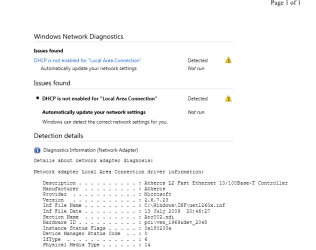
my internet is still not working with windows 7. it works with ubuntu though. network diagnostics says dhcp is not enabled for lan. plz help. heres the network diagnostic report error1.PNG
 
Last edited:

My Computer

OS
windows 7 Ultimate 32bit
CPU
intel c2d e7200 2.53ghz
Motherboard
asus p5gcmx/1333
Memory
2gb DDR2
Graphics Card(s)
nvidia GeForce 7300SE
Monitor(s) Displays
samsung sync master 793s
Screen Resolution
1280X1024
Hard Drives
250gb seagate
Case
Circle
Keyboard
iball
Mouse
iball
Internet Speed
512kbps

My Computer

Computer type
PC/Desktop
Computer Manufacturer/Model Number
Packard Bell
OS
Windows 7 Home Premium 64bit
CPU
Intel(R) Core(TM) i3-2120 CPU @ 3.30GHz
Motherboard
Packard Bell IPISB-AG
Memory
3.00 GB
Graphics Card(s)
(1) Intel(R) HD Graphics (2) VNC Mirror Driver
Sound Card
Realtek High Definition Audio
Monitor(s) Displays
AIO LCD
Screen Resolution
1920 x 1080
Hard Drives
WDC WD10EADX-22TDHB0 ATA Device
Fixed hard disk media
4 partitions
931.51 GB
Keyboard
Wireless
Mouse
Wireless
Antivirus
Microsoft Security Essentials
Browser
IE; Firefox
Other Info
Also:
Samsung N220 Plus Netbook - Windows 7 Home
HP laptop
iPad 5
Back
Top