Internet Pop-up problem

Chips

New member
Member
VIP
Local time
9:15 PM
Messages
204
Now this is an odd one. It's only just started and isn't anything to do with the regular pop-ups you might get. As a matter of fact it seems to do with Win 7 itself rather than the Internet. Every time my pointer goes anywhere near a word on any page of the Internet a small pop-up appears showing me something similar to a dictionary translation of that word. Anyone know what's causing it and how to stop it 'cause it's really, really annoying.
 

My Computer

Computer type
PC/Desktop
OS
Windows 10
That's usually a plugin in the browser. Which browser are you using? Firefox, Internet Explorer, or Chrome? Also some websites have that built-in with the web page. Not much you can do about that. Does this happen on every website?
 

My Computer

Computer type
PC/Desktop
Computer Manufacturer/Model Number
Custom Build
OS
Windows 7 Pro 64bit build 7601 SP1
CPU
Intel Core I5 3570K 3.4Ghz w/ Zalman CNPS9900NT RT
Motherboard
MSI Z77A-G45 Gaming
Memory
G.Skill F3-12800CL9D-8GbXL ; 4Gx2
Graphics Card(s)
EVGA Geforce GTX 770 Superclocked
Sound Card
Creative Sound Blaster Z
Monitor(s) Displays
Dual ViewSonic VX2770Smh-LED Black 27"IPS-Panel
Screen Resolution
1920x1080
Hard Drives
Kingston Hyper X 240GB SSD Win8 Pro 64bit 6GB/s Sata III
Intel 335 Series SSD 240GB Win8 Storage 6GB/s Sata III
Intel 320 Series SSD 600GB Storage 3GB/s Sata II
Western Digital Scorpio Black 1TB - Docked via Esata
PSU
Coolermaster GX 750W
Case
Corsair Vengence C70
Cooling
Coolermaster 120mm and Enermax 140mm
Keyboard
Corsair Vengence K70
Mouse
Logitech G500
Internet Speed
22mbps+
Browser
Firefox, Chrome, IE
Other Info
Swan M50W 2.1 speakers
APC UPS
Thermaltake BlacX HDD Dock
Samsung BD Optical Drive
Netgear WNDR4500
I'm using Internet Explorer. I've just checked and Firefox doesn't do it. And yes, it's on EVERY web page. And nope, I don't use Firefox regularly because It's unusable for regular browsing (no zoom), that and there's no Favourites option.

I've just found something out. Every time it happens there's a tiny logo in the corner. It's so tiny I've not been able to make it out until now. But just now I've found out it's actually the iGoogle logo, so it must be something to do with that! Any clues how to get rid of the damned thing?
 

My Computer

Computer type
PC/Desktop
OS
Windows 10
I'm using Internet Explorer. I've just checked and Firefox doesn't do it. And yes, it's on EVERY web page. And nope, I don't use Firefox regularly because It's unusable for regular browsing (no zoom), that and there's no Favourites option.

I've just found something out. Every time it happens there's a tiny logo in the corner. It's so tiny I've not been able to make it out until now. But just now I've found out it's actually the iGoogle logo, so it must be something to do with that! Any clues how to get rid of the damned thing?

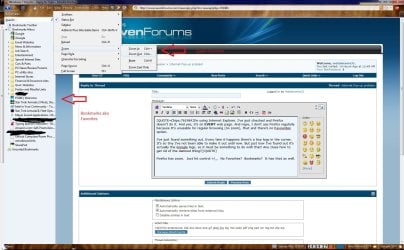
Firefox has zoom. Just hit control +/_. No Favorites? Bookmarks? It has that as well. Are you logged into a Google account? If so check the settings in there. Also you might have some Google toolbar installed. Check you programs and features in the Control Panel. Although if you like IE better than nothing wrong with that. My friend likes IE over FF as well. But I'm going still sell FF whenever I can.:D
 

Attachments

  • Firefox.jpg
    Firefox.jpg
    194.1 KB · Views: 5

My Computer

Computer type
PC/Desktop
Computer Manufacturer/Model Number
Custom Build
OS
Windows 7 Pro 64bit build 7601 SP1
CPU
Intel Core I5 3570K 3.4Ghz w/ Zalman CNPS9900NT RT
Motherboard
MSI Z77A-G45 Gaming
Memory
G.Skill F3-12800CL9D-8GbXL ; 4Gx2
Graphics Card(s)
EVGA Geforce GTX 770 Superclocked
Sound Card
Creative Sound Blaster Z
Monitor(s) Displays
Dual ViewSonic VX2770Smh-LED Black 27"IPS-Panel
Screen Resolution
1920x1080
Hard Drives
Kingston Hyper X 240GB SSD Win8 Pro 64bit 6GB/s Sata III
Intel 335 Series SSD 240GB Win8 Storage 6GB/s Sata III
Intel 320 Series SSD 600GB Storage 3GB/s Sata II
Western Digital Scorpio Black 1TB - Docked via Esata
PSU
Coolermaster GX 750W
Case
Corsair Vengence C70
Cooling
Coolermaster 120mm and Enermax 140mm
Keyboard
Corsair Vengence K70
Mouse
Logitech G500
Internet Speed
22mbps+
Browser
Firefox, Chrome, IE
Other Info
Swan M50W 2.1 speakers
APC UPS
Thermaltake BlacX HDD Dock
Samsung BD Optical Drive
Netgear WNDR4500
Almost sounds like an accelerator issue? Tools> Manage Add-Ons> Accelerators. When I rarely use IE, I see an icon to use accelerators tho?

IE8Accelerator_2.jpg

A Guy
 

My Computer

Computer type
PC/Desktop
OS
Windows 10 Home x64
CPU
INTEL Core i5-750 Quad-Core 3.37GHz
Motherboard
ASUS P7P55D
Memory
HyperX Fury Black Series 8GB (2 x 4GB) 1866Mhz
Graphics Card(s)
EVGA GeForce GTX 750 Superclocked 1GB 128-Bit GDDR5
Monitor(s) Displays
LG 32MA68HY 32" IPS
Screen Resolution
1920 x 1080
Hard Drives
Samsung 840 Evo 120GB, SEAGATE 500GB Barracuda® 7200.12, SATA 3 Gb/s, 7200 RPM, 16MB cache
PSU
ANTEC TruePower New TP-550, 80 PLUS, 550W
Case
ANTEC Three Hundred Illusion
Cooling
COOLER MASTER Hyper 212 Plus, 4 x 120mm 1 x 140mm Noctua's
Internet Speed
85 + Mbps
Antivirus
Avast
Browser
Vivaldi
i thought most of the webpage doing something like that..Not to say all but several. I think it's the script on that webpage itself. I'm just saying :)
 

My Computer

OS
window's 7
CPU
core 2 quad
Motherboard
gigabyte
Memory
2gb corsair
Graphics Card(s)
ati hd4850
Monitor(s) Displays
lg
Screen Resolution
1600 X 900
Case
power logic
Other Info
none of the spec above is accurate
Last edited:

My Computer

Computer type
PC/Desktop
Computer Manufacturer/Model Number
OQO 2+
OS
Windows 8 Pro w/MC 32-bit
CPU
Intel Atom 1.86 GHz
Motherboard
OQO 2+
Memory
2 GB
Graphics Card(s)
Intel GMA 500
Sound Card
IDT
Monitor(s) Displays
LCD
Screen Resolution
800 x 480 (portable) 1280 x 1024 (docked)
Hard Drives
64 GB SSD
PSU
9 Ah Battery (portable) or OQO Brick (docked)
Case
Shirt Pocket Sized
Cooling
Tiny Fan
Keyboard
Slide out (portable) DiNovo Edge (docked)
Mouse
Eraser head (portable) Logitech Bluetooth (docked)
Internet Speed
WWAN or 802.11G (portable) T1 (docked)
Browser
IE 10
Other Info
DVD-RW OQO Docking Station
Back
Top