Internet Problems

Hronsdlensel

New member
Local time
8:23 PM
Messages
2
I have an HP Pavillion dv7 3065dx, which runs Windows 7 Home Premium 64bit. Recently I've been having trouble playing internet videos from any website (they either don't load at all or take 5 or more minutes to load regardless of their size). When the problems began, I tried to download the free version of AVG and Malwarebytes to see if a virus or a rootkit could be the cause of my troubles, but though the downloader for the programs did download, when it ran it returned a message saying that it couldn't access the internet, and asking for information on any proxy server I might be using. I'm completely useless with computers. Please help me!
 

My Computer

OS
Windows 7 Home Premium 64bit
I have an HP Pavillion dv7 3065dx, which runs Windows 7 Home Premium 64bit. Recently I've been having trouble playing internet videos from any website (they either don't load at all or take 5 or more minutes to load regardless of their size). When the problems began, I tried to download the free version of AVG and Malwarebytes to see if a virus or a rootkit could be the cause of my troubles, but though the downloader for the programs did download, when it ran it returned a message saying that it couldn't access the internet, and asking for information on any proxy server I might be using. I'm completely useless with computers. Please help me!

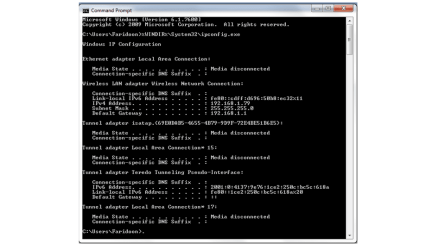
If you can post a screen shot of your ipconfig /all I may be able to help with this probelm.
 

My Computer

Computer type
PC/Desktop
Computer Manufacturer/Model Number
Home built
OS
Windows 7 Ult, Windows 8.1 Pro,
CPU
Q9650-4.275GHz, E8600 4.5GHz, E6750-3.8GHz
Motherboard
Evga 780i FTW
Memory
G.Skill PC2 9600 1200Mhz 5 5 5 15 2T
Graphics Card(s)
GTX480
Sound Card
Asus Xonar D2
Monitor(s) Displays
HannsG
Screen Resolution
1680X1050
Hard Drives
GSkill Phoenix Pro 120GB SSD
PSU
ThermalTake Toughpower 1000Watt modular
Case
ThermalTake XaserV
Cooling
Xigmatek S1283
Keyboard
Logitech G15
Mouse
Logitech G9
Internet Speed
T1
moz-screenshot-5.png
 

Attachments

  • ipconfigall.png
    ipconfigall.png
    40.9 KB · Views: 7

My Computer

OS
Windows 7 Home Premium 64bit
Thanks for posting the screen shot Hronsdlensel.

Can you try going into device manager at the top choose the "View" tab then choose "show hidden devices" then go to your network adaptors and look to see how many of the 6 to 4 tunnel adaptors you have there?

If there are many of them you will need to delate all them and reboot your machine. Windows will make a new one for you. This is usually a driver problem.
 

My Computer

Computer type
PC/Desktop
Computer Manufacturer/Model Number
Home built
OS
Windows 7 Ult, Windows 8.1 Pro,
CPU
Q9650-4.275GHz, E8600 4.5GHz, E6750-3.8GHz
Motherboard
Evga 780i FTW
Memory
G.Skill PC2 9600 1200Mhz 5 5 5 15 2T
Graphics Card(s)
GTX480
Sound Card
Asus Xonar D2
Monitor(s) Displays
HannsG
Screen Resolution
1680X1050
Hard Drives
GSkill Phoenix Pro 120GB SSD
PSU
ThermalTake Toughpower 1000Watt modular
Case
ThermalTake XaserV
Cooling
Xigmatek S1283
Keyboard
Logitech G15
Mouse
Logitech G9
Internet Speed
T1
Back
Top