Internet slow after installing 7 Ultimate

garethgkr

New member
Local time
4:18 PM
Messages
93
I recently installed 7 Ultimate 32bit yesterday and the internet speed has dropped down from 160KBs to 50KBs (crap speeds cause in Australia...)
The computer is connected using WIFI and is using a network card (D-Link DWA 510)
I tried reinstalling the program and drivers and it still wont budge.
Previous OS was Vista and the internet was flawless.
 

My Computer

Computer Manufacturer/Model Number
Self built
OS
Windows 7 Professional
CPU
Asus AMD 9550 Quad Core
Motherboard
Asus M3A78-EM
Memory
4GB DDR3
Graphics Card(s)
Saphire ATI HD 4850 1GB
Monitor(s) Displays
Pioneer Plasma - PDP508A
Screen Resolution
1920 x 1080
Hard Drives
1TB Samsung
2TB Seagate
PSU
Big Ant 600W
Case
Antec
Keyboard
Dinovo Edge
Mouse
Dinovo Edge
Hi.

Set your router to short preamble and also Beacon Intervel = 500
 

My Computer

Computer Manufacturer/Model Number
self built
OS
7600.20510 x86
CPU
P4 550 3.4 GHz HT running at 3.5 GHz
Motherboard
MSI PM8M3-V (MS-7211 v1.x) Micro-ATX mainboard
Memory
OCZ 2 GB(2x1GB) DDR400mHz running @ 414 mHz
Graphics Card(s)
HIS Radeon HD 3850 IceQ 3 Turbo HDMI Dual DL-DVI AGP
Sound Card
MOTU Traveler firewire studio interface 192 kHz 24 bit
Monitor(s) Displays
22" widescreen Acer X223W LCD, 17" Compaq P75 CRT
Screen Resolution
1680x1050 and 1280x1024
Hard Drives
SATA I x2 WD, 400 GB and 120 GB, SATA 2 WD Caviar Black 1 TB
PSU
350W generic
Case
Cybertronpc, it glows blue
Cooling
stock cpu fan, Ice-Q 3 gpu and system, many case fans
Keyboard
Logitch Classical Keyboard 200
Mouse
Logitech Mediaplay cordless
Internet Speed
1792/448 kbits/sec
Other Info
SATA II PCI fake RAID adapter, 1 GB Readyboost, original ATI Remote Wonder (even works with WMC perfectly), Logitech Rumblepad 2 game controller x2
How do I do that??

My modem/router is a Netgear DG834G.
 

My Computer

Computer Manufacturer/Model Number
Self built
OS
Windows 7 Professional
CPU
Asus AMD 9550 Quad Core
Motherboard
Asus M3A78-EM
Memory
4GB DDR3
Graphics Card(s)
Saphire ATI HD 4850 1GB
Monitor(s) Displays
Pioneer Plasma - PDP508A
Screen Resolution
1920 x 1080
Hard Drives
1TB Samsung
2TB Seagate
PSU
Big Ant 600W
Case
Antec
Keyboard
Dinovo Edge
Mouse
Dinovo Edge

My Computer

Computer Manufacturer/Model Number
self built
OS
7600.20510 x86
CPU
P4 550 3.4 GHz HT running at 3.5 GHz
Motherboard
MSI PM8M3-V (MS-7211 v1.x) Micro-ATX mainboard
Memory
OCZ 2 GB(2x1GB) DDR400mHz running @ 414 mHz
Graphics Card(s)
HIS Radeon HD 3850 IceQ 3 Turbo HDMI Dual DL-DVI AGP
Sound Card
MOTU Traveler firewire studio interface 192 kHz 24 bit
Monitor(s) Displays
22" widescreen Acer X223W LCD, 17" Compaq P75 CRT
Screen Resolution
1680x1050 and 1280x1024
Hard Drives
SATA I x2 WD, 400 GB and 120 GB, SATA 2 WD Caviar Black 1 TB
PSU
350W generic
Case
Cybertronpc, it glows blue
Cooling
stock cpu fan, Ice-Q 3 gpu and system, many case fans
Keyboard
Logitch Classical Keyboard 200
Mouse
Logitech Mediaplay cordless
Internet Speed
1792/448 kbits/sec
Other Info
SATA II PCI fake RAID adapter, 1 GB Readyboost, original ATI Remote Wonder (even works with WMC perfectly), Logitech Rumblepad 2 game controller x2
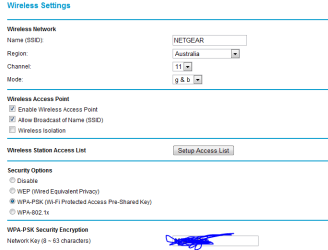
All I see is this.
 

Attachments

  • Capture.PNG
    Capture.PNG
    10.5 KB · Views: 170

My Computer

Computer Manufacturer/Model Number
Self built
OS
Windows 7 Professional
CPU
Asus AMD 9550 Quad Core
Motherboard
Asus M3A78-EM
Memory
4GB DDR3
Graphics Card(s)
Saphire ATI HD 4850 1GB
Monitor(s) Displays
Pioneer Plasma - PDP508A
Screen Resolution
1920 x 1080
Hard Drives
1TB Samsung
2TB Seagate
PSU
Big Ant 600W
Case
Antec
Keyboard
Dinovo Edge
Mouse
Dinovo Edge
You could probably install the latest firmware or 3rd party one to have many more choices.

But for now, try setting the g & b to g only instead. Then reboot router.
 

My Computer

Computer Manufacturer/Model Number
self built
OS
7600.20510 x86
CPU
P4 550 3.4 GHz HT running at 3.5 GHz
Motherboard
MSI PM8M3-V (MS-7211 v1.x) Micro-ATX mainboard
Memory
OCZ 2 GB(2x1GB) DDR400mHz running @ 414 mHz
Graphics Card(s)
HIS Radeon HD 3850 IceQ 3 Turbo HDMI Dual DL-DVI AGP
Sound Card
MOTU Traveler firewire studio interface 192 kHz 24 bit
Monitor(s) Displays
22" widescreen Acer X223W LCD, 17" Compaq P75 CRT
Screen Resolution
1680x1050 and 1280x1024
Hard Drives
SATA I x2 WD, 400 GB and 120 GB, SATA 2 WD Caviar Black 1 TB
PSU
350W generic
Case
Cybertronpc, it glows blue
Cooling
stock cpu fan, Ice-Q 3 gpu and system, many case fans
Keyboard
Logitch Classical Keyboard 200
Mouse
Logitech Mediaplay cordless
Internet Speed
1792/448 kbits/sec
Other Info
SATA II PCI fake RAID adapter, 1 GB Readyboost, original ATI Remote Wonder (even works with WMC perfectly), Logitech Rumblepad 2 game controller x2
i did it, and rebooted it. Then a msg popped up saying there was another comp that has the same IP as this comp and is conflicting or some sort.. And now no internet at all..
It is weird though coz now I'm on my laptop and it is still getting connection. where else the other comp it isnt getting a thing..
 

My Computer

Computer Manufacturer/Model Number
Self built
OS
Windows 7 Professional
CPU
Asus AMD 9550 Quad Core
Motherboard
Asus M3A78-EM
Memory
4GB DDR3
Graphics Card(s)
Saphire ATI HD 4850 1GB
Monitor(s) Displays
Pioneer Plasma - PDP508A
Screen Resolution
1920 x 1080
Hard Drives
1TB Samsung
2TB Seagate
PSU
Big Ant 600W
Case
Antec
Keyboard
Dinovo Edge
Mouse
Dinovo Edge
i did it, and rebooted it. Then a msg popped up saying there was another comp that has the same IP as this comp and is conflicting or some sort.. And now no internet at all..
It is weird though coz now I'm on my laptop and it is still getting connection. where else the other comp it isnt getting a thing..

Reboot the other computer. It may also have a b adapter which can't work with the router setting (unlikely). It probably just needs to pull an ip address from DHCP.

In the case it is b, it's very much advised to get a new adapter for that machine. b is so slow.
 

My Computer

Computer Manufacturer/Model Number
self built
OS
7600.20510 x86
CPU
P4 550 3.4 GHz HT running at 3.5 GHz
Motherboard
MSI PM8M3-V (MS-7211 v1.x) Micro-ATX mainboard
Memory
OCZ 2 GB(2x1GB) DDR400mHz running @ 414 mHz
Graphics Card(s)
HIS Radeon HD 3850 IceQ 3 Turbo HDMI Dual DL-DVI AGP
Sound Card
MOTU Traveler firewire studio interface 192 kHz 24 bit
Monitor(s) Displays
22" widescreen Acer X223W LCD, 17" Compaq P75 CRT
Screen Resolution
1680x1050 and 1280x1024
Hard Drives
SATA I x2 WD, 400 GB and 120 GB, SATA 2 WD Caviar Black 1 TB
PSU
350W generic
Case
Cybertronpc, it glows blue
Cooling
stock cpu fan, Ice-Q 3 gpu and system, many case fans
Keyboard
Logitch Classical Keyboard 200
Mouse
Logitech Mediaplay cordless
Internet Speed
1792/448 kbits/sec
Other Info
SATA II PCI fake RAID adapter, 1 GB Readyboost, original ATI Remote Wonder (even works with WMC perfectly), Logitech Rumblepad 2 game controller x2
i did it, and rebooted it. Then a msg popped up saying there was another comp that has the same IP as this comp and is conflicting or some sort.. And now no internet at all..
It is weird though coz now I'm on my laptop and it is still getting connection. where else the other comp it isnt getting a thing..

Reboot the other computer. It may also have a b adapter which can't work with the router setting (unlikely). It probably just needs to pull an ip address from DHCP.

In the case it is b, it's very much advised to get a new adapter for that machine. b is so slow.

It is a wireless g adaptor. But it was working fine before I put Windows 7 on the computer.... this is really weird.
 

My Computer

Computer Manufacturer/Model Number
Self built
OS
Windows 7 Professional
CPU
Asus AMD 9550 Quad Core
Motherboard
Asus M3A78-EM
Memory
4GB DDR3
Graphics Card(s)
Saphire ATI HD 4850 1GB
Monitor(s) Displays
Pioneer Plasma - PDP508A
Screen Resolution
1920 x 1080
Hard Drives
1TB Samsung
2TB Seagate
PSU
Big Ant 600W
Case
Antec
Keyboard
Dinovo Edge
Mouse
Dinovo Edge
Help?
 

My Computer

Computer Manufacturer/Model Number
Self built
OS
Windows 7 Professional
CPU
Asus AMD 9550 Quad Core
Motherboard
Asus M3A78-EM
Memory
4GB DDR3
Graphics Card(s)
Saphire ATI HD 4850 1GB
Monitor(s) Displays
Pioneer Plasma - PDP508A
Screen Resolution
1920 x 1080
Hard Drives
1TB Samsung
2TB Seagate
PSU
Big Ant 600W
Case
Antec
Keyboard
Dinovo Edge
Mouse
Dinovo Edge
Check to see if this is only a wireless issue...

Connect your laptop by Ethernet connection.. and see if your speeds increase..
also check to see if other computers in your home have the same IP address if they do they are conflicting..To check that start command line by just searching cmd and hit enter and type in ipconfig
Another thing to check is that do you have a password on your wireless network like (WPA WPA2)..if not put a password on it..(This will help unwanted people from accessing your network)

Hope this Helps..
 

My Computer

Computer Manufacturer/Model Number
HP Pavilion dv5 Notebook PC
OS
Windows Seven x64
CPU
2.2 GHz Dual Core
Motherboard
Quanta 3600
Memory
4GB
Graphics Card(s)
ATI Mobility RADEON HD 3470
Sound Card
ATI
Monitor(s) Displays
Laptop
Hard Drives
ATA Hitachi HTS543215 (5400RPM)
Case
Laptop
Cooling
Fan
Internet Speed
Basic DSL 1.5 up and Down
There is already a password for the network. And I checked all the computers have different Ips.
This is getting frustrating... having to transfer movies from another computer to it.
can it be that it isn't compatible? i did the win 7 compatibility program and everything was fine.
 

My Computer

Computer Manufacturer/Model Number
Self built
OS
Windows 7 Professional
CPU
Asus AMD 9550 Quad Core
Motherboard
Asus M3A78-EM
Memory
4GB DDR3
Graphics Card(s)
Saphire ATI HD 4850 1GB
Monitor(s) Displays
Pioneer Plasma - PDP508A
Screen Resolution
1920 x 1080
Hard Drives
1TB Samsung
2TB Seagate
PSU
Big Ant 600W
Case
Antec
Keyboard
Dinovo Edge
Mouse
Dinovo Edge
Back
Top