Internet so slow!!

smooveprined

New member
Local time
7:03 PM
Messages
62
I dont know what's going on.. When my mom first had got internet the thing was the fastest i ever seen. Downloading 2gb in 30 minutes.. That lasted for like a month.. Now about 5-6 months later this internet is slow. Downloading takes forever.. I had did a test on some site and it said 0.71 mbps download speed and 0.40 mbps upload.. Is this good? Please help!?
 

My Computer

Computer Manufacturer/Model Number
Hewlett-Packard/ Hp Pavilion dv6 Notebook PC
OS
Windows 7 Ultimate x64
CPU
Intel Core i5 CPU @ 2.53Ghz
Memory
Inter(R) Core(TM) i5 CPU M460 @ 2.53GHZ
Sound Card
IDT High Definition Audio CODEC
Monitor(s) Displays
Generic PnP Monitor
Screen Resolution
1366 x 768
Hard Drives
Hitachi HTS725050A9A364

My Computer

Computer type
PC/Desktop
Computer Manufacturer/Model Number
Self Built
OS
Windows 8.1 Pro x64
CPU
Intel Core i5-2500K @ 3.30GHz - S1155
Motherboard
Asus P8P67 LE Rev3, Intel P67, S115
Memory
8GB Corsair DDR3 XMS3, PC3-12800
Graphics Card(s)
NVIDIA GeForce GTX 650
Sound Card
On-Board
Monitor(s) Displays
3 x 24" {Extended Display}
Screen Resolution
1920 x 1080
Hard Drives
300GB Seagate Barracuda 7200
PSU
550W Coolermaster GX550
Case
Silverstone Precision PS04B
Cooling
Stock
Keyboard
Logitech K120
Mouse
World of Warcraft Cataclysm MMO Gaming Mouse
Internet Speed
80 MB
Antivirus
MSE / Windows Defender
Browser
Chrome
Nope. I looked at the thread but it didn't help.
 

My Computer

Computer Manufacturer/Model Number
Hewlett-Packard/ Hp Pavilion dv6 Notebook PC
OS
Windows 7 Ultimate x64
CPU
Intel Core i5 CPU @ 2.53Ghz
Memory
Inter(R) Core(TM) i5 CPU M460 @ 2.53GHZ
Sound Card
IDT High Definition Audio CODEC
Monitor(s) Displays
Generic PnP Monitor
Screen Resolution
1366 x 768
Hard Drives
Hitachi HTS725050A9A364
I dont know what's going on.. When my mom first had got internet the thing was the fastest i ever seen. Downloading 2gb in 30 minutes.. That lasted for like a month.. Now about 5-6 months later this internet is slow. Downloading takes forever.. I had did a test on some site and it said 0.71 mbps download speed and 0.40 mbps upload.. Is this good? Please help!?

.71mbps for download is pretty slow. Mine is about 16x that fast on my download. My upload is 2.5x as fast.
 

My Computer

Computer Manufacturer/Model Number
Self-Built in July 2009
OS
Windows 7 Ultimate x64
CPU
Intel Q9550 2.83Ghz OC'd to 3.40Ghz
Motherboard
Gigabyte GA-EP45-UD3R rev. 1.1, F12 BIOS
Memory
8GB G.Skill PI DDR2-800, 4-4-4-12 timings
Graphics Card(s)
EVGA 1280MB Nvidia GeForce GTX570
Sound Card
Realtek ALC899A 8 channel onboard audio
Monitor(s) Displays
23" Acer x233H
Screen Resolution
1920x1080
Hard Drives
Intel X25-M 80GB Gen 2 SSD
Western Digital 1TB Caviar Black, 32MB cache. WD1001FALS
PSU
Corsair 620HX modular
Case
Antec P182
Cooling
stock
Keyboard
ABS M1 Mechanical
Mouse
Logitech G9 Laser Mouse
Internet Speed
15/2 cable modem
Other Info
Windows and Linux enthusiast. Logitech G35 Headset.
So can you give me any suggestions on how to fix this please? and videos take forever to watch.. like this movie i've been trying 2 watch for the longest... And theres nothing wrong with my computer, because when I go to other places like at my other house with my brother its fine..
 

My Computer

Computer Manufacturer/Model Number
Hewlett-Packard/ Hp Pavilion dv6 Notebook PC
OS
Windows 7 Ultimate x64
CPU
Intel Core i5 CPU @ 2.53Ghz
Memory
Inter(R) Core(TM) i5 CPU M460 @ 2.53GHZ
Sound Card
IDT High Definition Audio CODEC
Monitor(s) Displays
Generic PnP Monitor
Screen Resolution
1366 x 768
Hard Drives
Hitachi HTS725050A9A364
First step would be to ping your default gateway and see what kind of response you are getting. If your cable is coming directly to your computer, you can see this ip address from an ipconfig /all. If you have a router, you will have to check the interface on the router to see what the default gateway is.

Then,
ping -t x.x.x.x (replace the X's with the IP address of your default gateway).

If you get dropped packets, then there is a problem with the ISP and you will have to give them a call to report it.


Also, if there is another computer on the local network that is doing a lot of uploading, that can cause very slow downloads. Your download speeds tank when your upload speeds are maxed out.
 

My Computer

Computer Manufacturer/Model Number
Self-Built in July 2009
OS
Windows 7 Ultimate x64
CPU
Intel Q9550 2.83Ghz OC'd to 3.40Ghz
Motherboard
Gigabyte GA-EP45-UD3R rev. 1.1, F12 BIOS
Memory
8GB G.Skill PI DDR2-800, 4-4-4-12 timings
Graphics Card(s)
EVGA 1280MB Nvidia GeForce GTX570
Sound Card
Realtek ALC899A 8 channel onboard audio
Monitor(s) Displays
23" Acer x233H
Screen Resolution
1920x1080
Hard Drives
Intel X25-M 80GB Gen 2 SSD
Western Digital 1TB Caviar Black, 32MB cache. WD1001FALS
PSU
Corsair 620HX modular
Case
Antec P182
Cooling
stock
Keyboard
ABS M1 Mechanical
Mouse
Logitech G9 Laser Mouse
Internet Speed
15/2 cable modem
Other Info
Windows and Linux enthusiast. Logitech G35 Headset.
Can you explain this again because i am lost..
 

My Computer

Computer Manufacturer/Model Number
Hewlett-Packard/ Hp Pavilion dv6 Notebook PC
OS
Windows 7 Ultimate x64
CPU
Intel Core i5 CPU @ 2.53Ghz
Memory
Inter(R) Core(TM) i5 CPU M460 @ 2.53GHZ
Sound Card
IDT High Definition Audio CODEC
Monitor(s) Displays
Generic PnP Monitor
Screen Resolution
1366 x 768
Hard Drives
Hitachi HTS725050A9A364
I think he wants you to open the command prompt so type command prompt on the search bar at the Start Menu, Open it. It should look like a program with a black screen and type the command ipconfig /all and press ENTER.Then look for the IPV4 Address on the list that should appear. Copy the numbers..
After that,type ping -t x.x.x.x (replace the X's with the IP address of your default gateway).
 

My Computer

Computer Manufacturer/Model Number
Custom Built
OS
Windows 7 Ultimate 32 Bit, Windows Developer Preview, Linux Mint 9 Gnome 32 Bit
CPU
Intel Pentium Dual CPU E2180@2GHz
Motherboard
Elitegroup 671T-M3
Graphics Card(s)
NVIDIA GeForce 7200 GS
Monitor(s) Displays
AOC TFT1560 15" LCD Monitor
Screen Resolution
1024x768
Keyboard
Logitech USB Keyboard
Okay i did that... Now im just seeing reply from (my ip address) bytes=32 time<1ms TTL=128
 

My Computer

Computer Manufacturer/Model Number
Hewlett-Packard/ Hp Pavilion dv6 Notebook PC
OS
Windows 7 Ultimate x64
CPU
Intel Core i5 CPU @ 2.53Ghz
Memory
Inter(R) Core(TM) i5 CPU M460 @ 2.53GHZ
Sound Card
IDT High Definition Audio CODEC
Monitor(s) Displays
Generic PnP Monitor
Screen Resolution
1366 x 768
Hard Drives
Hitachi HTS725050A9A364
I dont know what's going on.. When my mom first had got internet the thing was the fastest i ever seen. Downloading 2gb in 30 minutes.. That lasted for like a month.. Now about 5-6 months later this internet is slow. Downloading takes forever.. I had did a test on some site and it said 0.71 mbps download speed and 0.40 mbps upload.. Is this good? Please help!?

What Country are you in?

Please follow this and then Post back

http://www.sevenforums.com/network-sharing/144365-network-posting-tips.html

Josh
 

My Computer

Computer type
PC/Desktop
Computer Manufacturer/Model Number
Custom Built
OS
Windows 7 Professional x64 SP1 ; Windows Server 2012 R2 Standard
CPU
Intel Core i5 2400 @ 3.10GHz
Motherboard
Foxconn H67MP-S/-V/H67MP
Memory
8.0GB DDR3 @ 665MHz (2GBx4)
Graphics Card(s)
AMD Radeon HD 6870
Sound Card
Realtek High Definition Audio
Monitor(s) Displays
AOC 2243W & SMB1930NW
Screen Resolution
1440x900 & 1920x1080
Hard Drives
977GB Seagate ST31000524AS ATA Drive (SATA)
250GB WD iSCSI attached Drive
PSU
750W Gaming PSU
Case
Novatech Night
Cooling
Fan
Keyboard
Dell Standard PS/2 Keyboard
Mouse
R.A.T 07 Gaming Mouse
Internet Speed
Download: 10 Mbps Ping: 30ms Upload: 0.81 Mbps
Browser
Google Chrome
Other Info
Optiarc DVD RW AD-5260S ATA Device
Have you tried clearing your Internet cache? Use CCleaner to empty your browsing history which could speed up the Internet a bit but this dramatic slowdown in your net speed is unexplainable because it slowed down many times. I'm actually jealous of a speed than can download 2GBs in 30 minutes.

Have you tried troubleshooting your connection for problems? Right click the network icon on the side panel of the Taskbar and choose Troubleshoot Problems. Let it do its thing and see if there are any improvements...

Maybe your network provider is cheating you lol. Have you looked into that angle?? They could have simply lowered the bandwidth your connection could get and the good speed was only meant for the first month of subscribing or maybe it was a time limited offer for a new subscriber. I would look into those things too. If you think the network has a problem, tell your mom to call the network provider's customer support to give some assistance and shed light into this.
 

My Computer

Computer Manufacturer/Model Number
Custom Built
OS
Windows 7 Ultimate 32 Bit, Windows Developer Preview, Linux Mint 9 Gnome 32 Bit
CPU
Intel Pentium Dual CPU E2180@2GHz
Motherboard
Elitegroup 671T-M3
Graphics Card(s)
NVIDIA GeForce 7200 GS
Monitor(s) Displays
AOC TFT1560 15" LCD Monitor
Screen Resolution
1024x768
Keyboard
Logitech USB Keyboard
ISP is a one of the Possible cause

You may get slower speeds for many things

  1. You restarted your router so Internet slows down to keep a constant connection
  2. Someone else joined the ISP So your bandwidth was reduced to allow another user
  3. Amount of what you are paying for may affect your speeds
  4. Too many devices connected to your Router causing Internet to slow down
 

My Computer

Computer type
PC/Desktop
Computer Manufacturer/Model Number
Custom Built
OS
Windows 7 Professional x64 SP1 ; Windows Server 2012 R2 Standard
CPU
Intel Core i5 2400 @ 3.10GHz
Motherboard
Foxconn H67MP-S/-V/H67MP
Memory
8.0GB DDR3 @ 665MHz (2GBx4)
Graphics Card(s)
AMD Radeon HD 6870
Sound Card
Realtek High Definition Audio
Monitor(s) Displays
AOC 2243W & SMB1930NW
Screen Resolution
1440x900 & 1920x1080
Hard Drives
977GB Seagate ST31000524AS ATA Drive (SATA)
250GB WD iSCSI attached Drive
PSU
750W Gaming PSU
Case
Novatech Night
Cooling
Fan
Keyboard
Dell Standard PS/2 Keyboard
Mouse
R.A.T 07 Gaming Mouse
Internet Speed
Download: 10 Mbps Ping: 30ms Upload: 0.81 Mbps
Browser
Google Chrome
Other Info
Optiarc DVD RW AD-5260S ATA Device
Okay i did that... Now im just seeing reply from (my ip address) bytes=32 time<1ms TTL=128

Sounds like you were pinging an internal router address...ie 192.168.1.1. You need to be hitting your ISP's default gateway. With replies of under 1ms, you are likely still on your local LAN segment.
 

My Computer

Computer Manufacturer/Model Number
Self-Built in July 2009
OS
Windows 7 Ultimate x64
CPU
Intel Q9550 2.83Ghz OC'd to 3.40Ghz
Motherboard
Gigabyte GA-EP45-UD3R rev. 1.1, F12 BIOS
Memory
8GB G.Skill PI DDR2-800, 4-4-4-12 timings
Graphics Card(s)
EVGA 1280MB Nvidia GeForce GTX570
Sound Card
Realtek ALC899A 8 channel onboard audio
Monitor(s) Displays
23" Acer x233H
Screen Resolution
1920x1080
Hard Drives
Intel X25-M 80GB Gen 2 SSD
Western Digital 1TB Caviar Black, 32MB cache. WD1001FALS
PSU
Corsair 620HX modular
Case
Antec P182
Cooling
stock
Keyboard
ABS M1 Mechanical
Mouse
Logitech G9 Laser Mouse
Internet Speed
15/2 cable modem
Other Info
Windows and Linux enthusiast. Logitech G35 Headset.
Are you wireless or wired? If wireless, you may be getting WiFi interferance from a new neighbor or somehting (or worse, someone may be using your WiFi and stealing your bandwidth if is is not properly secured!) ...
 

My Computer

Computer Manufacturer/Model Number
Scratch built
OS
Windows 7 x64 Ultimate
CPU
i7 960
Motherboard
Asus P6X58D
Memory
12 Gig Corsair Dominator
Graphics Card(s)
Nvidia 480
Sound Card
Maudio Delta 44 + breakout box
Monitor(s) Displays
Dell UltraSharp U2410 24in and Samsung 21 dual monitors
Screen Resolution
1920x1200 and 1280x1024
Hard Drives
Primary: Intel X-25M G2 160G SSD
Secondary: Segate baracuda 1.0 TB
HDs in AHCI mode.
PSU
Corasair TX850
Case
Cooler Master HAF
Cooling
Corsair H50
Keyboard
Logitech G15 + N52 game pad
Mouse
Logitech MX518
Internet Speed
15kbs down 4.5kbps up
Other Info
WEI 7.6
CPU & RAM 7.6
Graphics 7.9
Hard disk 7.7
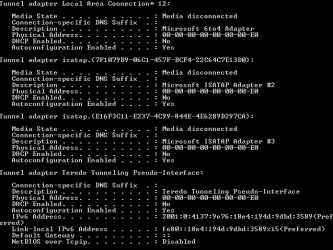
Is this what i was supposed to do? Because i was lost at step 3. I took the picture of what it said in cmd. and after that i was lost
 

Attachments

  • cmd ip.PNG
    cmd ip.PNG
    8.2 KB · Views: 9
  • cmd ip2.PNG
    cmd ip2.PNG
    3.6 KB · Views: 10

My Computer

Computer Manufacturer/Model Number
Hewlett-Packard/ Hp Pavilion dv6 Notebook PC
OS
Windows 7 Ultimate x64
CPU
Intel Core i5 CPU @ 2.53Ghz
Memory
Inter(R) Core(TM) i5 CPU M460 @ 2.53GHZ
Sound Card
IDT High Definition Audio CODEC
Monitor(s) Displays
Generic PnP Monitor
Screen Resolution
1366 x 768
Hard Drives
Hitachi HTS725050A9A364
and im on wireless. and no one is getting connection from this except in the house. No one else knows the code. or WEP.. and i recently reformatted my computer so i dont think it will have to deal with the internet cache because i had that problem before i reformatted it. and yea i tried troubleshoot problems many times because when i leave the computer for a while i always come back and it has no internet access. Sometimes this forces me to restart the computer? Why is this because this is not the first computer that that had happened on. And I'll tell my mom to call these people because this is ridiculous. Any other suggestions though? I appreciate everyones help!!
 

My Computer

Computer Manufacturer/Model Number
Hewlett-Packard/ Hp Pavilion dv6 Notebook PC
OS
Windows 7 Ultimate x64
CPU
Intel Core i5 CPU @ 2.53Ghz
Memory
Inter(R) Core(TM) i5 CPU M460 @ 2.53GHZ
Sound Card
IDT High Definition Audio CODEC
Monitor(s) Displays
Generic PnP Monitor
Screen Resolution
1366 x 768
Hard Drives
Hitachi HTS725050A9A364
Ok, WEP is breakable in about 60 seconds... It is no security what so ever. Well it might keep grandma from next door off, but no one else. You NEED to be using WPA2.

Secondly, do you know what other WiFi routers might be in the area? Is your house isolated? Can you see any other routers listed from the computer?

If you have a smart phone, there is a really nice app that will list your signal strength as you walk around your house and also tell you if other routers are stomping on your currently selected channel.
 

My Computer

Computer Manufacturer/Model Number
Scratch built
OS
Windows 7 x64 Ultimate
CPU
i7 960
Motherboard
Asus P6X58D
Memory
12 Gig Corsair Dominator
Graphics Card(s)
Nvidia 480
Sound Card
Maudio Delta 44 + breakout box
Monitor(s) Displays
Dell UltraSharp U2410 24in and Samsung 21 dual monitors
Screen Resolution
1920x1200 and 1280x1024
Hard Drives
Primary: Intel X-25M G2 160G SSD
Secondary: Segate baracuda 1.0 TB
HDs in AHCI mode.
PSU
Corasair TX850
Case
Cooler Master HAF
Cooling
Corsair H50
Keyboard
Logitech G15 + N52 game pad
Mouse
Logitech MX518
Internet Speed
15kbs down 4.5kbps up
Other Info
WEI 7.6
CPU & RAM 7.6
Graphics 7.9
Hard disk 7.7
Just a suggestion, enable MAC address filtering on your WIFI configuration and put your MAC address, this will restrict other PC in connecting to your WIFI, even you don't have any WEP or WPA2. This method is done by our professor at our school WIFI so we students cant connect to the internet, we even try to crack it using Backtrack but still, we can't connect. So that might be a good security for your WIFI.
 

My Computer

OS
Windows 7 Ultimate x64
CPU
AMD Phenom II x4 840
Motherboard
Emaxx
Memory
8GB
Graphics Card(s)
PALIT 9500GT 1GB 128bit
Sound Card
Realtech
Monitor(s) Displays
AOC 18" LCD
Screen Resolution
1366x768
Hard Drives
500GB SATA
PSU
ATX 500W CE
Case
Standard
Keyboard
Delux wireless
Mouse
A4Tech
Internet Speed
1mbs
Other Info
My computer is a crap.
Back
Top