Internet wrapper.exe I guess. Please help.

Neo11

New member
Local time
4:06 PM
Messages
21
Hello there ,
I'm using windows 7 , Home Premium 64 bit . And have recently clean installed my Sony Vaio notebook . And I've been using for like 5 months now . I have done all the windows updates and all up to date . But recently my system started to slow down the start up and shutting down, even the start menu on desktop takes minutes to show up. I see some Internet wrapper.exe on my prefetch and as I keep deleting them the less my system got these lag spikes . And this is at maximum when I actually connect my LAN wire into the notebook . I thought maybe some kind of malware . And downloaded malware bytes and done with the scan but got nothing . But this slowing up actually starts when I plug in the LAN wire into the notebook . What must I do to resolve this issue ?. Other than formating the whole system again . Please help .
Thank you.
 

My Computer

Computer type
Laptop
Computer Manufacturer/Model Number
Sony
OS
Windows 7 professional 64 bit i5
Memory
4GB
wrapper.exe can be a legit file typically used by Java. Go to msconfig (Start > Type "msconfig" > Press enter) Go to startup and post a picture of that screen.

You can use the Snipping Tool
How to Use the Snipping Tool in Vista
 

My Computer

Computer type
PC/Desktop
Computer Manufacturer/Model Number
Custom
OS
Dual Boot: Windows 8.1 & Server 2012r2 VMs: Kali Linux, Backbox, Matriux, Windows 8.1
CPU
A10 7700 Kavari SteamRoller
Motherboard
ASUS A88XM-PLUS (FM2+ )
Memory
8GB DDR3 SDRAM PC3-8500
Graphics Card(s)
1024MB ATI AMD Radeon R7 Graphics
Sound Card
Realtek High Definition Audio
Monitor(s) Displays
Samsung
Hard Drives
SSD Crucial 120gb
WD VelociRaptor 1tb
PSU
Rosewill Gaming 650w
Case
Rosewill Galaxy 2
Internet Speed
55/12
Antivirus
Malwarebytes, MSE, SAS
Browser
FireFox, Chrome
Sorry about the image . I tried snipe tool but it's taking like forever (issue I'm experiencing ) been 20 min yet it's saving image . So took a snap from my mobile .
 

Attachments

  • 2015-01-08-848.jpg
    2015-01-08-848.jpg
    907.7 KB · Views: 0

My Computer

Computer type
Laptop
Computer Manufacturer/Model Number
Sony
OS
Windows 7 professional 64 bit i5
Memory
4GB
I disabled all start up programs too . As thought they might be the reason, but even after disabling all . It takes hours to shut down and start up. Is it some kind of malware business .
 

My Computer

Computer type
Laptop
Computer Manufacturer/Model Number
Sony
OS
Windows 7 professional 64 bit i5
Memory
4GB
Ok lets test to see if its Malware/Virus related.

Lets run Malwarebytes again. Make sure you click Custom Scan and Check the box to Scan for Rootkits, then Check the box to scan C:
http://www.sevenforums.com/tutorials/338716-malwarebytes-anti-malware-free.html

Download and run SuperantiSpyware
SUPERAntiSpyware - Downloads

If you notice browser hijacks or toolbars.. Download and run Adwcleaner :: AdwCleaner Download

Post the txt files generated by these three programs and attach them to your next post.
 

My Computer

Computer type
PC/Desktop
Computer Manufacturer/Model Number
Custom
OS
Dual Boot: Windows 8.1 & Server 2012r2 VMs: Kali Linux, Backbox, Matriux, Windows 8.1
CPU
A10 7700 Kavari SteamRoller
Motherboard
ASUS A88XM-PLUS (FM2+ )
Memory
8GB DDR3 SDRAM PC3-8500
Graphics Card(s)
1024MB ATI AMD Radeon R7 Graphics
Sound Card
Realtek High Definition Audio
Monitor(s) Displays
Samsung
Hard Drives
SSD Crucial 120gb
WD VelociRaptor 1tb
PSU
Rosewill Gaming 650w
Case
Rosewill Galaxy 2
Internet Speed
55/12
Antivirus
Malwarebytes, MSE, SAS
Browser
FireFox, Chrome
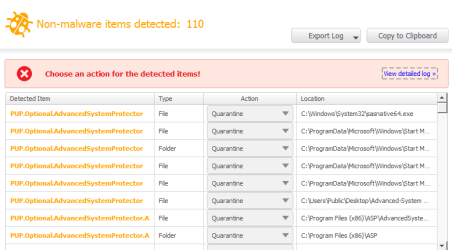
I dint find any malware before but when I checked in rootkit I got 110 threats . similarly with others and cleaned. My system is back to its original. Thank you so much:D:)
 

Attachments

My Computer

Computer type
Laptop
Computer Manufacturer/Model Number
Sony
OS
Windows 7 professional 64 bit i5
Memory
4GB
I already Had malware bytes installed and running for a week... but I dont know why it dint block these . How do I prevent them further ?. And one more thing, having malware byte .. Super anti spyware... and awd cleaner . would counterfeit ?
 

My Computer

Computer type
Laptop
Computer Manufacturer/Model Number
Sony
OS
Windows 7 professional 64 bit i5
Memory
4GB
Malwarebytes doesn't stop them for a reason. They are not malware.

It state that on the first line of your picture NON Malware.
They are PuP (potentially unwanted program)

Until you tell Malwarebytes whether you want them or not it doesn't know.
So it gives you choice what to do with them.

I have looked at your logs but I'm not a security expert.
I would remove all that was found if it was my computer.

If you downloaded those security programs from the sites Gator gave you they are not counterfeit.

One suggestion. For AdwCleaner form Bleeping Computer only tick on Bleeping computer and nothing else for the download.
 

My Computer

Computer type
PC/Desktop
Computer Manufacturer/Model Number
Home made Desktop
OS
Windows 10 Pro. 64/ version 1709 Windows 7 Pro/64
CPU
Intel i7-6800K @ 4.3
Motherboard
ASUS X-99 Deluxe II
Memory
Corsair Platinum 16 gig @2400
Graphics Card(s)
EVGA GTX 1070 OC
Monitor(s) Displays
Asus 27" LED LCD/VE278Q
Screen Resolution
1920-1080 or 1280-720 HDMI
Hard Drives
INTEL SSD 730-240 Gb Sata 3.0/
PSU
EVGA Platium 1200W
Case
Phanteks Luxe Tempered Glass 8 fans/ one radiator
Cooling
XSPC/ Water Cooled CPU
Keyboard
Das 4 Professional
Mouse
Logitech M705/MX Anywhere 2-S
Internet Speed
100 mbits
Antivirus
Microsoft Security Essentials/ Malwarebytes Premium 3.0/ SAS
Browser
I.E. 11 default/Firefox/ ISP Time Warner Cable/Spectrum
Other Info
LG BluRay Burner/
Sound system-KLipsch-THX/
Icy Dock ssd Hot Swap bays.
Yeah . I've done it. For now it's okay ! But what must I do to prevent them . Should I get another anti virus like avast which blocks on threat attempt ?
 

My Computer

Computer type
Laptop
Computer Manufacturer/Model Number
Sony
OS
Windows 7 professional 64 bit i5
Memory
4GB
Exactly what anti virus program do you use now?

Most PuP come from not watching carefully what you are downloading.
They come as a piggy back program when you download something else that you want. During such downloads you must select not to download them.
 

My Computer

Computer type
PC/Desktop
Computer Manufacturer/Model Number
Home made Desktop
OS
Windows 10 Pro. 64/ version 1709 Windows 7 Pro/64
CPU
Intel i7-6800K @ 4.3
Motherboard
ASUS X-99 Deluxe II
Memory
Corsair Platinum 16 gig @2400
Graphics Card(s)
EVGA GTX 1070 OC
Monitor(s) Displays
Asus 27" LED LCD/VE278Q
Screen Resolution
1920-1080 or 1280-720 HDMI
Hard Drives
INTEL SSD 730-240 Gb Sata 3.0/
PSU
EVGA Platium 1200W
Case
Phanteks Luxe Tempered Glass 8 fans/ one radiator
Cooling
XSPC/ Water Cooled CPU
Keyboard
Das 4 Professional
Mouse
Logitech M705/MX Anywhere 2-S
Internet Speed
100 mbits
Antivirus
Microsoft Security Essentials/ Malwarebytes Premium 3.0/ SAS
Browser
I.E. 11 default/Firefox/ ISP Time Warner Cable/Spectrum
Other Info
LG BluRay Burner/
Sound system-KLipsch-THX/
Icy Dock ssd Hot Swap bays.
I have been using Avast 2015 which I downloaded recently, but due to these issues it never went up more than 1% even after 3 or 4 hours . Since I have installed the above programs, I thought better remove the Anti virus . I've got none right now. Can you suggest me a good one , which meets all the needs . Ty.
 

My Computer

Computer type
Laptop
Computer Manufacturer/Model Number
Sony
OS
Windows 7 professional 64 bit i5
Memory
4GB

My Computer

Computer type
PC/Desktop
Computer Manufacturer/Model Number
Home made Desktop
OS
Windows 10 Pro. 64/ version 1709 Windows 7 Pro/64
CPU
Intel i7-6800K @ 4.3
Motherboard
ASUS X-99 Deluxe II
Memory
Corsair Platinum 16 gig @2400
Graphics Card(s)
EVGA GTX 1070 OC
Monitor(s) Displays
Asus 27" LED LCD/VE278Q
Screen Resolution
1920-1080 or 1280-720 HDMI
Hard Drives
INTEL SSD 730-240 Gb Sata 3.0/
PSU
EVGA Platium 1200W
Case
Phanteks Luxe Tempered Glass 8 fans/ one radiator
Cooling
XSPC/ Water Cooled CPU
Keyboard
Das 4 Professional
Mouse
Logitech M705/MX Anywhere 2-S
Internet Speed
100 mbits
Antivirus
Microsoft Security Essentials/ Malwarebytes Premium 3.0/ SAS
Browser
I.E. 11 default/Firefox/ ISP Time Warner Cable/Spectrum
Other Info
LG BluRay Burner/
Sound system-KLipsch-THX/
Icy Dock ssd Hot Swap bays.
If you want a free real-time Anti Virus program other than Avast I suggest Panda free.
It has an option to detect PUPs.
Best Free Antivirus Download | Panda Free Antivirus 2015
Many people suggest MSE (MS Security Essentials) but i don't know if it detects PUPs.

Or, do you want a paid security program(s) with annual fees ?

Whenever you remove a Security program such as Avast or Malwarebytes (MBAM) you should use the uninstaller for that program.
Before installing another AV program such as Panda or MSE you should use the Avast uninstall utility:
https://www.avast.com/uninstall-utility

You are using Malwarebytes free and that does not have real-time protection.
It will not block PUPs from being installed on your PC.
To block them from being installed you would need the paid real-time version of MBAM.

No security program is 100% effective in preventing or removing virus/malware.

It is up to the user to review the program options to make sure they are set as needed.

When you have a clean install you should create a System Backup Image.
When you run into any problems such as malware, you can restore the Image easily/quickly.
It's best to create backup images periodically.
For this I suggest Macrium free, and here is a tutorial by whs:
http://www.sevenforums.com/tutorials/73828-imaging-free-macrium.html
 

My Computer

Computer type
PC/Desktop
Computer Manufacturer/Model Number
home built
OS
Multi-Boot W7_Pro_x64 W8.1_Pro_x64 W10_Pro_x64 +Linux_VMs +Chromium_VM
CPU
AMD Athlon II x4 620
Motherboard
Gigabyte GA-MA785G-UD3H
Memory
6GB GSkill DDR2 800
Graphics Card(s)
AMD 4670 GPU + AMD 4200 IGP
Sound Card
on board Realtek ALC889A
Monitor(s) Displays
RCA 40" LCD TV, Insignia 32" LCD TV, HP 15" LCD monitor
Screen Resolution
1680 x 1050
Hard Drives
OCZ Vertex 3 120GB,
Samsung F3 1TB (3),
Several others - WD, Seagate, Hitachi, ...
PSU
Corsair 500 W
Case
Rosewill mid tower
Cooling
CM 90mm rifle
Keyboard
Gyration wireless, Logitech wireless, Dell USB wired
Mouse
Gyration wireless, Logitech wireless, V7 USB wired
Internet Speed
Spectrum - 100Mbps D / 10Mbps U
Antivirus
Avast, MBAM3, EMET, WinPatrol
Browser
Pale Moon, Firefox, IE
Other Info
2 multi-boot PC's
Mainly HTPC/Office/Gen purpose (no gaming).
Trendnet USB KVM.
LG DVD burner/Blue Ray Player.
Tray system for removable SATA backup drives.

Not currently OCd, under-volted.
I use Hybrid sleep, rarely re-boot or shutdown.

Hauppauge HD-PVR, Avermedia PCIe TV Tuner, Hauppauge PCI TV Tuner.
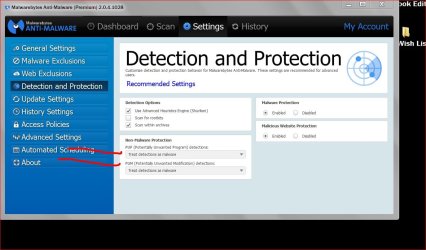
MSE has never blocked PuP's for me. At least it has never had a pop up stating so.

Malwarebytes Premium has this option.

Capture.JPGMalware bytes.JPG
 

My Computer

Computer type
PC/Desktop
Computer Manufacturer/Model Number
Home made Desktop
OS
Windows 10 Pro. 64/ version 1709 Windows 7 Pro/64
CPU
Intel i7-6800K @ 4.3
Motherboard
ASUS X-99 Deluxe II
Memory
Corsair Platinum 16 gig @2400
Graphics Card(s)
EVGA GTX 1070 OC
Monitor(s) Displays
Asus 27" LED LCD/VE278Q
Screen Resolution
1920-1080 or 1280-720 HDMI
Hard Drives
INTEL SSD 730-240 Gb Sata 3.0/
PSU
EVGA Platium 1200W
Case
Phanteks Luxe Tempered Glass 8 fans/ one radiator
Cooling
XSPC/ Water Cooled CPU
Keyboard
Das 4 Professional
Mouse
Logitech M705/MX Anywhere 2-S
Internet Speed
100 mbits
Antivirus
Microsoft Security Essentials/ Malwarebytes Premium 3.0/ SAS
Browser
I.E. 11 default/Firefox/ ISP Time Warner Cable/Spectrum
Other Info
LG BluRay Burner/
Sound system-KLipsch-THX/
Icy Dock ssd Hot Swap bays.
Good advice in this thread to take into consideration.

As far as your problem goes, have we made your experience a little better? I would suspect what we have accomplished so far won't get you where you need to be as we need to cleanup a little. What we have done so far is by no means a full cleanup but luckily after reading your logs I don't see anything that should have us too concerned, other than keeping track of what you downloaded. That has all been covered by the other guys in this thread so we will skip that lesson.

First of all, can you post a picture of your installed programs? We need to remove any PUPs or other bad programs that could be causing issues.

Go to Start > Control Panel > Click "Uninstall a program" or "Programs and Features" then post a picture of that screen in your next post
 

My Computer

Computer type
PC/Desktop
Computer Manufacturer/Model Number
Custom
OS
Dual Boot: Windows 8.1 & Server 2012r2 VMs: Kali Linux, Backbox, Matriux, Windows 8.1
CPU
A10 7700 Kavari SteamRoller
Motherboard
ASUS A88XM-PLUS (FM2+ )
Memory
8GB DDR3 SDRAM PC3-8500
Graphics Card(s)
1024MB ATI AMD Radeon R7 Graphics
Sound Card
Realtek High Definition Audio
Monitor(s) Displays
Samsung
Hard Drives
SSD Crucial 120gb
WD VelociRaptor 1tb
PSU
Rosewill Gaming 650w
Case
Rosewill Galaxy 2
Internet Speed
55/12
Antivirus
Malwarebytes, MSE, SAS
Browser
FireFox, Chrome
This is what I use.


Microsoft Security Essentials - Microsoft Windows


From you post #11 I have no idea what this means.
due to these issues it never went up more than 1%

I ment due to these lag spikes ... The scan has been stuck at 1 %. Never went any further even after 5 hours or more. And I have Microsoft essentials installed too. It just notifies it needs update(daily basis) nothing more . And shows no threats found you are protected.
 

My Computer

Computer type
Laptop
Computer Manufacturer/Model Number
Sony
OS
Windows 7 professional 64 bit i5
Memory
4GB
The process I've done now has been performed on safe mode since performing any action is taking too long on normal mode . Now after all these steps have been taken, the lag has reduced but still experiencing those in normal mode . If I play a movie or any video clip the audio is like in slow motion and all breaking up and gets stuck. :( If I connect LAN wire , this lag increases even more .
 

My Computer

Computer type
Laptop
Computer Manufacturer/Model Number
Sony
OS
Windows 7 professional 64 bit i5
Memory
4GB
Try downloading Autoruns :: Autoruns for Windows

Unzip the folder > Extract "Autoruns.exe" to Desktop > Right-click on Autorun.exe on Desktop and Click Run as administrator

Right-click and delete all yellow entries.

I would also consider updating your LAN drivers from your Motherboards support site.

Also, can you post a picture of your installed programs for me?
 

My Computer

Computer type
PC/Desktop
Computer Manufacturer/Model Number
Custom
OS
Dual Boot: Windows 8.1 & Server 2012r2 VMs: Kali Linux, Backbox, Matriux, Windows 8.1
CPU
A10 7700 Kavari SteamRoller
Motherboard
ASUS A88XM-PLUS (FM2+ )
Memory
8GB DDR3 SDRAM PC3-8500
Graphics Card(s)
1024MB ATI AMD Radeon R7 Graphics
Sound Card
Realtek High Definition Audio
Monitor(s) Displays
Samsung
Hard Drives
SSD Crucial 120gb
WD VelociRaptor 1tb
PSU
Rosewill Gaming 650w
Case
Rosewill Galaxy 2
Internet Speed
55/12
Antivirus
Malwarebytes, MSE, SAS
Browser
FireFox, Chrome
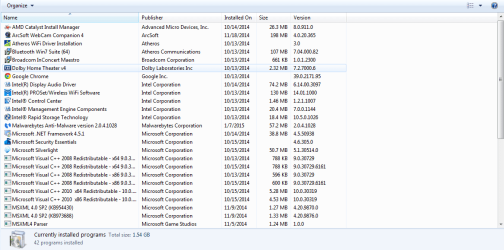
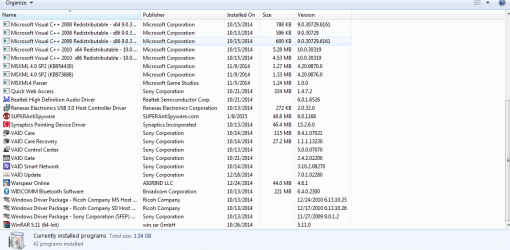
Here are the list of programs...
Also I have checked the website of Sony with original drivers and I have the same one's installed.
 

Attachments

  • Capture programs.PNG
    Capture programs.PNG
    80.4 KB · Views: 2
  • Capture programs 2.PNG
    Capture programs 2.PNG
    80.1 KB · Views: 2

My Computer

Computer type
Laptop
Computer Manufacturer/Model Number
Sony
OS
Windows 7 professional 64 bit i5
Memory
4GB
I would still update the driver just to make sure its running properly. Try removing Vaio Smart Network and see if that is possibly causing problems. I don't really see anything that should cause so many problems.

Maybe you can download and run CCleaner

Run the cleaner
After you run the cleaner, Click on Registry
Run the registry tool and make sure you create a backup when asked to.. Then fix all issues it finds.

Also, just for fun, run and sfc scan
http://www.sevenforums.com/tutorials/1538-sfc-scannow-command-system-file-checker.html
 

My Computer

Computer type
PC/Desktop
Computer Manufacturer/Model Number
Custom
OS
Dual Boot: Windows 8.1 & Server 2012r2 VMs: Kali Linux, Backbox, Matriux, Windows 8.1
CPU
A10 7700 Kavari SteamRoller
Motherboard
ASUS A88XM-PLUS (FM2+ )
Memory
8GB DDR3 SDRAM PC3-8500
Graphics Card(s)
1024MB ATI AMD Radeon R7 Graphics
Sound Card
Realtek High Definition Audio
Monitor(s) Displays
Samsung
Hard Drives
SSD Crucial 120gb
WD VelociRaptor 1tb
PSU
Rosewill Gaming 650w
Case
Rosewill Galaxy 2
Internet Speed
55/12
Antivirus
Malwarebytes, MSE, SAS
Browser
FireFox, Chrome
Back
Top