
Interpreting CPUID

masplin

New member
Member
VIP
Local time
7:47 PM
Messages
246
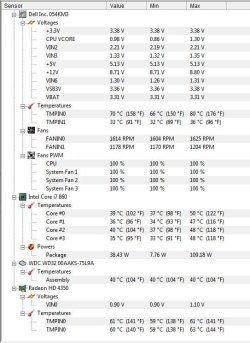
Every few weeks my Dell Vostro 350 starts making a horrible noise which I suspect is the fan. if I reboot it goes away for a while. I downloaded CPUID to check the fans/tempratures and attached is what I see. Does any of this look unusual? What is Fan PWM that is always 100%. When I rebooted and ran it again it look pretty much the same i.e. no obviously high temp and fan speeds similar.

Is there anything else I could run to test my fan? Could it be something physical that builds up over a few weeks?

Thanks Mike
 

Attachments
  • CPUID.JPG
    CPUID.JPG
    89.5 KB · Views: 149

My Computer

Computer Manufacturer/Model Number
Dell XPS 430
OS
Windows 7 64 bit
CPU
intel quad Q6600 2.4GHz
Motherboard
Intel X48
Memory
4GB
Graphics Card(s)
ATI Radeon HD 4850 512Mb
Sound Card
ATI High Def
Monitor(s) Displays
Dell 1707FPV
Hard Drives
640GB RAID 0
320GB
PSU
425W
Keyboard
Logitech MX3000
Mouse
Logitech M-RAG97
Internet Speed
7Mb
What is Fan PWM that is always 100%. When I rebooted and ran it again it look pretty much the same i.e. no obviously high temp and fan speeds similar.
Thanks Mike

Hi Mike;

My CPUID report does not show the PWM value. But a search in Google took me to WikiPedia and I found this:

Fan types

Common cooling fans have at least two pins on the connector. These two pins connect to the fan motor, usually a brushless DC type. Extra pins may be present, with either or both of the following features:

  • A tachometer that measures the actual speed of the fan as a pulse train, frequency being proportional to speed.
  • Control of fan speed using PWM (Pulse-width modulation.)
Two-pin fans operate either as an on/off fan, or can be controlled by varying the voltage. Fans will have either two, three, or four pins on the connector.


Sorry I can't provide more info on your subject.
 

My Computer

Computer type
PC/Desktop
Computer Manufacturer/Model Number
DIY Re-built.
OS
Windows 7 Home Premium 64Bits SP1
CPU
Intel i7-920
Motherboard
ASUS P6TD Deluxe
Memory
12 Gb (6x2GB Corsair XMS TR3X3G1600C9 G) Tri Channels
Graphics Card(s)
ASUS GTX-970 Turbo
Sound Card
ASUS On Board SoundMax
Monitor(s) Displays
Samsung UN46D6500 46" TV
Screen Resolution
1920x1080
Hard Drives
1 OCZ SSD Agility Sata III 120Gb
1 Samsung 1Tb
1 Samsung 750Gb
1 Western Digital 500Gb(Mounted in ext eSata case)
PSU
Enermax CUG-950W
Case
Full ATX (Generic)
Cooling
Fans (6) 80mm
Keyboard
Saitek Eclipse II
Mouse
Cyborg R.A.T-5
Internet Speed
Comcast 105.0 MBPS
Antivirus
AVG
Browser
Waterfox v40.02(x64)
Other Info
- Logitech X-530 5.1 Sound speakers.
- APC ES-1300.
- Arris TG862G/CT Modem/Router.
- Samsung BD-083A Blue Ray Player
- Lite On iHBS212 Blue Ray Burner
- Nippon Labs All-In-One Card Reader/Writer W/USB & eSata

My Computer

Computer type
PC/Desktop
Computer Manufacturer/Model Number
Gateway DX4831-01e (Mid-Tower Desktop)
OS
Originally Win 7 Hm Prem x64 Ver 6.1.7600 Build 7601-SP1 | Upgraded to Windows 10 December 14, 2019
CPU
Intel i3 530 2.93GHz, 2933MHz 2 Cores 4 Logical Processors
Motherboard
Gateway H57M01 133 megahertz
Memory
6GB of 1,333MHz DDR3 SDRAM
Graphics Card(s)
32MB Intel Graphics Media Accelerator HD IGChip
Sound Card
Realtek High Definition Audio
Monitor(s) Displays
Gateway HX2000 20inch TFT active matrix TN
Screen Resolution
1600 x 900 x 59 hertz
Hard Drives
WDC WD10EADS-00M2B0 [HDD] (1000.20 GB) -- drive 0,
HL-DT-ST DVDRAM GH41N [CD-ROM dr]
Four card readers, and Four USB 2.0
PSU
300watts.
Case
Mid-Tower Desktop
Cooling
Stock from Gateway
Keyboard
Natural Ergonomic Keyboard 4000, see Other Info
Mouse
Orig. Gateway wore out now using Insignia USB wired optical
Internet Speed
Vz FIOS 10ms png 57.64Mbps down 65.53Mbps up Speedtest.org
Antivirus
Zamana Anti-logger with Anti-malware, MSE, Windows Firewall,
Browser
IE11.0.9600.19399-Upd ver11.0.135, Firefox 68.0.1 x64
Other Info
System Specs by Belarc.

BIOS: American Megatrends Inc. P01-A0 11/17/2009

Replaced the MS 'Natural' Standard PS/2 Enhanced 101-102 Keyboard with a new Natural Ergonomic Keyboard 4000 on August 1st 2014.

Canon Pixma MG3222 Printer.

Updated to IE11 on 12102015 | Fios Quantum Router g1100

Additional AV: SpywareBlaster, manual Mbam, SAS
Normally my fan is almost silent despite the readings I posted and PWM of 100% so most of the time it isn't an issue with the fans being overactive. It just every few weeks it starts to make a racket. The question is does PWM of 100% just mean 100% duty cycle as per your link and is this normal? Presuming it is the CPUID report didn't look much differnet when it was making a racket this morning. Is there anyway of forcing the fan to maximum speed to see if I can reprodcue the noise?
 

My Computer

Computer Manufacturer/Model Number
Dell XPS 430
OS
Windows 7 64 bit
CPU
intel quad Q6600 2.4GHz
Motherboard
Intel X48
Memory
4GB
Graphics Card(s)
ATI Radeon HD 4850 512Mb
Sound Card
ATI High Def
Monitor(s) Displays
Dell 1707FPV
Hard Drives
640GB RAID 0
320GB
PSU
425W
Keyboard
Logitech MX3000
Mouse
Logitech M-RAG97
Internet Speed
7Mb
You may have a fan that is needs replacing. 100% is normal on Dell systems and set that way for
stability. Since the fan speed increases based upon load, to replicate, you probably need to do something
that is CPU intensive.
 

My Computer

Computer type
PC/Desktop
Computer Manufacturer/Model Number
Custom Build
OS
Windows 7 Home Premium 64 bit
CPU
Intel Core i7-4790
Motherboard
GA-Z87X-D3H
Memory
G.SKILL 8GB (2 x 4GB) DDR3 F3-10666CL9D-8GBNT
Graphics Card(s)
AMD Radeon R7 250
Sound Card
Realtek ALC892
Monitor(s) Displays
Samsung UN32EH5000, Dell 1703FPT
Screen Resolution
1920 x 1080, 1280 x 1024
Hard Drives
WD5003AZEX
WD10EZEX
Samsung HD103SJ
Samsung 128 GB 840 PRO
PSU
SeaSonic M12II SS-500GM
Case
Fractal Design Define R4
Cooling
Zalman CNPS9900ALED
Keyboard
Logitech K800
Mouse
Logitech M705
Internet Speed
16 Mbps
Antivirus
Avast
Browser
Firefox
Other Info
Bose Companion 2 Multimedia Speakers
Last couple of times its been overnight when you wouldn't expect it to be doing much but virus scans. OK well thanks for clarifying that what I'm seeing is normal for CPUID.
 

My Computer

Computer Manufacturer/Model Number
Dell XPS 430
OS
Windows 7 64 bit
CPU
intel quad Q6600 2.4GHz
Motherboard
Intel X48
Memory
4GB
Graphics Card(s)
ATI Radeon HD 4850 512Mb
Sound Card
ATI High Def
Monitor(s) Displays
Dell 1707FPV
Hard Drives
640GB RAID 0
320GB
PSU
425W
Keyboard
Logitech MX3000
Mouse
Logitech M-RAG97
Internet Speed
7Mb
Was just tapping around to see any easy way to stress my pc and came across OCCT. Being Russian is this actually safe as Kapersky thinks it's a trojan? Is this a good way to push my CPU and fans and see if I can produce the noise?
 

My Computer

Computer Manufacturer/Model Number
Dell XPS 430
OS
Windows 7 64 bit
CPU
intel quad Q6600 2.4GHz
Motherboard
Intel X48
Memory
4GB
Graphics Card(s)
ATI Radeon HD 4850 512Mb
Sound Card
ATI High Def
Monitor(s) Displays
Dell 1707FPV
Hard Drives
640GB RAID 0
320GB
PSU
425W
Keyboard
Logitech MX3000
Mouse
Logitech M-RAG97
Internet Speed
7Mb
Hi,

OCCT is legitmate (make sure the download site is good!) - see this guide which only details the GPU stress tests:

http://www.sevenforums.com/tutorials/160729-nvidia-amd-video-card-test-occt.html

OCCT CPU stressing uses the LINPACK libraries, but so does IntelBurnTest, which is quicker.

You could try IntelBurnTest which will really stress the CPU (and fans). Run 5 standard tests.

You must:
1. Know exactly what your CPU maximum temperature (TCase) is - find out here:
Intel® Core)

2. Monitor your temperatures very closely - use HWINFO64 for that.
HWiNFO64 Download

IMPORTANT : If the CPU core temperatures shown in HWINFO64 start approaching the TCase tempearture of your CPU, you MUST immediately stop the test to avoid overheating and damaging your CPU. I cannot stress this enough.

Regards,
Golden
 
Last edited:

My Computer

Computer type
PC/Desktop
Computer Manufacturer/Model Number
Golden Mk. I.4
OS
Windows 10 Pro x64 ; Xubuntu x64
CPU
Intel i7 860 @ 2.80 GHz O/C'ed to 4.0GHz
Motherboard
Gigabyte P55A-UD3R Rev.1. Award BIOS F13
Memory
16GB Corsair Vengance DDR3 @ 661 MHz Dual Channel (9-9-9-24)
Graphics Card(s)
EVGA NVidia GTX 560 1024MB
Sound Card
Realtek Integrated
Monitor(s) Displays
Dual Samsung SyncMaster 2494HS
Screen Resolution
1920*1080 and 1920*1080
Hard Drives
1*Samsung 840 EVO 120GB SSD;
1*OCZ Vertex 2 60GB SSD;
2*Samsung F3 SpinPoint 1TB in RAID0;
1*Samsung F1 SpinPoint 1TB;
2*Western Digital 1TB External USB 3.0
1*Western Digital 500GB External USB 3.0
1*Seagate 500GB External USB 2.0
PSU
Thermaltake ToughPower QFan 750W
Case
Thermaltake Element S VK60001W2Z
Cooling
Corsair H60 Water Cooling, 2*230mm and 2*80mm case fans
Keyboard
Logitech G110
Mouse
Logitech MX518
Have you checked the fans/heatsinks to see if they need cleaning of dust?
 

My Computer

Computer type
PC/Desktop
Computer Manufacturer/Model Number
Dwarf Dwf/11/2012 r09/2013
OS
Windows 8.1 Pro RTM x64
CPU
Intel Core-i5-3570K 4-core @ 3.4GHz (Ivy Bridge) (OC 4.4GHz)
Motherboard
ASRock Z77 Extreme4-M
Memory
4 x 4GB DDR3-1600 Corsair Vengeance CMZ8GX3M2A1600C9B (16GB)
Graphics Card(s)
MSI GeForce GTX770 Gaming OC 2GB
Sound Card
Realtek High Definition on board solution (ALC 898)
Monitor(s) Displays
ViewSonic VA1912w Widescreen (VGA)
Screen Resolution
1440x900
Hard Drives
OCZ Agility 3 SSD 120GB SATA III x2 (RAID 0)
Samsung HD501LJ 500GB SATA II x2
Hitachi HDS721010CLA332 1TB SATA II
Iomega 1.5TB Ext USB 2.0
WD 2.0TB Ext USB 3.0
PSU
XFX Pro Series 850W Semi-Modular
Case
Gigabyte IF233
Cooling
1 x 120mm Front Inlet 1 x 120mm Rear Exhaust
Keyboard
Microsoft Comfort Curve Keyboard 3000 (USB)
Mouse
Microsoft Comfort Mouse 3000 for Business (USB)
Internet Speed
NetGear DG834Gv3 ADSL Modem/Router (Ethernet) ~4.0 Mb/s (O2)
Antivirus
Avast! 8.0.1497
Browser
IE 11
Other Info
Optical Drive: HL-DT-ST BD-RE BH10LS30 SATA Bluray
Lexmark S305 Printer/Scanner/Copier (USB)
WEI Score: 8.1/8.1/8.5/8.5/8.25
Asus Eee PC 1011PX Netbook (Windows 7 x86 Starter)
Ok that did it. Temp climed to 72C very quickly (<1min) so stopped the test. I now have a horrible noise coming from the pc which sounds like the fan. However CPUID shows the fan RPM has dropped back to normal. I'm guessing it should get so hot so quickly!! I'll open it up and give it a good clean out as suggested, but if it does this again can I assume I have a problem with either fan or heatsink?
 

My Computer

Computer Manufacturer/Model Number
Dell XPS 430
OS
Windows 7 64 bit
CPU
intel quad Q6600 2.4GHz
Motherboard
Intel X48
Memory
4GB
Graphics Card(s)
ATI Radeon HD 4850 512Mb
Sound Card
ATI High Def
Monitor(s) Displays
Dell 1707FPV
Hard Drives
640GB RAID 0
320GB
PSU
425W
Keyboard
Logitech MX3000
Mouse
Logitech M-RAG97
Internet Speed
7Mb
So after a good clean out it seemed to hold the temp down to 70-71C . Horrible fan noise appeared above 2400 RPM but did stop when I ended the test. Can I assume Fan1 is the one over the heatsink and Fan2 is the one at the back of the PC casing? Oddly Fan2 peaked at 2600 RPM, but then sat at 2000RPM even while the temp was pushing above 70C. Is that obviously why Fan2 doesn't run at full capacity to keep the temp as low as possible?
 

My Computer

Computer Manufacturer/Model Number
Dell XPS 430
OS
Windows 7 64 bit
CPU
intel quad Q6600 2.4GHz
Motherboard
Intel X48
Memory
4GB
Graphics Card(s)
ATI Radeon HD 4850 512Mb
Sound Card
ATI High Def
Monitor(s) Displays
Dell 1707FPV
Hard Drives
640GB RAID 0
320GB
PSU
425W
Keyboard
Logitech MX3000
Mouse
Logitech M-RAG97
Internet Speed
7Mb
Back
Top