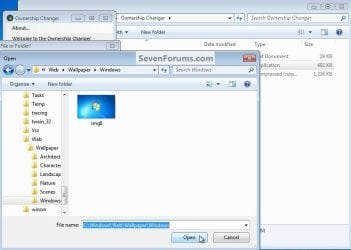
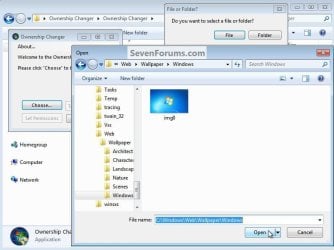
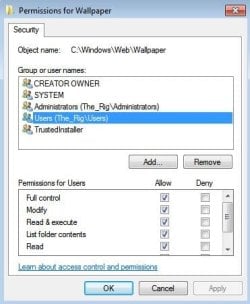
Taking ownership of files with the program worked great. However, I tried to take ownership of the "C:\Windows\Web\Wallpaper\Windows" folder, but the owner was still TrusterInstaller afterwards.
My Computer
At a glance
64-bit Windows 11 Pro for WorkstationsIntel i7-8700K OC'd to 5 GHz64 GB (4x16GB) G.SKILL TridentZ RGB DDR4 3600...ASUS ROG-STRIX-GTX1080TI-O11G-GAMING
Computer type
PC/Desktop
Computer Manufacturer/Model Number
Self built custom
OS
64-bit Windows 11 Pro for Workstations
CPU
Intel i7-8700K OC'd to 5 GHz
Motherboard
ASUS ROG Maximus XI Formula Z390
Memory
64 GB (4x16GB) G.SKILL TridentZ RGB DDR4 3600 MHz
Graphics Card(s)
ASUS ROG-STRIX-GTX1080TI-O11G-GAMING
Sound Card
Integrated
Monitor(s) Displays
2 x Samsung Odyssey G7 27"
Screen Resolution
2560x1440
Hard Drives
1TB Samsung 990 PRO M.2,
4TB Samsung 990 PRO PRO M.2,
TerraMaster F8 SSD Plus NAS
PSU
Seasonic Prime Titanium 850W
Case
Thermaltake Core P3
Cooling
Corsair Hydro H115i
Keyboard
Logitech wireless K800
Mouse
Logitech MX Master 4
Internet Speed
2 Gb/s Download and 100 Mb/s Upload
Antivirus
Malwarebyte Anti-Malware Premium
Browser
Google Chrome
Other Info
Logitech Z625 speaker system,
Logitech BRIO 4K Pro webcam,
HP Color LaserJet Pro MFP M477fdn,
APC SMART-UPS RT 1000 XL - SURT1000XLI,
Galaxy S23 Plus phone
Taking ownership of files with the program worked great. However, I tried to take ownership of the "C:\Windows\Web\Wallpaper\Windows" folder, but the owner was still TrusterInstaller afterwards.
It must be a issue with Windows 7 SP1 beta installed for it not working on folders. I just tested it in a 32-bit Windows 7 Enterprise VM without SP1 beta and it took ownership of the same folder above without issue.
My Computer
At a glance
64-bit Windows 11 Pro for WorkstationsIntel i7-8700K OC'd to 5 GHz64 GB (4x16GB) G.SKILL TridentZ RGB DDR4 3600...ASUS ROG-STRIX-GTX1080TI-O11G-GAMING
Computer type
PC/Desktop
Computer Manufacturer/Model Number
Self built custom
OS
64-bit Windows 11 Pro for Workstations
CPU
Intel i7-8700K OC'd to 5 GHz
Motherboard
ASUS ROG Maximus XI Formula Z390
Memory
64 GB (4x16GB) G.SKILL TridentZ RGB DDR4 3600 MHz
Graphics Card(s)
ASUS ROG-STRIX-GTX1080TI-O11G-GAMING
Sound Card
Integrated
Monitor(s) Displays
2 x Samsung Odyssey G7 27"
Screen Resolution
2560x1440
Hard Drives
1TB Samsung 990 PRO M.2,
4TB Samsung 990 PRO PRO M.2,
TerraMaster F8 SSD Plus NAS
PSU
Seasonic Prime Titanium 850W
Case
Thermaltake Core P3
Cooling
Corsair Hydro H115i
Keyboard
Logitech wireless K800
Mouse
Logitech MX Master 4
Internet Speed
2 Gb/s Download and 100 Mb/s Upload
Antivirus
Malwarebyte Anti-Malware Premium
Browser
Google Chrome
Other Info
Logitech Z625 speaker system,
Logitech BRIO 4K Pro webcam,
HP Color LaserJet Pro MFP M477fdn,
APC SMART-UPS RT 1000 XL - SURT1000XLI,
Galaxy S23 Plus phone
It must be a issue with Windows 7 SP1 beta installed for it not working on folders. I just tested it in a 32-bit Windows 7 Enterprise VM without SP1 beta and it took ownership of the same folder above without issue.
Strange, I have the public SP1 beta from MS Connect, and it just will not take ownership of that folder even though I selected Choose and the Folder button. :huh:
My Computer
At a glance
64-bit Windows 11 Pro for WorkstationsIntel i7-8700K OC'd to 5 GHz64 GB (4x16GB) G.SKILL TridentZ RGB DDR4 3600...ASUS ROG-STRIX-GTX1080TI-O11G-GAMING
Computer type
PC/Desktop
Computer Manufacturer/Model Number
Self built custom
OS
64-bit Windows 11 Pro for Workstations
CPU
Intel i7-8700K OC'd to 5 GHz
Motherboard
ASUS ROG Maximus XI Formula Z390
Memory
64 GB (4x16GB) G.SKILL TridentZ RGB DDR4 3600 MHz
Graphics Card(s)
ASUS ROG-STRIX-GTX1080TI-O11G-GAMING
Sound Card
Integrated
Monitor(s) Displays
2 x Samsung Odyssey G7 27"
Screen Resolution
2560x1440
Hard Drives
1TB Samsung 990 PRO M.2,
4TB Samsung 990 PRO PRO M.2,
TerraMaster F8 SSD Plus NAS
PSU
Seasonic Prime Titanium 850W
Case
Thermaltake Core P3
Cooling
Corsair Hydro H115i
Keyboard
Logitech wireless K800
Mouse
Logitech MX Master 4
Internet Speed
2 Gb/s Download and 100 Mb/s Upload
Antivirus
Malwarebyte Anti-Malware Premium
Browser
Google Chrome
Other Info
Logitech Z625 speaker system,
Logitech BRIO 4K Pro webcam,
HP Color LaserJet Pro MFP M477fdn,
APC SMART-UPS RT 1000 XL - SURT1000XLI,
Galaxy S23 Plus phone
Strange, I have the public SP1 beta from MS Connect, and it just will not take ownership of that folder even though I selected Choose and the Folder button. :huh:
I just tested it again but in a 32-bit Windows 7 Ultimate SP1 beta VM, and it worked in it. Not sure why it's not working on my main system though since it is the same as the VM setup except the main system is 64-bit.
My Computer
At a glance
64-bit Windows 11 Pro for WorkstationsIntel i7-8700K OC'd to 5 GHz64 GB (4x16GB) G.SKILL TridentZ RGB DDR4 3600...ASUS ROG-STRIX-GTX1080TI-O11G-GAMING
Computer type
PC/Desktop
Computer Manufacturer/Model Number
Self built custom
OS
64-bit Windows 11 Pro for Workstations
CPU
Intel i7-8700K OC'd to 5 GHz
Motherboard
ASUS ROG Maximus XI Formula Z390
Memory
64 GB (4x16GB) G.SKILL TridentZ RGB DDR4 3600 MHz
Graphics Card(s)
ASUS ROG-STRIX-GTX1080TI-O11G-GAMING
Sound Card
Integrated
Monitor(s) Displays
2 x Samsung Odyssey G7 27"
Screen Resolution
2560x1440
Hard Drives
1TB Samsung 990 PRO M.2,
4TB Samsung 990 PRO PRO M.2,
TerraMaster F8 SSD Plus NAS
PSU
Seasonic Prime Titanium 850W
Case
Thermaltake Core P3
Cooling
Corsair Hydro H115i
Keyboard
Logitech wireless K800
Mouse
Logitech MX Master 4
Internet Speed
2 Gb/s Download and 100 Mb/s Upload
Antivirus
Malwarebyte Anti-Malware Premium
Browser
Google Chrome
Other Info
Logitech Z625 speaker system,
Logitech BRIO 4K Pro webcam,
HP Color LaserJet Pro MFP M477fdn,
APC SMART-UPS RT 1000 XL - SURT1000XLI,
Galaxy S23 Plus phone
I just tested it again but in a 32-bit Windows 7 Ultimate SP1 beta VM, and it worked in it. Not sure why it's not working on my main system though since it is the same as the VM setup except the main system is 64-bit.
I'll test it on a 64-bit installation of Windows 7 SP1 in a little while. It is entirely possible something is different between your host and your guest VM.
My Computer
At a glance
Windows 7 Ultimate, OS X 10.7, Ubuntu 11.04Intel E6750 @ 3.80GHz2x2GB & 2x1GB (6GB) OCZ Reaper 1066MHz @ 1080MHzEVGA nVidia GTX 260 896mb (216 Core) FTW Edition
Computer Manufacturer/Model Number
Custom | Whitebox
OS
Windows 7 Ultimate, OS X 10.7, Ubuntu 11.04
CPU
Intel E6750 @ 3.80GHz
Motherboard
Gigabyte GA-EP45-UD3L (Revision 1.1)
Memory
2x2GB & 2x1GB (6GB) OCZ Reaper 1066MHz @ 1080MHz
Graphics Card(s)
EVGA nVidia GTX 260 896mb (216 Core) FTW Edition
Sound Card
Realtek ALC888
Monitor(s) Displays
21" VIZIO TV
Screen Resolution
1680x1050 @ 60Hz
Hard Drives
Western Digital WD6401AALS - 640GB
Hitachi HDP725016GLA380 - 160GB
PSU
Corsair 750W
Case
NZXT Nemesis Elite
Cooling
Thermaltake SpinQ
Keyboard
Logitech Wireless S520
Mouse
Logitech Wireless S520 - Microsoft Wireless Arc Mouse